
Why is my business not on Google Maps? Most owners asking that question are certain they already know the answer, and nearly all of them are wrong in the same direction. They assume the listing was deleted. Usually it wasn't. What disappeared was the visibility, not the profile, and those are two different faults with two different repairs.
There are three states a business can be in. It can be ineligible to hold a Business Profile at all. It can be eligible but unverified, suspended or misconfigured, which means the profile exists and still doesn't show. Or it can be published, verified and correctly set up, yet outranked for the searches that matter. Diagnose the state first. Applying the fix for one to the problem of another is how a week turns into a quarter.
Table of Contents
- Find Out Which of Three Problems You Have
- Eligibility and Address Rules That Hide a Listing
- Verification and Suspension Problems That Hide a Listing
- Why Low Rankings Make Your Listing Hard to Find
- How to Fix Your Listing in the Right Order
- Confirm the Fix Worked
- Decide Whether Google Maps Is Your Channel
Find Out Which of Three Problems You Have
The reason the order matters is volume. Google Maps is a major starting point for category searches, the "plumber Tampa" kind where someone has a problem and no company in mind yet. A listing that fails to appear for those searches misses that demand entirely, and no amount of website work recovers it.
Match your symptom to a row before you touch a single setting.
| Problem | What You See | Quick Check |
|---|---|---|
| Not eligible for a Business Profile | No profile exists, or one you created was removed | Do customers meet you in person at the listed address during published hours? |
| Unverified or suspended | The profile exists but edits are blocked, or it has vanished from Search | Business Profile Manager shows your verification status and any suspension notice |
| Address or service-area mismatch | Only a service area shows instead of a pin, or the listing appears for the wrong city | Your address and service-area settings match how you actually serve customers |
| Ranking too low | Your exact business name finds the profile, but "plumber Tampa" does not | Search your category plus your city while signed out |
Run the checks in that order. Eligibility sits above everything else, because an ineligible profile gets removed no matter how clean the rest of it is, and a suspended profile can't be optimized while it's dark. Ranking sits last for a reason too. A name search finds your profile even when other settings are broken, so it proves nothing. The category search, run signed out, is the test that counts.
For the wider context on how these pieces fit together, our guide to what local SEO actually covers lays out the whole system. Otherwise, pick the row that matches what you're seeing and start there.
Eligibility and Address Rules That Hide a Listing
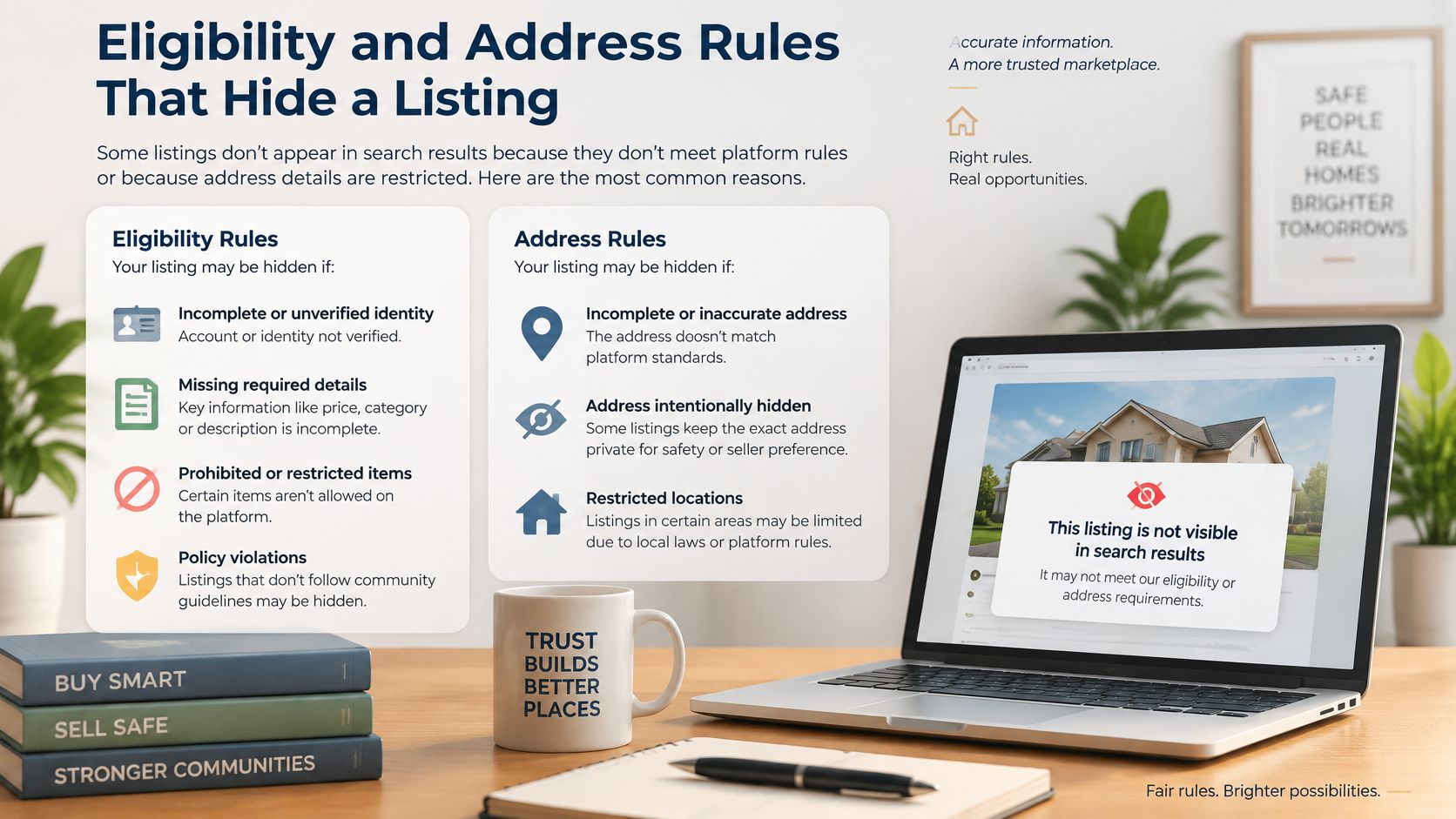
Google's eligibility rule is a single sentence, and it eliminates a surprising number of businesses that look legitimate from the outside. An eligible business makes in-person contact with customers during its stated hours, per Google's Business Profile eligibility guidelines. Online-only firms, lead-generation companies, brands with no customer-facing location, businesses representing a service at a place they don't own or control, and anyone using a P.O. Box all fall outside that line. A polished website, an active Instagram account and a virtual mailing address don't buy you in.
The rule reads like bureaucracy until you watch it land on a real address. Here's how the four setups diverge.
The Test That Settles Eligibility
Ask one question. Can a customer walk in during your published hours, or does your staff travel to them? If neither is true, profile work won't hold, and Google can disable a profile it decides doesn't exist at the claimed location.
Take a digital agency that rents a coworking desk it uses twice a month. That desk qualifies only if the team is there during the hours posted on the profile. Same room, same lease, different answer. A consultant whose listed address is a mail-forwarding service doesn't qualify at all, because nobody meets a customer there.
Practical rule: if a customer can't stand in front of a person at that address during posted hours, the address doesn't belong on the profile.
For the businesses that do qualify, the setup has to match the working model, and Google's guidance for service-area businesses is blunt. If you travel to customers and don't receive them at your own location, you get one profile for your central base with the address hidden. The overall service area should generally stay within about two hours of driving time from that base, and you shouldn't spin up a separate profile for every city you serve. Hiding an address doesn't delete the listing either. Google swaps the pin for the service area, so owners who expect a storefront result read a correctly configured listing as a broken one, and Google's rules on representing your business note that duplicate profiles create their own display problems on top of it.
| Setup | What Google Shows | Common Mistake |
|---|---|---|
| Storefront | A pinned address on Maps | Listing a P.O. box or an unstaffed virtual office |
| Hybrid | The address and the service area both appear | Listing a home or rented address staff don't use during stated hours |
| Service-area only | A hidden address with the service area shown instead | Creating a separate profile for every city served |
Two failures account for most of these cases. A plumber lists the house he lives in, where no customer has ever come, and an agency lists an unstaffed rented office two cities away. Both get flagged, removed or never approved. The repair is the same in both directions: strip the address nobody uses, switch to the setup that mirrors the actual operation, and merge duplicates into one profile rather than leaving two half-verified listings competing with each other. Getting name, address and phone identical across every directory is the follow-on job, and our notes on local SEO citations cover how to keep those consistent.
Verification and Suspension Problems That Hide a Listing
Verification is the gate most owners assume they've already cleared. Google states that content tied to an unverified Business Profile might not appear across Google at all, so a listing sitting in your dashboard can be effectively absent from Maps and Search, as Google's guide to handling Business Profile suspensions explains. The method offered varies by business, and the dashboard presents what it wants: video, phone, email or postcard.
Then come the suspensions, which get confused with each other constantly.
Soft Suspension Versus Hard Suspension
A soft suspension leaves the profile visible to customers but blocks your edits. A hard suspension pulls it from Search and Maps until an appeal is approved. Same word, opposite symptoms, which is why "my listing looks fine but I can't change anything" and "my listing is gone" land in different places.
Common triggers, in rough order of frequency:
- Inaccurate or unstaffed addresses, including virtual offices and P.O. boxes
- Duplicate listings for the same business or the same location
- Large unverified changes, such as a new name, category or address
- Guideline violations Google catches during review
Profile upkeep is a routine operational problem rather than an exotic one. In BrightLocal's 2025 SMB marketing survey, which polled 778 U.S. small-business owners and managers, business profile management shows up as a common operational issue.
Work through the account in this order:
- Sign in to Business Profile Manager and confirm which profile you're looking at.
- Read the verification status before assuming it's complete.
- Read any suspension notice and note whether it's soft or hard.
- Fix the flagged item rather than editing around it.
- Appeal a hard suspension once the underlying problem is corrected.
- Stop creating profiles while you wait. Duplicates lengthen the recovery instead of shortening it.
One more case worth naming: a profile that exists and is claimed by someone else, a former employee or a contractor who set it up years ago. Request ownership through the dashboard before anything else. Creating a second listing to work around it splits reviews and gives Google two conflicting records of the same business.
Why Low Rankings Make Your Listing Hard to Find
A verified, eligible, correctly configured profile can still be invisible for the searches that bring in work. Google says local results are primarily determined by relevance, distance and prominence, per its documentation on improving local ranking, and none of those three rewards effort equally.
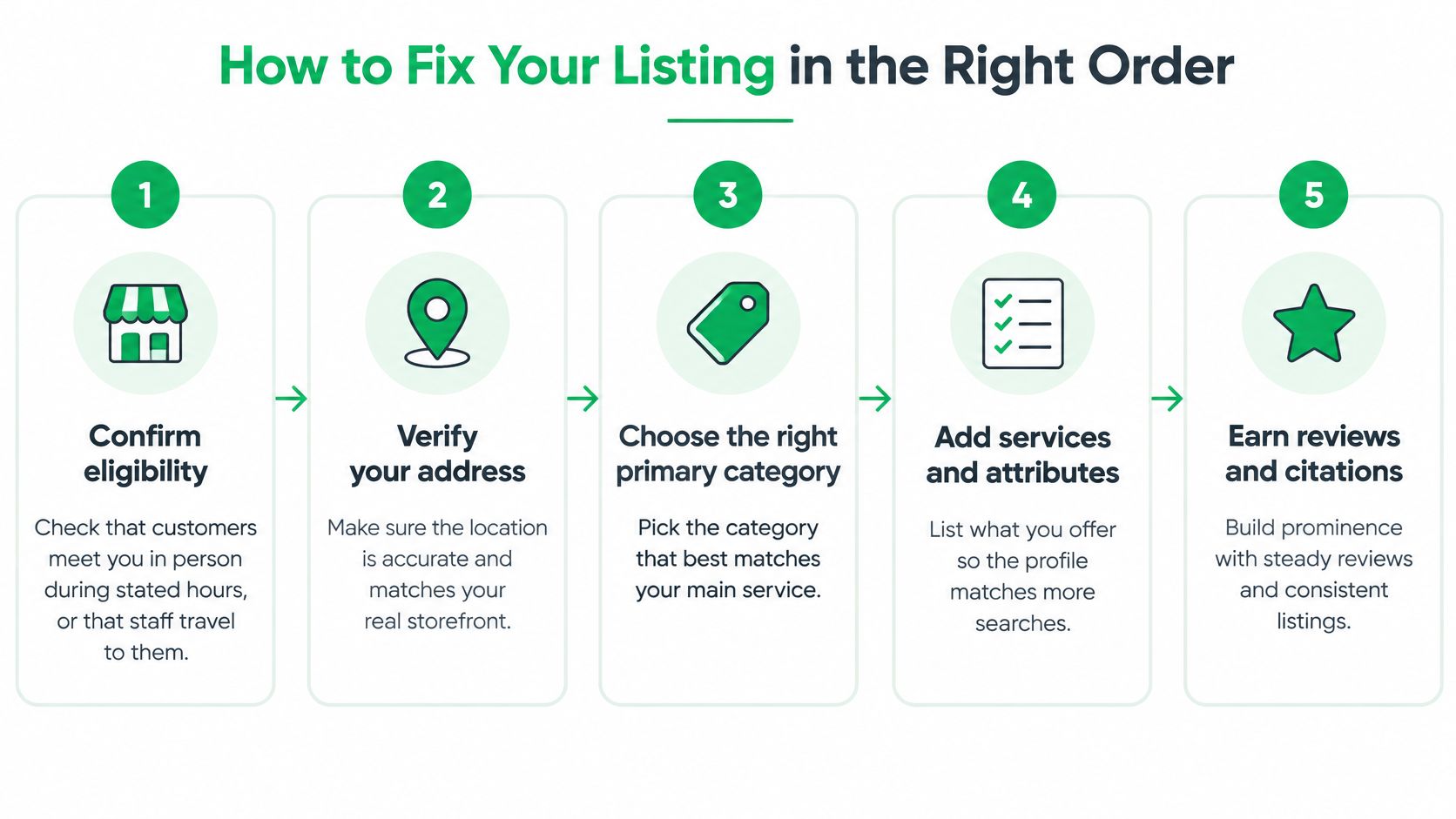
Relevance measures how closely the profile matches what was typed. The primary category carries most of that weight, then the listed services, the description, the hours and consistent business details. Distance measures how far you are from the searcher or the location Google infers, which is why a business in one city loses to closer competitors when someone in a neighboring city runs a broad query. Prominence reflects how well known the business appears from links on other sites, mentions in credible directories, review count and review score.
Put that together and a pattern appears. Say a Tampa agency searches its own name and finds the profile sitting right there, first result, correct hours. The same agency searches "SEO agency near me" from a hotel in Orlando and sees four competitors it has never heard of. Nothing is broken.
A listing that shows up for your name proves the profile works. It doesn't prove anyone can find it.
Four actions move those three dimensions without guaranteeing a position. Choose a primary category that names your core service rather than something adjacent. Write service descriptions in plain language a customer would type. Build consistent directory mentions so prominence signals agree with each other. Ask real customers for reviews steadily instead of in one burst. Everything else in local search optimization builds on those four.
How to Fix Your Listing in the Right Order
Sequence beats intensity here. Each step clears the ground the next one needs, and skipping ahead means repeating work.
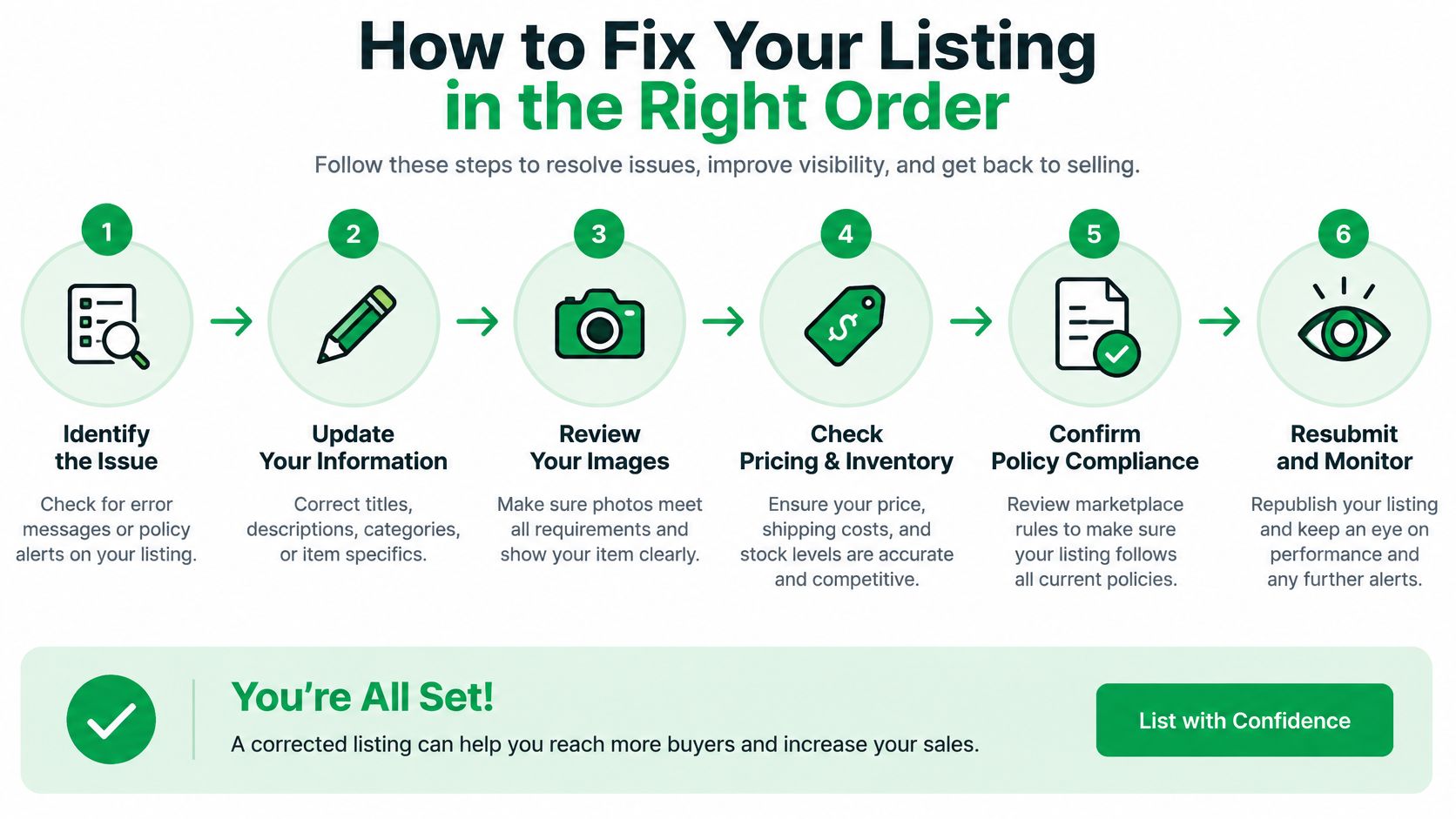
- Confirm eligibility. Customers meet you in person during stated hours, or staff travel to them. If neither, stop. No later step rescues an ineligible business.
- Find or create the profile in Business Profile Manager, and select storefront or service-area to match the actual operation. Getting this wrong now means redoing verification later.
- Complete verification using whichever method the dashboard offers. Unverified content may not surface at all, so this finishes before any optimization.
- Read any suspension notice, correct the specific item flagged, and appeal if the profile is hard suspended. Optimizing a suspended listing is wasted motion.
- Clean the address and duplicates. Remove unstaffed and P.O. box addresses, then merge duplicate listings into one record.
- Fill in the profile properly. Primary category, services, hours, and a name, address and phone number that match your website and directories character for character. Then put your remaining effort into the ranking signals rather than hunting for more fields to complete.
- Test while signed out. Search your exact business name with your city first, then your category with your city. Two different tests, two different answers.
- Wait, then retest. Ranking movement isn't instant, and a single check taken the morning after a change tells you almost nothing.
Step 5 and step 7 are the ones people skip, and both are cheap. If you'd rather run the whole sequence against a written standard, our local SEO audit checklist works through it field by field.
Confirm the Fix Worked
Success has a specific shape. Signed out, your exact business name plus your city returns the profile. Signed out, your primary category plus your city shows it too, even if it sits below the leaders. Run those two searches only after verification is complete and any appeal has been decided, because a pending appeal produces a false negative every time.
Don't judge on a single check. Ranking movement takes weeks, and one signed-out search from one location can mislead you in either direction.
If it still fails, backtrack in order. Eligibility first, since it's the most common blocker and the easiest to misread. Then the address and service-area configuration. Then duplicates, because a listing created in frustration during the process will split reviews and confuse both customers and Google.
When the profile is verified, eligible, correctly configured and still absent for category searches, the problem is relevance, distance or prominence, and the ranking work is where the remaining gains are. Reviews are the slowest lever and the one most owners abandon. Our own profile carries a 5.0 rating from 38 Google reviews, built on asking rather than on any field you can edit. Keep a dated log of what you changed. Without one, you can't match a shift in visibility to the fix that caused it, which is exactly what our guide to tracking visibility changes over time is built around. If you want a second set of eyes on the account, we offer a free audit: enter your website, email and name in the form on our home page and we'll map what's blocking the listing.
Decide Whether Google Maps Is Your Channel
Here's the uncomfortable part. Some businesses will never appear on Google Maps, and no optimization budget changes that. If you fail eligibility and can't create a staffed location where customers meet you during posted hours, the channel is closed. Chasing it anyway drains money that belongs somewhere more productive.
That decision gets easier when you look at where local demand lives. In 2024, 80% of U.S. consumers surveyed by SOCi searched online for local businesses weekly, and 32% did so daily, according to BrightLocal's local SEO statistics roundup. Most of that happens on the open web, not inside Maps. A business with no qualifying location should put its effort into local service pages on its own site, consistent details across directories, and organic results that capture the same intent.
Not every business belongs on Google Maps. Some can't be there, and the sooner that's accepted, the sooner the budget goes where it works.
If you do have a real staffed location or a legitimate service territory and the steps above haven't moved anything, an outside review earns its keep. A specialist can read account history, spot a conflict with an existing profile that you can't see from your side, and push a stalled appeal forward. Bring the diagnostic results from the first table. Knowing which of the three problems you're facing, and what you've already tried, cuts the review time in half.
When to Bring In a Second Set of Eyes
Three signals say hand it off. The profile keeps dropping after edits. An appeal has gone quiet with no path forward. Or the business runs on inbound calls and can't afford a month of monitoring. In each case the question isn't whether you can learn the dashboard. It's whether the downtime costs more than the help.
Once you know which problem you have, the path is usually short. Settle eligibility, clear verification or suspension, or build the ranking signals for the searches you care about.
Mr. Green Marketing, LLC works with local service businesses and multi-location brands on exactly this problem, from claiming and completing a Google Business Profile to the citation, review and content work that makes a listing competitive for category searches. If your listing is dark, misconfigured or outranked, we'll tell you which of the three it is before anyone touches a setting. Start by visiting Mr. Green Marketing, LLC and requesting a free audit and performance report.
Leave a Comment
sing in to post your comment or sign-up if you dont have any account.