
Companies that called a new lead in 30 minutes instead of within 5 minutes saw the odds of successfully contacting that lead fall 100-fold, according to a 2007 study by Dr. James Oldroyd of more than 15,000 leads. Not by a little. By a cliff. And that single fact should change how you approach how to increase lead generation, because it points somewhere most advice doesn't. Not at more traffic. Not at a bigger ad budget.
Your funnel is probably leaking leads you already paid to attract – through slow forms, slow replies, pages that don't match the search. Fix the leak first, measure it properly, then spend. That's the order in the 90-day playbook below.
Table of Contents
- Find Where Your Leads Leak First
- Quick Wins to Ship This Week
- Landing Pages, Forms and CTAs That Convert
- Choosing Channels by Speed, Cost and Fit
- KPIs to Track and How to Set Up Tracking
- A 30/60/90-Day Plan for Lead Growth
- Start With Your Free Audit This Week
Find Where Your Leads Leak First
Most small businesses asking how to increase lead generation already get some traffic, so the fastest gains usually sit after the click. Buying more visits before you know where visitors drop off just sends more people into the same broken path.
That trap is common. In a 2025 survey of 406 U.S. small-business owners from Clutch, 40% of businesses with websites identified SEO as their top lead source, while driving traffic and converting visitors remained a leading challenge for businesses overall. More content won't fix a form nobody finishes.
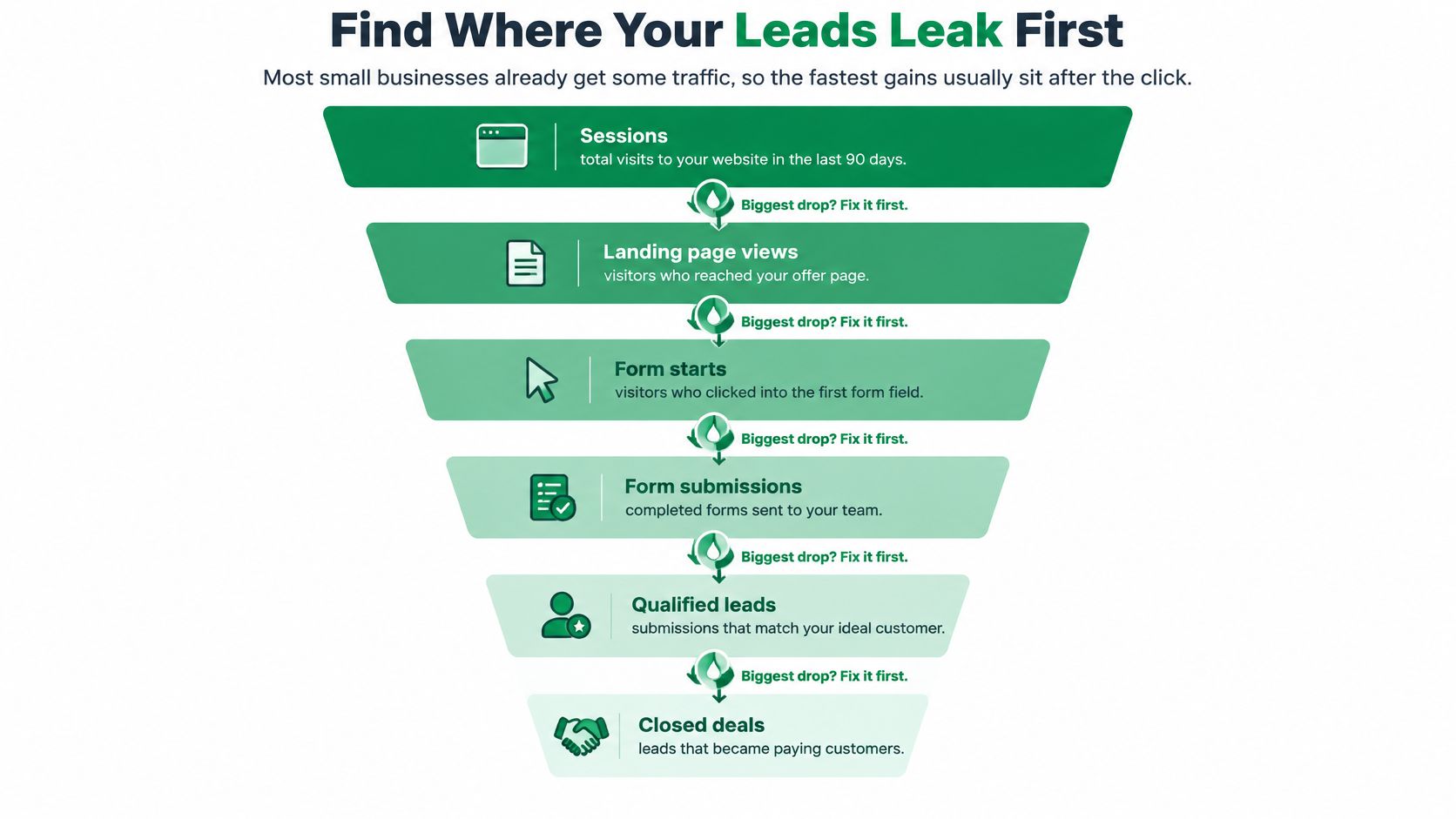
Pull Six Numbers for the Last 90 Days
You don't need expensive software. You need sessions by source, landing-page conversion, form starts versus form submits, median minutes to first human contact, the share of leads sales marks as qualified, and the share that became customers.
- Sessions by source: Which channels bring people who view an offer?
- Form starts versus submits: Are visitors interested, then quitting mid-form?
- Median response time: How long does a real inquiry wait for a person?
Use GA4, your form tool, and your CRM timestamps. If you're building this audit from scratch, a digital marketing audit template gives you the structure to record each stage in one place.
| Funnel stage | Question it answers | Where to find the data |
|---|---|---|
| Traffic | Which sources bring visitors who actually look at the offer? | GA4 acquisition report by source and medium |
| Landing page | Do visitors stay and move toward the form or phone number? | GA4 engagement and click events |
| Form | How many people who start the form finish it? | Form plugin analytics or form tool dashboard |
| Response | How long does a lead wait for a human reply? | CRM activity timestamps |
| Qualification | Which leads does sales accept as worth working? | CRM lead status and rejection reasons |
| Revenue | Which sources produce customers, not just contacts? | CRM closed-won records matched to ad spend |
Read the Pattern, Not Just the Totals
Say paid traffic rises for two months while leads stay flat. That usually isn't an ad problem. It points at the landing page, the form, or the time it takes someone to reply. Paid clicks are doing their job. The path after the click isn't.
Say a plumbing company gets 800 monthly sessions and 12 leads. A quick check shows 40 form starts and 12 submits, so the majority of people who tried to contact the company never finished. The form was the leak, not traffic, and doubling spend would've doubled waste.
Practical rule: Treat lead generation as a measurement and friction problem before you treat it as a traffic problem.
Find the single worst drop between two stages. Make that stage your only target for the next 30 days. One stage, one owner, one baseline you can beat.
Quick Wins to Ship This Week
Start with speed. Route every form submission to a phone or inbox that a named person watches, and set a five-minute first-contact target during business hours.
The reason is blunt. In a 2011 Harvard Business Review study that audited 2,241 U.S. companies, only 37% replied within one hour and 23% never responded, and organizations that contacted a prospect within one hour were nearly seven times more likely to achieve a meaningful conversation with a decision-maker than organizations that waited another hour. They were also more than 60 times as likely to qualify the lead compared with companies that waited 24 hours or longer.
And speed is cheap. Cheaper than ads, anyway.
Six Fixes in Order
- Submit a test lead from a phone every week. Confirm it reaches the right person, with the right service and source attached.
- Add click-to-call to mobile headers. Put a sticky call button on service pages so phone-ready visitors don't have to hunt.
- Replace the generic thank-you page. Give a next step, such as a calendar link or a clear promise of when someone will call.
- Remove one form field sales never uses. Log the date you removed it so you can compare completion before and after.
- Send an instant confirmation email. Name the service requested so the lead knows you received the right request.
- Set an alert at 15 minutes. Any lead older than that without a human reply should ping the owner and a backup.
Measure a Human, Not an Auto-Reply
Here's the common slip – teams count the automated confirmation as a response. It isn't. Automated acknowledgments should support rapid human contact for high-value inquiries, not replace it. Record time to first human contact separately, or your report will look fast while buyers wait.
Assign ownership with round-robin routing in your CRM, whether that's HubSpot, Pipedrive, or GoHighLevel. If the assigned person doesn't act, the alert escalates. No shared inbox that everyone assumes someone else checked.
After two weeks, a healthy result looks specific. Median response under five minutes during business hours. Zero broken submissions in the weekly phone test. If you can't say both, you don't have a traffic problem yet. You have an execution problem you can fix this week.
Landing Pages, Forms and CTAs That Convert
Read your landing page in the order a visitor does. If the headline doesn't match what they just searched or clicked, you've lost them before the form matters.
Build the Page Top to Bottom
Start with a headline that repeats the ad or search phrase, then one subhead that names the outcome and your response time. Below that, add a proof block with two client results or a named review count from Google. Real proof, near the ask.
Use one primary CTA, repeated above and below the fold. State the next action in plain terms, such as "Get a quote in one business day" or "Book a 15-minute call." Avoid vague labels like "Submit," which tell the visitor nothing about what happens next. If you want the full template before you rebuild, this guide on how to create high-converting landing pages walks through each block in sequence.
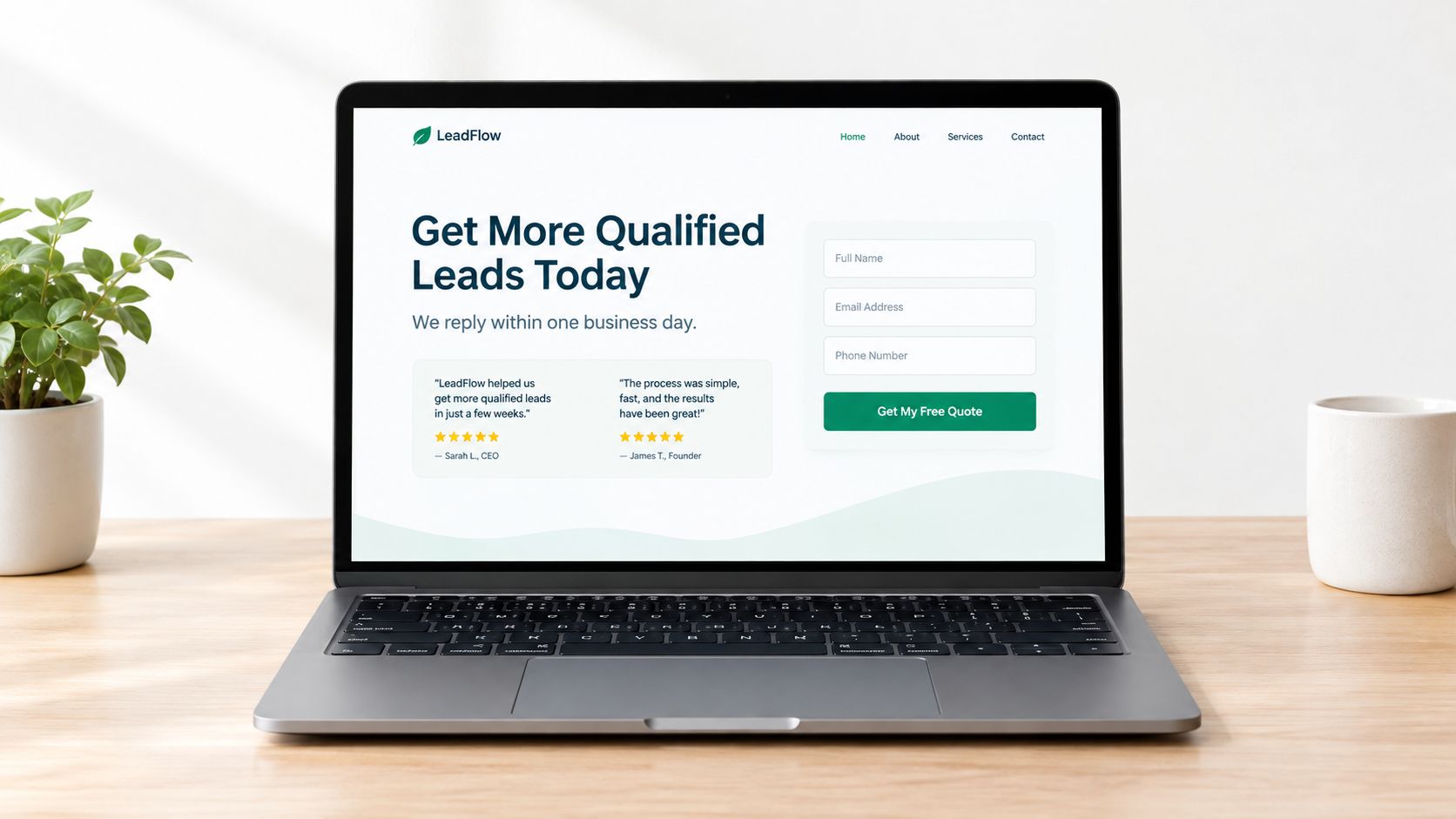
And keep competing links off the page. A landing page with a full nav, three offers, and a blog sidebar isn't generous. It's indecisive.
Make Every Form Field Earn Its Place
Start with name, business email, and the service needed. Add optional questions only when routing depends on them.
The cost of extra fields is measurable. A 2026 benchmark attributed to Digital Applied reported a 23.1% conversion rate for forms with three fields, falling to 17.0% at five fields, 11.4% at seven fields, and 6.9% at ten or more fields. That benchmark also reported forms with more than seven fields had abandonment near 67.8% in a survey of 1,500 B2B decision-makers.
| Form fields | Reported conversion rate | Practical use |
|---|---|---|
| 3 fields | 23.1% | Quote or call request: name, business email, service needed |
| 5 fields | 17.0% | Add phone or company size only when sales routing needs them |
| 7 fields | 11.4% | Keep only for pre-qualified paths such as enterprise inquiries |
| 10 or more fields | 6.9% | Move to a multi-step form or a booking calendar instead |
Trade-off, stated plainly. A longer form can improve qualification, but you'll get fewer leads to qualify. I would take the short form and qualify on the first call for most local and small B2B offers.
Consent and Accessibility Are Conversion Issues
Write the consent line in plain language. Say what the data is used for, and leave promotional opt-ins unticked. Preselected permissions may grow a list, but they don't build trust and they create cleanup work later.
- Visible labels above each field: Don't rely on placeholder text that disappears.
- Plain-language error messages: Say what's missing and how to fix it.
- Large tap targets: Thumbs on phones need room, especially on the CTA.
Always show a phone number for people who won't fill in forms. Some of your best leads are in a truck, on a job site, or using assistive technology. A form-only path filters them out for no good reason.
Test one element at a time. Headline, CTA copy, or field count, not all three at once. Wait until each variant has enough visits to show a real difference, which often means a few hundred visits per version, then keep the winner and test the next thing.
Choosing Channels by Speed, Cost and Fit
Choose channels on three things: how fast they produce a first lead, what they cost to run, and how well they fit the offer. My rule is simple. Start where demand already exists and where you can see cost per lead within 30 days, then add one slower channel that builds assets you keep.
| Channel | Time to first leads | Cost profile | Best fit |
|---|---|---|---|
| SEO and GEO | 3-6 months | Mostly labor, low cost per lead once pages rank | Services with clear buyer questions and local demand |
| Google Ads (PPC) | Days | Pay per click, scales directly with budget | Local services with high-intent searches |
| Content and thought leadership | 2-4 months | Writing and expert time | B2B offers with long sales cycles |
| Email nurture | 2-6 weeks to build sequences | Low tool cost, depends on list size | Businesses with existing contacts or past inquiries |
| Social promotion | 1-3 months | Organic time or paid boosts | Visual brands and B2B campaigns driving landing page traffic |
| Referrals and partnerships | 1-3 months | Referral fees or shared offers | Businesses with complementary service providers |
| Amazon ads and listings | 2-6 weeks | Ad spend per click plus listing work | Sellers with product-based demand |
Where Demand Already Exists
SEO and GEO means ranking for buyer questions and being cited in AI answers. Both reward clear service pages, complete local listings, and recent reviews. Best fit is a service people search for by problem and location. First metric to check is landing-page visits from non-branded search.
Google Ads suits high-intent local searches, such as emergency or quote-ready terms. Use exact and phrase match, a negative keyword list, and call extensions from day one. This breakdown of PPC for lead generation covers campaign structure if you're setting it up in-house. First metric is cost per qualified lead, not click-through rate.
Slower Channels That Compound
Content and thought leadership pays off for B2B offers with long sales cycles. Comparison frameworks, implementation checklists, and risk assessments help buyers decide before they call. First metric is assisted conversions from decision-stage pages.
Email nurture works for people who visited or inquired but didn't buy yet. It's cheap, but only if your list came from real opt-ins. First metric is replies and booked calls, not opens alone.
Social promotion mostly drives traffic to landing pages rather than generating finished leads on its own. Figures reported from HubSpot's 2024 State of Marketing data show that in 2024, 51% of B2B marketers used social-media promotion to drive traffic to landing pages, while 44% used email promotion, 36% SEO, and 33% paid advertising. First metric is qualified landing-page sessions by campaign.
Referrals and partnerships pair you with complementary providers, often for a simple referral fee. Slow to negotiate, excellent lead quality. Amazon ads and listings only belong in the mix if you sell products, and then the listing and sponsored ads come first.
Keep channel decisions in-house unless the channel needs skills nobody on your team has. That hand-off call gets easier once you know your numbers.
KPIs to Track and How to Set Up Tracking
If you can't define it, you can't improve it. Start with formulas your whole team calculates the same way.
| KPI | Formula | Target logic | Review |
|---|---|---|---|
| Lead conversion rate | Leads ÷ unique sessions | Trend up from your 90-day baseline | Weekly |
| Cost per lead | Ad spend ÷ leads | Set so it stays below your margin per customer | Weekly |
| Cost per qualified lead | Ad spend ÷ qualified leads | Lower is better; compare by channel | Weekly |
| Median response time | Median minutes from submit to first human contact | Under 5 minutes during business hours | Daily |
| Lead-to-customer rate | Customers ÷ leads, by source | Track by channel, not as one blended figure | Monthly |
| Form abandonment | 1 − (form submits ÷ form starts) | Falling month over month | Monthly |
Set targets from your margin, not from averages in other industries. A lead price that works for a law firm will sink a cleaning company. I would use your first 90 days as the baseline and judge channels against each other, which is where analytics and reporting discipline matters more than any dashboard tool.
Set Up Tracking in Five Steps
- Tag every paid and email link with UTM source and medium.
- Map each form and phone number to a source in the CRM.
- Agree a written definition of a qualified lead with sales, including rejection reasons.
- Record both submit time and first human contact time on every lead.
- Review numbers weekly and the channel mix monthly.
Know What Tracking Misses
UTMs miss most dark social shares and some phone calls, so use call tracking numbers from a tool like CallRail or WhatConverts on ads and landing pages. When GA4 and the CRM disagree, trust the CRM for lead counts and GA4 for traffic trends.
Don't chase perfect attribution. Chase attribution that's accurate enough to move budget with confidence.
AI needs the same discipline. A 2025 global small-business marketing survey reported by LocaliQ found nearly 60% of respondents were already using AI in marketing, with common applications including content creation, social-media management, and chatbots. Use AI for intent classification, FAQ assistance, lead routing, and follow-up drafting. Keep human review for claims, eligibility, sensitive data, and high-value prospects. Log consent, explain what data you collect and why, and always offer a route to a person from any chatbot, with keyboard navigation and readable contrast so the chat doesn't become a hidden barrier.
A 30/60/90-Day Plan for Lead Growth
Sequence matters more than effort. Measurement first, conversion fixes second, new spend last.
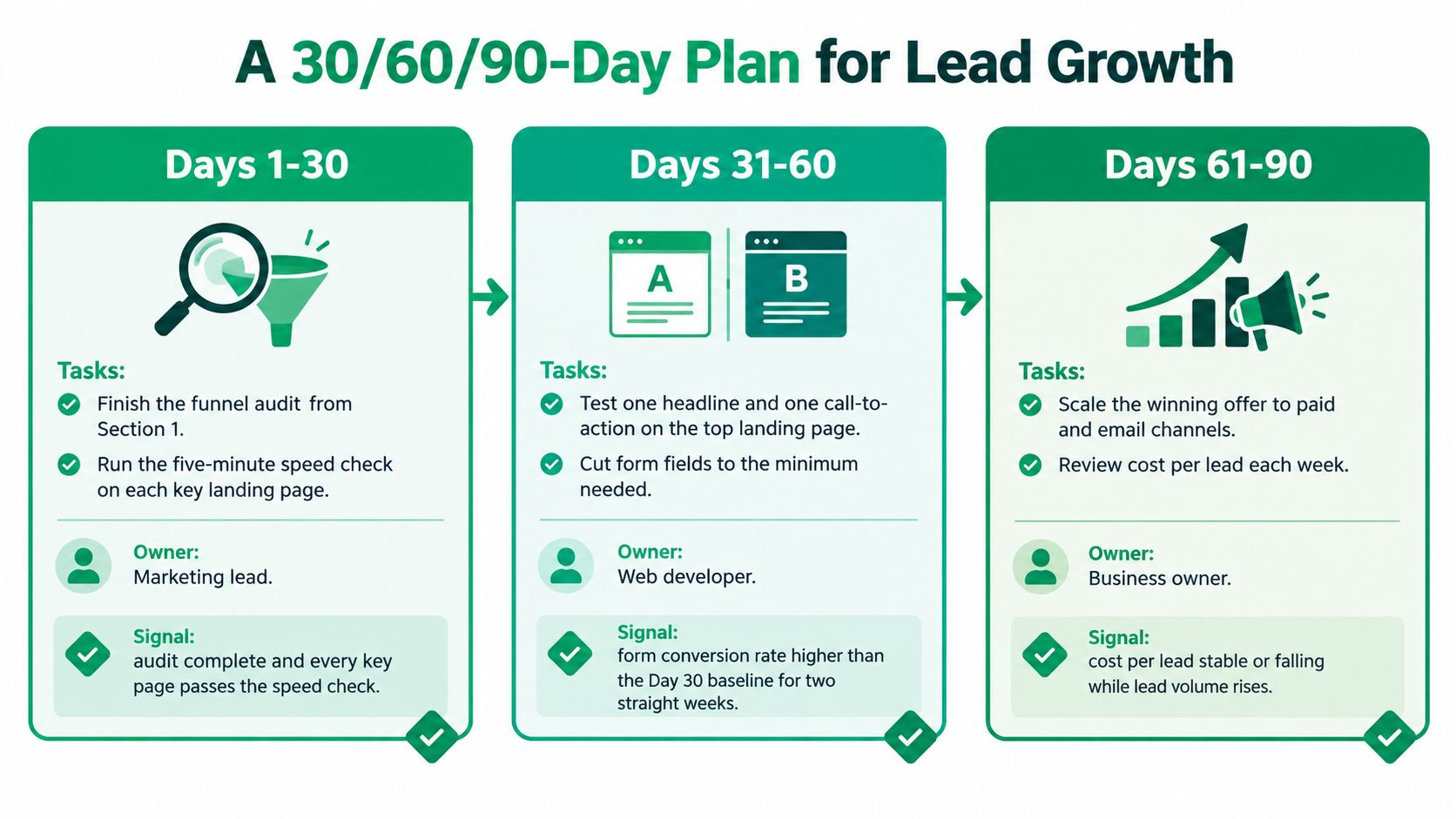
Days 1 to 30 Fix and Measure
Finish your funnel audit, put the five-minute speed rule and form cuts in place, and set up UTM tags plus CRM source mapping. If your CRM can't timestamp first contact cleanly, fix that now – a structured CRM implementation at this stage saves months of guesswork. Choose one paid channel and one organic channel to measure, nothing more.
Owner: whoever runs lead follow-up. Signal to check: median first-contact time under five minutes and a recorded baseline for every KPI. Don't move on without both.
Days 31 to 60 Test and Nurture
Launch the paid test with a capped budget and rewrite the one landing page that scored worst in your audit. Then send a nurture sequence to existing contacts and recent non-buyers.
- Email one: Confirm the request and name the next step within one business day.
- Email two: Answer the most common objection heard on sales calls.
- Email three: Share a comparison checklist buyers can use without you.
- Email four: Offer a 15-minute call with a clear opt-out.
Owner: one named person for ads and landing pages, one for email. Gate at day 60: pause any channel whose cost per qualified lead stays above margin for two consecutive weeks. No exceptions for channels you personally like.
Days 61 to 90 Scale What Proved Itself
Move budget to the source with the lowest cost per qualified lead. Start two partner conversations with complementary providers and publish one decision-stage asset, such as a comparison page or implementation checklist.
Say a dental office starts at 40 leads a month. It cuts its form from seven fields to three, answers leads within five minutes, and reaches about 55 leads by day 90 without raising ad spend. That's the shape of the win here. Same traffic, less friction, faster humans.
Assign one owner to each window. Tasks owned by the whole team are owned by nobody, and that's usually why plans like this stall in week two.
Start With Your Free Audit This Week
Start with the free audit and performance report from Mr. Green Marketing, LLC, which flags visibility gaps and ranks quick wins. It works best as a second opinion on the funnel numbers you've already pulled, so bring those numbers with you. An outside read is most useful when it can argue with your own data.
On Monday, your only job is to choose the single funnel stage you'll fix this month and name one owner for it. Then block five hours on the calendar for that owner's tracking and testing. Not "when there's time." Blocked.
Build It or Hand It Off
Build in-house if one person can spend about five hours a week on tracking, testing, and content, consistently. Hand off SEO, PPC, or Amazon when monthly spend is high enough that a wasted week of clicks costs more than an agency retainer, or when nobody on the team has time to keep the campaign running. Honest math beats hopeful staffing.
Set the day-90 check now. Rerun the funnel table, compare each number with the baseline, and decide which channel earns the next budget increase. Book that review on the calendar before you leave this page.
If your funnel audit shows leaks you don't have the hours to fix, Mr. Green Marketing, LLC can rebuild the weak stage, whether that's a conversion-focused landing page, SEO and PPC that target buyer-ready searches, or follow-up systems that stop leads slipping away. Request a free audit and performance report to see your visibility gaps and quickest wins ranked in order. Visit Mr. Green Marketing, LLC to get started.
Leave a Comment
sing in to post your comment or sign-up if you dont have any account.