
Digital Marketing Audit Template: You’ve got traffic, ad reports, CRM notes, and analytics dashboards open in separate tabs. Someone says the website feels slow. Someone else thinks paid search is wasting budget. The content team wants more topics, while sales says the leads aren’t ready. Everyone has an observation, but nobody has a shared answer about what to fix first.
That’s where a digital marketing audit template earns its place. Used properly, it isn’t a static checklist or a polished report that disappears into a shared drive. It’s a repeatable operating system that connects trustworthy measurement, channel analysis, weighted scoring, and an execution plan. And the best version includes a question many traditional audits still miss: will AI assistants accurately surface and cite the brand?
Digital Marketing Audit Template: Table of Contents
- Introduction to Your Digital Marketing Audit Template
- What to Prepare Before You Start Auditing
- How to Audit Every Core Channel Without Missing Gaps
- How to Score Findings and Prioritize Quick Wins
- Turning Your Completed Template Into a 30 60 90 Day Action Plan
- Final Takeaways and Next Steps for Continuous Improvement
Introduction to Your Digital Marketing Audit Template
A useful audit starts with the business problem, not with a tool. Maybe form submissions have slowed, paid campaigns keep spending without clear attribution, or organic traffic looks healthy while sales-qualified leads remain inconsistent. The symptoms appear across different platforms, so an informal review often produces disconnected opinions instead of a diagnosis.
Agencies and in-house teams increasingly use structured scorecards to replace that guesswork. Contemporary template sets commonly cover the website, SEO, SEM, landing pages, brand consistency, analytics, and conversion performance, while asking teams to capture 12 months of performance data for a dependable baseline (Smartsheet’s digital marketing report templates). That longer view helps separate a genuine performance issue from seasonality, campaign noise, or a temporary reporting problem.
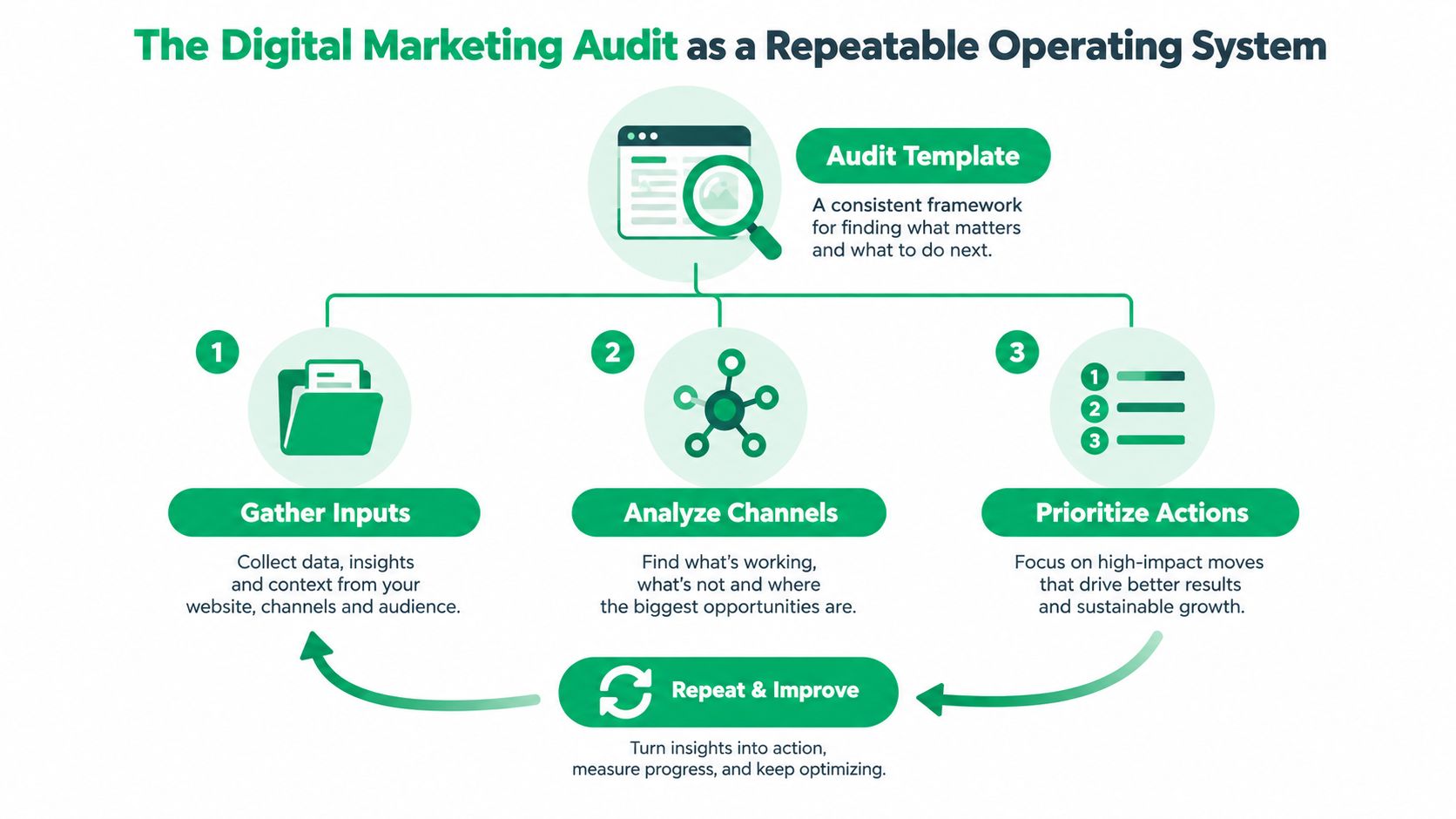
The audit is a decision system
The practical difference between a checklist and an operating system is what happens after the observation. “Organic landing pages need improvement” is too vague to schedule. A stronger entry identifies the page or component, the evidence, the likely business impact, the effort required, the owner, and the next action.
Template-based auditing matured alongside the wider adoption of Google Analytics for website traffic and behavior tracking. Established frameworks now use weighted scoring systems, channel-specific scorecards, and 30/60/90-day action plans to turn findings into execution roadmaps rather than static documents (Smartsheet’s template guidance).
A downloadable workbook should therefore give you a consistent place to record:
- Measurement inputs: Analytics configuration, conversion events, attribution, and revenue data.
- Channel findings: Website and technical SEO, organic search, paid media, content, email, CRM, and social.
- Modern discovery checks: AI-search prompts, bot access, entity clarity, and citation readiness.
- Prioritization fields: Impact, effort, severity, user impact, owner, and status.
- Execution planning: Actions grouped into immediate fixes, optimization work, and strategic initiatives.
Practical rule: An audit earns its keep only when another person can open it, understand the evidence, and know what happens next.
For a broader view of how an agency can turn these findings into an action plan, see digital marketing audit services. The point isn’t to create more documentation. It’s to make the next marketing decision less dependent on whoever happens to speak most confidently in the meeting.
Digital Marketing Audit Template: What to Prepare Before You Start Auditing
A rushed audit usually fails before anyone opens Google Analytics 4. The team hasn’t agreed on the scope, the conversion definition is unclear, or the available data covers different periods across platforms. A beautiful spreadsheet can’t repair those problems.
Start by writing a short audit brief. Name the business question, the pages and channels in scope, the period being reviewed, the primary customer journey, and the person responsible for the final action list. If the review covers a website, identify the specific flows that matter, such as lead forms, checkout, login, calls, or quote requests.
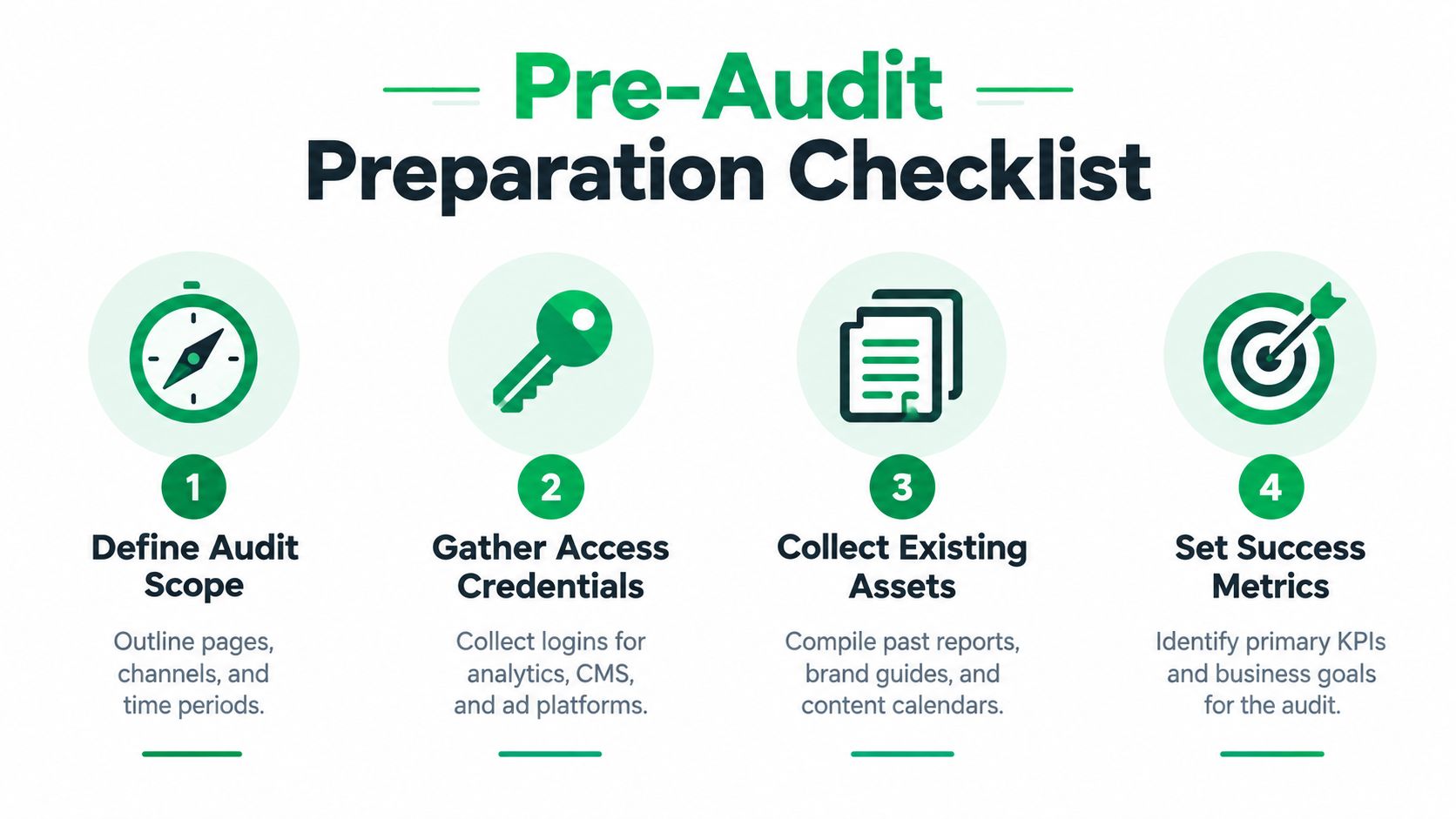
Establish the evidence before interpreting performance
Collect access before the audit begins. Depending on the scope, that may include GA4, Google Search Console, the CMS, Google Ads, Microsoft Advertising, social platforms, email software, call tracking, and the CRM. Export existing reports, campaign naming conventions, brand guidelines, landing page inventories, content calendars, and previous recommendations.
A content calendar planning resource can help organize the asset inventory, but don’t confuse publishing activity with performance. The audit needs to connect content to user journeys and business outcomes, not just count how much the team produced.
Measurement integrity comes first:
- Validate GA4 installation: Confirm the property is installed correctly and that key pages aren’t missing or double-tagged.
- Test conversion events: Check that form submissions, calls, and purchases are configured and firing accurately.
- Review attribution: Determine whether reporting captures the broader customer journey or over-credits the last click.
- Connect revenue evidence: Tie findings to available revenue attribution data so spend can be compared with actual performance.
- Record data gaps: Document missing access, inconsistent naming, broken events, and periods that can’t be compared cleanly.
The order matters. If tracking is unreliable, channel performance becomes a story built on unstable evidence. Fixing measurement before adding another channel also prevents teams from scaling activity that they can’t evaluate.
Digital Marketing Audit Template: Define scope for accessibility and user experience
Accessibility testing needs a reproducible boundary. Ground the review in WCAG 2.2 Level AA, described as the 2026 default for website audits in the relevant guidance (accessibility audit guidance). Specify which pages and flows are included, such as the homepage, checkout, login, forms, PDFs, and media.
The same guide lists success-criteria counts of 25 for Perceivable, 23 for Operable, and 20 for Understandable (accessibility audit guidance). Capture the exact page, failed criterion, user impact, and reproduction path. That gives developers something actionable instead of a broad complaint that the site “needs to be more accessible.”
Finally, decide how the scorecard will interpret results. One independent template recommends threshold bands of 85+ for strong, 65+ for solid with gaps, and below 40 for foundational work (SEO and marketing audit template guidance). Treat those bands as decision aids, not universal truth. Your weighting should reflect the business model, funnel, revenue mechanics, and current risk.
Digital Marketing Audit Template: How to Audit Every Core Channel Without Missing Gaps
The order of review prevents a common mistake: interpreting channel performance before confirming that the measurement layer works. Start with analytics and goals, then inspect the website and technical foundation, followed by organic search, paid media, content, email and CRM, social, accessibility, and AI-search visibility.
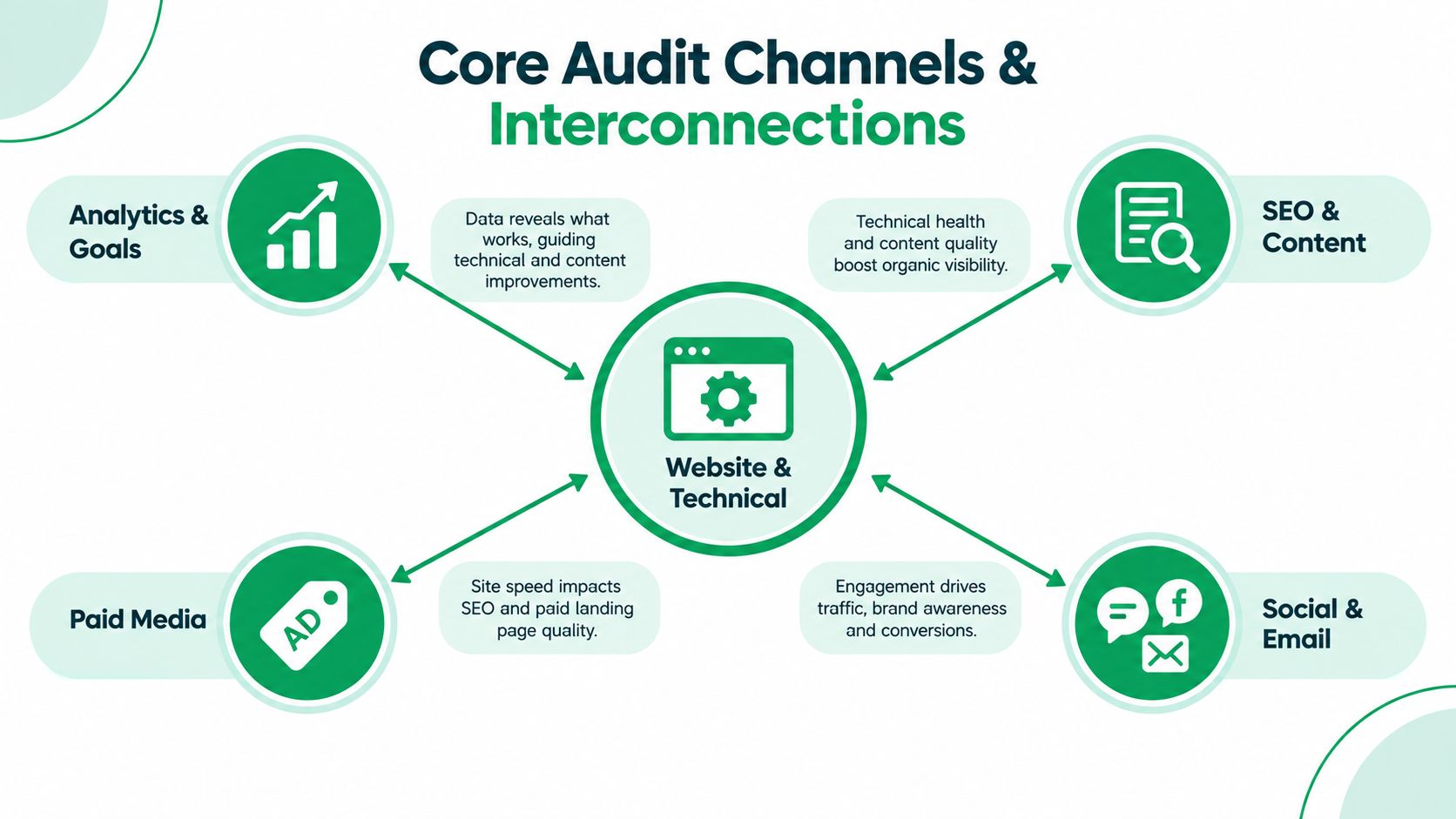
Analytics and goals
Open the audit with the questions that determine whether every later conclusion is credible. Is GA4 installed correctly? Are the important conversions firing? Do form submissions, calls, purchases, and meaningful engagement events map to the actual customer journey?
Then inspect attribution. A channel that appears weak under last-click reporting may assist conversions earlier in the journey, while a channel receiving all the credit may only capture the final interaction. The audit doesn’t need to force one perfect model. It does need to state which model is being used and where it creates blind spots.
Website and technical SEO
Review crawlability, indexation, internal links, redirects, canonical signals, mobile experience, page templates, landing page alignment, and technical performance. Check important pages manually, not just through a crawler. A tool can flag a missing title tag, but it won’t always explain why a visitor abandons a form or fails to understand the offer.
Look at the handoff from ad or search result to page. A relevant query can still produce poor results if the landing page hides the call to action, loads content late, or presents a different promise from the referring message.
Organic search and content
Use Search Console and analytics to identify pages gaining visibility, losing visibility, attracting irrelevant visits, or failing to support a conversion path. Review search intent, title and heading clarity, internal linking, content freshness, and whether each priority page answers the user’s actual question.
Content quality isn’t measured by publishing volume alone. A page can attract attention without helping a buyer decide. Record the next action for each important page, whether that means consolidating overlapping content, improving the explanation, adding a clearer conversion path, or strengthening evidence and entity context.
Paid media
Inspect campaign structure, search terms, negative targeting, audience definitions, creative-to-landing-page alignment, budget distribution, conversion settings, and assisted conversion behavior. Separate prospecting from remarketing where the platform allows it, because blended reporting can hide which audience is carrying performance.
The practical test is simple: can you explain what each active campaign is supposed to accomplish, which audience it serves, what conversion it optimizes toward, and what action follows from the result? If not, the account may be active without being strategically legible.
Email and CRM
Review list sources, segmentation, lifecycle stages, automation logic, suppression rules, deliverability signals, and the handoff between marketing and sales. Trace a contact from acquisition through nurture and opportunity creation. Look for dead ends, duplicate records, unclear ownership, and campaigns that generate engagement without a useful next step.
CRM data can also expose a channel problem that platform reports miss. If leads arrive but sales repeatedly rejects them for the same reason, the audit should connect that qualitative feedback to targeting, messaging, or qualification.
Social and accessibility
Social audits should examine platform roles, content formats, audience response, referral behavior, brand consistency, and conversion contribution. Don’t treat follower counts as a verdict. Ask what the channel is meant to do, then evaluate it against that job. For a dedicated review of those mechanics, use this social media audit resource.
Accessibility belongs in the same operational system, not in a separate compliance folder. Test keyboard access, focus behavior, labels, headings, color contrast, alternative text, captions, error messaging, and the named journeys within scope. Each issue should point to a page or component and a specific WCAG success criterion.
AI-search visibility
Traditional SEO checks can miss how AI systems retrieve and describe a brand. Recent guidance recommends querying priority prompts across Google AI Overviews, ChatGPT, Perplexity, and Gemini, checking whether bots such as GPTBot, ClaudeBot, and PerplexityBot are blocked, and validating whether important content appears in raw HTML rather than only through JavaScript rendering (AI-search readiness checklist).
Record whether the brand appears, how accurately it’s described, which sources are cited, and whether competitors occupy the answer. Add checks for entity clarity, citation readiness, and consistent positioning across owned and third-party surfaces. A strong Google presence doesn’t automatically guarantee accurate AI retrieval.
Digital Marketing Audit Template: How to Score Findings and Prioritize Quick Wins
An issue list is not a priority list. Once the channel review is complete, score every finding on two axes: likely impact and required effort. Use high, medium, and low for each. High-impact, low-effort items become immediate candidates, while high-impact, high-effort work belongs in a planned initiative rather than an improvised task list.
| Finding | Impact | Effort | Priority Action |
|---|---|---|---|
| Conversion event is misconfigured | High | Low | Test, repair, and document before interpreting channel results |
| Important content appears only after JavaScript rendering | High | Medium | Validate raw HTML, then assign a technical remediation |
| Irrelevant paid search terms consume budget | High | Low | Add exclusions, review query intent, and monitor outcomes |
| Accessibility issue affects a key form | High | Medium | Document the failed criterion, user impact, and fixing technique |
| Metadata issue on a low-value legacy page | Low | Low | Batch with routine maintenance rather than interrupting priority work |
Build a weighted scorecard
A weighted scorecard adds business context to the two-axis matrix. One established workbook assigns 20% to measurement and analytics, 15% to website and technical factors, 15% to search visibility, and 12% to paid media, producing a score out of 100 and a ranked fix list (Smart Insights benchmarking templates).
Use those weights as a starting pattern, not a rule for every company. An e-commerce business may need heavier attention on product pages and paid media. A local service business may place more practical weight on calls, forms, local search, and accessibility across lead journeys.
Score each pillar consistently, then attach evidence to the score. Don’t award a high rating because a platform is installed. Award it because the implementation is correct, the events are tested, the data is interpretable, and the process has an owner.
Digital Marketing Audit Template: Make the finding usable for another person
Accessibility and development findings need precise reporting fields. Include the page or component, failed WCAG success criterion, fixing technique, severity level, plain-language user impact, reproduction steps, and code-level recommendation, as recommended in practical audit guidance (ClickMinded’s digital marketing audit template).
The same discipline improves SEO, paid, and analytics recommendations. Add the evidence, business consequence, owner, effort estimate, and success signal. If a stakeholder can’t tell what to do from the row, the row isn’t finished.
For a deeper method of comparing performance gaps against effort and business consequence, review this performance gap analysis guide. Keep the first action tier narrow. A short list that gets completed beats a sprawling backlog labeled urgent.
Digital Marketing Audit Template: Turning Your Completed Template Into a 30 60 90 Day Action Plan
A completed scorecard becomes valuable when it changes the calendar. Sort the ranked findings into three horizons, assign one accountable owner to each action, and define the evidence that will show whether the fix worked. The plan should be easy for a founder, marketer, designer, developer, or sales lead to understand without translating specialist language.
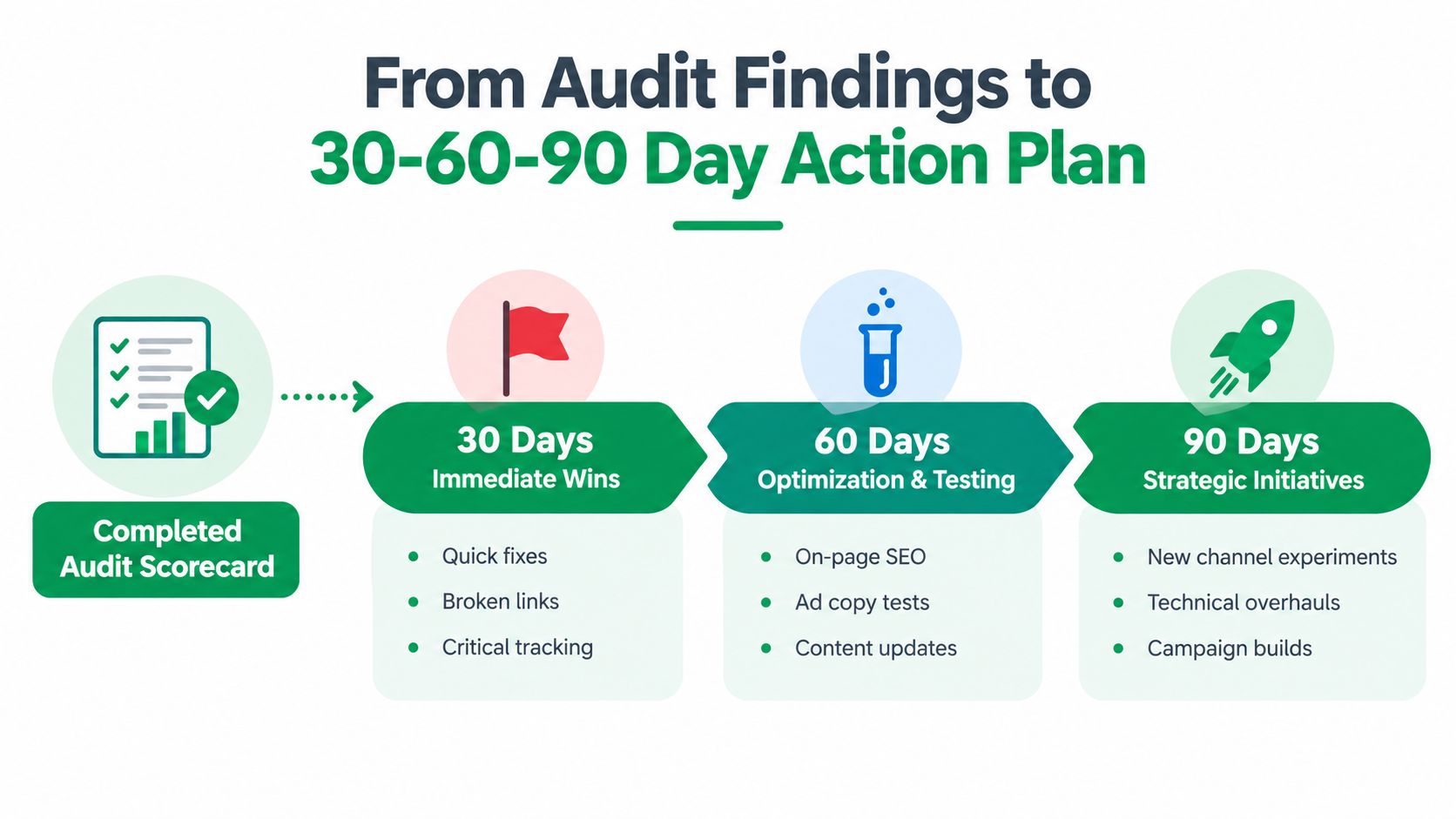
Digital Marketing Audit Template: The first 30 days
Start with high-impact, low-effort corrections and measurement repairs. That may include broken links, critical tracking problems, incorrect conversion events, obvious landing page friction, paid search exclusions, or accessibility issues blocking a key form.
Assign an owner and a verification date. A tracking fix isn’t complete when someone edits the tag. It’s complete when the team tests the event, confirms the data appears correctly, and records the implementation so the next audit doesn’t reopen the same question.
Digital Marketing Audit Template: The next 60 days
Use this phase for optimization and testing. Improve on-page SEO, revise ad copy, update important content, refine email segmentation, repair nurture logic, and test landing page changes. Keep each action tied to a stated hypothesis and a measurable business signal.
AI-search readiness can sit here when the technical foundation is sound. Test priority prompts, review how the brand is described, inspect bot access, confirm that important content is visible in raw HTML, and improve entity clarity where the evidence shows a retrieval problem.
Digital Marketing Audit Template: By 90 days
Reserve the final horizon for strategic initiatives that need coordination, planning, or new production. Examples include a technical website overhaul, a substantial content program, a new channel experiment, a campaign rebuild, or a broader CRM cleanup.
Tie the roadmap to revenue attribution wherever the data supports it. That doesn’t mean every action will produce an immediate revenue signal. It means the team should state how the action is expected to influence the customer journey and which evidence will be reviewed at the next checkpoint.
A small-business marketing plan resource can help translate the audit into a broader operating calendar. Keep the audit alive with scheduled re-checks. Mark completed fixes, record new evidence, and adjust priorities when customer behavior, technology, or business direction changes.
Digital Marketing Audit Template: Final Takeaways and Next Steps for Continuous Improvement
A digital marketing audit template works when it creates shared judgment. The team trusts the data because measurement was checked first. Marketers and developers understand the findings because each issue has evidence, impact, effort, and a clear owner. Leadership can make a budget decision because the scorecard ranks gaps instead of presenting every observation as equally important.
The most useful operating rhythm is simple:
- Measure before interpreting: Validate GA4, conversion events, attribution, and revenue connections before judging channels.
- Score before scheduling: Use weighted pillars and impact-versus-effort ratings to separate quick wins from structural work.
- Include AI visibility: Test how Google AI Overviews, ChatGPT, Perplexity, and Gemini represent the brand, rather than relying on classic SEO checks alone.
- Re-audit deliberately: Review completed actions, compare the new evidence with the baseline, and update the roadmap instead of starting from scratch.
- Keep the scope practical: SMBs don’t need a massive report to make progress. One well-chosen channel or customer journey can reveal the first worthwhile fix.
And don’t wait for perfect data. Document what’s missing, repair the highest-risk measurement issue, and move forward with a transparent level of confidence. A living scorecard will teach the team more than a one-time report that tries to sound certain about everything.
Mr. Green Marketing, LLC offers digital marketing audits and performance reports covering website experience, SEO, PPC, analytics, conversion paths, and AI-search visibility. Visit Mr. Green Marketing, LLC to request an outside perspective, identify priority fixes, and turn your findings into an execution plan.
Leave a Comment
sing in to post your comment or sign-up if you dont have any account.