
How to Create High Converting Landing Pages That Sell? You can usually spot the problem before the dashboard does. The campaign is live, the ads are getting clicks, the page loads fine, and the form is there. Yet the leads are thin, the sales team is annoyed, and a competitor with less traffic keeps pulling more value out of the same market.
That gap is rarely about one broken thing. It’s usually a landing page that was built like a brochure, not a decision tool. And the fix isn’t another pile of “best practices,” it’s treating the page as a set of tradeoffs, between clarity and detail, friction and qualification, speed and proof, message match and broader persuasion.
How to Create High Converting Landing Pages That Sell: Table of Contents
- Why Most Landing Pages Leave Conversions on the Table
- Research and Planning Before You Touch the Design
- Designing Layout, Copy, and Forms as One System
- Writing Headlines, CTAs, and Message Match by Traffic Source
- Cutting Form Friction Without Killing Lead Quality
- A/B Testing That Actually Produces Winners
- Your 30-Day Landing Page Optimization Plan
Why Most Landing Pages Leave Conversions on the Table
The first mistake is building for everyone. A page that tries to speak to every visitor ends up matching no one, because it blurs the offer, softens the promise, and hides the action behind too much generic language. The second mistake is writing copy before the offer is sharp. If you haven’t decided exactly what’s being sold, to whom, and why now, the page starts drifting into brand language and feature lists. The third mistake is a form that asks for too much, too soon. A lead gen page that needs three useful inputs but demands ten fields is paying a friction tax it probably can’t recover.
That’s why benchmarks matter. Across 41,000 pages, the median landing page conversion rate is 6.6% (Unbounce benchmark), while a good landing page is often framed as starting around 11.4% and top performers can reach 40.8% depending on the industry (Unbounce good conversion rate benchmark). A page at 6.6% isn’t failing, it’s just average. The spread is the point, because sector performance isn’t flat. Events and entertainment sit at 12.3%, while SaaS is 3.8% in that same benchmark set (Unbounce good conversion rate benchmark).
Traffic source changes the target
A “good” conversion rate depends on where the visitor came from. Email traffic has historically converted at 19.3% in one benchmark set, and visitors from email converted 77.06% more than visitors from paid search (Shopify landing page statistics). Another benchmark set shows average conversion rates of 5.2% from email, 3.1% from paid search, and 1.2% from social media, with e-commerce pages averaging 1.8% (Alternates AI personalization and adaptive landing pages). Those numbers aren’t a license to chase one universal target. They’re a warning that cold traffic, warm traffic, and branded intent behave like different audiences, because they are.
Practical rule: judge the page against its own traffic mix, not a generic website average.
That same logic applies to offer type. A free trial page, a demo request page, and a quote form shouldn’t be held to the same standard, because the visitor’s commitment is different. A “good” rate for a light, low-friction action is not the same as a serious sales conversation. For that reason, the right benchmark is whatever beats your trailing baseline by a defensible margin for the exact source and offer you’re running.
| 2026 Landing Page Conversion Benchmarks by Industry and Traffic Source | Cold Paid Traffic | Email / Retargeting | Organic / Branded Search |
|---|---|---|---|
| SaaS trial or demo offers | Lower, because intent is colder and offer comprehension matters more | Higher, because the audience already knows the brand or problem | Higher than cold paid, because branded intent reduces uncertainty |
| E-commerce product or category pages | Lower, especially for first-touch visitors | Higher, when the audience has already engaged with the brand | Higher, when search intent is specific and commercial |
| B2B service lead gen | Mid-range, with qualification pressure built into the form | Higher, if the offer is tied to a previous touchpoint | Higher, when the searcher already knows the service category |
| Higher-intent demo or consultation requests | Better than light offers, because the visitor is closer to a decision | Strongest when nurtured in advance | Strong when the query signals a purchase or vendor search |
The point isn’t to memorize a single number. It’s to stop designing pages as if every visitor arrives with the same intent. If the traffic is cold and the offer is abstract, the page needs more orientation and less clutter. If the traffic is warm and the value is already accepted, the page can carry more proof and detail without collapsing into distraction.
How to Create High Converting Landing Pages That Sell: Research and Planning Before You Touch the Design
The page starts long before the layout. First, lock the offer in plain language. What is being sold, to whom, and what would the visitor do instead if this page didn’t exist? That alternative matters, because a landing page is competing against inertia, not just against competitors.
Next, define the one audience segment this page is for. Not “small businesses,” not “everyone in market,” just one specific visitor with one reason to care. If you’re building around a customer profile, keep that work disciplined and tight with a clear buyer persona development framework. The better the segment definition, the easier it is to decide what belongs on the page and what should be left out.
Traffic source comes next. The promise in the ad, email, or link has to survive the first screen, not just the headline. If the visitor clicked for a specific service, product, or problem, the page needs to mirror that language immediately. If the page can’t keep that promise, the drop-off starts before the scroll begins.
Build the brief, not the wireframe
Before design work starts, the team needs a short brief with four items:
- Primary action: the single conversion event the page is built for.
- Supporting proof: the testimonials, logos, screenshots, or process details that reduce uncertainty.
- Fallback micro-conversion: a softer action for visitors who aren’t ready to convert today.
- Non-negotiables: any compliance, brand, or operational constraints the page has to obey.
The brief should also define what gets excluded. If a visitor segment needs a different promise, different proof, or a different level of commitment, that’s a separate page, not a compromise layout. Too many teams try to force one template to do every job, and the result is a page that’s too vague for cold traffic and too thin for warm traffic.
The best brief I’ve seen fits on one page, and it reads like a decision memo, not a marketing brainstorm.
Once those calls are made, the rest of the build gets faster. Copy has a target. Design has a hierarchy. The form has a business purpose. That’s the starting point for how to create high converting landing pages, because the page can’t convert what the strategy hasn’t already clarified.
How to Create High Converting Landing Pages That Sell: Designing Layout, Copy, and Forms as One System
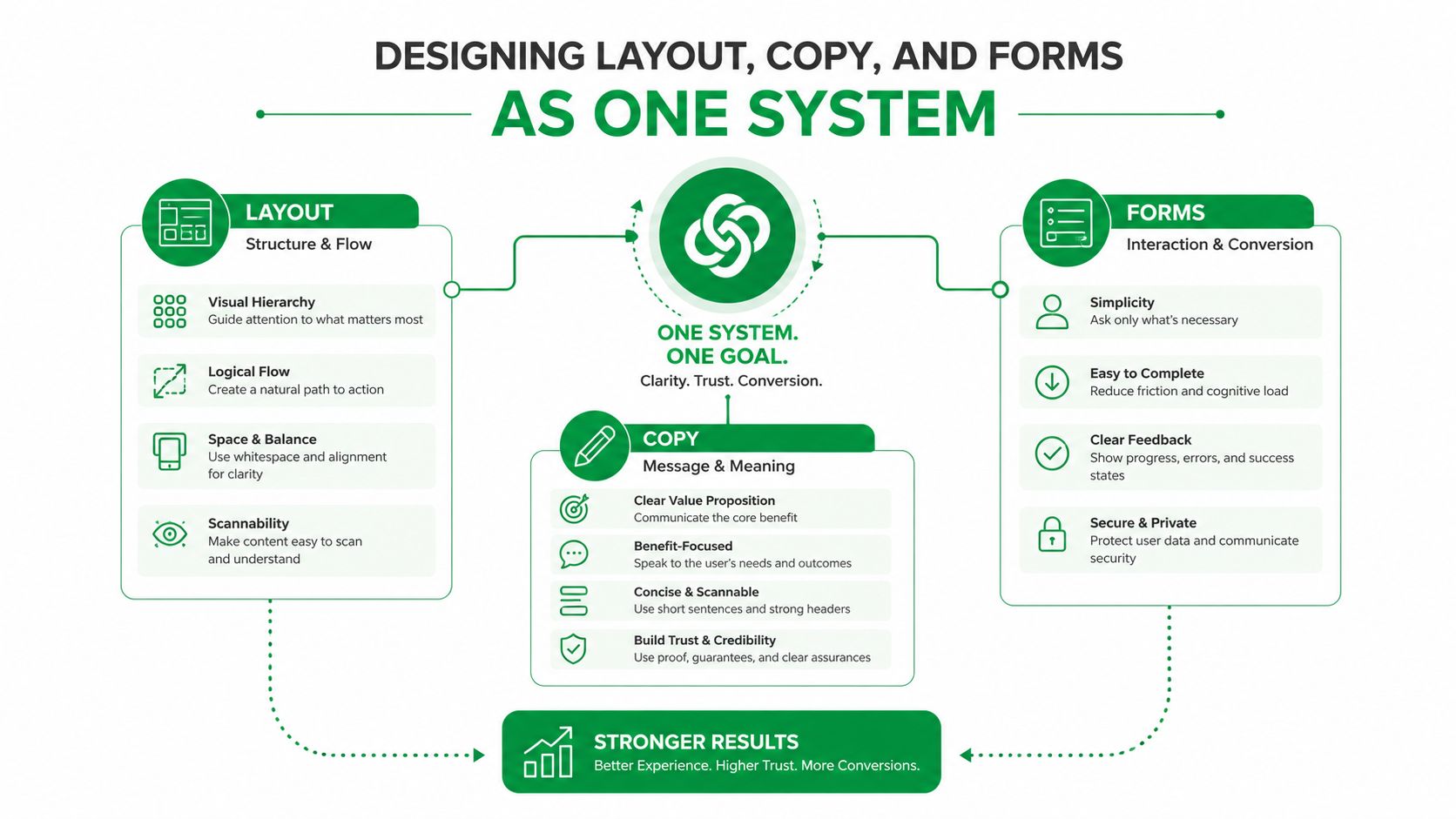
Layout, copy, and forms fail when they’re treated like separate deliverables. A designer can make a page beautiful, a writer can make it persuasive, and a marketer can make the form “conversion-friendly,” yet the page still underperforms because the three pieces don’t guide the same visitor toward the same action. The system matters more than the parts.
Decide the hierarchy first
The layout should answer one question fast, what do I do here? That means the visual hierarchy has to point toward one primary CTA, not several equal options. A single-column layout often helps when the offer needs explanation, while a multi-column layout can work when the audience is already warm and the proof is compact. Hero composition, imagery, and social proof should all support the same reading order, not compete for attention.
The tradeoff is simple. Denser pages can lift trust when the traffic is warm, but they can bleed cold paid visitors who don’t yet care enough to decode a heavy page. That’s why the same structure won’t win everywhere. A product visual may outperform a stock photo when the offer is tangible. A testimonial block may need to sit higher when the offer has more perceived risk. And a long page with anchors can work when the visitor is already looking for detail.
How to Create High Converting Landing Pages That Sell: Build the page in the right sequence
Start with a wireframe. Then write the copy against that structure, not around it. Add the form only after the page already knows what information it needs to close the gap between interest and action. Finish with a mobile pass, because a desktop page that looks polished can still fall apart on a phone if spacing, field size, or CTA placement gets awkward.
One useful rule is to keep each layer doing one job. Layout directs attention. Copy reduces uncertainty. The form captures the action. Once those jobs blur, the page starts asking the visitor to do too much thinking.
The high-converting pages I trust usually feel calm, not crowded. They don’t need to show everything at once. They need to show the right thing first.
How to Create High Converting Landing Pages That Sell: Writing Headlines, CTAs, and Message Match by Traffic Source
A headline isn’t “good” because it sounds sharp. It’s good because it keeps the promise that brought the visitor there. A Google Ads click with a specific keyword expectation needs that phrase echoed above the fold. An email subscriber who already downloaded something expects continuity, not a brand-new pitch that ignores the previous touch. A social visitor often needs more orientation because they arrived with less intent and less context.
Match the mindset, not just the wording
For cold paid traffic, the headline should often name the offer or problem directly. For warm email traffic, continuity matters more than novelty. For organic branded search, the visitor already knows you, so the page can move faster into proof and action. The mistake is matching visually while missing the meaning. A banner image may echo the ad, but if the headline shifts the promise, the message match is still broken.
A practical checklist helps:
- Headline: repeat the offer or pain point the visitor already recognized.
- Subhead: clarify the payoff or next step.
- Image: show the product, service, or outcome that fits the source.
- CTA label: say what happens next, not just “submit.”
- Form pre-fill: reduce effort where the system can safely do it.
Use stronger words where they help clarity, not where they inflate hype. A useful internal reference for CTA language and persuasion framing is this power words reference, but the essential work is still message fit. A bold button won’t rescue a weak promise.
| Message Match by Traffic Source | Visitor Mindset | Headline Focus | CTA Style | Proof to Lead With |
|---|---|---|---|---|
| Cold paid search | Solving a specific problem, but still skeptical | Mirror the query or offer | Direct and low-friction | Immediate benefit, offer clarity |
| Already familiar with the brand or content | Continue the last touchpoint | Familiar, continuity-based | Prior engagement, prior promise | |
| Retargeting | Recognizes the brand, still undecided | Remove objections and sharpen value | Action-oriented with reassurance | Testimonials, comparisons, guarantees |
| Organic branded search | Looking for the company or offer by name | Confirm they’re in the right place | Clear and confident | Logos, credentials, recognizable proof |
When the traffic source and page promise can’t be reconciled on one template, split the path. Dedicated pages beat compromised ones. That’s especially true when different sources enter at different levels of awareness.
Cutting Form Friction Without Killing Lead Quality
Every field you ask for is a tax. Some fields are worth it, some aren’t. A form should collect only the information that changes how the lead gets handled, not the information that makes the team feel tidy. The form is part of the conversion decision, not a data-harvesting exercise.
The conversion cost of extra fields is real. One-field forms convert at 18.2%, two fields at 13.0%, three at 11.5%, four at 9.9%, five at 8.1%, seven at 7.6%, eight at 5.8%, and nine or more fields fall to 4.2% (form field conversion statistics). That curve is blunt, and it’s useful. Every added field raises friction, and the page has to earn that friction with better lead quality.
Keep what changes handling
If removing a field would not change sales follow-up, qualification, routing, or fulfillment, drop it by default. A name and email often do the heavy lifting for a first-touch lead. A phone number can be justified when speed-to-contact matters. Company size may matter when the offer, pricing, or sales motion changes by segment. Vanity segmentation fields usually don’t survive that test.
The cleanest way to think about it is downstream. Sales feedback matters, but so do MQL-to-customer ratios and the true cost of junk leads landing in a rep’s queue. If a field helps prevent poor routing or wasted follow-up, it has business value. If it only helps the marketing team sort leads into prettier reports, it’s probably friction without enough return.
For teams that need more data over time, progressive profiling and conditional fields do the job better than one intimidating form. Smart defaults can shorten the effort. Multi-step flows can also ease the first commitment without pretending the lead quality question doesn’t exist. The point is to spread the ask across time instead of front-loading every question into the first interaction.
Field rule: if the data won’t change what happens after submission, it shouldn’t be on the first form.
One practical exception is when the offer is high-consideration and the next step genuinely requires qualification. In that case, the form can be longer, but each field has to earn its place. Don’t hide behind “sales needs it” unless sales can explain exactly why.
How to Create High Converting Landing Pages That Sell: A/B Testing That Actually Produces Winners
Most A/B tests don’t give you the clean win people hope for. Industry summaries show only about 13% of tests create a statistically significant winner, around 9% produce a significant loss, and roughly 78% are inconclusive, while tests focused on headline, hero image, CTA, or form elements win about 24% of the time (Digital Applied A/B testing summary). That’s not a reason to stop testing. It’s a reason to stop testing lazily.
Start with a real hypothesis
A test should begin with a plain-English claim. If we change the headline to better match the paid search query, more visitors will start the form. If we shorten the form, more visitors will submit. If we move proof higher on the page, warmer traffic will convert better. That’s a hypothesis. “Let’s try a blue button” usually isn’t.
The strongest ideas come from heatmaps, funnel drop-off, and actual customer interviews, not from cosmetic opinions in a meeting. The test should use one primary metric, one variable, and a clear runtime plan before launch. No peeking. No rewriting the rules midstream because the early numbers look exciting. If the test is small, unstable, or too short, it doesn’t deserve a decision.
There’s also a second problem many teams miss. They run too many changes at once, then wonder why the result is muddy. High-impact elements are usually the best place to spend effort, especially when the page already has a clear offer and the issue is focus, friction, or trust.
I also see teams overestimate button color and underestimate message shape. The latter is harder to ship, but it usually matters more.
How to Create High Converting Landing Pages That Sell: Rank ideas by impact, not by convenience
A simple rubric works better than instinct alone:
- Expected lift: how much the change might matter if the hypothesis is right.
- Confidence: how strongly the research supports the idea.
- Ease: how quickly the team can build and deploy it.
That’s the same logic I use when deciding whether to test copy, structure, or the form. Big structural changes often deserve more attention than tiny visual tweaks. If the team can’t explain why a test should move a metric, it probably doesn’t belong in the queue.
For a deeper operating model on experimentation discipline, this CRO best practices guide is a useful companion. The key takeaway is still the same. A/B testing is a low-odds, high-discipline process. The winners are real, but they’re earned through focus and patience.
Your 30-Day Landing Page Optimization Plan
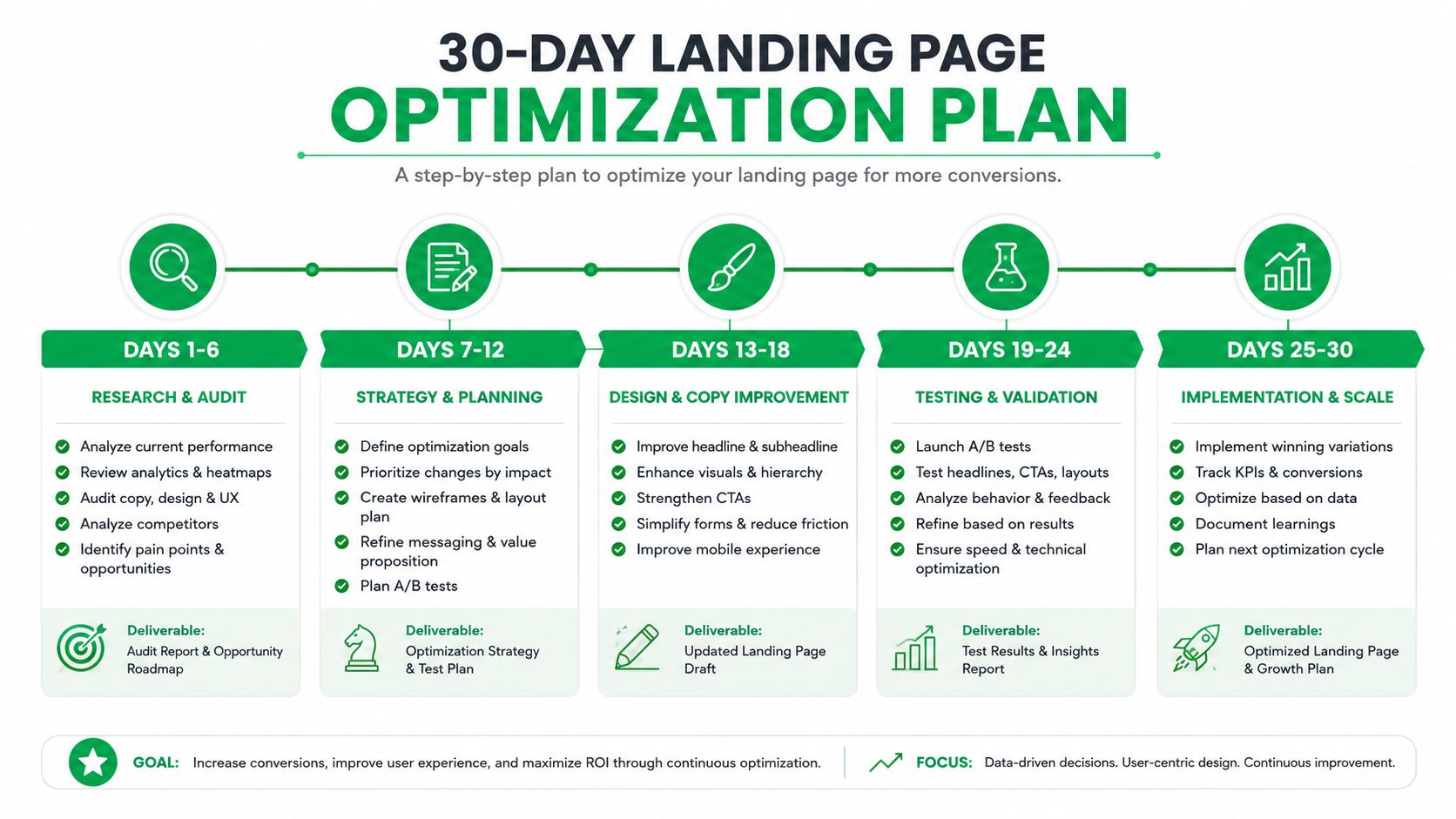
The first 30 days should not try to solve everything. They should produce a page that’s coherent, instrumented, and ready to learn. Week one is for research, offer lock, wireframe, and copy draft. Week two is for design, form friction review, and device QA. Week three launches the page and starts the data collection. Week four runs the first test, monitors early signals, and queues the next hypothesis.
Use checkpoints, not vibes
The page should not be judged the moment the first lead comes in. Set a minimum amount of traffic before reading results, then compare the page against the right benchmark for the traffic source and offer. If the conversion rate is clearly above the page’s trailing baseline, keep going. If it’s stuck in the middle with weak engagement, the issue is usually message fit, form friction, or proof placement. If bounce is high and scroll depth is shallow, the page is probably losing the visitor before the offer lands.
A practical dashboard needs both leading and lagging indicators. Leading indicators include headline engagement, scroll behavior, and form starts. Lagging indicators include conversion rate, lead quality, and downstream sales feedback. The two matter together, because a page can collect more leads and still create worse business outcomes.
Keep the maintenance cadence tight
By day 30, document what happened, what changed, what won, and what lost. Save the loser insights, because they usually tell you more about audience resistance than the winning version does. After that, maintain the page with scheduled copy refreshes, speed audits, and quarterly experiments. If traffic grows or the offer shifts, the page needs another pass.
For teams that want help with conversion-focused websites, landing page design, PPC landing pages, and ongoing testing, Mr. Green Marketing, LLC can build and refine the page around your traffic source, offer, and form strategy. If you want a partner that treats landing pages as a measurable system, visit Mr. Green Marketing, LLC and request a free audit to see where your current page is leaking conversions.
Leave a Comment
sing in to post your comment or sign-up if you dont have any account.