
Your crawl just finished and the screen is a wall of red. A site health score of 61, a few hundred rows, and a client call in the morning. What you need isn't another warning. You need to know which five things to fix first, and who's going to do them.
Most SEO audit examples stop at the checklist. They show a dashboard, list the issues, and leave the hard part, turning forty findings into a work order, to somebody else. That's why audits die in shared drives.
Here's the version I run, with a hypothetical store carried through the whole way. Seven checks, a scoring model that puts revenue ahead of tidiness, and one owner and one deadline per line.
Table of Contents
- What a Sample SEO Audit Covers at a Glance
- Checking Whether Google Can Crawl and Index Your Pages
- Reading Core Web Vitals Against Google's Thresholds
- Mobile, Robots.txt and Structured Data Checks
- Scoring Findings by Business Impact
- A Worked Ecommerce Example and Its Ranked Fix List
- Checking Whether AI Answers Mention Your Brand
- Turn the Findings Into a 30-Day Fix Plan
What a Sample SEO Audit Covers at a Glance
Say a mid-size online store comes to you with about 4,000 URLs. The product template drags on mobile. The XML sitemap lists SKUs the catalogue retired and misses the collections launched since. Three people edited category titles over four years, so no two follow the same pattern. Revenue is flat, and nobody in the building agrees on why.
An audit answers a narrow question before anything else: can Google discover, interpret, index and serve these pages? Keywords, links and conversion come after that gate. I check seven areas in a fixed order.
| Audit area | What you inspect | Tool | Output |
|---|---|---|---|
| Crawling and indexing | robots.txt, sitemaps, status codes, canonicals | Search Console URL Inspection | Indexability matrix |
| Core Web Vitals | LCP, INP, CLS by template and device | Search Console Core Web Vitals report, CrUX | Failing URL groups |
| Mobile parity | Content, structured data and robots tags on mobile vs desktop | Mobile and desktop crawl comparison | Parity gaps list |
| Robots.txt and rules | File location, size, blocked resources | Robots.txt report, crawler | Blocked-URL list |
| Structured data | Schema type, errors, live-page result | Rich Results Test, Schema Markup Validator | Eligibility status per template |
| On-page and internal links | Titles, headings, orphan pages, link depth | Site crawler | Orphan and thin-page list |
| Search performance | Impressions, clicks and queries by page | Search Console performance report | Demand evidence per URL group |
Technical access first, always. A page Google can't reach can't rank, however good the copy is. Once access is proven, speed and experience come next, because a page that fails on a phone loses the visit even when it ranks. Content and internal links come last, since that's where you're choosing between opportunities rather than putting out fires.
Every row above ends in a finding. The table is the map, not the deliverable.
Record each finding like this: URL group, the evidence, the status, the owner. Product template, 4.1 second LCP on mobile at the 75th percentile, open, front-end developer.
That format matters more than it sounds. "Improve page speed" is a wish. "Category template, LCP 4.1 s on mobile, assigned to the front-end developer, recheck in 28 days" is a task with an end state. The finished output for this store, a ranked list led by 310 revenue pages hidden behind a noindex their own template inserts, shows up later in this guide.
Checking Whether Google Can Crawl and Index Your Pages
Start with two minutes and one URL. Paste a high-value product page into URL Inspection in Search Console and read four lines: coverage, crawl status, user-declared canonical, Google-selected canonical. If the page is on Google, the canonicals agree and crawled resources aren't blocked, that page is fine. Move on.
If it isn't, you're inside the three-stage system Google describes for Search: crawling, indexing and serving. The Google Search Essentials guide lays out how it works, and the crawling stage is where most audit findings live. Googlebot finds pages mostly by following links from pages it has already crawled, then supplements that with sitemaps, redirects and any accessible URL it can reach.
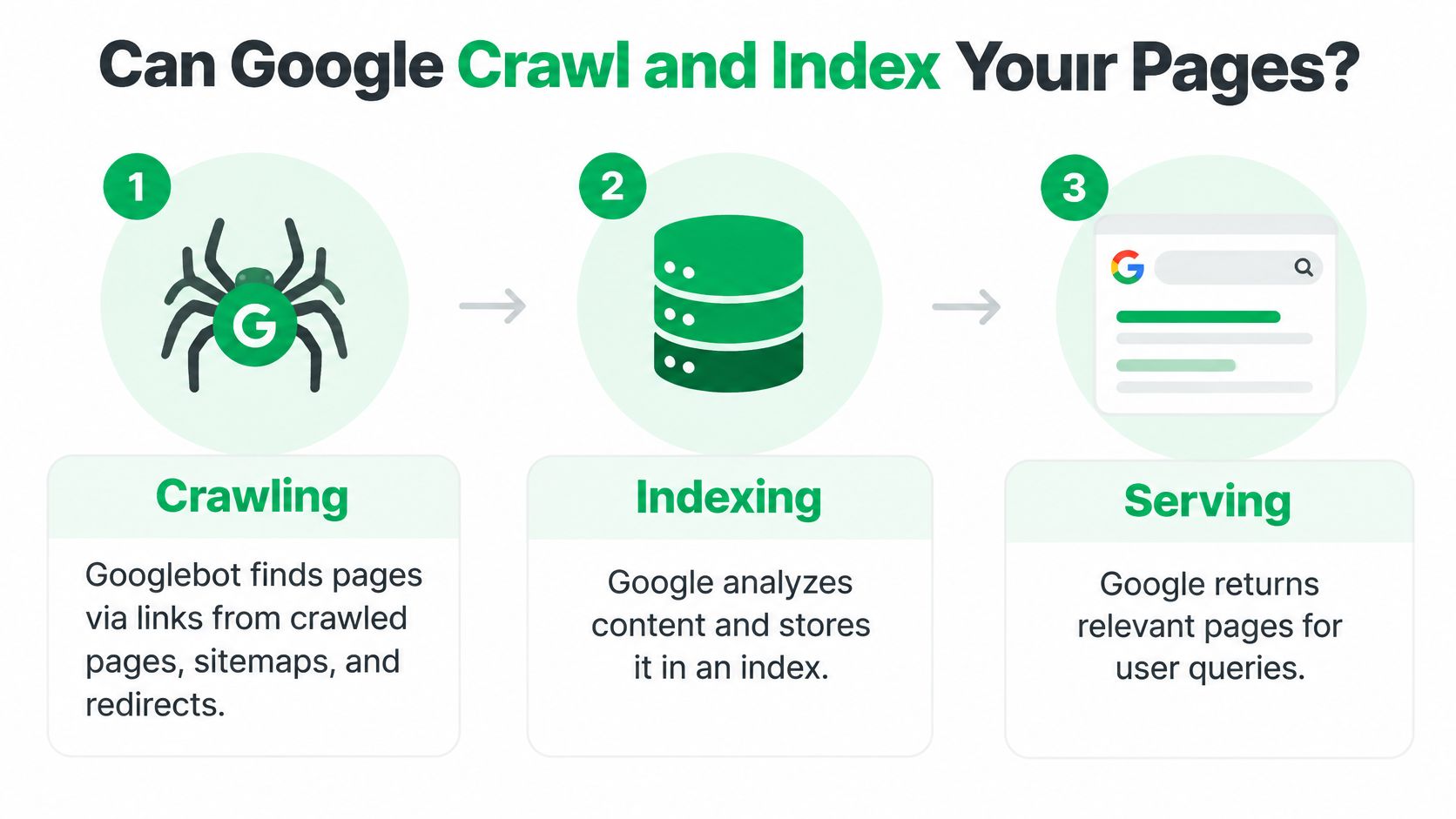
Then the check widens to five conditions per URL. All five have to hold before a page is even eligible:
- Not blocked by robots.txt. A disallow stops the crawler at the door.
- HTTP 200. A long redirect chain still passes some authority, but a soft 404 tells Google the page is gone.
- Publicly reachable. Login walls and geo-blocks hide a page unless you test from where Googlebot crawls.
- Indexable content. Rendered, not just present in HTML that a client-side script fills in later.
- No conflicting noindex. The most common silent killer in ecommerce.
That last one deserves a rule of its own.
The distinction that causes most of the damage: robots.txt controls crawling, not indexing. A page you never want in results needs a noindex directive, and Google has to be able to crawl the page to see it.
In the store, the product template injected a noindex meta tag whenever a SKU was flagged discontinued, which caught refurbs and seasonal returns. Those URLs returned 200, rendered fine, and were invisible. In the same crawl, a set of filtered parameter URLs was crawlable but canonicalized to the unfiltered category, so Google kept crawling thousands of URLs it would never index.
The matrix that proves it
Count your way out of that. Build an indexability matrix: submitted URLs against indexed URLs, grouped by status code, canonical target, orphan status and duplicate cluster. For this store the numbers read 3,820 submitted, 3,510 indexed, 310 noindex, 90 orphaned and 640 parameterised duplicates.
Crawl budget is a non-issue for most sites. Google's own guidance puts deliberate crawl-budget management at sites with hundreds of millions of pages, or tens of millions of frequently changing ones. Below that scale, your problems are specific pages rather than volume.
Rank what comes out. Revenue pages that are internally linked, indexable, self-canonical and present in the sitemap go to the top, and the technical SEO best practices that keep them there belong on the same list.
Reading Core Web Vitals Against Google's Thresholds
Speed findings are only useful with a threshold, a device and a share of traffic attached. Google's good thresholds are LCP at or below 2.5 seconds, INP at or below 200 milliseconds and CLS at or below 0.1, as the web.dev Core Web Vitals guide sets them out.
| Metric | Good threshold | Common cause | First fix |
|---|---|---|---|
| Largest Contentful Paint (LCP) | 2.5 seconds or less | Oversized hero image, render-blocking CSS, slow server response | Compress and size the hero image, defer non-critical CSS |
| Interaction to Next Paint (INP) | 200 milliseconds or less | Long JavaScript tasks, heavy third-party scripts | Break up long tasks, remove or delay non-essential scripts |
| Cumulative Layout Shift (CLS) | 0.1 or less | Images, ads and embeds without reserved dimensions | Set width and height or reserved space for every media slot |
The number that changes how you report this is the 75th percentile. A page counts as good only when at least 75% of real page views hit the threshold for each metric, which is why one PageSpeed Insights run proves very little. Export from the Core Web Vitals report in Search Console or the Chrome UX Report, split mobile from desktop, and work on URL groups rather than single pages.
The product template on mobile
The store's product template failed LCP on mobile at 4.1 seconds at the 75th percentile while desktop passed at 2.2. Two causes stacked up: a 2,400 pixel hero image served at full resolution into a 400 pixel slot, and a brand font loaded late by a tag manager container.
INP came in at 340 milliseconds. Three scripts ran long tasks on interaction, a reviews widget, a currency converter and a chat bubble that loaded whether or not anyone opened it. CLS sat at 0.21, all of it from ad slots and product images with no reserved space, so the layout jumped as each one landed.
The cause stack usually splits across owners:
- Front end. Hero image, fonts, render-blocking CSS.
- Vendor list. Every third-party script marketing has added since launch.
- Design system. Reserved dimensions for images and ad slots.
Pull the failing URL groups, multiply by sessions, and sort by traffic rather than by how ugly the metric looks. A template with 1,200 URLs behind it and a 4.1 second LCP beats a single landing page at 5 seconds every time, and it also beats a hundred blog posts with missing alt text.
Fix, deploy, then measure field data again after 28 days. A synthetic test that turns green the same afternoon tells you the change shipped, not that real users felt it. And keep the results in their place. Passing all three doesn't guarantee a ranking, so these findings sit beside the indexability ones, not above them.
A quarter spent chasing a green dashboard while 300 product pages sit under a noindex is a quarter lost. The page speed optimization work is only worth scheduling once those pages can be crawled at all.
Mobile, Robots.txt and Structured Data Checks
Google uses the mobile version of a page for indexing and ranking, which makes a side-by-side comparison the only honest mobile test, as the mobile-first indexing guidance explains. Pull the mobile and desktop versions of your top twenty templates and check three things match: the content, the structured data and the robots meta tags.
A mobile-only noindex is a real fault and a quiet one. It usually arrives through a plugin that adds a "mobile optimized" variant, or a theme setting someone enabled to fix duplicate content. Desktop looks indexable, mobile says no, and Google follows mobile. Check whether primary content needs a tap or swipe to appear too, because Googlebot won't perform those actions to reveal it. Specification tables tucked into accordions are the usual culprit.
Fast afternoon test: disable JavaScript in your browser, load three product pages, and see what's left. That's roughly what a crawler sees before rendering.
Robots.txt comes next, and it's a file of rules rather than a suggestion box. Google requires it in the site's top-level directory, served as UTF-8 plain text, and enforces a 500 KiB size limit, per the robots.txt documentation. Oversized files get truncated, and truncation can drop the one rule that mattered. Read each line in context as well. A perfectly valid disallow on an asset directory takes your CSS and product images with it, and Google renders the page without them.
Structured data, validated twice
Use two tools for two different questions. The Rich Results Test answers which Google features a page could be eligible for. The Schema Markup Validator checks Schema.org correctness more broadly, including types that never become rich results. Then inspect the live URL in Search Console to see what Google received, following Google's structured data guidance.
Record four fields per template: schema type present, validation errors, live-page inspection result, and whether eligibility is reached. Valid markup doesn't guarantee a rich result, and a template change six weeks after launch can break markup that passed in staging. Put it on a monthly check instead of a one-time fix, and keep Breadcrumb, Product and VideoObject at the front of the queue when the list is longer than the sprint.
Scoring Findings by Business Impact
Severity is the wrong sort order, and it's the one every crawler hands you. A missing alt attribute on 1,400 blog images scores as a high-volume issue and changes nothing. A noindex in a shared product template scores as one issue and costs real revenue.
I score each finding on five factors, 1 to 5 on each, then weight the total by how many revenue pages sit behind it.
| Factor | Score 1 | Score 5 | Example |
|---|---|---|---|
| Severity | Cosmetic | Blocks indexing or rendering | Stray noindex in a shared product template |
| Affected pages | A handful of URLs | Whole template or thousands of URLs | About 310 product URLs sharing one template |
| Business value | Informational page | Page that drives orders or leads | Core service and checkout-linked product pages |
| Implementation effort | Several sprints | One config change | Removing a single robots meta tag from a template |
| Evidence of lost demand | No impressions or clicks | Strong impressions with falling clicks | Queries with high impressions and low clicks in Search Console |
Two notes on using it. Score business value from the revenue attached to the page, not from how important the page feels to whoever owns it. And treat implementation effort as real effort, including QA, deployment windows and the designer who has to sign off on reserved ad slots.
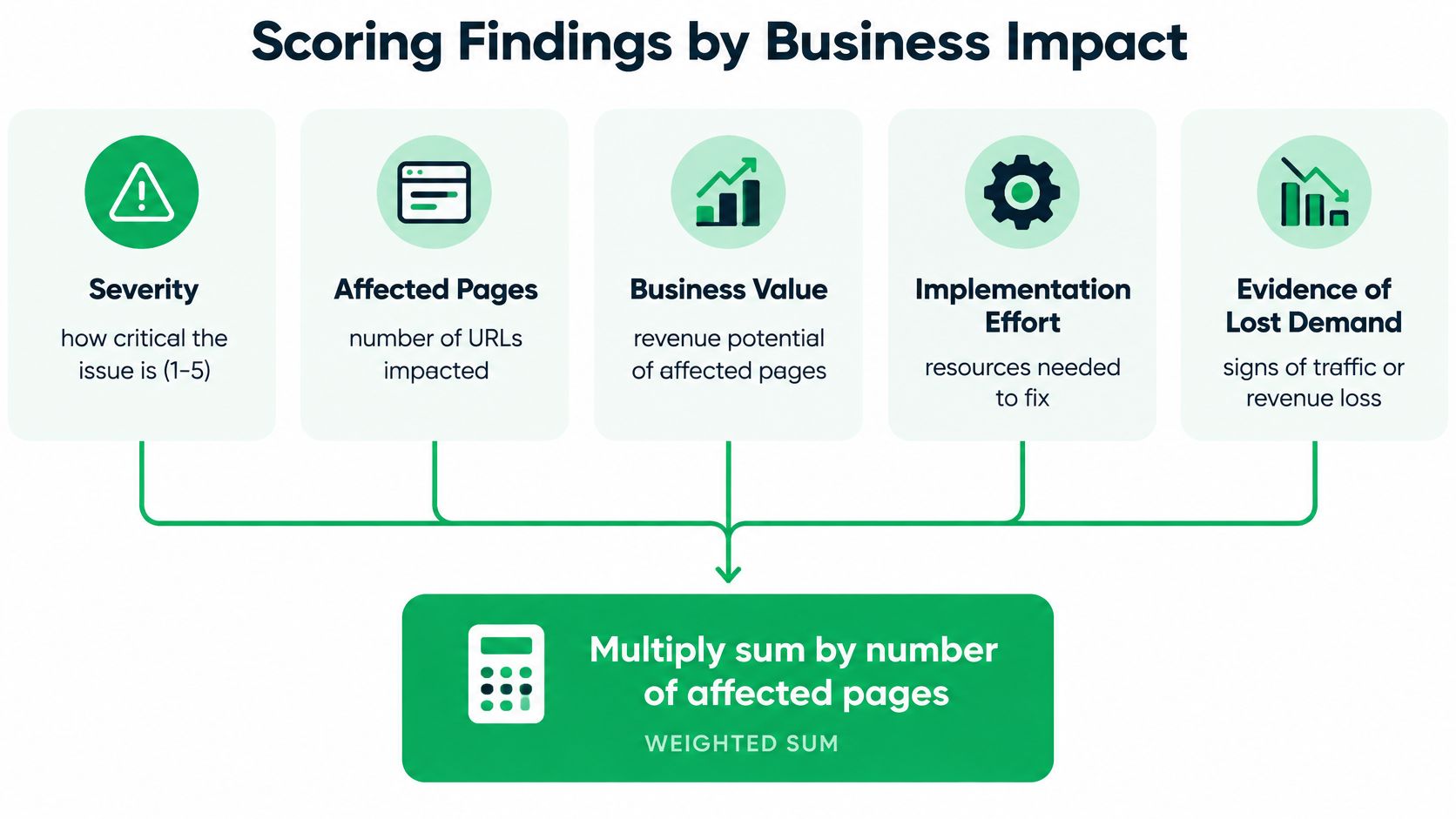
Then the contrarian part. A technically clean site isn't automatically a successful one. I've handed over audits with a 94 site health score and a traffic problem, because every page was indexable and none of them answered a question anyone was typing. The Search Console crawling and indexing documentation keeps those diagnoses separate for a reason.
Three weeks, one developer
Say one developer has three weeks and a designer has four days. Ranked by severity alone, they'd start on 1,400 missing alt attributes and finish nothing that matters. Run the list through the scoring instead:
- Stray noindex on the product template. Severity 5, 310 pages, revenue pages, one template change. Top of the list.
- Category template LCP. Severity 4, 1,200 pages, revenue, high effort. Second on traffic weight.
- Missing Product schema on listings. Severity 3, medium effort, moderate upside. Third.
- Parameter URLs canonicalized elsewhere. Severity 3, but it needs an SEO decision more than it needs a developer.
- Hero images on blog posts. Low severity, low effort, 900 pages, weak revenue link. Batch it whenever there's slack.
Every item needs a number that should move. Which Search Console figure, by how much, by what date. Indexed pages from 3,510 to 3,820 by the 28th. That sentence is the difference between an audit and a document nobody opens twice. Keeping one line per finding and reviewing it monthly, the way a digital marketing audit template is built to do, keeps the list alive past the kickoff meeting.
A Worked Ecommerce Example and Its Ranked Fix List
Back to the store. Four weeks after the crawl, this is what left my desk.
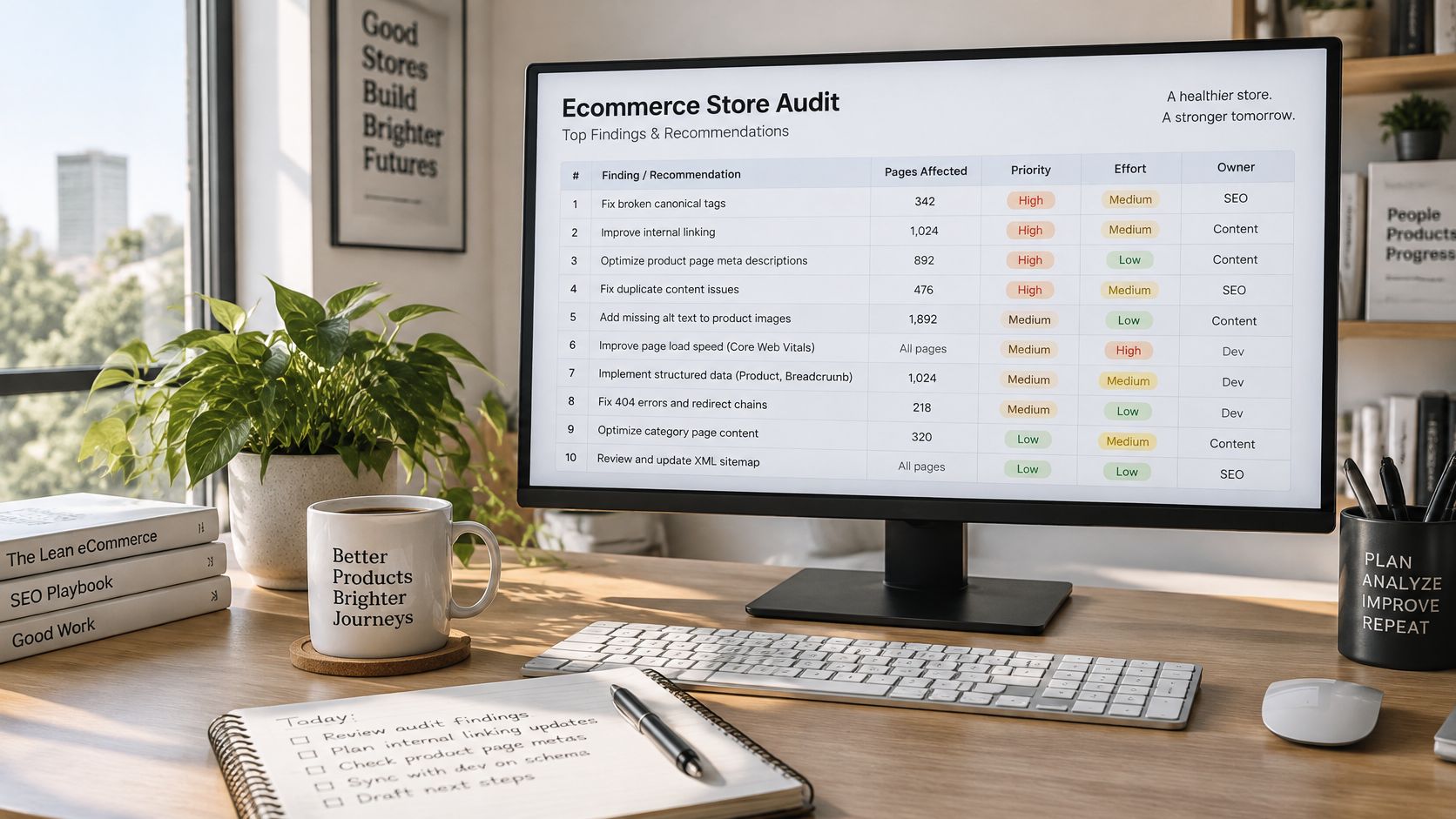
| Finding | Priority | Effort | Owner |
|---|---|---|---|
| Product pages returning 200 with stray noindex | 1 | Low | Developer |
| Category template LCP 4.1 s on mobile | 2 | High | Developer and designer |
| Missing Product schema on listing pages | 3 | Medium | Developer |
| Crawlable parameter URLs canonicalized elsewhere | 4 | Medium | SEO lead |
| Oversized hero images on blog posts | 5 | Low | Content team |
The first row takes an afternoon. The template was adding noindex to any SKU flagged discontinued, and this is the part people miss, it also caught refurbs and anything temporarily out of stock. A developer removed the conditional, we requested indexing on the 310 product URLs, and URL Inspection confirmed the first batch inside a day.
The second row is the expensive one. The category template carried 1,200 URLs and a 4.1 second mobile LCP. That's a designer plus a developer, roughly two weeks of a sprint, and it ranks second purely on traffic weight. Nobody argues about it once the sessions multiplier is on the page.
What moved, measured honestly
Four weeks of before and after:
- Indexed pages in the coverage report went from 3,510 to 3,816 as the noindex batch returned.
- Mobile LCP on the category template moved to 2.3 seconds at the 75th percentile after the hero image and font work.
- Clicks on the affected product queries climbed from week three, which is the shape indexing produces rather than a copy rewrite.
Then check the business layer, not just the search layer. Website traffic, leads generated, conversion rate and revenue are the numbers that fund the next sprint, and clients see them in regular performance reporting rather than in a one-off document.
Credit only what the timing supports. If revenue rose the same week a promotion went out, you can't pin it on canonicals. Annotations on the performance chart, added by right-clicking the date, cost thirty seconds and save an argument later.
One more row belongs on this store's list and it isn't a Google check: a sample of AI answers for twenty priority prompts. That measurement remains out of reach in many cases yet. A 2026 industry analysis citing the Semrush AI Visibility Index found that only 9% of surveyed marketing teams had access to all the data needed to assess AI-search visibility, while 45% lacked sufficient measurement capability altogether, according to the AIO readiness audit analysis. A thin baseline isn't a reason to skip the check. The ecommerce SEO best practices that make product pages crawlable are the same ones that make them quotable.
The ranked list is the deliverable. Not the score, not the dashboard export.
Checking Whether AI Answers Mention Your Brand
Add this after the crawl work, not instead of it. Conventional audits stop at Google results, and buyers now ask assistants which product to buy. The usable question is narrower than "how do we rank in AI": can a business tell whether these systems mention it accurately, cite its website, or recommend a competitor instead?
Build a sample of 20 to 30 repeatable prompts. Cover the five best-selling product categories, the brand questions people type, and the service locations if there are any. Write the list once and run that exact list every time, in the same window, on the same platforms.
Log five fields per prompt:
- Mentioned. Yes or no, and which brand names appeared beside yours.
- Cited. Whether your own domain shows up as a source.
- Accurate. Facts checked against your site, including price, availability and location.
- Competitors. Who was recommended, and for which prompt.
- Referral traffic. Any traceable session, usually the weakest column.
Check your own side first
Facts need to be crawlable, consistent across every authoritative page, clearly tied to the brand entity, and answered directly on a page a customer would land on. If your opening hours live only inside an image, nothing reads them. Same for a price that appears in three places with two different values.
Treat the output as a directional signal. The same prompt can return different answers on consecutive runs, so a single screenshot proves nothing. Rerun the sample in week four of the fix plan and compare mention and citation rates against the baseline you wrote down.
Expect gaps. Sometimes the honest finding is that you don't have enough visibility to say anything yet, and one paragraph saying so is worth more than a fabricated trend line. If you want the mechanics of getting cited rather than just measured, the guide to optimizing for AI search covers entity consistency and the page formats these systems pull from.
Turn the Findings Into a 30-Day Fix Plan
Four weeks of work, in the order the scoring produced.
- Week one, access. Clear every top-tier finding: stray noindex tags, blocked resources, robots.txt rules that take CSS with them. Confirm each with URL Inspection and watch the coverage report. These are hours, not sprints, and they unblock everything downstream.
- Weeks two and three, experience. Take the category template through development, release it to a share of traffic first if you can split it, then track LCP, INP and CLS in the Core Web Vitals report across the next 28 days.
- Week four, structured data and the AI sample. Deploy the Product schema fixes, validate with the Rich Results Test, inspect a live URL, and rerun those 20 to 30 prompts against the baseline you recorded.
One owner, one deadline, one validation step per task, all in a shared sheet someone reviews on Monday. A finding without an owner is a paragraph.
Where to start if you're doing this alone: pick the top three items and begin this week. The first one is almost always a template change measured in hours.
That's the whole shift. An audit isn't a verdict on your website, it's a work order, and the fastest way to prove it works is to move one number in Search Console and say when you'll look again.
If you'd rather someone hand you the crawl, the speed export and the ranked list before you commit a sprint to it, Mr. Green Marketing, LLC runs a free audit that returns a performance report on visibility gaps and the quick wins worth taking first. You can request one by entering your website, email and name on the home page. Visit Mr. Green Marketing, LLC to start there.
Leave a Comment
sing in to post your comment or sign-up if you dont have any account.