
Traffic is steady, perhaps even improving, but revenue has stopped responding. The paid team wants more visitors, the design team wants a new homepage, and leadership wants to know why leads or orders aren't keeping pace. In that situation, the fastest answer usually isn't another campaign. It's a disciplined look at what happens after visitors arrive.
A website conversion audit shows where intent turns into hesitation, confusion, or abandonment. Done properly, it replaces opinions with evidence, separates desktop problems from mobile problems, and turns accessibility issues into practical conversion opportunities. The output isn't a pile of design preferences. It's a ranked set of fixes and tests tied to business metrics.
Table of Contents
- What a Website Conversion Audit Actually Is
- Define Success Metrics and Map the Funnel
- Run UX and Heuristic Checks Across Key Pages
- Audit Technical Performance and Mobile Behavior
- Use Heatmaps and Session Recordings the Right Way
- Turn Findings Into a Prioritized Test Backlog
- Execute the Audit With a 30-60-90 Day Plan
What a Website Conversion Audit Actually Is
A website conversion audit is a structured diagnostic of the journey from a visitor's first meaningful interaction to a completed revenue event. That event might be a purchase, a qualified lead, a booked consultation, a trial activation, or another action that matters to the business.
The audit combines four evidence sources:
- Funnel analytics review: Identify where users enter, progress, hesitate, and leave.
- Heuristic and accessibility checks: Examine clarity, trust, navigation, form mechanics, keyboard access, contrast, and error handling.
- Technical and mobile performance: Review loading behavior, layout stability, browser compatibility, device experience, and tracking reliability.
- Qualitative behavior: Use heatmaps, scroll data, surveys, and session recordings to understand what users appear to be trying to do.
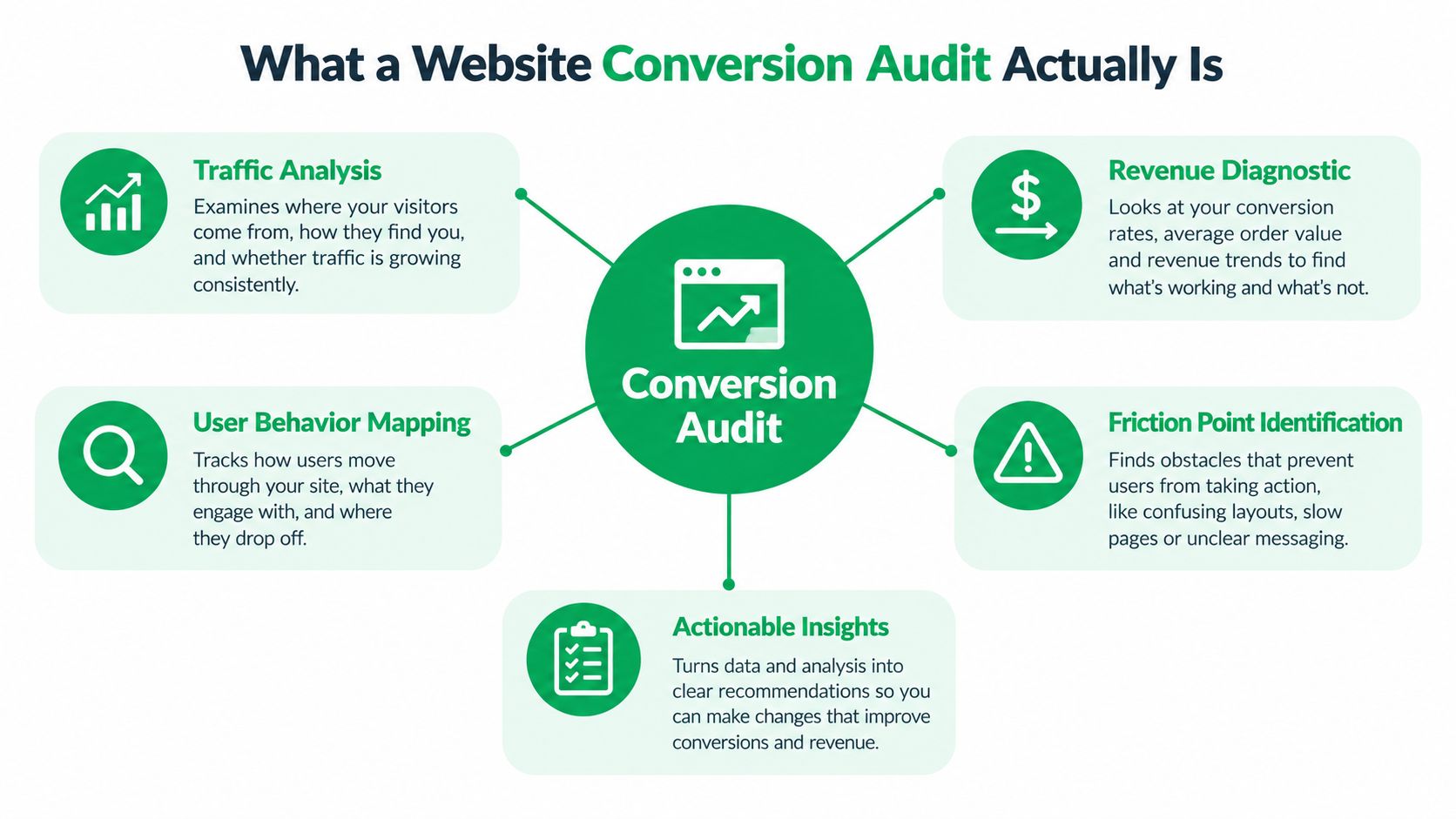
The boundary matters. An audit isn't a redesign, a copy rewrite, or a one-off A/B test. It identifies problems, estimates their likely importance, and converts them into a hypothesis-backed backlog that a team can fix or test.
Practical rule: Audit the funnel in front of you, not the website you wish you had.
Generic checklists fail because they treat every site as if it has the same visitors, devices, offer, and buying process. A form might be too long for one audience and appropriately detailed for another. A prominent popup might help one acquisition channel while disrupting a high-intent product journey.
The conversion rate optimization overview provides useful context, but the audit itself must begin with your own data. This guide uses two lenses that generic CRO advice often underweights: device-segmented baselines and accessibility as a conversion lever. Those lenses help distinguish a sitewide average from the specific experience failing on a particular browser, device, page, or funnel step.
Define Success Metrics and Map the Funnel
Start by choosing the event that represents business value. Ecommerce teams may use completed orders or completed checkout. Lead-generation teams may prioritize qualified submissions rather than every form completion. SaaS teams might track activated accounts, not just registrations.
Separate the North Star metric from diagnostic metrics. The primary metric tells you whether the business outcome improved. Diagnostic measures, such as CTA clicks, form starts, error rates, and checkout exits, explain why.
In GA4 or Mixpanel, build the funnel as a set of explicit events rather than relying on a single conversion report:
- Identify the goal URL or event.
- Record every meaningful step between landing and completion.
- Segment by device, browser, new versus returning visitor, and acquisition source.
- Calculate step-to-step movement and inspect absolute counts alongside rates.
- Compare assisted interactions with the final touchpoint.
A blended funnel can hide a serious device problem. Consider this illustrative DTC scenario, not a benchmark: the brand sees 2.1% overall checkout completion, but only 0.6% on mobile Safari. The blended view makes the checkout look acceptable enough to postpone. The device view points directly toward browser testing, payment behavior, input handling, and mobile form friction.
| Funnel Step | Desktop CR % | Mobile Safari CR % | Blended CR % |
|---|---|---|---|
| Product view to add to cart | Higher than mobile Safari | Lower than desktop | Blended result |
| Cart to checkout | Higher than mobile Safari | Lower than desktop | Blended result |
| Checkout start to completion | Higher than mobile Safari | 0.6% in the illustrative scenario | 2.1% in the illustrative scenario |
At each step, look for an unusual dwell time, repeated backtracking, unexpected cart exits, and assist events that the default attribution model under-credits. A content page may not receive the last click, yet it can answer objections before a visitor reaches pricing.
The useful question isn't “What is our conversion rate?” It's “Which segment loses the most valuable visitors at which step?”
Set a defensible baseline window before prioritizing work. Use at least 28 days where traffic volume allows, and exclude unusual promotions, outages, tracking changes, and campaign anomalies. For a broader view of how users move through stages, compare the funnel with customer journey mapping guidance. A baseline should describe normal operating conditions, not last week's noise.
Run UX and Heuristic Checks Across Key Pages
A heuristic review becomes useful when it follows the money. Don't score every page equally. Start with the homepage, highest-traffic landing pages, category or feature templates, product or pricing pages, and the checkout or lead form.
Translate familiar usability principles into conversion questions. Can a first-time visitor understand the offer and intended next action quickly? Does the page show system status during loading or form submission? Can users recover from an error without losing their work? Does the interface use familiar language instead of internal terminology?
Check the pages closest to action
On a homepage or landing page, inspect the above-the-fold offer, audience, outcome, and primary CTA. If the value proposition needs a long explanation before a visitor knows what the company sells, the page is asking for trust before earning attention.
On a product, service, or pricing page, place proof near the decision. Look for clear inclusions, transparent next steps, relevant testimonials, guarantees where appropriate, and a CTA that states the outcome rather than merely saying “Submit” or “Continue.”
On a lead form, assess field count, labels, optional versus required inputs, autofill behavior, inline validation, and error recovery. Accessibility is part of this review, not a separate compliance exercise. The Washington accessibility guidance for forms emphasizes accurate labels, logical keyboard order, and error feedback that screen reader users can access.
Run a quick accessibility sweep:
- Tap targets: Check that controls are at least 44 by 44 pixels where the interface requires touch interaction.
- Focus states: Make keyboard focus visible and logically ordered.
- Error messages: Announce errors clearly to assistive technology and identify the affected field.
- Contrast: Check that primary CTA text and controls meet WCAG AA contrast expectations.
- Reading order: Confirm that mobile layouts and form instructions make sense without visual positioning.
A 2025 WebAIM Million analysis found detectable WCAG 2.2 Level A or AA failures on 94.8% of top homepages, with an average of 51 errors per page. The most common issues included low-contrast text at 79.1%, missing alternative text at 55.5%, and missing form labels at 48.2%. These figures are reported in this analysis of website audit evolution. Treat those failures as blocked interactions and lost trust, not just compliance tasks.
Score each finding with a simple grid: High impact, medium impact, or low impact, paired with high, medium, or low effort. The point isn't to produce a beautiful report. It's to prevent a redesign reflex. A targeted label fix, clearer CTA, or accessible error state may deserve priority over a new visual system. Teams looking for structured user research can also review UX testing services as part of the evidence-gathering process.
Audit Technical Performance and Mobile Behavior
Page speed, mobile interaction, and form mechanics belong in the conversion analysis because they determine whether visitors can complete the intended action. A technically elegant page that makes checkout difficult still fails commercially.
Begin with Core Web Vitals, including LCP, INP, and CLS, segmented by device and page template. Compare CrUX field data with real-user monitoring from your analytics setup so you can separate laboratory performance from what customers experience on real connections and phones.
Don't import a generic revenue claim into your business case. Instead, connect technical metrics to your own history. For example, compare conversion and bounce behavior across pages or periods with different LCP performance, then estimate the relationship using your site's data. Historical CRO evidence cited in this conversion audit guide reports that each additional second of load time can reduce conversions by roughly 7%. Use that as context for why speed matters, not as a promise about your site.
Review mobile as its own product
Open key journeys on actual phones, including mobile Safari. Inspect the thumb zone, sticky add-to-cart behavior, input zoom, keyboard overlap, tap-target spacing, coupon entry, address validation, and payment handoff. A responsive desktop layout can still produce a broken mobile flow.
For forms, capture field-level events:
- Completion time: How long users take from first focus to submission.
- Error rate: Which fields produce repeated validation failures.
- Abandon point: The exact field or screen where users stop.
- Device split: Whether the problem concentrates on mobile or a browser.
- Recovery behavior: Whether users correct the issue or leave immediately.
A 2026 benchmark set reports a cross-industry median form conversion rate of 17.3%, with the top decile at 38% or higher. It also reports that mobile lead-generation forms convert about 32% below desktop on a normalized five-field B2B form. These figures appear in the form conversion benchmark analysis, and they reinforce the need to measure forms directly rather than treating them as ordinary page elements.
| Metric | Good Threshold | Poor Threshold | Typical Conversion Impact | Priority |
|---|---|---|---|---|
| LCP | Fast field experience for the key template | Delayed main content | Can reduce intent before the offer appears | High when tied to funnel loss |
| INP | Responsive taps, typing, and submission | Noticeable interaction lag | Can interrupt form and checkout completion | High on mobile |
| CLS | Stable layout during load | Buttons or fields shift | Can cause mis-taps and lost focus | Medium to high |
| Form validation | Clear, immediate, accessible feedback | Repeated or vague errors | Can stop completion at the final step | High |
| Third-party scripts | Only necessary scripts on action pages | Unused tags and blocking code | Adds performance and tracking risk | Prioritize by affected traffic |
Build a short technical debt list covering render-blocking scripts, oversized hero images, unused third-party tags, redirect chains, and broken tracking pixels. Then connect every issue to a hypothesis. Mobile website optimization guidance can inform the implementation discussion, but the backlog should still reflect your own device data.
Use Heatmaps and Session Recordings the Right Way
Wasting behavioral tools by opening a heatmap without a question is a common pitfall. Start with three to five high-traffic, high-intent pages: a landing page, a product or pricing page, a long-form article, and a form step are sensible candidates.
Use enough observations to identify patterns before acting. A practical working threshold is typically 1,000 to 2,000 sessions per page, but sample requirements depend on traffic quality, page variability, device mix, and the size of the behavior difference. Always segment by device and traffic source. A paid landing page and an organic article may share a template while serving very different intent.
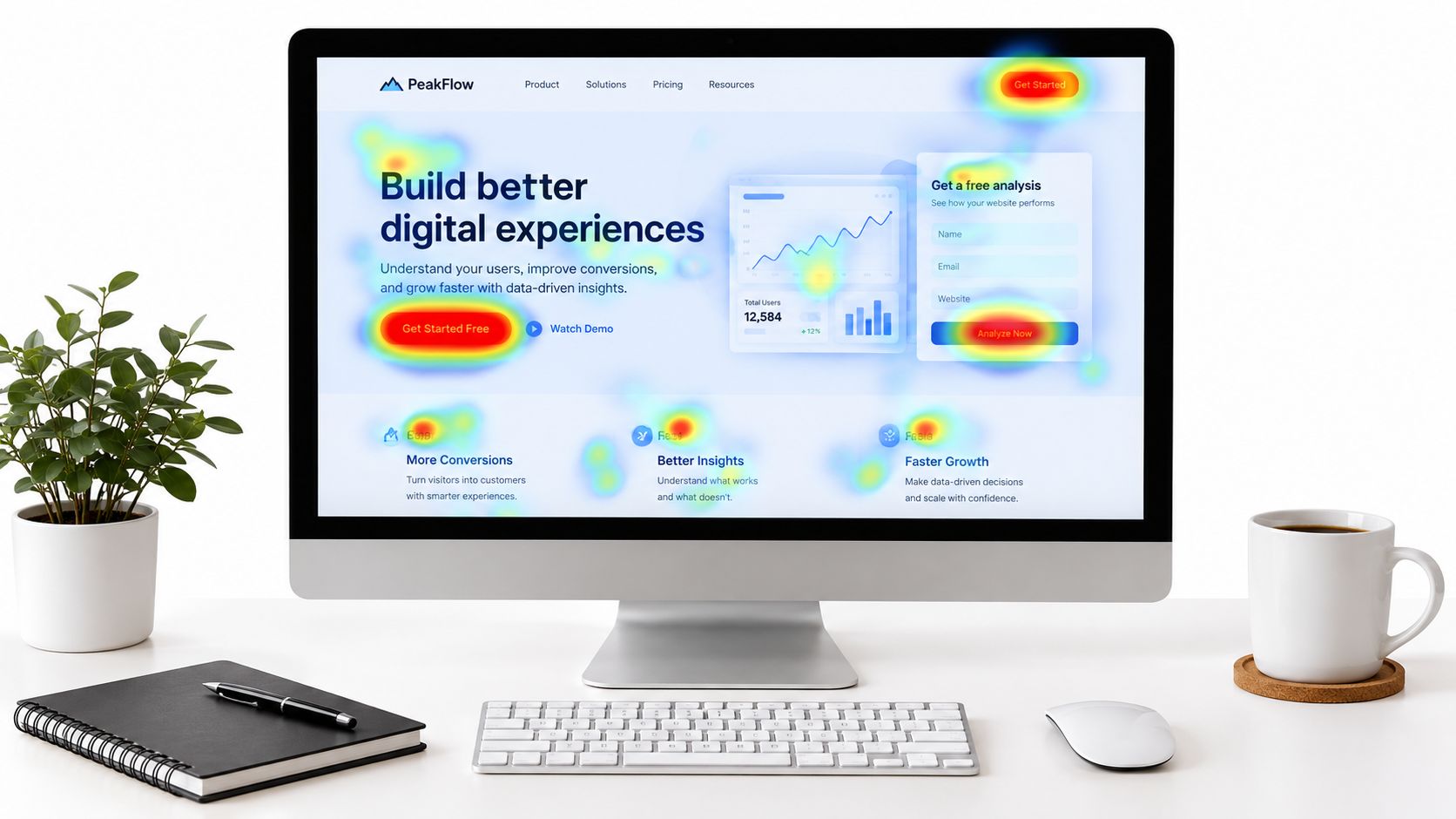
Heatmaps show where attention goes. Session recordings help explain why users hesitate. Look for repeated confusion around the same element, a scroll-depth cliff before critical proof, dead clicks on something styled like a link, rage clicks near an unresponsive control, and form fields that trigger recurring validation errors.
I once reviewed recordings where users repeatedly clicked a headline styled like a link. That wasn't a copy problem. It was a CTA placement and affordance problem. Small distinction, useful fix.
Document observations before interpretations
Write the raw behavior first:
- “Users tap the product image repeatedly on mobile.”
- “Visitors reach the form but stop after the phone field.”
- “Users scroll past the pricing CTA before returning upward.”
- “The error appears above the form, not beside the invalid field.”
Then add the interpretation and proposed test. Don't turn one unusual recording into a sitewide conclusion. A compelling anecdote can start an investigation, but a repeated pattern earns backlog priority.
For mobile, use touch heatmaps where possible. Recordings can reveal hesitation, but touch behavior and scrolling often need a device-specific view. Skip low-volume slices that cannot support a reliable pattern, and protect personal data through masking and access controls. The best behavioral insight is not “users seem confused.” It's a precise observation that maps to a page, segment, element, and measurable outcome.
Turn Findings Into a Prioritized Test Backlog
An audit that ends with a list of fixes is a wish list. The useful deliverable is a prioritized test backlog, with one row per hypothesis and enough detail for a team to plan implementation, measurement, and review.
Use a standard format:
Because we observed [behavior] on [page] for [segment], changing [element] to [variant] will increase [metric] in the desired direction.
Score each hypothesis with ICE, using Impact, Confidence, and Ease on a 1 to 10 scale. If the team already uses RICE, keep that system instead of introducing a second scoring language. Impact should come from funnel drop-off, traffic touched, revenue relevance, and qualitative evidence. Confidence should reflect the strength and consistency of the evidence. Ease should include design, engineering, analytics, legal, and operational dependencies.
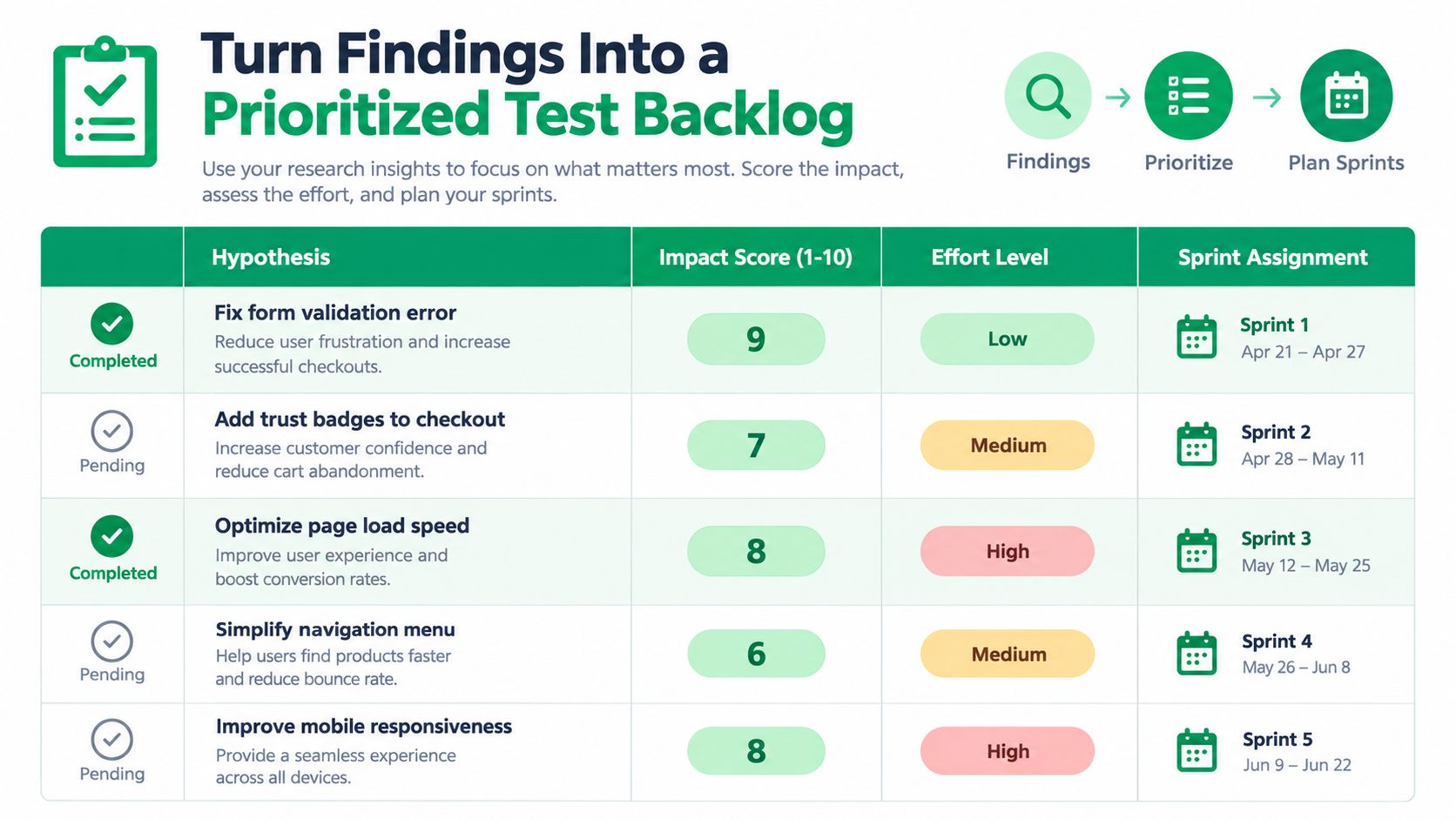
Group hypotheses by page, then by test type:
- Structural: Change the sequence or architecture of the page.
- Copy: Clarify the offer, objection handling, or CTA language.
- Layout: Reposition proof, pricing, navigation, or controls.
- Form: Remove friction, improve labels, or change validation.
- Social proof: Place relevant evidence closer to the decision.
Flag quick wins with an Ease score of 8 or higher for the first sprint, but don't let ease outrank impact. A tiny fix on a low-traffic page isn't automatically better than a difficult improvement on checkout.
Two test ideas are ready to make concrete:
- Pricing-page proof test: The control keeps customer evidence below the primary offer. The variant moves a concise testimonial and relevant proof point above the fold, directly beside the primary CTA. The primary metric is pricing-page progression to the next step. The guardrail is engagement with secondary navigation and downstream lead quality.
- Mobile checkout form test: The control keeps the existing eight-field form. The variant reduces it to five fields by removing information that isn't needed for the next step, preserves required consent, and uses accessible inline validation. The primary metric is mobile checkout completion. The guardrails are order quality, support contacts, and payment failure rate.
Use conversion rate optimization best practices as a planning reference, then attach every test to an owner, implementation status, audience segment, primary metric, guardrail, and decision date. A backlog becomes operational when another person can run it without asking what the hypothesis meant.
Execute the Audit With a 30-60-90 Day Plan
A good audit can still fail if nobody schedules the work. Use a 30-60-90 day plan to separate immediate repairs from experiments and longer-term learning.
Days 0 to 30
Ship no-test wins that have already been validated through analytics, heuristics, or accessibility review. That may include correcting form labels, repairing error states, improving CTA clarity, compressing oversized assets, removing a blocking script, fixing a broken tracking event, or resolving a mobile layout defect.
These changes don't need to wait for an A/B test when the current experience is objectively broken or inaccessible. Document the baseline, implementation date, affected pages, and expected direction of impact so the team can still evaluate the result.
Days 31 to 60
Launch the first wave of experiments from the ICE-ranked backlog. Keep the test question narrow. If the hypothesis concerns trust placement, don't also rewrite the headline, replace the navigation, and change the form in the same variant. Otherwise, a result won't tell you which change caused the movement.
Use the primary and guardrail metrics defined in advance. Don't stop because the first few days look exciting, and don't declare a winner before reaching the pre-registered sample requirement. A weak stopping rule creates false confidence and makes later decisions harder.
Days 61 to 90
Scale successful experiments where the evidence supports it, retire losing variants, and document what the result changed about your understanding of the audience. Add device-specific or personalization tests only after the underlying experience works consistently.
Save the learning in a shared test repository. Include the hypothesis, segment, screenshots, implementation notes, result, limitations, and follow-up question. The repository prevents teams from repeating failed ideas because someone forgot why a version was retired.
Keep this printable cycle nearby:
- Define: Confirm the business event and diagnostic metrics.
- Segment: Split device, browser, audience type, and source.
- Map: Trace every step from entry to completion.
- Inspect: Review UX, accessibility, technical performance, and behavior.
- Prioritize: Score hypotheses by impact, confidence, and ease.
- Test: Assign a primary metric and guardrails.
- Learn: Record outcomes and schedule the next audit cycle.
The audit isn't the deliverable. The learning loop is.
Run the cycle quarterly, and rerun focused checks after a redesign, major campaign, checkout change, or unexplained conversion decline. A website conversion audit earns its value when findings become shipped improvements, measured experiments, and better decisions.
Mr. Green Marketing, LLC offers conversion-focused website work, SEO, PPC, analytics review, heatmaps, session recordings, and a free audit and performance report to identify visibility and conversion gaps. Visit Mr. Green Marketing, LLC to request an assessment and turn your highest-priority findings into a practical testing plan.
Leave a Comment
sing in to post your comment or sign-up if you dont have any account.