
SEO Migration Strategy: You’ve launched the redesigned site, switched the DNS, and opened Search Console before your first coffee. The homepage loads, but organic traffic looks frighteningly quiet. A few important URLs return errors, the new sitemap hasn’t been submitted, and nobody can say with confidence whether the canonical tags survived the move.
That moment is familiar because migration risk rarely comes from one dramatic mistake. It comes from small omissions that compound: a missing redirect, a blocked crawler, a canonical pointing to the old domain, or a forgotten subfolder full of valuable pages. A reliable SEO migration strategy treats the move as a controlled technical project, with evidence captured before launch and a monitoring plan that continues well after the new site goes live.
SEO Migration Strategy: Table of Contents
- Why Most Migrations Go Wrong
- Building Your Pre-Migration Audit Checklist
- Executing the Redirect Map
- Testing Structured Data and Indexing
- The Launch Day Protocol
- Post-Launch Monitoring and Recovery
Why Most Migrations Go Wrong
The worst migration panic usually starts with a graph. The old site’s organic line has dropped, the new site’s line hasn’t appeared, and the team is trying to decide whether to wait or roll back. Search engines may still be processing the new structure, but the same symptom can also signal a broken redirect map, an indexing block, or a template-wide canonical error.

A site migration changes several relationships at once. Search engines must connect old URLs with new destinations, crawl the replacement pages, interpret their technical signals, and decide whether the move is genuine. If the old site returns an unexpected error, blocks crawling, or sends users through several redirects, the replacement structure becomes harder to understand.
SEO Migration Strategy: The failures hide in ordinary templates
Redirects get most of the attention, but template-level SEO elements often cause the wider outage. A new header can introduce a noindex directive across an entire page type. A CMS can generate self-referencing canonicals with the wrong hostname. A development configuration can leave the production robots.txt blocking a directory that contains revenue-driving pages.
International sites have another layer of exposure. Hreflang, canonical tags, internal links, structured data, and sitemaps all need to describe the new site consistently. One forgotten language variant can send crawlers toward an obsolete URL or leave a regional page disconnected from its alternatives.
A 404 isn’t automatically a disaster. It becomes a migration failure when a valuable legacy URL has no deliberate destination, or when a broken internal link keeps sending users and crawlers into a dead end. A practical 404 troubleshooting guide can help distinguish intentional removals from errors that need restoration or redirection.
Practical rule: A traffic drop is a symptom, not a diagnosis. Check crawlability, redirects, indexing, and page-level signals before anyone blames the redesign.
The antidote to launch-day panic is a baseline. Without one, the team can see that performance changed but can’t identify which URL class, template, or technical dependency caused it. With one, the investigation becomes a comparison exercise rather than a guessing contest.
SEO Migration Strategy: Building Your Pre-Migration Audit Checklist
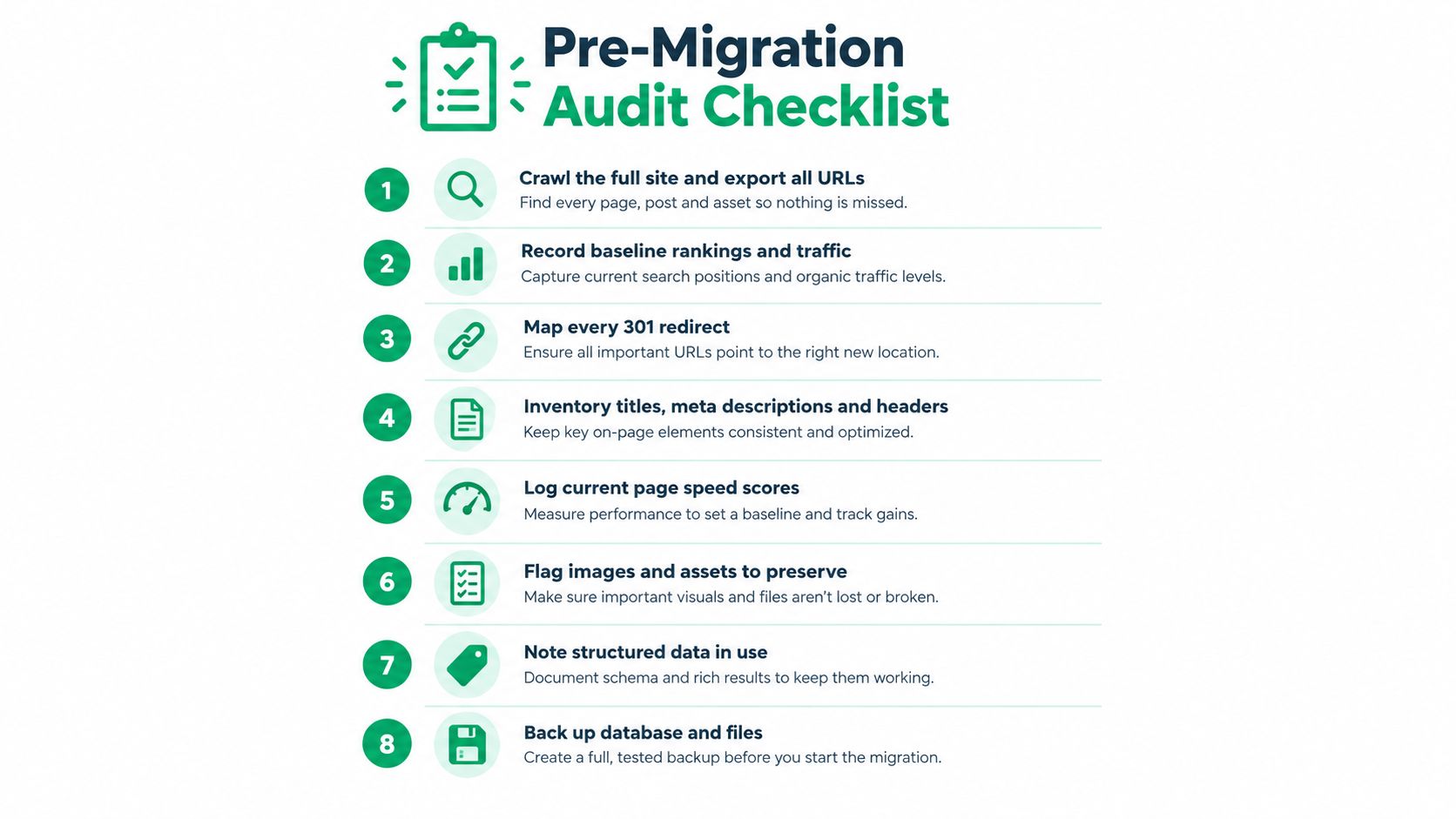
Before changing code, capture what the current site is doing well and where it is already fragile. Pre-launch benchmarking gives you the reference point needed to separate migration damage from ordinary ranking variation or an existing technical problem.
A solid SEO migration strategy starts by inventorying the site’s critical SEO assets, including crawlability, canonical tags, robots.txt, sitemaps, internal links, hreflang, structured data, URL structure, page load speed, indexing rates, crawl errors, and keyword rankings. The Search Engine Land migration checklist supports this baseline-first approach.
Capture the URL and crawl baseline
Start with a full crawl of the live site. Export every discovered URL, status code, title, meta description, heading structure, canonical target, indexability state, and internal-link relationship. Don’t rely on the XML sitemap alone. Sitemaps show intended URLs, while a crawl exposes orphaned pages, redirect chains, forgotten assets, and links that users can still follow.
Then reconcile that crawl with Search Console data, analytics landing pages, backlink information, and the CMS export. The goal is not a tidy list. It’s a complete inventory of URLs that search engines know about, users visit, or other sites reference.
Record the following before development changes reach production:
- Organic visibility: Export the keyword and landing-page data you’ll use for post-launch comparisons.
- Indexing signals: Save current indexed-page information, crawl errors, excluded URLs, and sitemap status.
- Technical directives: Record robots.txt rules, canonical patterns, noindex directives, hreflang relationships, and structured-data types.
- Performance markers: Log current page-speed observations by important template, device context, and page type.
- Link architecture: Document navigation, footer links, contextual internal links, and links to high-value pages.
SEO Migration Strategy: Make the baseline usable
A spreadsheet dump isn’t a monitoring system. Group URLs by template and business purpose, such as product pages, category pages, service pages, editorial content, location pages, and downloadable assets. Add an owner to each group so a post-launch anomaly has someone responsible for investigating it.
Preserve the actual HTML and configuration where possible. Screenshots can help, but they won’t tell you whether a canonical was rendered server-side or added by JavaScript, and they won’t reveal how a response behaved for a crawler. Keep exports dated and label the final pre-launch snapshot clearly.
Finally, run a separate technical SEO audit against the staging build. Compare it with the live baseline, not with an idealized checklist. A clean migration preserves known strengths while correcting deliberate issues. It shouldn’t introduce a new problem under the cover of a redesign.
SEO Migration Strategy: Executing the Redirect Map
The redirect map is the bridge between the site you’ve earned authority for and the site you want search engines to understand. Treat it as a technical specification, not a spreadsheet that gets handed to developers at the last minute.
Google’s site-move guidance calls for a complete URL mapping, server-side redirects from old URLs to new ones, traffic monitoring on both versions, and submission of the new sitemap in Search Console. It also recommends keeping redirects live for as long as possible, generally at least one year.
Map destinations by intent
Create one row for every meaningful legacy URL. Include the old address, its current status, the proposed destination, the redirect status, the page owner, and a verification field. The destination should preserve the old page’s purpose as closely as possible.
A product page should move to its equivalent product page. A service page should move to the corresponding service page. If several pages have been consolidated, document that decision and validate the new page’s relevance. Sending every old URL to the homepage is quick, but it gives users poor context and makes it harder for search engines to understand what changed.
Use crawl data, analytics landing pages, Search Console URLs, backlink discoveries, XML sitemaps, and CMS records to build the source list. Then test patterns against real URLs. A wildcard rule can be useful for a predictable URL structure, but it still needs sampled validation across categories, parameters, trailing-slash variations, and legacy folders.
SEO Migration Strategy: Use permanent redirects correctly
For a permanent move, use a server-side 301 redirect from the old URL to its direct new destination. Don’t place an intermediate URL between them. Chains add unnecessary requests and make diagnosis harder, while loops can prevent both users and crawlers from reaching the intended page.
Temporary redirects have a different purpose. Google’s redirects documentation distinguishes their search-result behavior: permanent redirects show the new target in search results, while temporary redirects continue showing the source page. Choosing the wrong redirect type can therefore communicate the wrong migration intent.
Run automated checks before launch and repeat them after deployment:
- Coverage: Every important legacy URL has a deliberate action.
- Directness: Each redirect reaches the final destination without a chain.
- Relevance: The target matches the old page’s topic and user intent.
- Status: Permanent moves return the intended permanent redirect response.
- Assets: PDFs, images, feeds, and other discoverable files aren’t omitted from the map.
- Internal links: The new site links directly to new URLs instead of routing through old addresses.
A redirect map should also include URLs that won’t migrate. Some pages have no useful replacement. Don’t invent a misleading destination merely to avoid an error response. Record the removal decision, check that no valuable internal or external links depend on it, and make sure the remaining site doesn’t reference it.
The old infrastructure must remain available while search engines and users transition. Google recommends keeping redirects in place as long as possible, generally for at least a year. That isn’t a reason to postpone cleanup forever. It is a reason to avoid shutting down the old environment while it still serves a migration function.
For teams combining a redesign with a URL change, the SEO website redesign guidance is useful as a companion to the redirect work. The trade-off is straightforward: a broad rule is faster to deploy, while page-level mapping gives you better control and clearer recovery when something goes wrong.
SEO Migration Strategy: Testing Structured Data and Indexing
A staging site should be treated as a rehearsal environment, not a screenshot gallery. The new templates need to be crawled, rendered, and compared with the baseline before the DNS switch makes the changes public.
Structured data deserves its own test pass because a migration can preserve visible content while altering the markup that describes it. Check the schema output on representative pages from each template, validate required properties, inspect entity relationships, and confirm that Organization, WebSite, product, article, local business, or other relevant types point to the new site identity.
A tool such as Google’s Rich Results Test can help validate eligible markup, while a source-code crawl can reveal schema that only appears under particular rendering conditions. Don’t test only the homepage. The damaging mistake is often in a secondary template that nobody opened during the final review.
Separate domain changes from hosting changes
The migration path depends on what changes. A hosting move keeps URLs intact, so the primary risks involve infrastructure, DNS timing, server responses, crawl access, and performance. A domain move changes the URL identity itself, which adds redirect mapping, sitemap replacement, canonical updates, and Search Console actions.
| Migration Type | Redirect Requirement | Search Console Action | DNS Consideration |
|---|---|---|---|
| Hosting move with unchanged URLs | Usually no URL redirect, validate responses and availability | Monitor the existing property and crawling | Point DNS to the prepared environment and keep the old host available until service is stable |
| Domain move with changed URLs | Map old URLs to relevant new URLs with server-side permanent redirects | Verify both properties and use Change of Address where applicable | Coordinate DNS, certificates, hosting, and redirect availability |
| URL restructuring on the same domain | Redirect changed paths directly to their replacements | Submit the updated sitemap and monitor indexing | Confirm the server handles old paths consistently |
| Combined redesign and domain move | Preserve the full mapping while validating templates, canonicals, and structured data | Complete the relevant property and sitemap actions | Treat DNS and application deployment as separate release checks |
When moving a domain, Google’s Change of Address workflow requires a 301 redirect from the old homepage to the new homepage, recommends 301s for canonical pages, and says those redirects should remain live for at least 180 days, longer if Google still sends traffic to them.
Test the signals that decide continuity
Crawl the staging site with temporary access controls in place, then test the production candidate after those controls are removed. Check that canonicals resolve to the intended new URLs, hreflang pairs are reciprocal, internal links use the new structure, robots.txt permits required crawling, and the XML sitemap contains the URLs you want discovered.
Use URL Inspection in Search Console for important page types after launch, but don’t mistake a successful inspection for a complete audit. Sample every major template. A single valid product page doesn’t prove that category pages, translated pages, or editorial pages survived intact.
Structured data is one signal among many. It won’t compensate for a blocked page, a broken canonical, or a destination that doesn’t match the legacy content. The strongest test is consistency across the rendered page, source HTML, sitemap, internal links, and redirect destination.
A specialist resource on schema markup for SEO can help teams document the markup they need to preserve before the release candidate is approved.
SEO Migration Strategy: The Launch Day Protocol
Launch day should be procedural. If people are still debating redirect destinations, sitemap contents, or robots.txt rules at the moment of deployment, the project isn’t ready to switch.
Start with a final backup and a frozen baseline. Confirm the new site is accessible, analytics collection works, certificates are valid, key templates render correctly, and the redirect layer is active for the old URLs. Keep a named person on the release who can inspect server logs and another who can validate search signals.

Choose the correct launch sequence
| Move type | First operational checks | Search workflow | Main risk |
|---|---|---|---|
| Hosting-only move | Confirm the new environment serves users and crawlers reliably | Monitor the existing property and traffic patterns | DNS, server availability, crawl stability, and performance |
| Full domain migration | Confirm redirects, new URLs, canonicals, sitemap, and analytics | Verify both properties, submit the new sitemap, and use Change of Address | Lost URL continuity, incomplete mapping, and index transition |
| Restructure without domain change | Test changed paths and internal links | Submit the updated sitemap and inspect affected URL groups | Redirect errors and broken site architecture |
Submit the new sitemap in Search Console once the new site is live. Monitor traffic and crawl activity on both old and new versions, because old addresses can remain visible in the index for a period even when they redirect correctly. Google’s migration guidance on indexed old URLs specifically notes that redirects don’t automatically remove old URLs immediately.
Don’t redirect the old robots.txt. Make sure the old site doesn’t block crawlers from fetching the legacy URLs and following their redirects. At the same time, confirm that temporary staging restrictions, noindex tags, and development exclusions are gone from the production site.
Watch the first signals, not just traffic
Check a representative set of old URLs manually, then crawl a larger sample. Look for unexpected 404s, 5xx responses, redirect loops, wrong destinations, missing analytics, broken internal links, and canonical targets that still reference the old site.
Traffic may look incomplete while the transition is underway. That doesn’t make every decline normal. Compare the affected URL groups with your baseline and investigate patterns. A sitewide change points toward infrastructure or indexing. A problem limited to one folder usually points toward a template, redirect rule, or content handoff.
Use the new-site SEO checklist for the final release review, but keep the launch runbook focused on evidence. The calmest cutovers are the ones where every check has a recorded owner and a clear pass condition.
Post-Launch Monitoring and Recovery
A migration isn’t finished when the new homepage loads. The valuable monitoring work starts immediately because early evidence can reveal whether a problem affects one URL, one template, one directory, or the entire site.
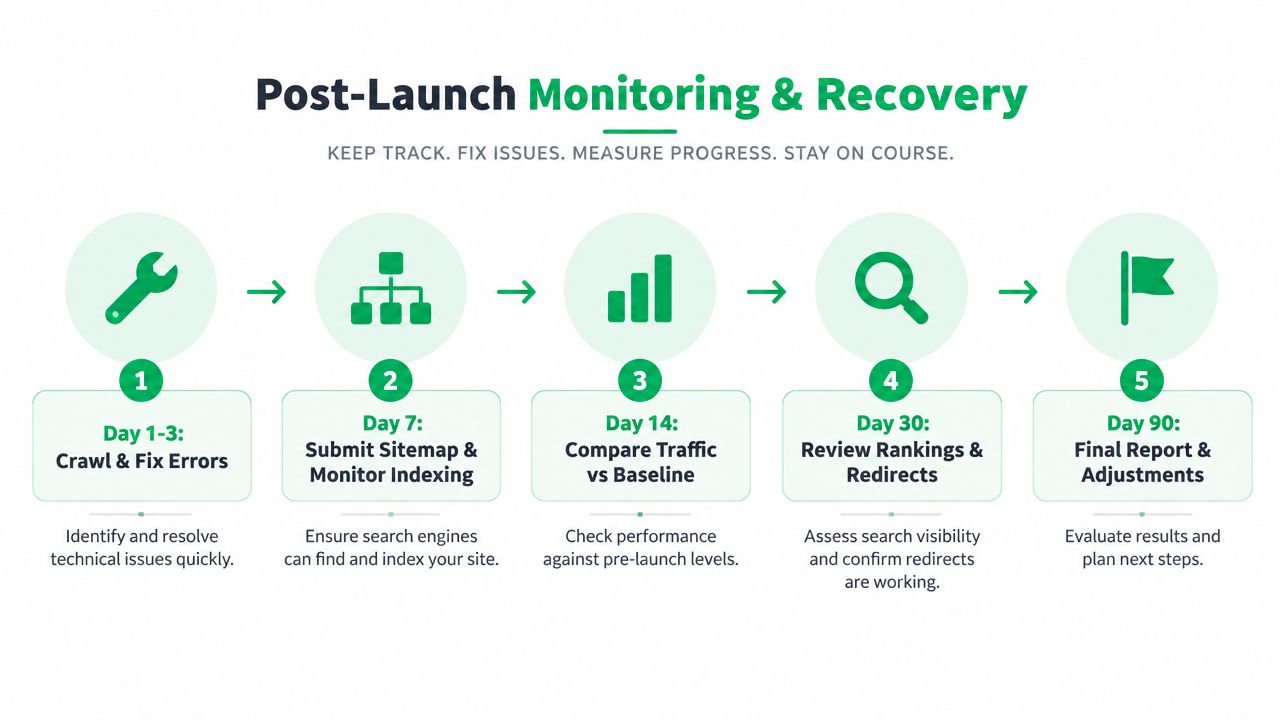
The cadence below is deliberately more structured than the usual “keep an eye on analytics.” It ties each review to a decision, so the team knows when to fix, investigate, escalate, or consider a rollback.
Use a defined monitoring rhythm
Day 1 through Day 3 is incident response. Review server and crawl logs, redirect responses, 404s, 5xx errors, robots.txt, sitemap accessibility, analytics collection, and key page templates. Fix obvious technical failures before spending time interpreting ranking movement.
Day 7 is the first indexing review. Check the new sitemap’s processing, inspect important URLs, compare indexed and excluded groups, and look for unexpected “discovered” or “crawled” pages that should be included. Keep watching old URLs too, because their continued appearance can be part of the transition rather than evidence that redirects failed.
Day 14 is the first meaningful baseline comparison. Segment organic traffic and landing pages by URL class instead of relying on one sitewide line. Compare the new results with the pre-launch inventory and investigate any cluster that moved together.
Day 30 is the redirect and ranking audit. Re-crawl the old URL set, review redirect destinations, check canonicals and hreflang, and compare rankings at the page level. A broad recovery pattern and a single-folder decline require different responses.
Day 90 is the strategic review. Document what changed, which issues were corrected, which legacy URLs still receive activity, and whether the new architecture is behaving as designed. Then turn the findings into permanent tests and ownership rules.
Decide when recovery is needed
A rollback shouldn’t be an emotional response to one alarming morning. It should follow pre-agreed criteria involving crawl failures, indexing disruption, severe server instability, or a sustained performance pattern that the team can trace to the migration.
Keep the old environment available while confidence builds. If the problem is limited to a redirect rule, fix the rule. If the new site has a blocked template, remove the block. If the deployment has widespread failures and the rollback conditions are met, restore the prior version carefully and document every change.
The post-launch record matters as much as the fix. Without notes, teams repeat the same mistake during the next CMS change, redesign, or domain move. A migration succeeds when the site survives the transition and the organization learns how to detect drift before it becomes a ranking problem.
Mr. Green Marketing, LLC offers technical SEO audits and strategy-led digital marketing support that can help you inventory crawlability, redirects, indexing, and site performance before a migration. Visit Mr. Green Marketing, LLC to request an audit and discuss a practical monitoring plan for your next site move.
Leave a Comment
sing in to post your comment or sign-up if you dont have any account.