
Add Keywords to Website the Right Way: So, you’ve done your keyword research. And you’ve got a golden list of terms ready to go. The next step is figuring out where to put them on your website. This is exactly where so many well-intentioned SEO strategies fall apart, turning into a clumsy exercise of just sprinkling keywords across a page and hoping for the best.
That old-school approach just doesn’t work anymore.
Why Just Adding Keywords Is Not Enough

Let’s be clear: blindly forcing keywords into your content is a fast track to nowhere. This tactic, known as keyword stuffing, is a relic from a bygone era of SEO. Search engines like Google? Incredibly sophisticated now. They don’t just count keyword mentions; they analyze context, user intent, and the overall quality of your page.
Simply adding keywords without a real plan is like shouting into a void. You might be making noise, but no one is listening. A complete waste of time.
Add Keywords to Website the Right Way: Moving from Guesswork to Strategy
The real magic isn’t just in what keywords you use, but in where and why you place them. It’s all about being intentional. Think of it less like a technical chore and more like having a clear, helpful conversation with both your audience and the search engines.
Before you touch a single word on your site, you need a mental shift. The goal is to prove your page is the absolute best, most relevant answer to a person’s search. And that means focusing on a few key things:
- Understanding User Intent: First, figure out what the searcher is really looking for. Are they trying to buy something, learn a new skill, or find a specific location? Your keyword placement has to align with that goal.
- Demonstrating Authority: Second, your content needs to be so thorough that the keywords feel completely natural and earned. Not forced.
- Creating a Great User Experience: And finally, a page that’s well-structured, scannable, and easy to read will always outperform a jumbled mess of keywords. Every single time.
The most powerful keyword strategy is one that prioritizes the user first. When your content genuinely helps someone, you’re not just optimizing for an algorithm; you’re building trust and authority that search engines reward.
The High Stakes of Keyword Placement
And make no mistake, the stakes are higher than ever. Gartner predicts a 25% drop in search engine volume by 2026 due to the rise of generative AI, making every single visitor that much more valuable.
Getting your keyword strategy right is crucial when organic traffic still drives a massive 46.98% of all site visits. Even more telling is that the #1 organic result gets a staggering 39.8% of all clicks, completely eclipsing the second position.
Ultimately, your keywords are just one piece of a much larger puzzle. To really succeed, you need to understand how all the different components work together. For a deeper dive, you can explore the latest on SEO ranking factors and see what it takes to win in today’s environment. When done right, strategic keyword placement is one of the most effective tools for driving real-world results.
Add Keywords to Website the Right Way: Your Blueprint for High-Impact Keyword Placement
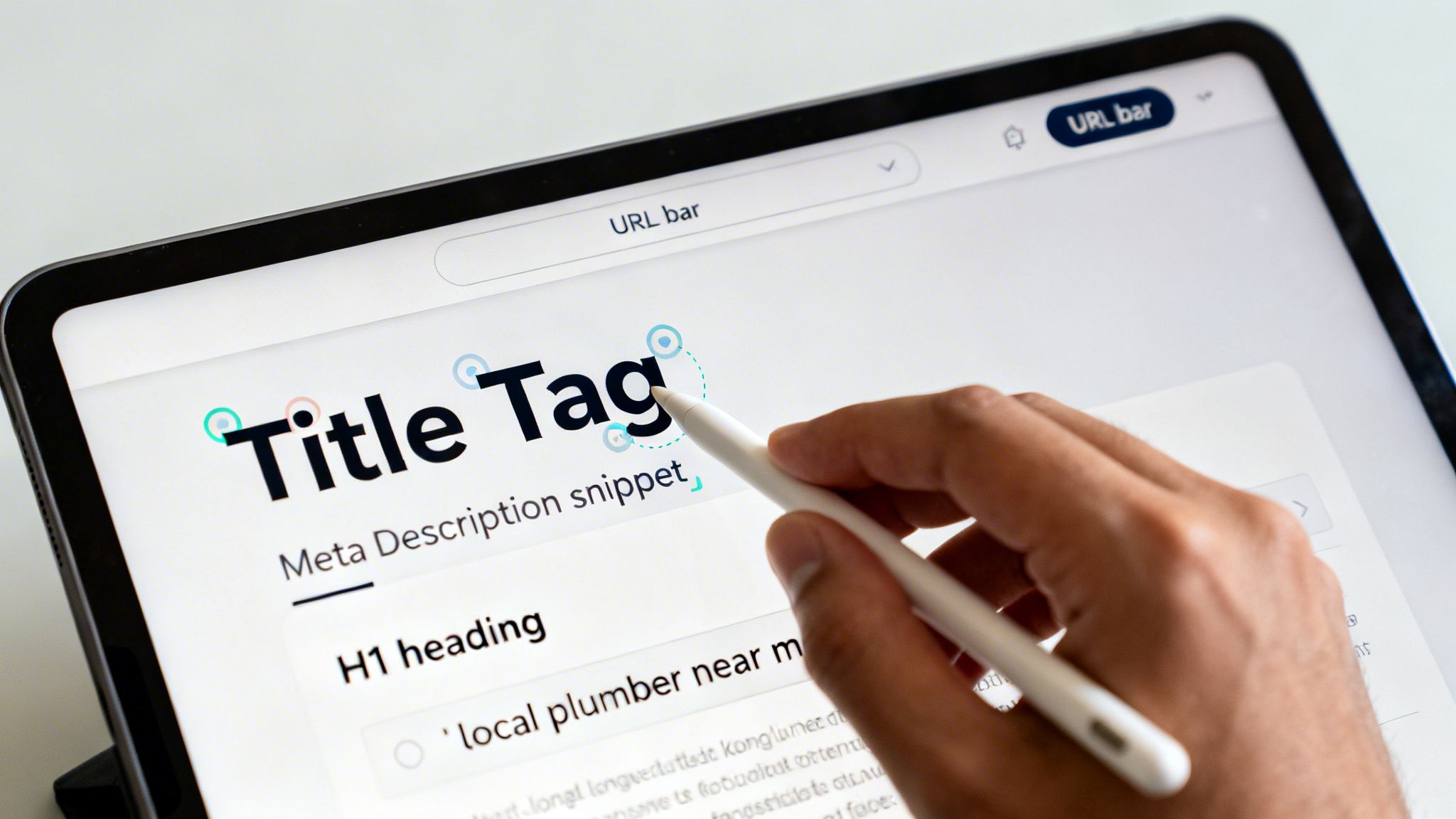
Alright, you’ve done the hard work of finding your keywords. Now for the most important part: where do you actually put them? Getting this right is the difference between ranking on page one and getting lost in the noise.
Think of it this way—Google’s crawlers are constantly scanning your site, trying to understand what each page is about. Your job is to give them a crystal-clear map. We’re going to walk through the exact “SEO hotspots” we use to signal relevance and drive rankings for our clients.
Let’s start with a high-level look at the most critical places to put your keywords. These are the low-hanging fruit—the spots that deliver the biggest bang for your buck.
Add Keywords to Website the Right Way: High-Impact Keyword Hotspots on Your Website
This table breaks down the most critical locations to add your keywords on any given page, explaining why each spot matters for SEO and user experience.
| Website Element | What It Is | Why It Matters for Keywords |
|---|---|---|
| URL | The web address of the page (e.g., yourdomain.com/service-page). |
It’s one of the first things Google reads. A clean, keyword-rich URL signals the page’s topic immediately. |
| Title Tag | The headline shown on the search results page and in the browser tab. | This is a massive ranking factor. It’s your main opportunity to tell Google and users what your page is about. |
| Meta Description | The short blurb of text under your title in the search results. | While not a direct ranking signal, a compelling description with keywords dramatically improves click-through rates. |
| H1 Heading | The main headline displayed on the actual webpage. | The H1 confirms the page’s core topic for both users and search engines. There should only be one per page. |
These four elements are non-negotiable. They are the 20% of on-page SEO that will drive 80% of your results. Let’s break down how to optimize each one.
1. Add Keywords to Website the Right Way: Craft the Perfect URL
Your URL is often the first handshake your page has with Google. It needs to be clean, readable, and straight to the point. And – get this – pages with a keyword in the URL have a 45% higher click-through rate than those without one. It’s a simple fix with a huge impact.
Keep it short and sweet, use hyphens to separate words, and drop any unnecessary characters like numbers or symbols.
- Good:
yourdomain.com/emergency-plumbing-repair - Bad:
yourdomain.com/services/page?id=8675309
The good URL tells you exactly what to expect. The bad one tells you nothing.
2. Add Keywords to Website the Right Way: Master the Title Tag and Meta Description
These two are a classic one-two punch in the search results. Your title tag grabs the user’s attention and signals relevance, while the meta description closes the deal and earns the click.
The best meta descriptions don’t just summarize; they persuade. They speak directly to the user’s problem and promise a solution, making your listing the most compelling choice on the page.
Let’s use a real-world example. A plumber in Florida wants to rank for “drain cleaning services pensacola.”
- Good Title Tag: Drain Cleaning Services in Pensacola | Mr. Green Plumbing
- Good Meta Description: Clogged drain? We offer fast, affordable drain cleaning services in Pensacola. Upfront pricing & 24/7 service. Get a free estimate today!
See how that works? The primary keyword is right at the front of the title. The meta description includes related terms (“clogged drain”) and a strong call-to-action. To really nail this, you need to write for both search engines and people, which we cover in our guide on how to write SEO-friendly blog posts.
3. Add Keywords to Website the Right Way: Harness the Power of a Single H1 Heading
Your H1 is the headline on your page. It’s the first thing visitors see after they click, and it should immediately confirm they’ve landed in the right place.
A common mistake we see is people using multiple H1 tags on a single page or just making some text bigger to look like a headline. Don’t do it. You get one H1 per page, and it needs to contain your primary keyword and closely match your title tag.
It’s a simple rule, but it’s critical for telling both users and Google what your page is all about. For more tips on weaving keywords into your on-page content, this guide on how to write SEO-friendly blog posts is a fantastic resource.
Add Keywords to Website the Right Way: Weaving Keywords into Your Content and Images
Now we get to the heart of your page: the body content and images. This is where so many people either go completely overboard, stuffing keywords into every sentence, or they miss some of the biggest SEO opportunities on the page.
Let’s get it right.
This is where you prove you have real topical authority. Forget about hitting some mythical keyword density number from 2010. The goal is to create comprehensive content that naturally includes your main keyword along with a handful of related secondary terms.
Writing for People First, Google Second
Your number one goal with body content is simple: answer the user’s question so thoroughly they have no reason to hit the back button. When you focus on that, adding keywords to your website becomes an organic process, not a forced one.
A great way to do this is by structuring your content with subheadings (like the H3s you see here). They break up your text and create perfect spots to place secondary keywords.
For instance, if your primary keyword is “home security systems”:
- Your H1 might be: The Ultimate Guide to Home Security Systems
- Your H2s and H3s can then target related terms like:
- How to Choose a Monitored System
- DIY Home Security System Installation Tips
- Comparing Wireless vs. Hardwired Security
Each subheading creates a new opportunity to build relevance and answer a specific user question. This makes your keyword usage feel earned and helpful, not spammy.
The best content doesn’t just mention keywords; it explores the concepts behind them. By thoroughly covering a topic, you’ll naturally start ranking for dozens of long-tail variations you didn’t even intentionally target.
To do this well, start by placing your primary keyword somewhere within the first 100-150 words. This immediately signals the page’s main topic to search engines. From there, sprinkle it and your secondary keywords naturally throughout the rest of the content. If it sounds robotic when you read it aloud, you’re doing it wrong.
Add Keywords to Website the Right Way: The Overlooked Goldmine of Image Alt Text
This is one of my favorite quick wins. So many websites either completely ignore image alt text or upload files with generic names like IMG_8432.jpg. This is a massive missed opportunity.
Alt text (alternative text) is a short, written description of an image. Its main job is to help screen readers describe the image to visually impaired users, making your site more accessible. But it has a powerful secondary benefit: it tells search engines what your image is about.
And optimizing it is incredibly simple. A good formula to follow is:
[Primary or Secondary Keyword] showing [a literal description of the image].
Let’s say you run a dog grooming business in Austin, and you have a picture of a golden retriever getting a bath.
- Weak Alt Text:
dog - Better Alt Text:
golden retriever in a bathtub - Excellent Alt Text:
Dog grooming in Austin featuring a happy golden retriever getting a bath.
This one change helps you show up in both regular web search and Google Image Search, which can be a huge source of traffic. It also makes your site better for all users, which is a core part of modern web design. You can learn more about this in our comprehensive website accessibility checklist.
Add Keywords to Website the Right Way: Advanced Strategies Beyond Basic Keyword Placement
If you’ve handled the fundamentals—your title tags are sharp, H1s are focused, and body copy is solid—you’re already doing better than most. But to really dominate your niche, you have to think bigger. This is where we move past optimizing a single page and start building a cohesive, site-wide strategy that Google can’t ignore.
Ready to level up? Let’s get into the techniques that separate good SEO from truly great SEO.
Add Keywords to Website the Right Way: Master Your Site with Keyword Mapping
This is a big one. Keyword mapping is the art of assigning one primary keyword (and its related terms) to one specific page on your website. It’s that simple, and it’s that important.
Think of it as creating an architectural blueprint for your SEO. The goal is to give every valuable keyword a dedicated “home.” This strategy is your best defense against a common and devastating SEO mistake: keyword cannibalization. This happens when several of your pages compete for the same keyword, which confuses Google and often results in none of them ranking well.
So, how do you map your keywords effectively? It’s a four-step process:
- Start with your keyword research. You should already have a solid list of the primary and long-tail keywords you want to target.
- Audit your current pages. Figure out which pages naturally align with which keywords. Your “About Us” page will never rank for “emergency roof repair,” but a dedicated service page absolutely can.
- Assign one primary keyword per URL. This is where discipline pays off. Open up a spreadsheet and list your URLs in one column and assign a single, primary keyword to each in the next. Be ruthless—one page, one main focus.
- Find the gaps. What important keywords are left over? If a valuable term doesn’t have a page to call home, that’s your cue to create new content, whether it’s a blog post, a new service page, or a detailed guide.
This simple exercise brings incredible clarity to your content plan and helps you build a logical site structure that search engines love to crawl and rank.
Add Keywords to Website the Right Way: Weave a Web of Internal Links
Internal linking is easily one of the most powerful—and most overlooked—ways to strategically place keywords. This isn’t about randomly dropping links everywhere. It’s about using anchor text to pass authority and signal relevance between your pages.
Anchor text is just the clickable text in a link. When you use a keyword-rich phrase as anchor text, you’re explicitly telling Google, “Hey, the page I’m pointing to is an expert on this exact topic.”
For example, using the anchor text “our guide on AI search” to link to a relevant article sends a much stronger signal than a generic phrase like “click here.”
Here’s how to put it into practice:
- Link from high-authority to low-authority pages. Use your popular pages, like your homepage or a viral blog post, to send some link equity to newer or less-visible pages you want to boost.
- Use descriptive anchor text. Ditch “read more” and opt for phrases that describe the destination page, like “learn about our smart home security systems.” Be specific.
- Look for contextual opportunities. While writing, always be on the lookout for natural places to link to other relevant content on your site. It’s great for users and even better for spreading ranking power.
This visual shows you exactly where to integrate keywords across your content—from the body copy to headings and even images—to create a unified signal for search engines.
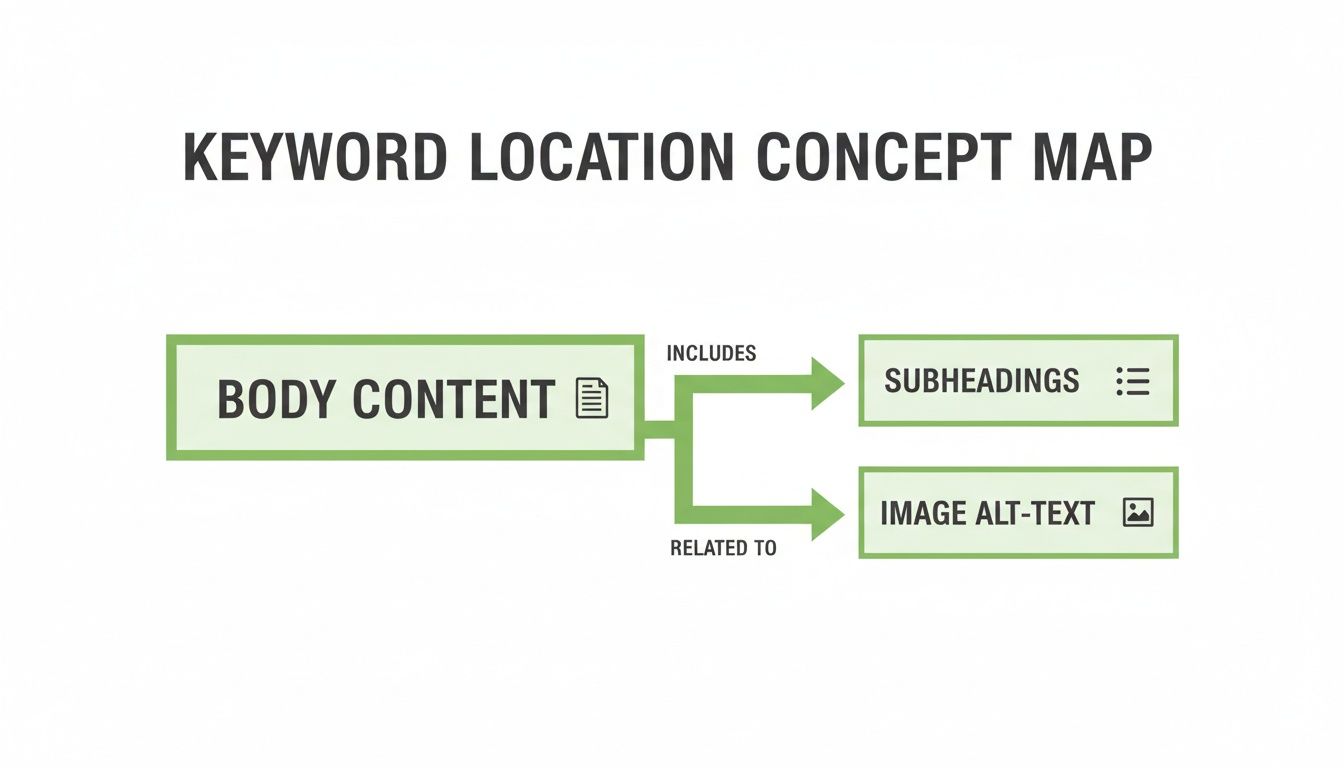
The key takeaway is that keywords need to be thoughtfully woven into every element, not just stuffed into paragraphs. This holistic approach builds a much stronger case for why your page deserves to rank.
Add Keywords to Website the Right Way: Demystify Schema Markup
Okay, don’t let the technical-sounding name throw you. Schema markup is just a vocabulary of code that you add to your site to help search engines understand your content on a much deeper level. Think of it as leaving a set of perfectly labeled notes for Google on your webpage.
This is more critical than ever. As search evolves, AI-generated summaries could slash clicks by 34% while 63% of sites see more AI-driven traffic. Making your content machine-readable is no longer optional. When you combine smart keyword usage with thought leadership, you can see an incredible 748% ROI, and schema is a huge piece of that puzzle.
For example, with schema, you can explicitly tell Google:
- “This page is a recipe, and here are the ingredients and cook time.”
- “This page is for a product, and here is the price and its star rating.”
- “This page is an article, and here is the author’s name.”
The reward for your effort? Google might grant you rich snippets in the search results—those eye-catching extras like star ratings, review counts, or event dates that show up right under your page title. They make your listing impossible to miss and can give your click-through rate a massive boost.
To learn more about preparing for the next wave of search, check out our guide on how to optimize for AI search and make sure you’re ahead of the curve.
Common Mistakes When Adding Keywords to a Website
Let’s talk about what not to do. After years in this business, believe me, we’ve seen it all. This isn’t about shaming anyone; think of it as a friendly intervention to help you sidestep the common SEO traps that can tank your rankings faster than they build them.
Knowing how to add keywords correctly is only half the battle. Knowing what to avoid is the other.
Mistake #1: The Undead Sin of Keyword Stuffing
I know what you’re thinking—isn’t this a problem from 2005? You’d be surprised how often we still see it. Keyword stuffing is the old-school tactic of cramming your target keyword into a page as many times as possible, hoping more is better.
It’s not. It’s a massive red flag for Google and makes your content completely unreadable for actual humans.
- What it looks like: “We sell the best red running shoes. Our red running shoes are perfect for runners who need red running shoes for their next race.”
- The solution: Just write naturally. If your page is genuinely about red running shoes, the keyword and its variations will show up organically. Your goal is to create valuable content, not to hit some imaginary keyword quota.
Mistake #2: Chasing High-Volume, Irrelevant Keywords
This one is incredibly tempting. You uncover a keyword with 50,000 monthly searches and immediately think, “I have to rank for that!” But if that keyword has zero relevance to what you actually sell or do, you’re just spending resources to attract the wrong crowd.
Even if you manage to rank, your bounce rate will go through the roof because visitors will land, see you don’t have what they want, and leave. This sends a powerful negative signal to Google that your page is a poor match for the query, and your rankings will eventually fall off a cliff.
A keyword with 10 monthly searches from highly-qualified buyers is infinitely more valuable than a keyword with 10,000 searches from people who will never become customers. Intent always beats volume.
Mistake #3: Creating ‘Frankenstein’ Pages
We call it a ‘Frankenstein’ page—a monstrous creation that tries to target a dozen different keywords and topics all at once. It’s stitched together from unrelated ideas, and the result is a confusing mess for both users and search engines.
For instance, trying to make a single page rank for “roof repair,” “gutter installation,” and “siding replacement” is a recipe for failure. Each of those services is distinct and deserves its own dedicated, focused page. Remember the keyword map we discussed? One page, one primary target.
Mistake #4: The ‘Set It and Forget It’ Mindset
Finally, we come to the most common mistake of all: completely ignoring your analytics. Adding keywords to a website isn’t a one-and-done task. It’s the starting gun for a much longer race. You absolutely have to track your performance to see what’s working and what’s not.
If you aren’t checking your Google Search Console or analytics platform, you’re flying blind. You have no way of knowing if your chosen keywords are driving traffic, if you’re ranking for the wrong terms, or if one tiny tweak could double your click-through rate.
The most successful SEO strategies are built on a constant loop of action, measurement, and refinement. Don’t let your hard work go to waste by skipping the most important part: finding out if it actually worked.
How to Know If Your Keyword Strategy Is Working
You’ve put in the work, embedding your keywords across every important part of your site. So you’re done, right? Not quite. Getting your keywords in place is just the starting line—now comes the part where you prove it was worth the effort.
This is where you stop guessing and start measuring. Without tracking your results, you’re flying blind. Closing the loop with data is how you turn a one-off project into a repeatable strategy that actually grows your business.
The Essential SEO Scoreboard
Your ground zero for performance tracking is Google Search Console. It’s free, it’s non-negotiable, and it gives you a direct look at how Google views your website. This tool cuts through the noise and delivers the hard data you need.
Think of it as your SEO scoreboard. It tells you what’s working, what isn’t, and where you need to focus your attention next.
Once you’re set up, you need to know which numbers actually matter. Don’t get distracted by vanity metrics; focus on these core indicators to see if your efforts to add keywords to a website are paying off.
- Impressions: How many times did your page pop up in the search results? A jump in impressions is the first sign your new keywords are getting you seen.
- Clicks: This tells you how many people actually clicked through to your site. High impressions but low clicks? That’s a sign your title or meta description isn’t pulling its weight.
- Click-Through Rate (CTR): Simply put, this is your clicks divided by your impressions. A rising CTR is a huge win—it means your snippet is resonating with searchers and beating out the competition.
- Average Position: Where are you ranking, on average, for a given keyword? You want to see this number trending down (closer to position 1).
I always tell clients: don’t just look at the numbers. Look at the story the numbers are telling you. A rising position for a keyword with dropping clicks is a major red flag that something is wrong with your snippet in the search results.
Connecting Keywords to Conversions
While Search Console tells you what’s happening before the click, Google Analytics tells you what happens after. This is where you connect your keyword efforts to real business outcomes.
Head over to the organic search report for the page you just optimized. Are you seeing more traffic from search engines? That’s great. But more importantly, are those new visitors actually doing what you want them to do—like filling out a form, signing up, or making a purchase?
By tracking both sets of data, you create a powerful feedback loop. You’ll see which keywords drive not just traffic, but valuable traffic. This lets you double down on what’s working, fix what isn’t, and turn your keyword strategy into a reliable engine for growth.
Frequently Asked Questions About Adding Keywords
Once you’ve done the research and mapped your terms, the real questions start to surface. We hear these all the time from clients getting hands-on with adding keywords to their websites.
Let’s clear up some of the most common points of confusion we see.
How many keywords should I use on a single page?
This is a classic. The best approach is to stay focused. Every page should have one primary keyword that defines its core topic. From there, you can support it with 2-4 secondary keywords that are closely related.
Pushing for more than that is a common mistake. You’ll end up with a confusing, watered-down page that doesn’t rank well for anything. The goal is depth, not breadth. A page that provides incredible value on one specific topic will naturally start pulling in traffic for dozens of long-tail variations on its own.
How long does it take to see results after adding keywords?
The honest answer? It depends. SEO is a marathon, not a sprint, and anyone who tells you otherwise isn’t giving you the full picture.
For a brand-new page, you might see Google start testing its position within a few days or weeks. But if you’re updating an existing page that’s been around for a while, it could take a couple of months for the changes to fully settle in the search results. Your site’s overall authority and the keyword’s competitiveness are huge factors here.
A one-time keyword update is a good start, but real, lasting results come from consistency. Ongoing optimization and fresh content are what build authority and drive the compounding growth you’re looking for.
Should I bother adding keywords with zero search volume?
Sometimes, absolutely. This is a tactic that separates the pros from the beginners. When a tool shows ‘zero’ search volume, it usually just means the volume is very low—maybe 1-10 searches per month.
But here’s the secret: those few searchers are often incredibly motivated. They have high intent and know exactly what they’re looking for. If that “zero-volume” keyword perfectly describes your product or service, it represents a golden opportunity. It’s a low-competition, high-conversion term your competitors are almost certainly ignoring.
Can I just use an AI tool to add all my keywords?
AI tools are fantastic assistants, but you shouldn’t let them drive the car. Use them for brainstorming keyword ideas, outlining content, or even writing a first draft. They can save a ton of time.
However, AI still can’t replicate a human’s understanding of your brand voice, industry nuances, or the real intent behind a search query. Always—and I mean always—have a human review, edit, and refine any AI-generated content. Your final product needs to sound like it came from an expert in your company, not a robot.
Ready to stop guessing and start growing? At Mr. Green Marketing, LLC, we build data-driven SEO strategies that deliver real results. Request your free audit and see what a targeted keyword plan can do for your business.
Leave a Comment
sing in to post your comment or sign-up if you dont have any account.