
SEO Friendly Blog Posts: So, you want to know how to write SEO-friendly blog posts. It feels like a guessing game sometimes, right? One month you’re ranking, the next you’ve vanished. And…it’s not luck. There’s a proven, repeatable process that businesses use to drive real results—and we’re going to walk you through it.
Forget the fluff. This is a practical blueprint for building a content engine that actually generates leads, builds your authority, and grows your business.
SEO Friendly Blog Posts: Your Framework for High-Ranking Blog Content
We’re diving into the full process, from digging up the keywords your customers are actually searching for to structuring your post in a way that keeps readers on the page. You’ll see the on-page SEO signals that Google loves, why good visuals are non-negotiable, and—most importantly—how to promote your content so it doesn’t just sit there gathering digital dust.
This isn’t about chasing vanity clicks; it’s about attracting the right people who have a problem you can solve. Let’s get to it.
SEO Friendly Blog Posts: Why SEO Blogging Matters More Than Ever
Pouring hours into a blog post only to have it disappear into the search engine abyss is a common and painful experience. But when you get the SEO right, the rewards are massive.
Here’s the data: businesses with active blogs generate 67% more leads per month than those without one. Even more telling, bloggers who make SEO a priority can earn over $50,000 more annually than those who don’t. This isn’t just noise; it’s a clear sign of what a solid strategy can deliver. You can find more stats like this in our 2026 blogging data roundup.
The Core Parts of an SEO Blog Post
Writing for SEO isn’t a single task. It’s a series of connected steps, where each one builds on the last. A misstep in one area can easily undermine all your hard work.
At its core, the entire process boils down to a simple three-part workflow: Research, Write, and Promote.
This chart shows the complete process for creating SEO content that works.
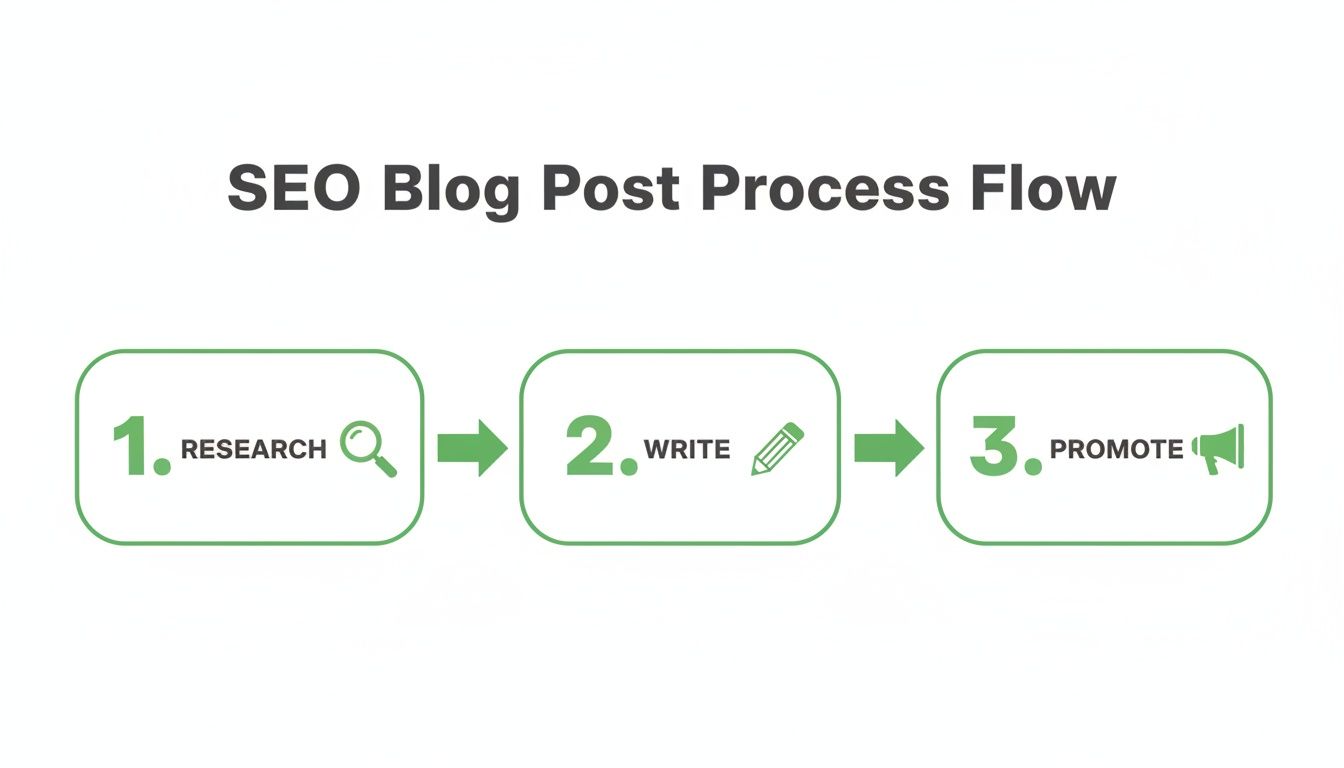
As you can see, hitting “publish” isn’t the finish line—it’s the halfway point. The real wins come from strategic planning before you write and dedicated promotion after you publish.
SEO success isn’t just about ranking. It’s about being clear, helpful, and easy to find for both the people searching and the search engines connecting them to you.
Understanding this framework is the first step toward creating content that actively works for your business instead of just taking up space.
The SEO Blogging Cheat Sheet
To make this even easier, here’s a quick-reference table that breaks down the most important components of an SEO-friendly blog post. Think of it as your cheat sheet for every article you write.
| Component | Why It Matters for SEO | Quick Tip |
|---|---|---|
| 1. Keyword Research | Aligns your content with what users are actively searching for. | Target long-tail keywords (3+ words) for higher-intent traffic. |
| 2. Engaging Title | Drives clicks from the search results page (SERP). | Include your primary keyword and a benefit-driven hook. |
| 3. Quality Content | Keeps users on the page, signaling value to Google. | Answer the searcher’s question thoroughly and clearly. |
| 4. On-Page SEO | Helps search engines understand, index, and rank your content. | Use your keyword in the title, URL, meta description, and first paragraph. |
| 5. Visuals & Media | Increases engagement and time on page. | Add relevant images, infographics, or videos with descriptive alt text. |
| 6. Internal Linking | Distributes authority across your site and helps Google find pages. | Link to at least 2-3 other relevant posts or pages on your website. |
| 7. Promotion | Builds authority and drives traffic from sources outside of Google. | Share your post on social media and email your subscriber list. |
This table covers the fundamentals. Nail these seven components, and you’ll be miles ahead of the competition.
SEO Friendly Blog Posts – From Clicks to Customers: The Real Goal
At the end of the day, ranking on Google is just a means to an end. The real goal is to turn searchers into customers. Every single element of an SEO-friendly blog post should work toward that objective.
- Keyword Research attracts the right audience with a specific problem.
- Quality Content builds trust by showing you know how to solve that problem.
- On-Page SEO makes it easy for search engines to recognize and recommend your solution.
- Promotion gets your solution in front of more potential customers.
When these pieces work together, you’re not just writing a blog post; you’re building a reliable, lead-generating asset for your business. This is how you start to consistently increase organic search traffic over the long term.
How to write SEO Friendly Blog Posts – Step 1: Find Keywords That Drive Business Results
Let’s talk about keyword research. I get it—it can feel like a chore, but it’s the absolute foundation of any SEO strategy that works. If you get this wrong, your content will never find its audience. And you’re just writing for yourself. Getting it right is the first real step in creating blog posts that bring in actual business.
We’re not going to get lost in technical jargon here. Instead, we’ll focus on a practical approach you can start using today. This is all about uncovering what your ideal customers are really asking Google—their biggest pain points, their most pressing questions, and the queries that signal they’re ready to make a move.
This is how we shift from guessing what people want to knowing what they need.
Think Like a Customer, Not a Marketer
Before you even open a keyword tool, grab a pen and paper. Seriously. The biggest mistake I see businesses make is searching for keywords based on how they describe their own services. You have to get inside your customer’s head.
What words do they use? What specific problem are they trying to solve right now?
- A plumber doesn’t just offer “hydro-jetting services.” A homeowner searches, “drain cleaner not working what to do.”
- A financial advisor isn’t selling “holistic wealth management.” A potential client is googling, “how much do i need to save for retirement.”
- You don’t just sell “boutique digital marketing.” A small business owner is desperately searching, “how to get more local customers.”
Start by brainstorming 5-10 core problems your business solves. Frame them as direct questions. This simple mindset shift is the key to finding keywords that actually lead to sales.
Understand the “Why” Behind Every Search
Finding keywords isn’t just about search volume; it’s about understanding search intent. This is the ‘why’ behind what someone types into that search bar. When your content matches the user’s intent, Google rewards you because you’ve delivered a satisfying answer.
There are four main types of search intent:
- Informational: The user needs an answer or wants to learn something (e.g., “what is SEO”).
- Navigational: The user is trying to get to a specific site (e.g., “Mr. Green Marketing login”).
- Commercial: The user is comparing options before making a purchase (e.g., “best SEO tools for small business”).
- Transactional: The user is ready to buy or take action now (e.g., “hire SEO agency near me”).
Your blog content will almost always target informational and commercial intent. By answering your audience’s questions, you build trust and establish your authority. That way, when they’re finally ready to buy, you’re the first one they think of.
Find High-Intent Keywords with the Right Tools
Once you’ve brainstormed your customer-focused ideas, it’s time to find the right keywords with some data. We’re on the hunt for long-tail keywords—those longer, more specific phrases of three or more words. They have lower search volume, but their conversion potential is sky-high.
Think about it: someone searching for “shoes” is just browsing. But someone searching for “best waterproof hiking boots for wide feet” knows exactly what they want and is probably ready to buy.
Tools like Ubersuggest can give you a great starting point for finding these gems and seeing how competitive they are.
The tool gives you critical data like search volume, SEO difficulty, and other keyword ideas, helping you focus your efforts where they’ll have the most impact.
Of course, finding relevant topics is only half the battle. You also need to learn how to find low competition keywords so your content can actually break through the noise and rank.
Expert Tip: Don’t get fixated on huge search volumes. A keyword with only 50 monthly searches that perfectly matches your service is infinitely more valuable than a generic term with 5,000 searches that just brings in unqualified traffic.
I always recommend using a mix of free and paid tools. Even free resources like Google’s “People Also Ask” box and autocomplete suggestions are goldmines for content ideas. For a deeper dive into tools and tactics, check out our complete guide to SEO strategies for small businesses.
How to write SEO Friendly Blog Posts – Step 2: Craft Content That Captivates and Converts

You’ve locked in a keyword with real business potential. A great start. But it’s only the beginning. Now comes the real challenge: writing a blog post that not only answers a user’s question but also convinces search engines it’s the best answer out there.
This is where brilliant ideas often fail. We see it all the time—a great topic trapped in a huge wall of text. Readers hit the back button in seconds, and Google takes note.
Writing for SEO isn’t just about stuffing in keywords. It’s about creating an experience. You need to structure your post to guide the reader, build trust, and subtly lead them toward the solution you offer.
Structure for Scannability, Not Just Reading
Let’s get one thing straight: most people won’t read your blog post word-for-word. They scan for answers. In fact, research shows users typically read only about 20% of the text on a webpage.
Your job is to make that 20% count. Make your key points impossible to miss.
- Short Paragraphs: Stick to a two or three-sentence maximum per paragraph. This creates white space, making your content feel less intimidating and easier to skim on any device.
- Clear Subheadings: Use H2s and H3s to break your content into logical sections. Your subheadings should tell a story on their own, giving scanners a complete overview of the article at a glance.
- Strategic Formatting: Use bold text for important terms and stats. Use italics for emphasis. This guides the reader’s eye to the most critical takeaways without being distracting.
This isn’t just a user-friendly tactic. Search engines use headings and formatting to understand the hierarchy and core topics of your article. A clean structure is a powerful signal of quality.
SEO Friendly Blog Posts: Match the Format to the Search Intent
Ever notice how certain types of posts always seem to rank for specific queries? Not a coincidence. The format of your content is just as important as the information within it.
Answering a user’s need isn’t just about what you say; it’s about the package you deliver it in. Matching format to intent is a quiet but powerful SEO signal.
Before you write a single word, consider which format best serves your keyword:
- Listicles: Posts like “7 Ways to…” or “The Top 5 Tools for…” are incredibly effective. They promise a quick, digestible read and work perfectly for keywords where users are comparing options or looking for a list of ideas.
- How-To Guides: This is your go-to format for informational keywords. A clear, step-by-step guide that solves a specific problem is one of the best ways to build authority and earn your audience’s trust.
- Case Studies: Perfect for demonstrating expertise and driving bottom-of-the-funnel conversions. A case study shows potential customers exactly what you can do by detailing the results you achieved for someone else.
A simple pro tip: Google your target keyword and analyze the top-ranking pages. Are they listicles? In-depth guides? Videos? This gives you a massive clue about what format Google believes searchers want. Don’t copy them, but use their success as your starting point.
SEO Friendly Blog Posts: Go Deep and Become the Ultimate Resource
In a world obsessed with short attention spans, it sounds wrong, but long-form content consistently crushes it in search results. Why? Because comprehensive, authoritative articles fully answer a user’s query, leaving them no reason to go back to Google.
A study on blogging performance found that long-form posts over 3,000 words can generate up to 3x more traffic and earn 77.2% more backlinks than shorter articles. This isn’t about adding fluff to hit an arbitrary word count. It’s about creating the single best resource on the internet for that topic.
Think of it this way: your goal is to cover the subject so thoroughly that your reader’s journey ends with you. You answer their initial question and the follow-up questions they didn’t even know they had. For a deeper dive into how this principle works in a broader strategy, check out our guide on content marketing best practices that deliver real results.
How to write SEO Friendly Blog Posts – Step 3: Master On-Page and Technical SEO Essentials

You’ve done the heavy lifting—you’ve researched your keywords and drafted a great post. Now it’s time to make sure Google can actually understand all that hard work. This is where on-page and technical SEO come in.
Think of it as giving Google a clear roadmap to your content. It’s not about keyword stuffing or trying to trick the algorithm. It’s about optimizing specific elements on the page to signal relevance, quality, and authority.
These aren’t minor tweaks; they’re foundational pieces that directly impact whether your content gets seen or gets buried.
SEO Friendly Blog Posts: Your On-Page SEO Checklist
For every single post you publish, running through a quick on-page SEO check is non-negotiable. It takes just a few minutes, but it can be the difference between ranking on page one and getting lost on page ten.
Here are the absolute essentials:
- URL Slug: Keep it short, clean, and to the point. Include your primary keyword, use hyphens between words, and ditch any fluff. For example, use
/seo-friendly-blog-postsinstead of/how-to-write-the-best-seo-friendly-blog-posts-in-2026. - Title Tag: This is your headline in the search results. It has to grab attention and include your primary keyword, ideally near the start. Aim for 55-60 characters so it doesn’t get cut off.
- Headings (H1, H2, H3): Your article needs one—and only one—H1 tag, which is your main title. Use H2s for major sections and H3s for sub-points. Sprinkle your primary and secondary keywords naturally into these headings.
- Image Alt Text: Every image needs descriptive alt text. It’s crucial for accessibility, helping visually impaired users, but it also gives search engines another clue about your content’s topic.
Getting these four elements right builds a rock-solid foundation for every article you write.
On-page SEO mistakes are incredibly common, but they’re also some of the easiest to fix. Here’s a quick rundown of what to avoid and what to do instead.
On-Page SEO Quick Wins
| SEO Element | Common Mistake | Best Practice & Impact |
|---|---|---|
| Title Tag | Stuffing it with keywords or making it too long. | Write a compelling, 55-60 character title with the keyword near the front. Impact: Higher click-through rates. |
| URL Slug | Using default URLs with dates and random numbers. | Create a short, keyword-rich slug. Impact: Better user experience and clearer signals to Google. |
| Headings | Using multiple H1 tags or no headings at all. | Use a single H1 for the title and structured H2s/H3s. Impact: Improved readability and SEO structure. |
| Alt Text | Leaving it blank or just using the keyword. | Write a descriptive sentence of the image for accessibility. Impact: Better image search rankings and accessibility. |
Nailing these best practices takes just a few extra minutes per post but makes a huge difference in how your content performs long-term.
SEO Friendly Blog Posts: The Art of the Meta Description
The meta description is that small blurb of text under your title in Google’s search results. While it’s not a direct ranking factor, it has a massive impact on your click-through rate (CTR).
Think of it as a mini-advertisement for your post. It needs to answer one simple question for the searcher: “Why should I click this?”
Your meta description is your one chance to make a first impression on the search results page. Don’t waste it with a keyword-stuffed sentence. Instead, offer a clear benefit and a hint of the solution inside.
Focus on the value. What problem will the reader solve by clicking your link? Keep it around 155 characters, include your keyword where it feels natural, and add a call to action. If you want to go deeper, there’s great advice on how to write meta descriptions that get more clicks that will help your posts stand out.
SEO Friendly Blog Posts – Internal Linking: The Underrated Superpower
Internal linking—the simple act of linking to other relevant pages on your own website—is one of the most powerful and overlooked SEO tactics out there.
First, it helps Google discover your content and understand the relationships between your pages. When you link several articles about a similar topic, you build topical authority, signaling to Google that you’re an expert in that niche.
Second, it keeps readers on your site longer. A well-placed link to another helpful article reduces your bounce rate and boosts engagement, both of which are positive ranking signals. For every new post, make it a habit to link to at least 2-3 older, relevant articles.
Don’t Forget the “Technical” Touches
Finally, let’s touch on a couple of “technical” SEO basics that are easier than they sound. You don’t need to be a developer to handle these.
- Mobile-Friendliness: The majority of web traffic is now on mobile. Your site must look and function perfectly on a phone. There’s no excuse. Use Google’s Mobile-Friendly Test tool to check your pages.
- Page Speed: Nobody waits for a slow site. If your page takes more than three seconds to load, you’re losing visitors. Use Google’s PageSpeed Insights to check your score and see what’s slowing you down.
These aren’t just “nice-to-haves” anymore; they are table stakes. Google rewards sites that provide a better user experience, and that starts with a fast, mobile-friendly foundation.
How to write SEO Friendly Blog Posts – Step 4: Promote Your Post Beyond Hitting Publish

Hitting ‘publish’ is the starting gun, not the finish line. I’ve seen countless businesses pour all their energy into writing the perfect SEO-friendly post only to stop right there. A huge mistake.
A brilliant blog post with no promotion strategy is like shouting into the void. All the hard work you put into keywords, structure, and on-page SEO is wasted if no one ever sees it. Smart promotion is what turns your content from a passive asset into an active, traffic-driving machine.
SEO Friendly Blog Posts: Work Smarter with Content Repurposing
You don’t need to create entirely new content for every platform. That’s a fast track to burnout. Instead, treat your core blog post as the ‘mothership’ and break it down into smaller, platform-specific pieces.
This approach gets far more mileage out of your work and lets you meet your audience where they already spend their time.
- Social Media Snippets: Pull a compelling statistic, a key takeaway, or an interesting quote from your article. Turn it into a sharp-looking graphic with a tool like Canva and share it on LinkedIn, Facebook, or Instagram. Always, always include a link back to the full post.
- Short-Form Video Scripts: That listicle you wrote? Each point is a ready-made 30-second script for a TikTok or Instagram Reel. People love quick, valuable tips, and video is an incredibly powerful format for engagement.
- Email Newsletter: Don’t just send a bare link. Paste the introduction and first main point of your blog post directly into your email. Then, add a clear “Read More” button to drive your most engaged audience straight to your site. This is a tactic that consistently drives high-quality traffic for our clients.
- Infographic: Condense the main steps or data points from your article into a simple, shareable infographic. Visuals are incredibly effective—posts with images get 94% more views on average than those without.
This isn’t about creating more work. It’s about maximizing the value of the work you’ve already done.
SEO Friendly Blog Posts: Engage in Communities Where Your Customers Live
One of the fastest ways to get targeted eyes on your new article is to share it where your ideal customers are already gathered. But—and this part is critical—you can’t just drop a link and run. That’s spam, and it will get you ignored or banned.
The key is to provide value first.
Find relevant Facebook groups, LinkedIn communities, Slack channels, or subreddits in your niche. Become a regular. Answer questions, offer advice, and establish yourself as a helpful, recognizable name.
Then, when someone asks a question that your blog post directly answers, you can share it. For example, if you see a post in a small business group asking, “How do I get my blog to show up on Google?” you can respond with a helpful tip and add, “I actually wrote a full guide on this, you can check it out here if you want to go deeper.”
This approach changes the dynamic from self-promotion to genuine helpfulness. You’re not spamming; you’re providing a solution at the exact moment someone needs it.
This method builds trust and drives highly relevant traffic from users who are actively looking for the information you’re providing.
SEO Friendly Blog Posts: Build Relationships for Backlinks and Guest Posts
Now for the long game. Off-page SEO, particularly earning backlinks, is arguably one of the most powerful ranking factors. A backlink is simply a link from another website to yours, and Google sees it as a vote of confidence in your content.
But how do you get them? You build relationships.
Start by identifying non-competing blogs, publications, or businesses in your industry that serve a similar audience. Don’t just fire off a cold email asking for a link—that rarely works. Instead, play the long game:
- Engage with their content: Follow them on social media, leave thoughtful comments on their articles, and share their work with your own audience (and tag them).
- Provide value first: Find a broken link on their site and suggest your article as a perfect replacement. Or, if you mentioned their business in your post, let them know. People love to see they’ve been featured.
- Pitch a guest post: Once you’ve established a connection and are on their radar, you can pitch a guest post. This is where you write an article for their site, providing their audience with value while including a natural link back to your own website in the content or your author bio.
This is a slow-burn strategy; it takes time and genuine effort. But earning just a handful of high-quality backlinks from authoritative sites will do more for your SEO than almost any other tactic. It’s how you build lasting authority and create content that truly ranks for years to come.
Alright, we’ve covered a lot of ground. But I know you’ve still got some of those nagging questions bouncing around in your head. I get it. These are the exact same questions my clients ask when we first sit down to map out their content strategy.
So, let’s just tackle them head-on. No fluff, no vague consultant-speak—just the straight answers I’ve learned from years in the trenches.
Your SEO Blogging Questions Answered
Question 1: How Often Should I Actually Blog for SEO?
This is a question I get from almost every client. My answer is always the same: consistency beats frequency every single time. Don’t burn yourself out trying to publish three thin, rushed posts a week just because you read it on some guru’s blog. It’s a fast track to mediocre content and zero results.
For most businesses we work with, one high-quality, in-depth blog post per week is the sweet spot. It’s frequent enough to show Google your site is active and consistently building value, and it helps you build a solid content library relatively quickly.
If that pace feels impossible—and for a lot of small teams, it is—then dial it back. Aim for two fantastic posts a month.
The real key is creating a reliable publishing schedule you can stick to. A business that publishes one great post on the first Tuesday of every month will see better long-term results than one that drops five posts in January and then goes radio silent until May.
Find a rhythm you can maintain. Quality is your north star, not quantity.
Question 2: How Long Does It Take for a Blog Post to Rank on Google?
This is the million-dollar question, and the honest-to-goodness answer is… it depends. I’ve seen posts climb to page one in a matter of weeks, and I’ve seen others take a year or more to gain traction. In fact, a 2024 study found the average age of a top-10 ranking page is over two years old.
But that’s just an average. How fast your post ranks comes down to a few critical factors:
- Your Website’s Authority: A brand-new site with no history or backlinks has a much steeper hill to climb than an established domain with a strong reputation. Authority acts like a tailwind.
- Keyword Competition: Trying to rank for “best running shoes”? You’re going up against industry giants. But targeting a long-tail keyword like “best running shoes for flat-footed beginners”? That’s a fight you can win, and much faster.
- Content Quality and Promotion: An exceptional, well-promoted article will always outpace a “good enough” post that you just publish and forget. Promotion is the fuel for your content engine.
As a general rule, you can expect to see initial movement and data within 3-6 months. Think of SEO as a long-term investment, not an overnight trick. Patience is part of the strategy.
Question 3: Can I Just Use AI to Write All My Blog Posts?
Let’s be very clear here. Can AI help you brainstorm ideas, create outlines, or even rough out a first draft? Absolutely. It can be an incredible tool for speeding up the process.
But should you let an AI write your entire post, hit publish, and walk away? No. Absolutely not.
Google’s position is simple: they reward high-quality content that helps users, period. They don’t care if a human or a robot wrote it. The problem is, content created solely to game the system without offering real value is spam.
Most purely AI-generated content falls short because it lacks:
- E-E-A-T: Real-world Experience, Expertise, Authoritativeness, and Trustworthiness.
- Original Insights: It can’t share a personal story, a unique client success, or a contrarian opinion based on experience.
- A Distinct Brand Voice: It defaults to a generic, slightly robotic tone that puts readers to sleep.
The winning strategy? Use AI as a brilliant assistant, not as a substitute for your expertise. Let it handle the grunt work, but always have a human expert review, edit, and inject their unique knowledge, stories, and voice into the final piece. That’s how you create content that both Google and your customers will love.
At Mr. Green Marketing, LLC, we blend expert human strategy with smart tools to create SEO content that doesn’t just rank, but drives real business growth. If you want to stop guessing and start seeing results, let’s talk.
Leave a Comment
sing in to post your comment or sign-up if you dont have any account.