
A site audit is a structured, data-driven review of a website's technical health, user experience, search visibility, and content quality. Because mobile devices account for about 60.9% of global website traffic, a small business needs an audit to find problems that can reduce visibility, enquiries, sales, and revenue.
You may have seen the warning signs already. Organic traffic has slipped, your sales have stayed flat, and your website still looks perfectly fine when you open it on your laptop. Then a consultant mentions a “site audit,” and the phrase sounds more technical than useful.
It isn't a mysterious score or a cosmetic review. A good audit examines how search engines discover and understand your pages, how visitors use them, and whether the site supports commercial goals. The result should be a prioritized list of actions, not a spreadsheet full of disconnected errors.
Table of Contents
- The Short Answer for Busy Business Owners
- The Four Main Types of Site Audits Explained
- What a Technical Site Audit Checks
- Why Audits Matter More in 2026 Than They Used To
- The Most Common Findings in SMB Audits
- Tools and Approaches for Running a Site Audit
- Turning Audit Results Into a Fix-It Plan
- A Simple Site Audit Checklist for SMBs
The Short Answer for Busy Business Owners
A customer lands on your service page, checks it on a phone, and leaves before contacting you. Your team sees fewer enquiries, while the website still appears normal on a laptop. That gap is where a site audit earns its place.
A site audit is a structured diagnostic of how a website supports search visibility, visitors, and revenue. It examines technical SEO, page content, user experience, accessibility, security, and the paths people follow toward a call, form submission, or purchase. The goal is to connect each finding with a business consequence.
Practical rule: A useful audit explains what is wrong, why it matters, and what to do next.
The audit works like a health check for the site. A misconfigured canonical tag may push search engines toward the wrong page. A difficult mobile form may stop a ready-to-buy visitor. An outdated service page may attract people looking for something you do not sell. Each problem affects the business differently, so each deserves a different priority.
And the scope can extend beyond search rankings. An audit may review performance, mobile usability, accessibility, security, and compliance together. Industry guidance on website audits explains this broader approach and how audits can help quantify risk rather than rely on guesswork.
For a small business, the useful output is a ranked repair list. Fix a blocked money page before polishing a low-traffic article. Resolve a broken enquiry path before adjusting minor metadata. The right order protects visibility and revenue when time and budget are limited.
This guide explains the main audit types, the technical checks behind them, common SMB findings, available tools, and a practical way to plan repairs. If you are considering outside support, website SEO audit services can clarify what a structured review may include.
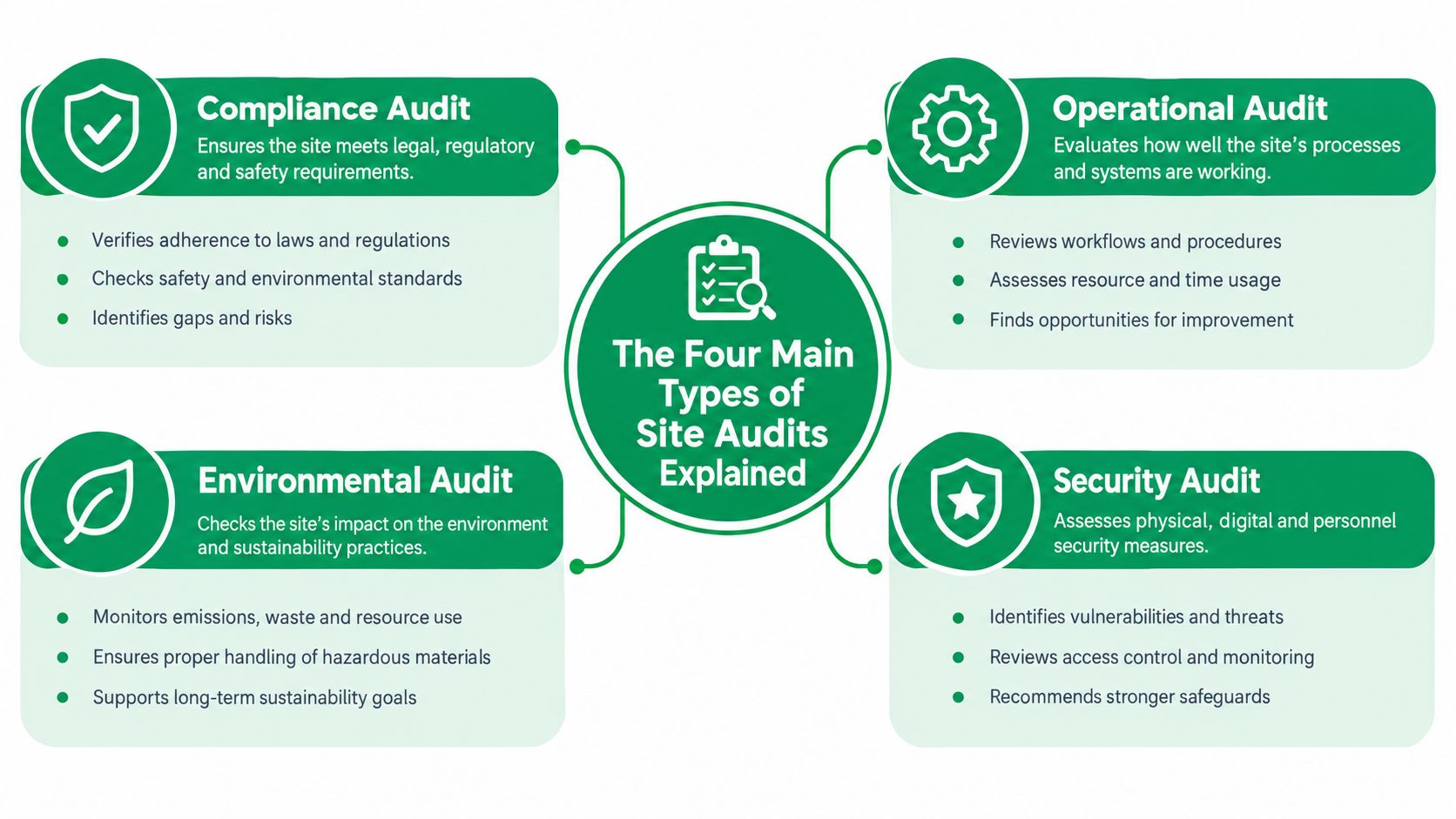
The Four Main Types of Site Audits Explained
Think of a website as a physical business. A technical audit inspects the building systems. An on-page audit checks the signs and labels. A content audit reviews the stock on the shelves. A UX and conversion audit watches how customers move through the premises.
Technical SEO audit
This is the mechanic's inspection of the website engine. It checks whether search engines can crawl important pages, process JavaScript, understand the site structure, and index the correct URLs. It also reviews speed, HTTPS, structured data, redirects, mobile performance, and related foundations.
A typical finding might be a robots.txt rule blocking a valuable service folder. The fix is to remove or adjust the rule, then verify that the affected pages can be crawled and indexed.
Technical SEO guidance commonly includes crawlability, indexability, canonical tags, duplicate URLs, status codes, redirects, site architecture, JavaScript rendering, Core Web Vitals, mobile usability, HTTPS, and structured data. HubSpot's technical SEO guide provides a useful overview of these checks.
On-page SEO audit
This is the proofreading pass for your storefront. It reviews title tags, meta descriptions, headings, image alt text, keyword targeting, and internal links. The question is whether each important page clearly communicates its topic to both visitors and search engines.
A sample finding is a product page with a generic title such as “Home.” The fix is to write a specific title that describes the product and its purpose.
Content audit
A content audit takes stock of what the site publishes. It identifies thin pages, duplicate copy, outdated information, weak topic coverage, and pages that fail to match search intent.
A service business might have three nearly identical pages targeting nearby towns, with little information that distinguishes them. Consolidating or improving those pages may create a clearer, more useful resource than leaving several weak versions online.
UX and conversion audit
This is like watching real shoppers walk through the aisles. It examines navigation, mobile usability, accessibility, forms, calls to action, checkout steps, and friction between the first visit and the desired action.
A short form that fails to explain an error is a practical example. The fix may be clearer field labels, useful validation messages, and a visible confirmation after submission. A dedicated conversion optimization audit focuses on this path from visitor interaction to completed business action.
Most SMBs need a blended audit. A fast website with weak content still struggles, and excellent content cannot compensate for pages that search engines cannot access. Start with the technical layer because it can prevent every other improvement from working.
What a Technical Site Audit Checks
A potential customer searches for a service, reaches your website, and finds a page that never loads properly. Or Google cannot access the page at all. A technical site audit traces problems like these from the underlying setup to the business result: fewer visible pages, fewer visits, and fewer opportunities to generate leads or sales.
The review works in layers. Each layer answers a practical question: can the right person or search engine find the right page, understand it, and use it?
Crawlability and indexability
Crawlability asks whether search engine crawlers can reach important URLs. An auditor checks robots.txt, XML sitemaps, internal links, orphan pages, and blocked paths. An orphan page may exist in the CMS but have no useful internal link pointing to it, making discovery harder. A valuable service page with no path from the rest of the site can miss search traffic.
Indexability asks whether a page is eligible to appear in search results. The audit checks noindex tags, canonical tags, redirect chains, URL parameters, duplicate versions, and status codes. If a page points its canonical tag to another URL, the site may be signalling that the other version is preferred. That choice can send search visibility, and the enquiries it could produce, to the wrong page.
For a fuller walkthrough of the foundations, see this guide to technical SEO best practices.
A crawl reviews many pages consistently. A site: search offers a quick indication of whether a particular URL is indexed. SEOptimer's technical SEO checklist also highlights robots.txt, current XML sitemaps, and crawl-log analysis as useful checkpoints.
Performance and rendering
Performance means more than whether a page feels fast. Auditors use specific measurements:
- Largest Contentful Paint, or LCP, shows how quickly the main visible content appears.
- Interaction to Next Paint, or INP, evaluates how promptly the page responds after a visitor interacts.
- Cumulative Layout Shift, or CLS, identifies unexpected movement as content loads.
- Time to First Byte, or TTFB, measures how quickly the browser receives the first server response.
The audit also checks mobile responsiveness, large images, render-blocking resources, JavaScript and CSS crawl blockers, and content that appears only after scripts run. A slow booking page or a button that does not respond can turn qualified interest into an exit.
Security, structure, and meaning
Security checks include HTTPS, mixed content, certificate warnings, and signs that could weaken visitor trust. Structured data checks whether schema markup accurately describes eligible content, such as products, services, articles, or local businesses.
Architecture reviews URL patterns, internal linking, pagination, language versions, and hreflang where relevant. Moz's SEO audit checklist recommends recording the preferred site version, relevant subdomains or language versions, priority pages, and key page templates before the crawl begins.
| Layer | What It Inspects | Sample Finding |
|---|---|---|
| Crawlability | Robots.txt, sitemaps, internal links, orphan URLs | Important service pages have no internal links |
| Indexability | Noindex tags, canonicals, redirects, duplicate URLs | A revenue page has the wrong canonical |
| Performance | LCP, INP, CLS, TTFB, mobile rendering | The hero image delays the main content |
| Security | HTTPS and mixed-content warnings | An old asset still loads over HTTP |
| Architecture | URL structure, pagination, hreflang, schema | Regional pages lack language targeting signals |
Technical problems often stay invisible to the owner. If Google cannot crawl or render a page cleanly, strong copy, attractive design, and a persuasive call to action may never get a fair chance. For a small business with limited time and budget, rank findings by affected revenue pages first, then address the fixes that restore access, clarity, or usable page performance.
Why Audits Matter More in 2026 Than They Used To
A customer searches for a local plumber on a phone, reaches a slow page, and leaves before the contact form appears. The business may blame weak demand, while the actual problem is a mobile experience that blocks ready-to-buy visitors. For local plumbers, retailers, consultants, and restaurants, an audit connects that technical failure to missed enquiries and sales.
Performance remains a widespread weakness. Many sites still fall short of Google's Core Web Vitals thresholds, so an audit can identify slow loading, delayed interaction, or unstable layouts and rank each issue by its effect on important revenue pages. The result is a diagnostic, not a technical scorecard. It shows which problems deserve attention before cosmetic improvements.
Google made Core Web Vitals part of its ranking systems in 2021. That milestone broadened audits beyond title tags and keywords to include loading speed, interactivity, and visual stability. Mobile-first expectations, accessible interfaces, and clear page structure now affect whether visitors can understand an offer and take the next step.

Accessibility adds another reason to monitor the site continuously. External analysis of the top one million homepages found that 94.8% had detectable WCAG 2.2 Level A or AA failures, with an average of 51 accessibility errors per page. It also found low-contrast text on 79.1% of pages and missing image alt text on 55.5%. The accessibility and website audit report from Incremys explains why recurring checks matter. For an SMB, clearer text, usable forms, and meaningful image descriptions can remove barriers before they cost a potential customer.
AI-driven discovery creates another gap. Because generative engines rely heavily on structured data and clear entity signals, treat schema completeness as a quarterly check rather than a one-time fix. This discussion of AI-era website audits explains why familiar SEO checks must now support newer discovery environments. For tactics that already work in AI-driven results, see this guide on how to optimize for AI search.
An annual audit can miss issues introduced by redesigns, plugins, templates, and publishing changes. Smaller quarterly checks create a steadier feedback loop. With limited time and budget, fix problems on pages closest to revenue first, then address broader site improvements.
The Most Common Findings in SMB Audits
Most SMB reports contain familiar patterns. The details vary by platform, but the business questions remain consistent: can search engines find the page, can visitors use it, does the content answer the need, and does the site look trustworthy?
Crawl and index problems
Blocked robots.txt paths, stale sitemaps, missing canonical tags, redirect chains, and orphan pages appear frequently. Start by identifying which affected URLs drive enquiries, sales, or important organic visibility. Then correct the directive, update the sitemap, flatten the redirect, or strengthen internal links.
Performance findings
Auditors often find oversized hero images, delayed JavaScript, layout movement, and templates that work on desktop but fail on mobile. Compressing important images, removing unnecessary scripts, and testing the main templates on phones are practical first actions.
Content weaknesses
Thin product descriptions, duplicated service pages, outdated claims, vague titles, and missing internal links weaken the site's ability to match search intent. Improve the pages that support commercial decisions first. Consolidate duplicates where they compete with one another, and expand useful pages where visitors need more context.
Trust and accessibility signals
Legacy pages may contain mixed content, weak contrast, missing alt text, unlabeled form fields, or unclear error messages. These issues can make a business appear less credible and can block visitors from completing tasks.
| Theme | Common Finding | Quick Fix |
|---|---|---|
| Crawl and index | A key folder is blocked in robots.txt | Review the rule and test affected URLs |
| Crawl and index | Several URLs represent the same page | Select the preferred URL and use accurate canonicals |
| Performance | Large images delay visible content | Compress and serve appropriately sized images |
| Content | Similar service pages repeat the same copy | Consolidate or give each page a distinct purpose |
| Trust | A legacy page loads mixed content | Replace insecure asset references and retest HTTPS |
| Accessibility | Form fields lack useful labels | Add clear labels and plain-language error messages |
Some fixes can improve visibility quickly because they remove a direct barrier to crawling or indexing. Others protect existing visibility rather than create an immediate ranking change. A broken internal link to a high-value page deserves attention before a minor metadata refinement.
For a clear explanation of how missing pages and dead links affect visitors, review this guide to 404 file not found errors. The right response depends on whether the URL should be restored, redirected, replaced, or removed.
Tools and Approaches for Running a Site Audit
The right audit method depends on the site's size, the team's skills, the available budget, and the question you need answered. A small local site and a large ecommerce catalogue shouldn't be forced into the same workflow.
Free tools for a first pass
Google Search Console is valuable for ongoing monitoring. It can reveal indexing issues, search queries, page experience signals, manual actions, and changes in performance. A free crawler such as Screaming Frog can inspect a limited crawl and expose broken links, missing titles, redirects, duplicate elements, and status codes.
Free tools suit a small site, a new project, or an owner who needs to understand the basics before spending money. Their limitation is interpretation. A report may identify a missing element without explaining whether it affects a high-value page or a rarely visited archive.
Paid platforms for repeatable analysis
Semrush, Ahrefs, and Sitebulb provide broader reporting, project monitoring, competitor context, and recurring crawls. They can save time when a team manages many templates, locations, products, or content updates.
The subscription becomes more useful when the site has enough complexity that manual exports and spreadsheet work distract from decision-making. It still doesn't replace judgement. A tool can flag duplicate pages, but a person must decide whether to merge them, rewrite them, or keep both for distinct audiences.
Agency-led interpretation
An agency-led audit combines crawling and platform data with human review. That can be useful when the owner needs a business case for development work, has experienced a traffic decline, is planning a migration, or wants accessibility and conversion paths assessed alongside SEO.
A pragmatic SMB setup is Search Console for monitoring, one paid platform for deeper periodic reviews, and a strategic external review when the business is making significant changes. Don't buy a large platform to generate a longer list of warnings. Buy it when the saved time and clearer prioritization justify the cost.
Turning Audit Results Into a Fix-It Plan
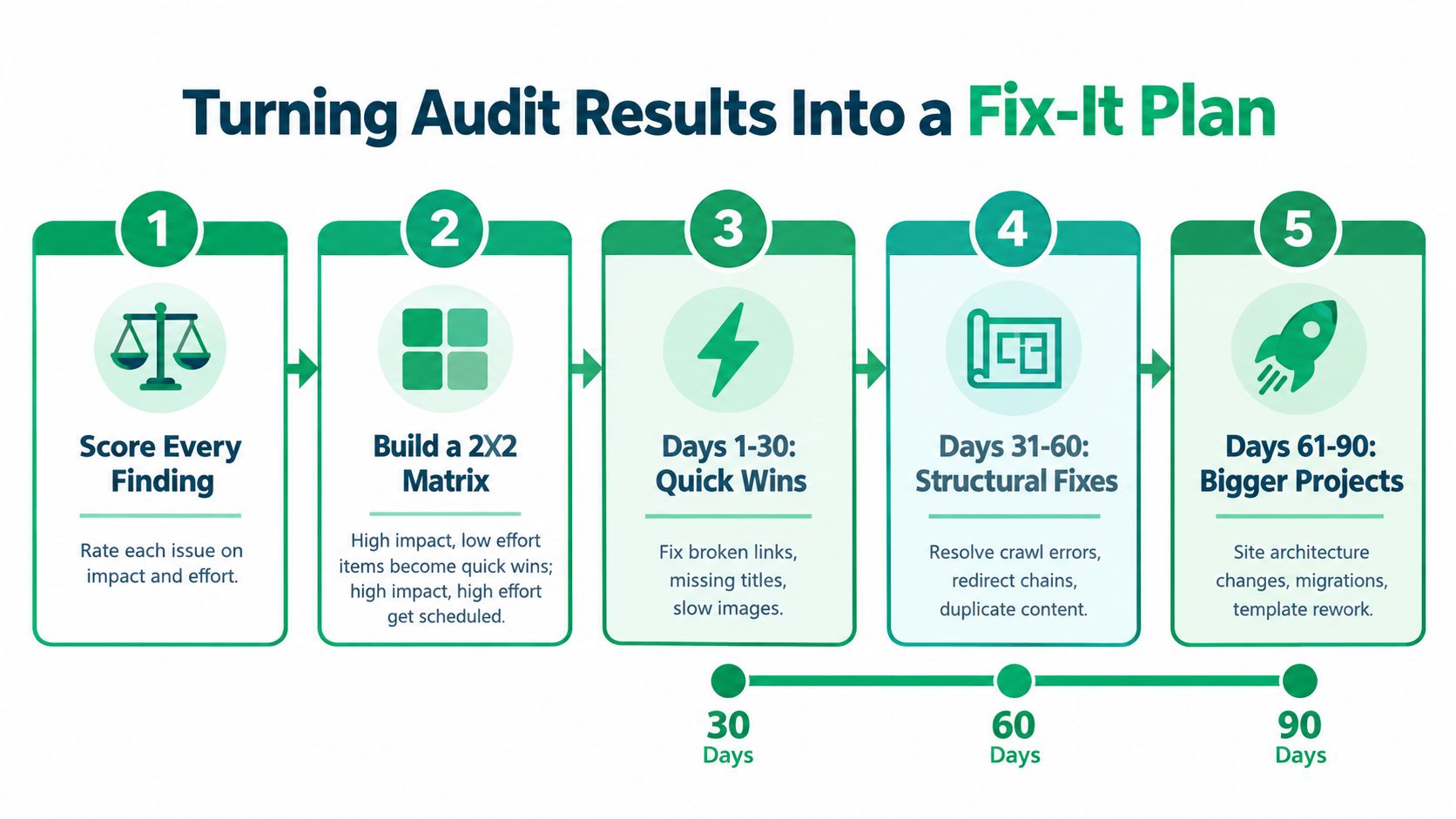
A report becomes useful when someone can act on it. Start by scoring every finding on two axes: business impact and effort to fix. Business impact includes potential effects on revenue pages, qualified traffic, enquiries, completed purchases, and important user journeys. Effort includes development time, approval steps, content work, and platform limitations.
Then place each finding into a simple matrix.
- High impact, low effort: Do these first. Examples include correcting a broken internal link, updating a missing title, or removing an incorrect noindex tag from a page that should be visible.
- High impact, high effort: Schedule these carefully. Template changes, migrations, architecture revisions, and major performance work need owners and testing.
- Lower impact, low effort: Batch these into a maintenance block.
- Lower impact, high effort: Defer them unless they support a larger project or remove a material risk.
A practical 30-60-90 day sequence
During the first 30 days, handle quick wins and urgent blockers. Assign a person to fix crawl restrictions, broken links, missing titles, and slow images on priority pages. Record the baseline before making changes so you can compare later.
From days 31 to 60, work on structural fixes. That may include redirect chains, duplicate content, template-level headings, internal-link architecture, or a more reliable sitemap process. Coordinate SEO, development, and content owners instead of passing an unranked spreadsheet between teams.
Past 60 days, schedule larger projects such as a redesign, a template rebuild, a platform migration, or a substantial content restructuring. These projects deserve testing plans and a clear definition of success.
Three findings on the matrix
A slow mobile page usually belongs in the high-impact group when it affects a core service, product, or lead form. A missing schema field may be a quick technical correction, but its priority depends on the page type and whether the markup accurately represents the content. A thin content cluster is often a larger editorial project, so it may require research, consolidation, rewriting, and internal-link updates.
Give every task one accountable owner. “Fix performance” isn't an outcome. “Improve the mobile loading experience on the top service template, then retest the affected pages” gives the team a defined job and a measurable checkpoint.
A Simple Site Audit Checklist for SMBs
Use this checklist as a working document for an employee, freelancer, developer, or agency. Start with the pages that generate enquiries, sales, or meaningful organic visits, then extend the review across the rest of the site.
Technical checks
- Robots and crawling: Confirm robots.txt doesn't block important pages.
- XML sitemap: Check that the sitemap is current and contains URLs you want search engines to discover.
- Indexability: Review noindex tags, canonical tags, redirects, duplicate URLs, and status codes.
- Performance: Test Core Web Vitals, mobile responsiveness, image loading, and JavaScript rendering.
- Security: Confirm HTTPS works consistently and investigate mixed-content warnings.
- Architecture: Review URL structure, internal links, pagination, language versions, and structured data.
On-page checks
- Titles: Give every important indexable page a unique, descriptive title.
- Meta descriptions: Write useful summaries that reflect the page and support a clear search result.
- Headings: Use a logical heading hierarchy that makes the page easy to scan.
- Internal links: Connect related pages and make priority content easy to reach.
- Images: Add descriptive alt text where an image carries meaning.
Content checks
- Thin pages: Improve, consolidate, or remove pages that offer little unique value.
- Duplicate copy: Separate pages with distinct purposes or combine competing versions.
- Freshness: Update outdated information, examples, screenshots, and offers.
- Search intent: Check whether each page answers the question behind the query.
- Calls to action: Give important pages a clear next step.
UX and conversion checks
- Mobile usability: Complete key journeys on a phone, not just on a desktop.
- Navigation: Make services, products, contact details, and supporting information easy to find.
- Forms: Label fields clearly, explain errors, and confirm successful submission.
- Accessibility: Test keyboard access, contrast, alt text, and form labels against a defined WCAG standard. An accessibility audit should define the standard, environments, page scope, and user flows, while documenting the relevant success criterion and exact issue location, as described in this accessibility audit methodology.
- Conversion paths: Follow the route from landing page to enquiry, booking, checkout, or purchase.
A stalled site usually doesn't have one dramatic flaw. It has a collection of small barriers, such as a page search engines can't index, a form mobile visitors can't complete, or content that no longer matches the customer's question. Run the checklist, connect each finding to visibility or revenue, save the baseline, and schedule the next review for the following quarter.
Mr. Green Marketing, LLC offers website SEO audits, conversion audits, and free audit and performance reports that help identify visibility and conversion gaps. Visit Mr. Green Marketing, LLC to request a review and turn your site findings into a focused growth plan.
Leave a Comment
sing in to post your comment or sign-up if you dont have any account.