
IT Support Services: And your team is working, customers are placing orders, and a critical system suddenly stops responding. The website goes offline. Staff lose access to shared files. A remote employee can’t authenticate, and nobody knows whether the problem is a local device, a cloud service, or a security incident. The first few minutes feel manageable. Then the interruptions spread.
That scenario is why IT support services deserve a place in operating budgets, not just emergency spending. Modern support covers far more than fixing laptops. It protects uptime, manages endpoints, supports cloud applications, handles vendors, strengthens security, and gives employees a reliable path to help when technology blocks revenue.
IT Support Services: Table of Contents
- Why Modern Businesses Cannot Survive Without IT Support
- The Different Types of IT Support Services Explained
- Budgeting for IT Support and Understanding Pricing Models
- Decoding Service Level Agreements and Response Times
- How Remote Work and Security Have Changed the IT Landscape
- A Practical Checklist for Choosing the Right IT Provider
- Strategic Next Steps for Optimizing Your IT Infrastructure
IT Support Services: Why Modern Businesses Cannot Survive Without IT Support
A growing business can run on a surprisingly small technology stack, but that stack carries a large share of daily operations. An online store needs its website, payment tools, inventory systems, analytics, and customer communication platforms. A professional services firm may depend on Microsoft 365, project management software, video conferencing, document storage, and secure client portals. If any of those systems fail, employees stop serving customers even when the rest of the business remains healthy.
The broader IT services economy shows the scale of this dependence. Multiple market research estimates place global IT services at roughly USD 1.5 trillion to USD 1.8 trillion in 2026, with projections commonly reaching about USD 2.5 trillion to USD 3.3 trillion by 2031 to 2034, at mid-to-high single-digit annual growth rates. The market definition includes managed services and infrastructure or network services, which reflects how support has expanded beyond break-fix troubleshooting into operational continuity and lifecycle management. See the global support services market overview for that broader context.
The real cost is operational interruption
A downtime event doesn’t only create a technology problem. It creates a coordination problem.
- Revenue stops: Customers can’t complete purchases or reach a sales representative.
- Employees improvise: Staff switch to personal devices, duplicate files, or create workarounds that introduce new risks.
- Managers lose visibility: Leaders spend time diagnosing symptoms instead of serving customers.
- Trust weakens: Repeated outages make clients question whether the company can protect their information or meet deadlines.
Practical rule: If a system supports revenue, customer delivery, compliance, or employee access, it needs an owner, a recovery process, and a defined support path.
Support also protects the digital marketing engine. A broken analytics connection can distort reporting. A website deployment issue can interrupt lead generation. A misconfigured access permission can prevent a marketing team from publishing a campaign. Businesses investing in digital marketing for small business should treat website availability, tracking, security, and platform access as part of the same operating system.
The point isn’t that every SMB needs a large internal IT department. Most don’t. The point is that every SMB needs dependable responsibility for its technology. That responsibility might come from an employee, an external provider, or a blended model. Leaving it undefined is the expensive option.
The Different Types of IT Support Services Explained
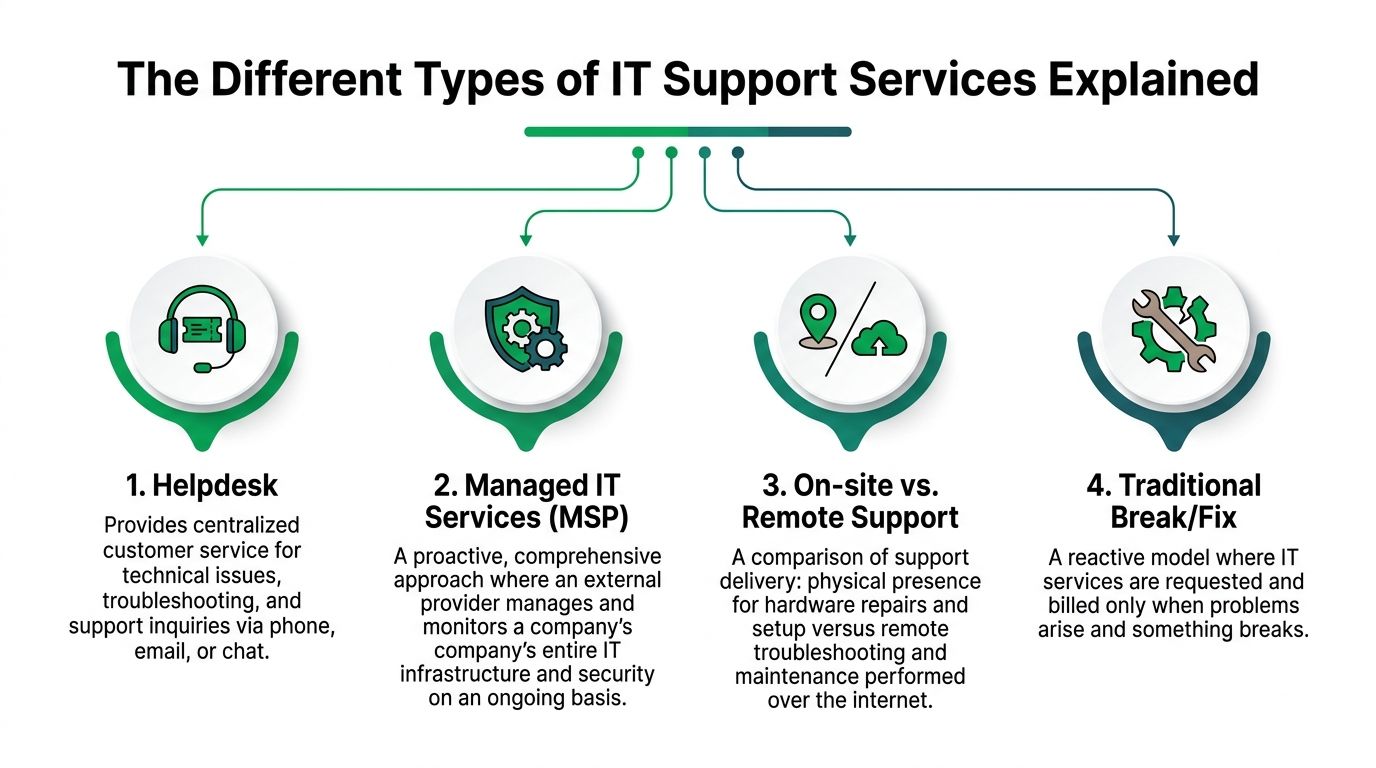
IT support models solve different problems. Choosing one starts with identifying whether you need immediate assistance, ongoing prevention, physical presence, or predictable coverage. Don’t select a provider because its plan sounds all-encompassing. Match the service model to the consequences of failure.
Helpdesk support
A helpdesk is the front door. Employees submit tickets, send emails, use chat, or call when they can’t access an application, configure a device, or complete a routine task. Strong helpdesks categorize incidents, search a maintained knowledge base, resolve common problems quickly, and escalate technical issues without making the user repeat the entire story.
This model works well when your infrastructure is stable and your main need is user assistance. It doesn’t automatically provide strategic planning, security ownership, patch management, backup oversight, or vendor coordination. Ask what sits behind the helpdesk before assuming the service is complete.
IT Support Services: Managed IT services
A managed service provider, or MSP, acts more like a primary care physician than an emergency room. The provider monitors systems, maintains endpoints, manages updates, reviews security alerts, supports cloud platforms, and helps plan technology changes before they disrupt work.
Managed support suits businesses that want a single operational partner and a predictable service relationship. It can also complement internal staff. Your employee may own business applications while the MSP manages infrastructure, endpoint health, backups, and escalation.
On-site and remote support
Remote support handles many modern incidents efficiently. A technician can troubleshoot an application, review endpoint health, guide a user through a fix, or manage a cloud account without traveling. That speed matters for distributed teams.
On-site support still has a role. Hardware failures, office networking, physical access systems, cabling, and workstation installations sometimes require someone at the location. The right question isn’t whether on-site support is old-fashioned. It’s which incidents need it, how quickly attendance is available, and whether travel fees are clear.
IT Support Services: Break-fix support
Break-fix is the emergency-room model. You call when something fails and pay for the intervention. It can make sense for a very small organization with limited dependencies and a high tolerance for disruption.
The weakness is timing. Break-fix doesn’t naturally reward prevention, documentation, or long-term system ownership. Bills can also arrive when your team is already dealing with lost productivity. Businesses considering outsourced web development should apply the same principle to IT support: define ownership before a critical digital asset becomes urgent.
IT Support Services: Budgeting for IT Support and Understanding Pricing Models
Most SMBs don’t need the cheapest IT plan. They need a support model whose cost matches the damage a failure would cause. A company with distributed employees, customer-facing systems, and sensitive data should budget differently from a small office with limited technology dependence.
Independent benchmark content places managed IT support around $100 to $200 or more per user per month, while break-fix support commonly runs $100 to $250 per hour. Some surveys estimate that SMB IT support can consume 2% to 7% of annual revenue. These figures come from SMB IT support spending benchmarks for 2025 and 2026, and they should be treated as budgeting reference points, not automatic quotes.
| Model Type | Typical Cost Range | Best For |
|---|---|---|
| Managed IT support | $100 to $200+ per user per month | Businesses that want predictable coverage and proactive maintenance |
| Break-fix support | $100 to $250 per hour | Organizations with low dependency on technology and tolerance for irregular incidents |
| Hybrid support | Varies by scope | SMBs with internal ownership that need external expertise for security, infrastructure, or escalation |
Compare the bill with the disruption
Hourly pricing can look cheaper until a serious incident consumes several hours, affects multiple employees, and requires follow-up work. A monthly plan can appear more expensive during quiet periods, but it buys planning, documentation, monitoring, and a defined route to assistance.
The important calculation is not the provider invoice. Add lost employee time, delayed orders, missed calls, failed campaigns, emergency procurement, and management attention. Then ask whether the proposed service prevents those costs or merely responds after they occur.
A 25-employee business and a 100-employee business shouldn’t receive the same package by default. For each, map users to devices, applications, locations, remote access needs, backup requirements, security controls, and support hours. Pricing becomes more understandable once the provider shows exactly what drives the fee.
IT Support Services: Watch the exclusions
Low headline pricing often excludes the work that matters during a difficult event. Review whether the agreement includes:
- After-hours coverage: Confirm whether nights, weekends, and holidays cost extra.
- Projects: Separate routine support from migrations, office moves, and application rollouts.
- Security tools: Identify which endpoint, email, identity, and monitoring products are included.
- Backup and recovery: Ask who checks backup success and who leads restoration.
- On-site work: Clarify travel, hardware handling, and attendance charges.
- User scope: Check whether contractors, temporary workers, and remote staff count as supported users.
Businesses also need to distinguish IT budgeting from marketing budgeting. A company evaluating digital marketing agency pricing packages should preserve enough technology capacity to keep websites, analytics, access controls, and campaign platforms reliable. Growth spending and support spending work together. One creates demand, the other keeps the systems able to handle it.
IT Support Services: Decoding Service Level Agreements and Response Times
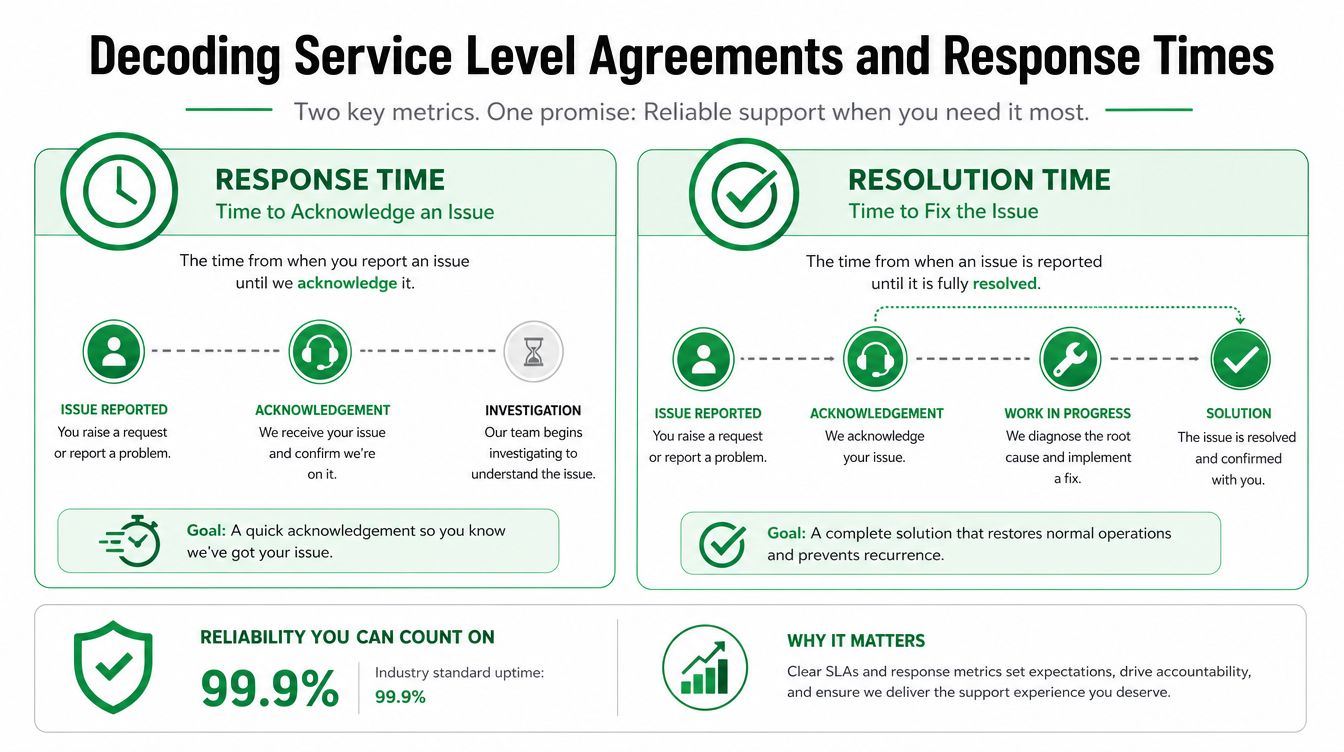
An SLA is useful only when it describes what happens after an incident begins. Many buyers focus on a single uptime figure and overlook response definitions, restoration targets, escalation rules, exclusions, and update schedules.
The uptime math is straightforward. A 99.9% uptime target allows about 8.7 hours of downtime per year, while 99.99% allows roughly 52.6 minutes, according to this technology services SLA explanation. That one-digit improvement cuts tolerated outage time by more than 90%. The promise matters only if the provider can explain how it monitors availability and handles an exception.
Response isn’t resolution
Response time means the provider acknowledges or begins handling the issue. Resolution time means the fault is fixed, a workaround is delivered, or an agreed plan is in place, depending on the contract language. A fast acknowledgment can still leave your team waiting if escalation and restoration are poorly managed.
A common benchmark sets priority targets at different levels:
- P1 critical incident: 15-minute first response.
- P2 high-priority incident: 30 to 60 minutes.
- P3 standard fault: 2 to 4 business hours.
- P4 low-priority request: About one business day.
These targets are documented in IT support SLA response-time guidance. A separate published support SLA framework dispatches P1 tickets within 15 minutes, responds within 30 minutes, and requires a resolution or plan within 1 hour. For P2 tickets, it specifies dispatch within 15 minutes, response within 45 minutes, and a resolution or plan within 2 hours.
Read the operational details
Some policies define attendance and communication, not just acknowledgment. One ticket-priority policy assigns P1 incidents a 15-minute response, on-site attendance within 4 hours, and client updates every 15 minutes. Its P2 process uses a 1-working-hour response and updates every 4 hours.
Channel expectations matter too. One SLA guide for help desks places live-chat first response under 60 seconds, email-first response within 4 business hours, and low-priority response within 24 business hours. Ask whether those targets apply to every request or only incidents that meet specific definitions.
Use an RFP for website design as a model for disciplined requirements. Specify priorities, response channels, business hours, maintenance windows, service credits, escalation contacts, and the meaning of “resolved.” Ambiguity is where SLA value disappears.
IT Support Services: How Remote Work and Security Have Changed the IT Landscape
Remote work changes the support boundary. The office is no longer the obvious perimeter, and the employee’s laptop may connect through a home network, public Wi-Fi, personal workspace, and cloud applications before reaching company data.

A helpdesk that only resets passwords and fixes software isn’t enough for a distributed team. Modern coverage should address endpoint management, identity, access permissions, device encryption, patching, backups, cloud configuration, phishing resistance, and incident escalation. The provider must know which devices exist, who can access which systems, and how to contain a compromised account or endpoint.
Security is part of support
The old separation between “IT support” and “security” creates gaps. A technician who restores access without checking suspicious login activity may solve the user’s immediate problem while leaving an attacker inside. A provider that manages devices without enforcing updates may keep employees productive while increasing exposure.
Remote and hybrid packages increasingly combine helpdesk, network and endpoint management, cybersecurity, cloud support, backups, disaster recovery, and vendor management. That bundled approach makes operational sense because the same provider can connect a user complaint to an endpoint event, identity issue, or service outage.
The cost drivers aren’t evenly distributed. A 2025 survey attributed 22% of managed IT support costs to advanced security tools and 18% to 24/7 NOC or SOC coverage, as reported in the SMB IT trends report. Those services may be necessary for a distributed team, but not every business needs identical around-the-clock coverage.
Don’t buy 24/7 monitoring as a badge. Buy the monitoring, response, and escalation your risk profile requires.
Match coverage to exposure
Start with your working pattern. A remote company handling sensitive client data may need stronger identity controls and endpoint response than a local office with limited cloud access. A business selling online may prioritize website availability, payment integrations, backups, and rapid vendor escalation.
Ask providers to separate essential controls from optional enhancements. You may need managed patching, secure access, backup verification, and defined incident response immediately. You may not need every premium security dashboard or full-time human monitoring if your systems, hours, and risk don’t justify it.
IT Support Services: A Practical Checklist for Choosing the Right IT Provider
A provider can sound polished and still be a poor operational fit. Evaluate the service you’ll receive during a stressful incident, not the presentation you receive during the sales call.
1. Test the response promise
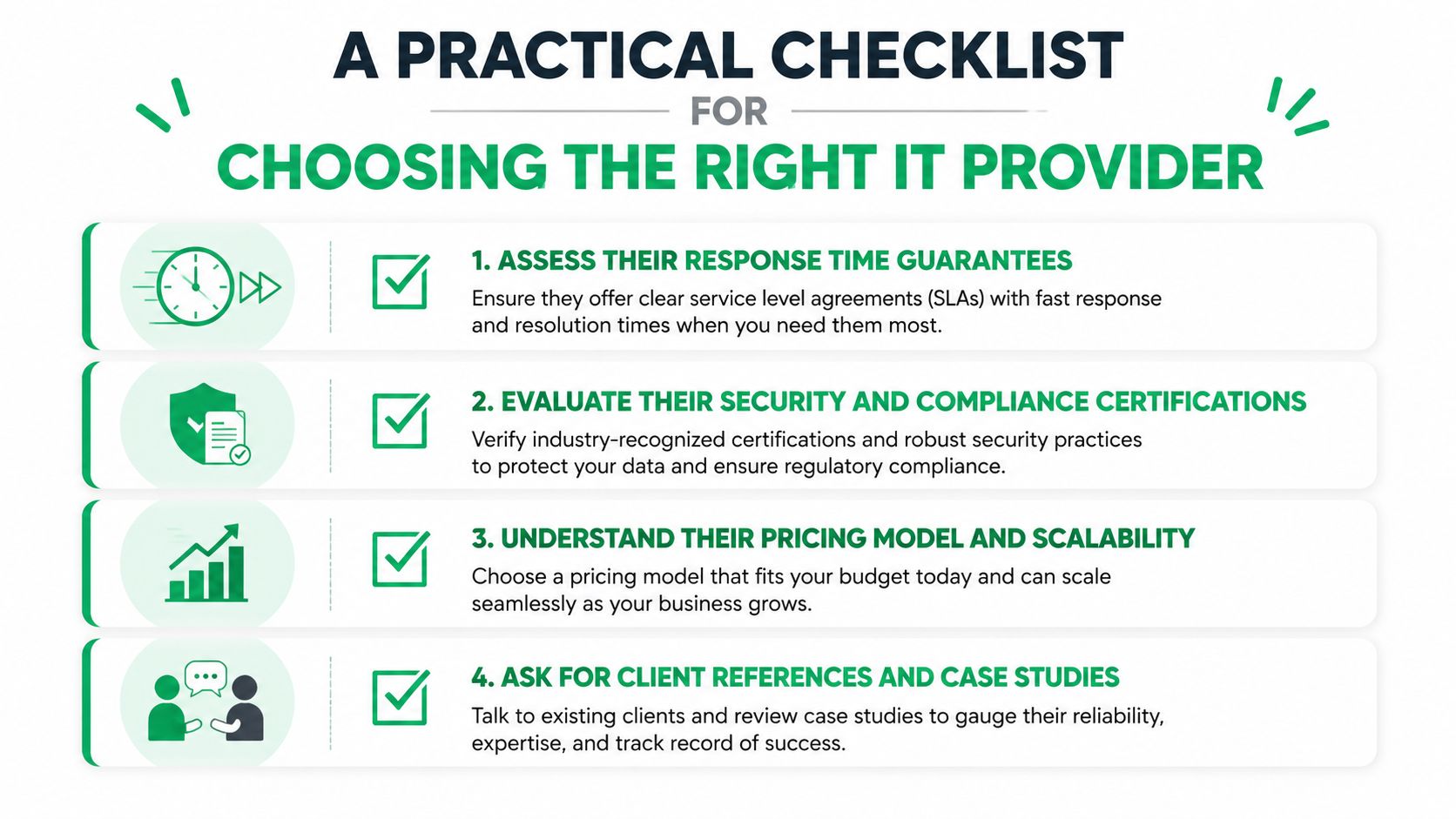
Ask the provider to define every priority level in plain language. Who can open a P1 ticket? Does the clock start when an email arrives, when a portal ticket is accepted, or when a technician reads it? Does “response” mean an automated acknowledgment or contact from a qualified person?
Request the escalation path. You should know who owns communication when the first technician can’t resolve the incident. A good provider will explain how it handles third-party outages, executive-impacting incidents, and situations where the fix requires on-site work.
2. Inspect security ownership
Don’t accept “security is included” without a list. Ask which tools and processes cover:
- Endpoint protection: What happens when a device reports suspicious activity?
- Identity controls: How are access changes, former employees, and privileged accounts handled?
- Patch management: Who monitors missing updates and exceptions?
- Backup verification: How does the provider confirm that recovery data is usable?
- Incident response: Who leads containment, communication, and restoration?
- Compliance support: Can the provider document controls relevant to your customers or industry?
Certifications can help, but they don’t replace operational evidence. Ask how the team applies its processes to an SMB with your applications and staffing model.
3. Make the pricing scalable
Have the provider build the quote from your actual environment. List users, endpoints, locations, critical applications, support hours, expected growth, project work, security tools, backup, and on-site needs. Then ask what happens when you add a user, remove a location, replace a device, or migrate a system.
Watch for contracts that price every request separately. Predictability matters, but so does flexibility. A rigid agreement can become expensive as your business changes.
4. Validate the onboarding process
Onboarding reveals whether the provider is organized. Ask for the sequence of discovery, documentation, access review, monitoring deployment, backup validation, user communication, and handoff. Require an inventory of assets and accounts, along with a clear list of unresolved risks.
Client references should discuss responsiveness, communication during incidents, billing accuracy, and transition quality. Ask what the provider doesn’t cover. Candid exclusions are safer than impressive promises with hidden boundaries.
Choose the provider that explains its limits clearly. You’re hiring judgment and accountability, not just a ticket portal.
IT Support Services: Strategic Next Steps for Optimizing Your IT Infrastructure
Start with an honest inventory. Record users, devices, applications, vendors, locations, access privileges, backup arrangements, recurring failures, and systems that directly support revenue. Mark each item as essential, important, or replaceable. This gives you a practical risk map before a provider recommends a package.
Then pursue quick wins that reduce avoidable friction. Remove unused access, document ownership, verify backup status, standardize supported devices, and create an escalation list for critical vendors. These steps won’t solve every infrastructure problem, but they make future support faster and more accountable.
Use your analytics and reporting strategy to connect technology reliability with business outcomes. If website availability, lead tracking, customer communication, or e-commerce operations matter to growth, include them in IT priorities rather than treating them as separate concerns.
The right support strategy combines predictable assistance, practical security, clear escalation, and room to scale. Review the environment regularly, measure recurring incidents, and adjust coverage when your team, applications, or risk changes. Don’t wait for a major outage to discover that nobody owns recovery.
Mr. Green Marketing, LLC helps businesses strengthen the digital systems behind growth through web design, SEO, PPC, analytics, branding, and related digital marketing services. Visit Mr. Green Marketing, LLC to request a free audit and performance report, identify visibility gaps, and prioritize practical improvements across your online infrastructure.
Leave a Comment
sing in to post your comment or sign-up if you dont have any account.