
SEO Website Redesign: You’re a few days from launch. The mockups look polished, the homepage finally feels modern, and someone in the room says the site is “ready.” That’s usually the moment the risk gets underestimated, because the redesign isn’t just a visual refresh. It’s a migration of the organic channel that has been carrying leads, revenue, and brand discovery in the background.
A seo website redesign lives or dies on what happens to the pages people already trust. If the old site was brought on by low conversions, high bounce rates, weak mobile UX, or poor SEO fit, those same pain points can get worse fast if the migration is sloppy, especially when redirect mapping, content preservation, measurement, and mobile behavior aren’t treated as part of the launch plan. The safest teams don’t treat SEO as a cleanup task after design approval. They run it in parallel from day one, with a saved baseline they can compare against when everybody’s inbox starts filling up after launch.
SEO Website Redesign: Table of Contents
- The Redesign Moment Agencies Rush Through
- Running the Pre-Launch SEO Audit That Sets the Baseline
- Mapping URLs, Content, and Keywords to the New Site
- Setting Up the Technical Foundations Before Launch
- Staging and Testing the Redesign Before It Goes Live
- Running a Disciplined Launch Day and First Week
- Monitoring, Diagnosing, and Recovering in the First 90 Days
SEO Website Redesign: The Redesign Moment Agencies Rush Through
Traffic is steady on Tuesday morning, then the new site goes live on Thursday. The old product pages disappear, the navigation feels cleaner, and the team breathes easier. Then Search Console starts showing crawl issues, a few high-intent pages stop ranking where they used to, and the sales team notices that forms are not firing the way they did before.
That pattern is common. In a 2020 survey cited by Neil Patel, 80.8% of redesigns were driven by low conversion rates, 65% by high bounce rates, 61% by the need for better UX, 53.8% because the site was not responsive on all devices, and 23.1% because it was not SEO-friendly, which is a good reminder that redesigns usually begin as fixes for measurable friction, not vanity projects. That same friction is exactly what a bad migration can amplify, because a prettier layout does not matter if the site breaks rankings, indexing, or internal linking after launch. Neil Patel’s breakdown of redesign risk
What matters is the organic channel, not the mockup
Practical rule: treat the redesign as a search migration with a design layer on top, not a design project with SEO sprinkled in later.
The teams that get this right usually do one thing early. They document what already works. That baseline becomes the only honest comparison after launch, especially when people are tempted to judge success by visuals or stakeholder excitement instead of organic sessions, rankings, conversions, and bounce rate.
Mobile behavior also shapes the outcome. Forbes Advisor reports that 45% of web traffic in North America comes from mobile devices, so a redesign that improves mobile usability can protect a big portion of organic demand, while one that slows mobile rendering or hides key content can damage visibility fast. The redesign moment is never just “How does it look?” It is “What happens to the traffic that already knows this brand?” Brightspot on redesign SEO risk
A good starting point is to align the redesign brief with the business case, the page architecture, and the risk list. A solid RFP for website design needs SEO, analytics, and conversion requirements in the same document as creative goals.
SEO Website Redesign: Running the Pre-Launch SEO Audit That Sets the Baseline
The pre-launch audit isn’t a deliverable for the folder, it’s the evidence file for launch week. If traffic dips later, the team needs to know whether the new site caused it, whether the old site was already trending down, or whether a tracking problem is hiding the complete picture. Search Engine Land recommends saving GA4, Search Console, and server-log data before any changes are made, which is exactly where the audit should begin. Search Engine Land’s redesign checklist
Build the baseline before a single template changes
Start with a full crawl of the current site. Export every URL, title tag, meta description, H1, and inbound link, then save the current XML sitemap and server-log data. That gives the SEO team a map of what exists today, which pages matter, and where the strongest signals are already concentrated.
Next, pull baseline performance from GA4 and Search Console. You want impressions, clicks, CTR, organic sessions, organic users, bounce rate, and conversions captured before redesign work begins. If the project team can’t compare post-launch data back to this set, they’re flying blind.
A practical inventory should also cover things most redesigns forget:
- Forms and funnels: every lead form, quote request, checkout step, and multi-step submission path.
- Measurement assets: GA4 events, conversion tags, consent mode, CMP behavior, and server-side tracking.
- Paid landing pages: campaigns that depend on old URLs and legacy tracking.
- High-value URLs: the top pages that carry organic traffic, revenue, or assisted conversions.
Practical rule: don’t call the audit “done” until someone can point to the pages, tags, and funnels that must survive launch unchanged or improved.
The point isn’t to create more paperwork. It’s to protect the assets that fund the redesign. If the site appears healthy in a crawl but lead capture is broken, the launch has still failed from a business standpoint.
For a fuller methodical pass, a proper SEO audit should sit alongside the redesign plan, not after it. The same baseline discipline also helps a team spot which pages are carrying the most weight so they don’t get rewritten out of recognition when the new sitemap gets built.
SEO Website Redesign: Mapping URLs, Content, and Keywords to the New Site
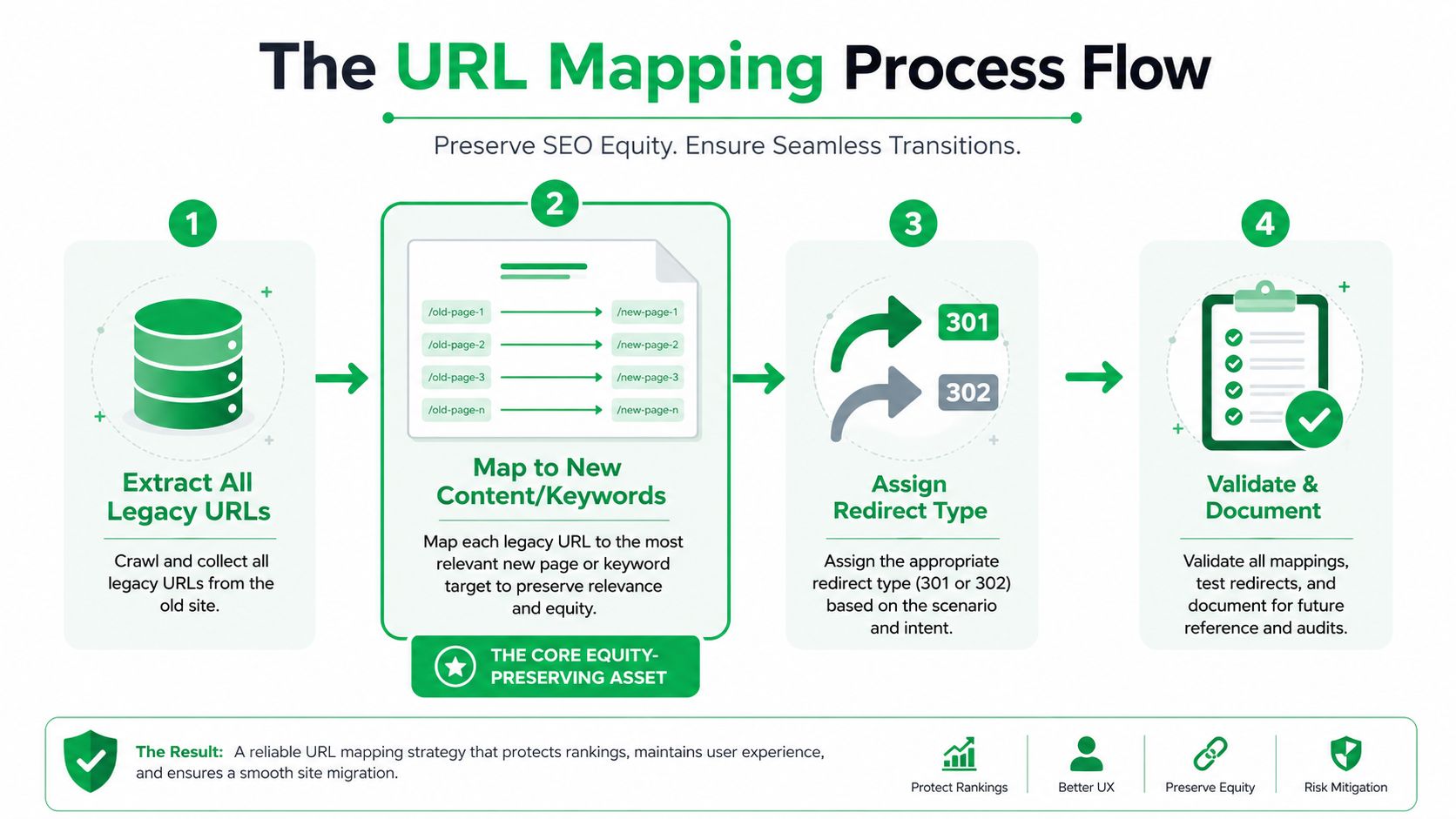
The URL map is the document that decides whether the redesign preserves or burns organic equity. Every page that changes location needs a destination, and that destination needs to make sense for users and search engines. The cleanest migrations treat this as a one-to-one decision tree, not a creative exercise.
Use redirect decisions, not guesswork
The first move is simple. Match each old URL to a new URL, then decide whether that page should be preserved, merged, or retired. High-performing pages should usually stay alive in some form, while thin or overlapping pages can sometimes be consolidated into a stronger destination. If a page’s intent no longer matches anything on the new site, redirect it to the closest relevant parent, not the homepage by default.
Redirect type matters too. Use 301 redirects for permanent moves, not temporary 302s. Test for redirect chains and loops before launch, because each extra hop adds friction and makes migration errors harder to debug once the site is live. The best practice is clear on this point, permanent redirects preserve the path from old content to new content, while temporary ones signal the change is not final. E9 Digital’s redesign checklist
SEO Website Redesign: Map keywords to the new sitemap, not just pages
The next layer is keyword assignment. Each priority query needs a target URL on the new site, and that target should reflect search intent rather than internal department structure. If the architecture is being reshaped, keep essential pages within three clicks of the homepage, use a clear category and subcategory hierarchy, and add breadcrumbs so the crawl path and the user path both stay readable. Hashe’s redesign checklist
That matters because content is not filler in a redesign. It’s an SEO asset. Headings, body copy, schema, alt text, and internal links should be preserved or improved, not stripped out in the rush to make a page look cleaner. Shopify’s redesign guidance also pushes the same point, keep high-value pages, refresh rather than delete strong content, and validate the redirect logic before anything ships. Shopify’s website redesign SEO guide
The actual working document should show:
- Old URL
- New URL
- Redirect type
- Primary keyword target
- Content action, preserve, merge, or retire
- Internal link updates needed
For a site moving through this process, a sitemap validation workflow keeps the mapping from becoming a pile of disconnected decisions. And if the page structure is being refactored at the same time, keep the content hierarchy readable rather than trying to reinvent every template from scratch.
Setting Up the Technical Foundations Before Launch
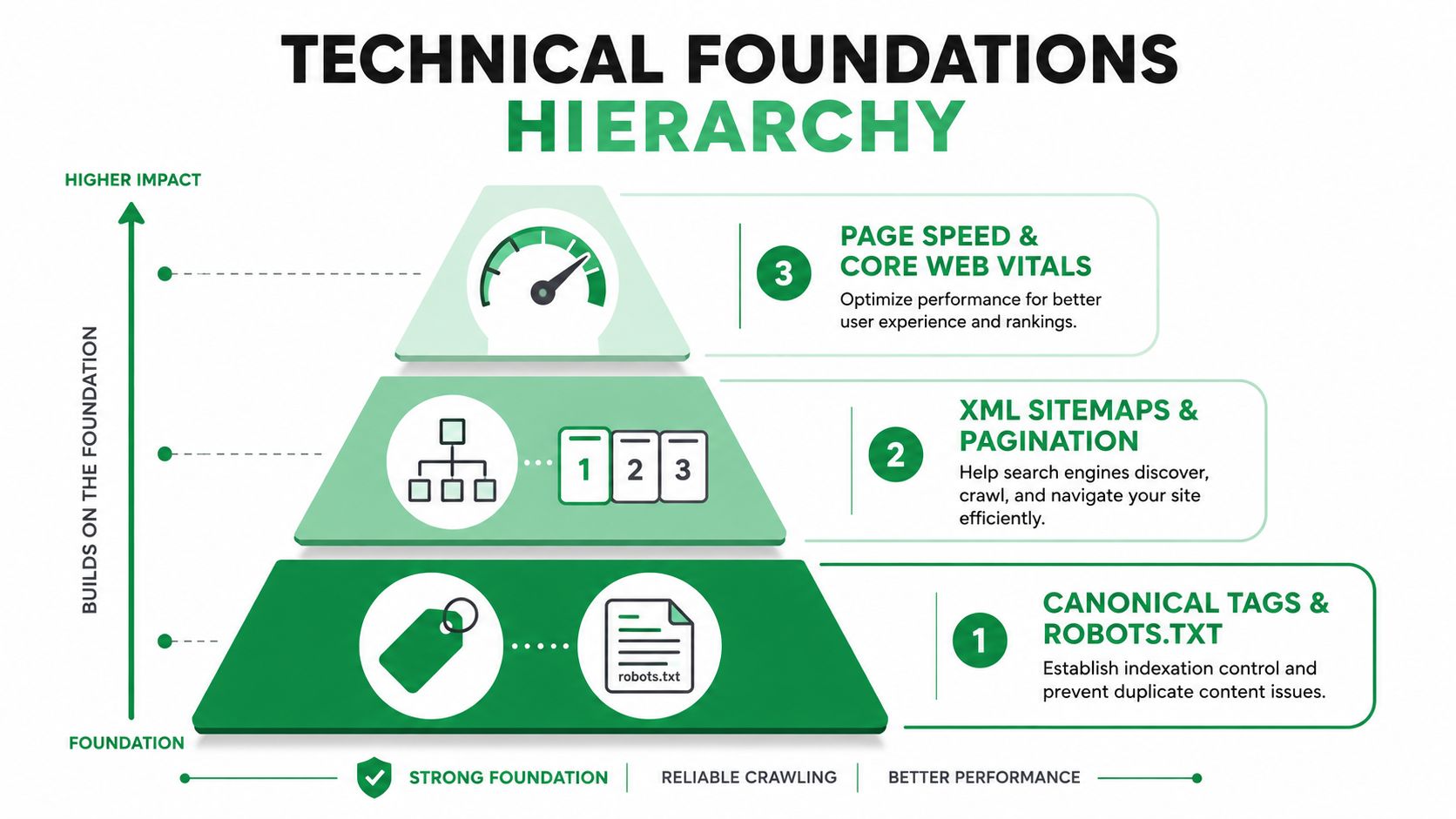
A redesign can look finished in design review and still break search once it hits production. The problems usually sit in the technical layer, where canonical tags point to the wrong place, schema disappears during the template rebuild, or mobile rendering hides content that used to be visible to crawlers and users.
Protect indexing signals first
Canonical tags need to point to the final live URLs, not staging versions or temporary paths. XML sitemaps should match the new architecture, and robots rules need a fresh check so important content remains crawlable. If the new templates introduce pagination, structured collections, or category pages, the crawl logic has to make sense on day one, not after cleanup.
Schema needs the same attention. If the old pages used structured data, validate the new markup against the current output and confirm the content still supports it. A redesign can strip away the visible cues search engines used to understand a page, even when the page looks cleaner to humans. For a closer look at structured data implementation, schema markup for SEO belongs in the technical checklist before launch.
SEO Website Redesign: Measurement integrity is part of SEO now
The failure mode that gets missed most often is measurement drift. GA4 events, conversion tags, consent mode, CMP behavior, and server-side tracking need to be rebuilt against the new DOM, not assumed to survive the redesign on their own. If those assets break, the site may still rank, but the team will not know whether rankings are producing leads, revenue, or dead sessions.
A redesign can look successful in Search Console and still fail in the CRM if the forms or event tracking stop firing.
That is why conversion-critical assets should be treated as migration objects alongside redirects and metadata. In practice, that means forms get tested on staging, event names are checked against the new templates, and any consent dependencies are documented before go-live. A clean split is to have technical SEO own crawlability and indexing, while analytics and CRO own measurement recovery.
For teams that need help pressure-testing the UX layer, UX testing services can expose interaction problems before launch. Mr. Green Marketing, LLC also works across site design, SEO, and tracking setup, so the same team can keep the migration from splitting into disconnected tasks.
SEO Website Redesign: Staging and Testing the Redesign Before It Goes Live
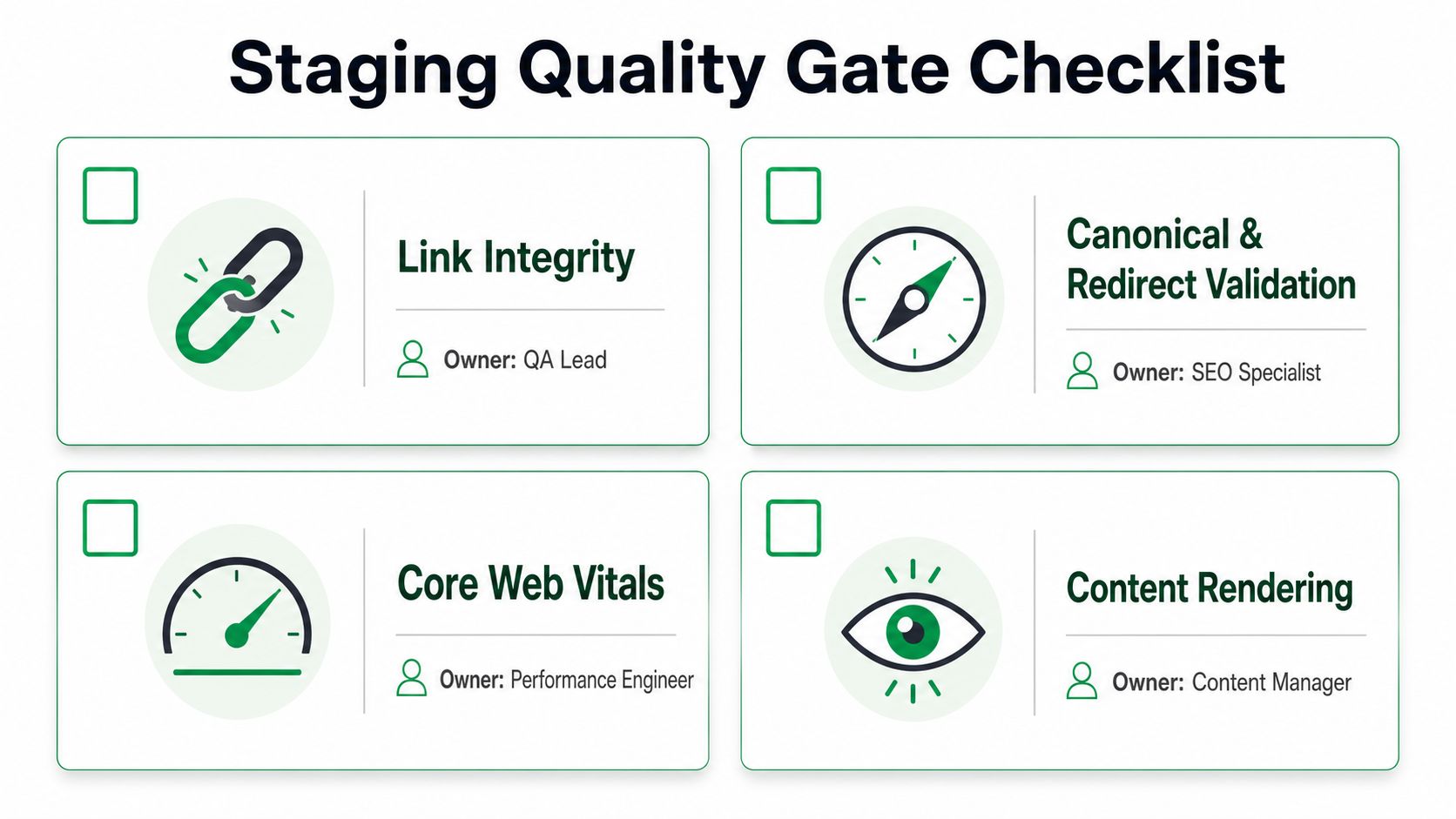
Staging is the quality gate. If a problem can be caught there, it should never reach production. Teams that treat staging as a visual approval screen usually find missing titles, broken redirects, and untracked forms after launch, which is the most expensive place to discover them.
Compare the old crawl to the staging crawl
Run a full crawl of staging and compare it with a crawl of the current site. Look for missing titles, duplicate metadata, absent H1s, orphaned pages, and lost internal links. If a high-value page has been rewritten so aggressively that the topic signal is weak, flag it before the site goes live.
Then spot-check the redirect map. Every important old URL should resolve with the right status code and land on the intended page without chains or loops. Any mismatch between source and destination needs to be corrected while the site is still behind the curtain. If the redirect path is messy in staging, it will be worse once traffic starts hitting it at scale.
Test the content and measurement stack together
Content QA should look for thin copy, duplicated modules, and pages that ended up orphaned by the new navigation. Mobile rendering should be checked on real devices and viewport sizes, not just in a desktop browser with a responsive preview. Core Web Vitals should be measured on the same page types the old site uses so the redesign does not regress the conditions it was meant to improve.
Measurement QA belongs in the same pass. Forms need to submit cleanly and send the right lead or order signal. GA4 events should fire on the correct interactions, consent mode and CMP behavior should not block legitimate reporting, and ad conversion tracking must still attach to the new templates. Server-side tracking, if the site uses it, should be verified against the new DOM rather than assumed to survive the redesign on its own.
If a form works but the event never fires, the site can still sell, but the reporting story breaks.
Teams that need a stronger handoff on the UX side can use UX testing services to expose interaction problems before launch. That review is more useful before deployment than after, when a bad form flow or broken interaction has already hit search traffic and paid traffic at the same time.
SEO Website Redesign: Running a Disciplined Launch Day and First Week
Launch day should feel controlled, not heroic. The project team needs a plan that says who deploys, who watches Search Console, who checks redirects, and who has the authority to pause or roll back if something serious breaks. A redesign launch is not one event, it’s a series of checks inside a time window.
Deploy during a low-traffic period when the team can watch the site closely. Submit the updated XML sitemap to Google and Bing, then verify that the new pages are getting crawled and that the old URLs are resolving the way the mapping document said they would. During the first 48 hours, Search Console deserves repeated checks for crawl errors, because that’s where early redirect and indexing problems usually show up first.
SEO Website Redesign: Focus on the highest-value pages first
The audit should already have identified the top pages that drive the majority of organic value. Those are the pages to monitor first, because they’re the ones most likely to hurt revenue if they wobble. If those pages start returning errors, losing traffic abruptly, or redirecting to the wrong destination, the team should fix the issue immediately rather than waiting to see if it settles.
A normal wobble looks like minor index churn, temporary ranking fluctuation, or a few stale cache issues. A serious problem looks like mass 404s, broken forms, missing tracking, or a pattern of redirects landing in the wrong place.
Keep communication tighter than the tech stack
Internal communication matters almost as much as the technical checklist. Someone needs to own Search Console verification, someone needs to watch analytics, and someone needs to tell leadership whether a dip is temporary volatility or a real regression. The worst launch days usually involve too many people watching dashboards and nobody making a decision.
If you have to choose between panic and calm, choose calm with receipts. A launch team that understands which pages matter and which errors are expected can separate noise from actual failure much faster.
Monitoring, Diagnosing, and Recovering in the First 90 Days
The first 90 days decide whether a redesign settles into a stronger traffic pattern or becomes a slow bleed. That period needs a monitoring cadence, not occasional checking. Search Console, GA4, and crawl data should all be part of the same view, because rankings alone never tell the full story.
Use the baseline as the truth source
Compare Search Console impressions, clicks, CTR, and average position against the saved baseline for the priority URL set. In parallel, watch GA4 for organic sessions, bounce rate, and conversion rate against pre-launch levels. If those signals move in different directions, the team should assume there’s a tracking, content, or indexing issue somewhere in the chain.
Weekly re-crawls catch problems introduced after launch, especially when editors or developers make post-launch changes. Look for new 404s, redirect chains, canonical drift, missing metadata, and pages that lost internal links when the site went from staging to production. That’s often where the damage shows up, not in the first deploy, but in the cleanup work that follows.
Use a simple action table
| Time Window | Metric | Normal Volatility | Investigate | Take Action |
|---|---|---|---|---|
| First 48 hours | Crawl errors | A few new URLs or stale cache effects | Repeated 404s on priority pages | Fix redirects, sitemap, or canonical issues |
| First 2 weeks | Organic sessions | Small fluctuations by page type | Clear drop on key landing pages | Check indexing, internal links, and content parity |
| First 30 days | Conversions | Minor reporting lag or attribution shifts | Forms or events stop matching baseline | Repair tags, consent logic, or form handling |
| First 90 days | Rankings and average position | Normal movement during reprocessing | Sustained loss on priority keywords | Revisit page intent, linking, and redirect mapping |
The recovery moves are usually straightforward once the issue is identified. Restore deleted pages if they mattered. Tighten internal links where the new hierarchy buried important URLs. Refresh thin content if the new page lost the context that made it rank.
This is also where teams learn whether the redesign solved the business problem that triggered it. If the site is easier to use, cleaner to crawl, and better at capturing leads, the migration did its job. If not, the design may have improved appearances while the channel underneath stayed broken.
If you’re planning a redesign and want the SEO, analytics, and conversion pieces handled as one migration instead of separate emergencies, Mr. Green Marketing, LLC builds those workstreams together. Visit Mr. Green Marketing, LLC to request a free audit and performance report, then use it to map the pages, tags, and tracking that need to survive your next launch.
Leave a Comment
sing in to post your comment or sign-up if you dont have any account.