
The dashboard says clicks are climbing. The search terms look busy, and the campaign has spent its monthly budget. But the dental practice still has empty appointment slots, the skincare store's revenue hasn't moved, and the SaaS team is getting trial sign-ups that never become sales conversations. Your boss wants an answer by Friday.
That's where PPC campaign optimization often goes sideways. The temptation is to change bids because bids are visible and quick to adjust. The harder, more useful work is checking whether the campaign is measuring the right outcome, reaching the right intent, and making a convincing promise that the landing page fulfills.
Table of Contents
- The Optimization Trap Most PPC Accounts Fall Into
- Structuring Accounts for Real Optimization
- Bidding Strategies That Actually Fit Your Volume
- Ad Copy That Matches Search Intent
- Landing Pages and Targeting That Lift Conversion Rate
- Testing and Incrementality on Small Budgets
- Troubleshooting and Your Operator Checklist
The Optimization Trap Most PPC Accounts Fall Into
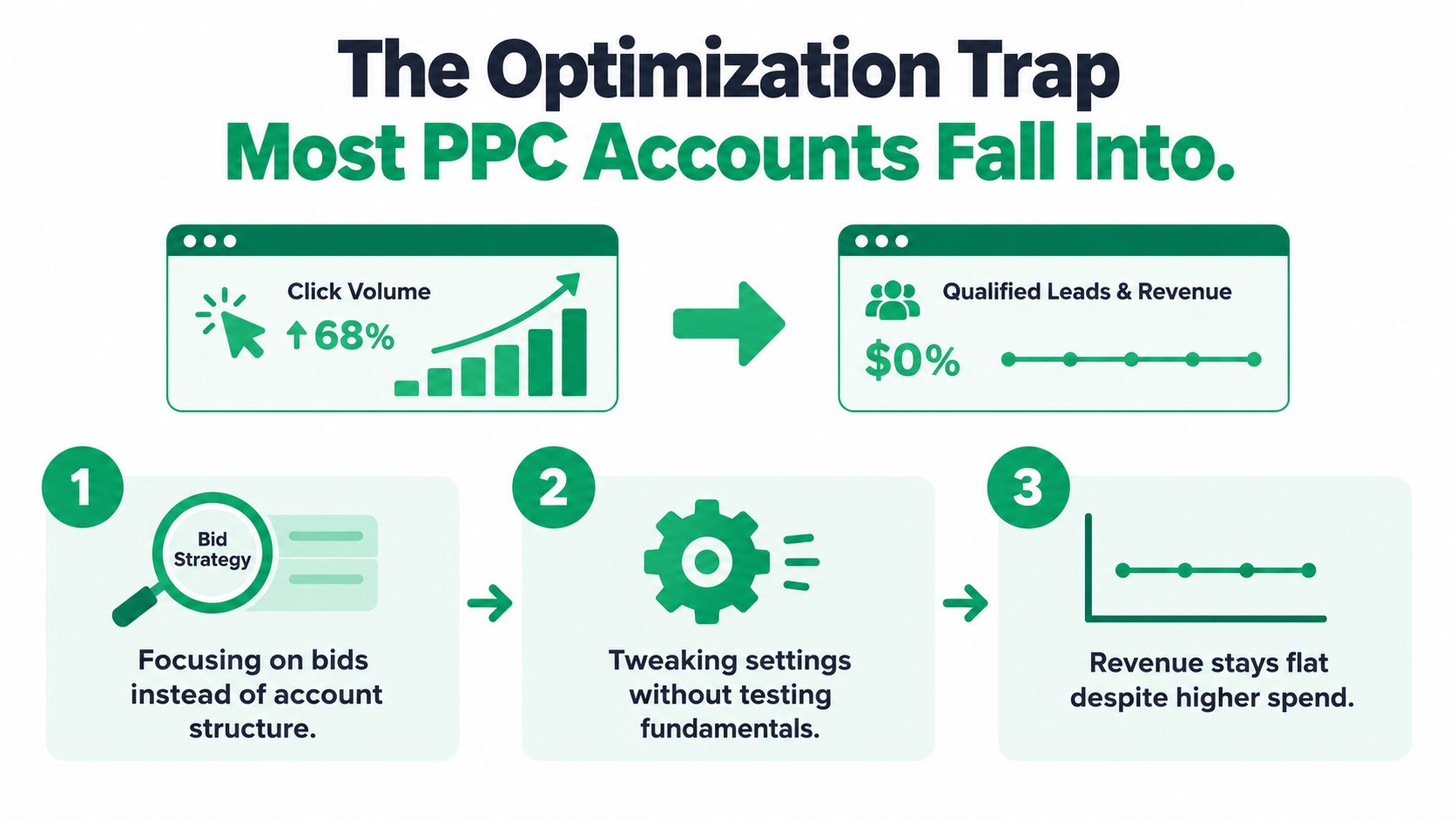
A common stalled-account pattern looks deceptively healthy: more clicks, a rising cost per acquisition, and qualified leads that barely move. A local dental practice may be counting every appointment-form start as a conversion, even when the patient doesn't book. A DTC skincare brand may optimize toward product-page visits instead of purchases. A B2B SaaS team may count a free-trial registration as equal to a sales-qualified opportunity.
Those aren't just reporting quirks. If an advertising platform receives weak or incomplete conversion signals, automated bidding can pursue the easiest recorded action rather than the business result you need. Start with four connected moves: define the outcome, validate measurement, inspect the account structure, and assess the message and post-click experience.
Make the conversion signal worth optimizing
Choose one or more conversion actions that represent business value: a qualified lead, a booked appointment, a completed purchase, or revenue. Implement the platform's conversion tag on the event that represents that action, then verify that it fires once, attributes correctly, and passes value when applicable. A form-start event can still be useful for analysis, but it shouldn't stand in for a qualified lead.
Google says conversion tracking helps identify which ads drive valuable customer actions and supports optimization toward business goals. For many Smart Bidding strategies, Google recommends evaluating performance over a period containing at least 30 conversions, typically a month or longer; Target ROAS is generally evaluated with at least 50 conversions (Google's Smart Bidding guidance). If your account isn't generating that volume, avoid treating a few volatile days as proof that an automated strategy has succeeded or failed.
Next, segment performance by campaign, search term, device, geography, audience, and landing page. This gives you a practical way to spot a mismatch, such as mobile traffic generating form starts but few qualified leads, or a particular search theme spending without producing business outcomes.
Before changing anything: Write down the hypothesis, primary KPI, guardrail metrics, start date, traffic allocation, and stopping rule. If you can't say what result would make you keep or undo the change, it's not a controlled optimization.
Clicks can tell you whether an ad attracted attention. They can't tell you, on their own, whether the traffic had value. Optimizing to clicks or platform-reported leads while ignoring lead quality, duplicate events, and revenue can teach the bidding system to find inexpensive but commercially weak actions.
Structuring Accounts for Real Optimization
Account structure determines whether you can distinguish one kind of demand from another. Organize campaigns around business goals and meaningful intent groups, then keep ad groups focused enough that a search theme, ad, and landing page make sense together. A sprawling ad group with emergency HVAC, maintenance, and installation searches makes it harder to write relevant copy and harder to identify what needs fixing.

Group by intent, then use diagnostics
A national HVAC advertiser might separate emergency repair, installation, and routine maintenance into distinct themes, each with its own ads and destination. That structure makes it easier to find irrelevant searches and apply negative keywords deliberately. It also gives you cleaner performance comparisons without raising bids to compensate for a relevance problem.
Match types and negatives are operating controls, not housekeeping. Review search terms, preserve the useful queries, and exclude terms that clearly signal the wrong service, location, or purchase intent. Don't respond to every weak result by adding more keywords. Sometimes the account already has enough demand; it's just grouped so broadly that the reporting hides what's working.
Google Ads reports Quality Score at the keyword level on a 1–10 scale. Its three components are expected click-through rate, ad relevance, and landing-page experience, each marked Below average, Average, or Above average against comparable auction performance over the previous 90 days. Google explicitly describes Quality Score as a diagnostic signal, not a direct input to the auction (Google's Quality Score guide).
Use those component statuses to choose a practical next step. Weak ad relevance points toward a keyword-to-ad mismatch; weak landing-page experience suggests looking beyond the ad itself. Don't chase a higher score as an end in itself. The point is to find friction that affects the customer journey and improve the account's ability to make useful decisions.
Bidding Strategies That Actually Fit Your Volume
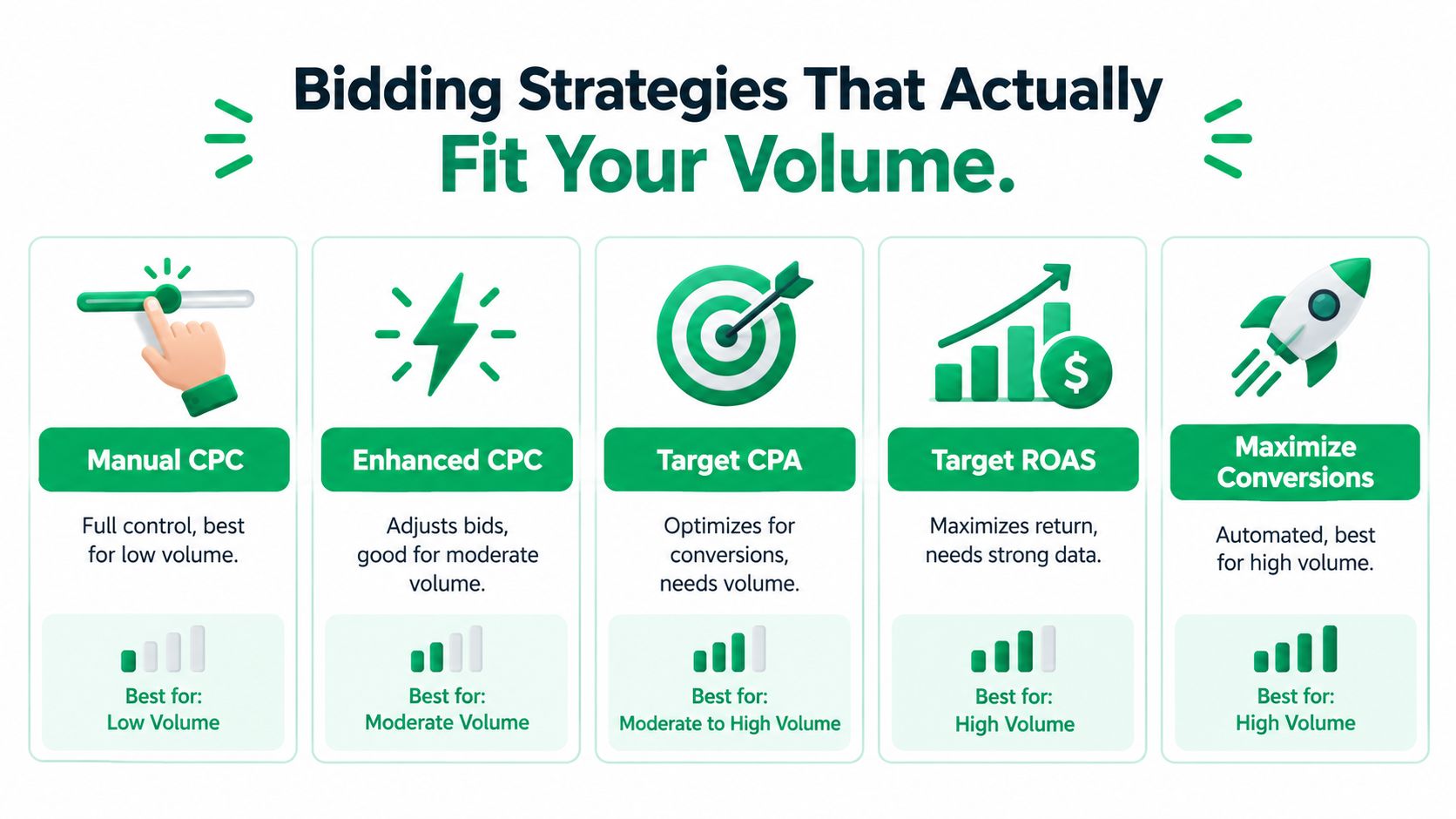
Bidding isn't a shortcut around poor measurement or thin data. The useful strategy depends on how much control you need and whether the account's conversion history can support the system's goal. With a small budget and roughly one conversion a day, a new bidding strategy may be less important than ensuring the conversion is real, valuable, and assigned to the right campaign goal.
Choose for the account you have
| Strategy | What it does | When it can make sense |
|---|---|---|
| Manual CPC | Lets you set bids directly. | Useful when conversion volume is limited and you need hands-on control. |
| Enhanced CPC | Adjusts manual bids in response to signals. | Consider it when you want some automation but still want a manual foundation. |
| Maximize Conversions | Uses auction-time bidding to seek conversions. | More suitable when conversion tracking is reliable and the account can generate meaningful volume. |
| Target CPA | Optimizes toward a cost-per-acquisition target. | Use when the target reflects viable economics and there's enough conversion evidence to evaluate it. |
| Target ROAS | Optimizes toward conversion value relative to spend. | Requires trustworthy value tracking and a stronger conversion dataset. |
Smart Bidding adjusts bids for conversions or conversion value in each individual auction. But the system optimizes against the conversion actions the campaign is configured to use. A tracked event isn't automatically a bidding target: Google says an action must be marked Primary and included in the campaign's selected goal for bidding to use it (Google's conversion-action settings). If page views or form starts are Primary while qualified leads are not, the campaign may pursue the wrong outcome efficiently.
Portfolio bidding can help manage related campaigns under a shared strategy, but it doesn't fix a bad signal. Nor does a more aggressive Target ROAS target create revenue where the account lacks reliable value data. For a small account, manual control and clean structure can be the sensible holding pattern while better conversion feedback accumulates.
Use the strategy that matches the evidence you have, not the one that sounds most advanced. For more detail on that decision, see this PPC bid strategy guide.
Ad Copy That Matches Search Intent
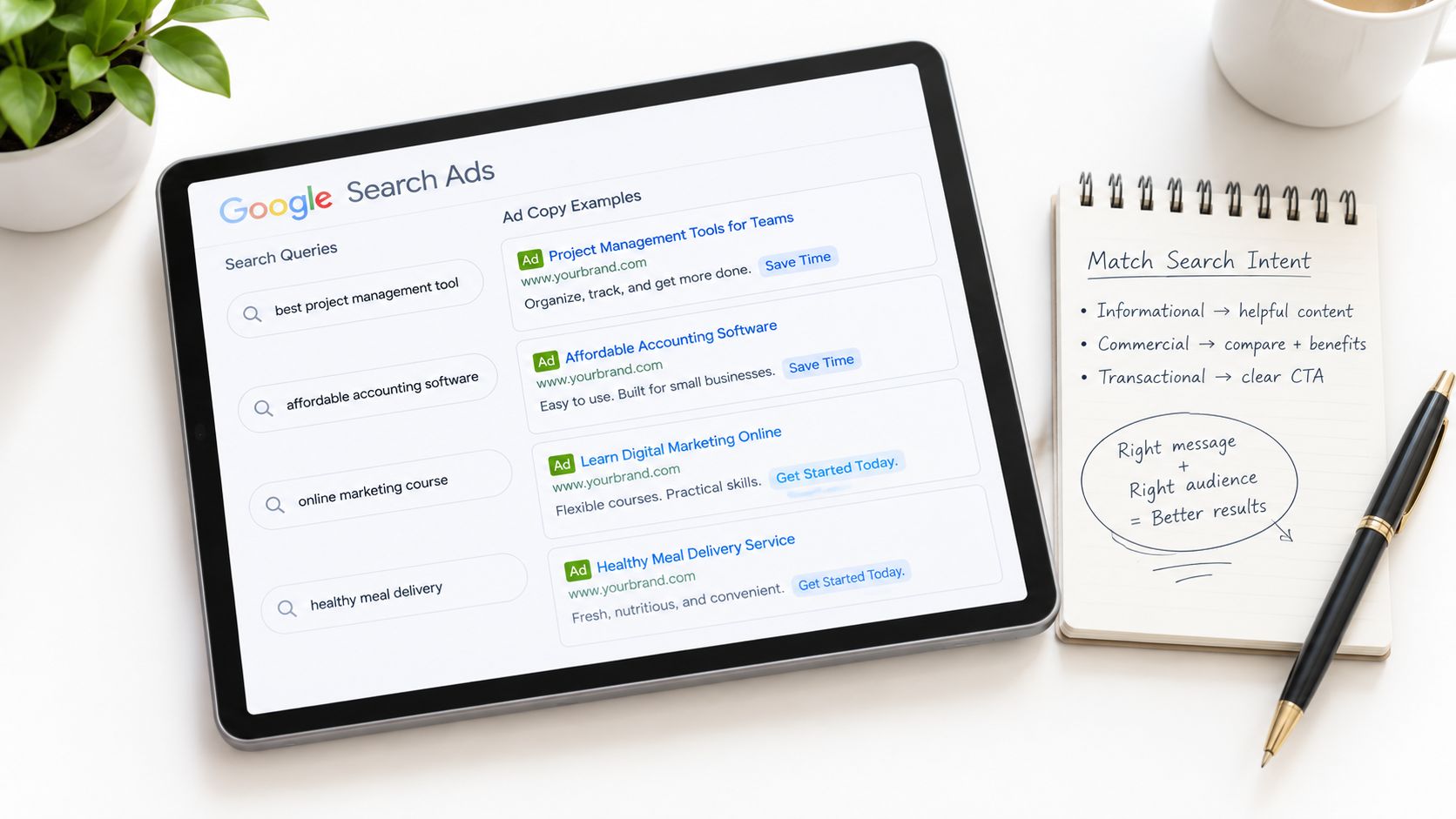
A high-intent search deserves an ad that answers the searcher's actual question. “Quality service at great prices” doesn't tell someone whether you handle emergency plumbing in their area. “Shop skincare” doesn't distinguish a product for sensitive skin from a general catalog. Specificity gives the right prospect a reason to click and helps discourage the wrong one.
Write to the search, not to the account
Build responsive search ads around a clear value proposition, then make sure the language fits the ad group's theme. A local service ad should make the service and service area obvious. An e-commerce ad should reflect the product category and the offer available on the destination page. Don't promise an appointment, price, or promotion that the landing page can't support.
Use sitelinks, callouts, and structured snippets to add useful details, not filler. A sitelink can take a searcher directly to a relevant service or product range. A callout can clarify a meaningful point of difference. If the extension doesn't help someone decide or find their way, it's just extra copy.
Quality Score diagnostics help separate a copy issue from a post-click issue. Weak expected click-through rate may point to a message that isn't compelling for the query; weak ad relevance can indicate that the ad group is too broad or the copy is mismatched. Don't assume every low status calls for a bid increase.
Google's Ad Rank determines both whether an ad is eligible to show and its position. It considers the bid, ad and landing-page quality, relevance and usefulness, expected post-click experience, and other auction-time signals; minimum thresholds can prevent an ad from appearing even when it has a bid (Google's Ad Rank explanation). A polished ad can't compensate for weak relevance or an unhelpful destination. For practical ways to sharpen the message, use this guide to improving click-through rates.
Landing Pages and Targeting That Lift Conversion Rate
The click is a handoff, not a win. If the ad promises a consultation but the landing page opens with a generic company introduction, you've made the visitor do extra work. Keep the message consistent from query to ad to page, place one clear call to action where it's easy to find, and make the next step feel straightforward on mobile.
Remove friction before adding audience layers
Look at the page as a prospect would. Does the headline repeat the ad's promise? Is the form asking only for information needed at this stage? Are trust signals visible near the decision point? A regional law firm, for example, might test a more specific hero message and a shorter inquiry form. Treat any improvement as a hypothesis to verify against qualified inquiries, not a result to assume in advance.
Audience options such as in-market, affinity, custom intent, customer match, and demographic layers can help focus analysis, but a small account can't afford to shrink reach blindly. When you're unsure whether an audience belongs in the core targeting, compare it in observation mode first. Move to targeting mode only when the evidence supports narrowing delivery.
Attribution also affects how you judge the post-click path. Google's data-driven attribution assigns credit according to observed contributions from eligible ad interactions across the customer journey rather than giving all credit to the final interaction. Google recommends at least 200 conversions and 2,000 ad interactions within 30 days to give the model enough data to analyze patterns (Google's data-driven attribution guidance). If your account doesn't meet that recommended volume, avoid treating a modeled view of assist value as certainty.
Post-click work can improve the value of the traffic you already buy, but only when you measure the right outcome. Use this landing-page creation guide to review the page's message, action, and friction before expanding targeting.
Testing and Incrementality on Small Budgets
More data isn't automatically better data. A small account can collect plenty of clicks and still have too few qualified outcomes to tell whether a change helped. On tight budgets, simplify before you scale: consolidate overlapping campaigns, focus on a primary business conversion, and feed qualified-lead or revenue outcomes back where you can.
Test one meaningful change at a time
For a major change to budget allocation, bidding, match types, creative, or landing pages, define the hypothesis and primary KPI first. Use platform experiments when the account has enough volume to compare outcomes. Where it doesn't, a carefully selected geographic or audience holdout may offer a more useful directional read than changing several campaign settings at once.
Avoid declaring a winner based on a short run of noisy results. Keep guardrails alongside the primary measure: lead quality, revenue, and efficiency can reveal a trade-off that conversion count alone hides. For a local business, a cheaper form fill isn't a success if it produces no booked appointments.
Small-budget advantage: Reducing complexity and improving offline conversion feedback can be more useful than adding another platform or a wider keyword list. A cleaner signal gives you a better basis for the next decision.
Measurement is also changing beyond last-click reporting. Google's 2025 Ads updates highlighted on-device conversion measurement for iOS, expanded third-party attribution reporting, and Meridian, an open-source marketing-mix-modeling solution designed to measure incremental lift and calibrate results with experiments. Google also said improvements allow incrementality measurement at lower spend and conversion minimums (Google's Ads updates). These tools don't make every reported conversion causal proof; compare platform reporting with qualified leads, revenue, and new-customer outcomes. For a practical measurement framework, see how to measure marketing campaign effectiveness.
Troubleshooting and Your Operator Checklist
When performance slips, look for a broken signal before reaching for a new bid strategy. Broad match spending on irrelevant searches calls for search-term review and negatives. A conversion tag firing on every page view needs to be corrected at the event level. Bidding toward a low-value event means reviewing which actions are Primary and included in the campaign goal.
Click quality deserves attention, too. A Microsoft Research study published in 2012 developed a method advertisers could use to measure click spam independently. In experiments involving control ads, the researchers reported approximately $1,000 charged for about 30,000 clicks across the tested networks, illustrating that a recorded click isn't necessarily legitimate or valuable (Microsoft Research's click-spam study).
Check placements and geographic patterns where relevant, watch for unusual click spikes, and compare platform-reported clicks with analytics and CRM outcomes. Exclude suspicious traffic sources where the platform allows it. If mobile traffic is underperforming, inspect the page on an actual phone before changing the campaign's targeting.
A practical 30-60-90 day operating rhythm
- First month: Define the business-value conversion, audit the tag, confirm the campaign's Primary actions, review search terms, and establish a baseline.
- Second month: Test a focused change to structure, copy, bidding, or the landing page. Keep the primary KPI and guardrails fixed while the test runs.
- Third month: Scale only the changes that improve business outcomes. Import qualified-lead or revenue feedback where possible, then review the result with the same measurement rules.
If conversion measurement needs attention before another optimization, start with this guide to Google Ads conversion tracking. Fix the signal first; then decide what to scale.
Mr. Green Marketing, LLC offers PPC campaign management, including setup, monitoring, bid optimization, keyword harvesting, and negative-keyword filtering. If you want an experienced team to review your measurement, campaign structure, and landing-page alignment, request a free audit and performance report from Mr. Green Marketing, LLC.
Leave a Comment
sing in to post your comment or sign-up if you dont have any account.