
You've inherited a Google Ads account where branded CPCs have crept upward, margins are tightening, and someone is asking why ROAS fell last quarter. The first instinct is usually to open the keyword table, find a few low Quality Scores, and start changing bids.
That approach wastes time. Quality Score is a diagnostic signal, not a tuning knob. It can show whether Google sees a problem with expected clickthrough rate, ad relevance, or landing page experience, but the visible score alone doesn't tell you what to fix. Google describes Quality Score as a 1-to-10 estimate based on those three components, with each component rated Above average, Average, or Below average against advertisers shown for the exact same search during the previous 90 days. Google's Quality Score documentation makes the distinction clear.
Table of Contents
- When Quality Score Becomes Your Real Problem
- The Three Components Google Measures
- Reading the Keyword Table Like a Diagnostic
- Rewriting Ads for Better Ad Relevance
- Lifting Expected CTR Beyond Just Headlines
- Fixing Landing Page Experience Where It Counts
- Your 90 Day Quality Score Audit and Testing Plan
When Quality Score Becomes Your Real Problem
A mid-tier ecommerce account can look healthy in reporting while slipping in efficiency. Brand campaigns still generate conversions, impression volume appears stable, and the account manager keeps refreshing the ROAS column, hoping the decline was temporary. Meanwhile, the keyword table contains several weak scores, so Quality Score becomes the obvious suspect.
That's where teams often make the wrong move. They pause valuable terms, change bids, broaden targeting, or rebuild campaigns around the number instead of asking which component is creating friction. A low score can matter, but a low score on a keyword that meets its conversion and profitability targets may be less urgent than an average score on a high-spend term that attracts poor-quality traffic.
Practical rule: Use Quality Score to locate the problem, then use business performance to decide how aggressively to solve it.
The vanity-KPI approach creates two risks. First, you may improve the displayed score while damaging conversion intent. Second, you may spend hours adjusting bids even though Google treats the score as a diagnostic of relevance, predicted engagement, and landing-page experience. Google's optimization guidance specifically points advertisers toward the component ratings rather than bid changes alone.
The better workflow is simple:
- Find the expensive friction: Prioritize keywords that spend materially or influence important coverage.
- Identify one weak component: Don't assume the lowest overall score explains the cause.
- Make one targeted change: Restructure the ad group, rewrite the ad, or repair the page.
- Measure commercial outcomes: Watch conversions, conversion rate, cost per conversion, and profitability alongside the diagnostic.
For a useful primer on the wider role of account structure and campaign execution, see this guide to PPC campaign management. The objective isn't a perfect 10. It's a clear diagnosis that helps you stop guessing.
The Three Components Google Measures
A keyword can show a respectable overall score while one component is holding back performance. Google blends three component ratings into the displayed Quality Score, and those components can move independently. Use the score to locate the bottleneck, not as a single verdict on the campaign. The definitions are covered in this beginner's guide to PPC marketing.
Expected clickthrough rate
Expected CTR estimates how likely searchers are to click an ad in the relevant auction context. Copy quality matters, but it is only one part of the result. Competitor offers, device mix, the search results page, and the commercial intent behind the query can all affect how attractive your ad appears.
An Average rating does not automatically mean the ad needs a rewrite. A results page dominated by free tools, strong organic features, or familiar brands may require a clearer offer and more useful assets. The practical question is whether the ad gives a qualified searcher a strong reason to choose it over the alternatives.
Ad relevance
Ad relevance measures how closely the ad matches the keyword and the searcher's intent. A broad ad group can receive a Below average rating even when every keyword concerns the same product. For example, “affordable CRM,” “CRM for contractors,” and “CRM migration services” express different needs, while generic software copy may address none of them precisely.
The correction is often structural before it is editorial. Separate mixed themes, align each ad with one intent, and use language that reflects the query. Rewriting headlines without fixing the grouping leaves the underlying mismatch in place.
Landing page experience
Landing page experience evaluates the usefulness and relevance of the destination after the click. Google considers whether the page supports the searcher's intent, follows through on the ad's promise, and works properly across devices. Strong ad relevance can coexist with weak landing page experience when a precise ad leads to a generic or unsuitable page.
| Component | What It Measures | Above Average Looks Like | Below Average Signals |
|---|---|---|---|
| Expected CTR | Predicted likelihood of a click in the relevant search context | The offer and assets compete clearly for the query | Searchers may prefer competing ads or the offer may lack distinction |
| Ad relevance | Alignment between keyword intent and ad language | The ad directly reflects the searcher's need | The ad group mixes themes or uses generic copy |
| Landing page experience | Relevance and usefulness after the click | The page continues the ad's promise and supports the next action | Message mismatch, weak usability, or an unsuitable destination |
The components do not have to rise together. A keyword may have Above average ad relevance, Average expected CTR, and Below average landing page experience. That pattern points to a post-click problem, not a reason to rewrite the ad or reorganize the keyword group blindly.
Review each rating separately, then choose the change that matches the weak signal. A beginner's guide to PPC marketing provides broader context on paid search mechanics, while the component breakdown shows where to investigate first.
Reading the Keyword Table Like a Diagnostic
Open the relevant Google Ads search campaign, go to the keyword view, and customize the columns. Add Quality Score, Expected CTR, Ad relevance, and Landing page experience. Google's support guidance on viewing and interpreting Quality Score data supports this component-level workflow.
Don't read the table like a leaderboard. Read it like a medical chart.
Start with commercial exposure
Sort or filter the table to surface keywords with meaningful impressions, spend, or strategic importance. A low score on an inactive term isn't the same operational problem as a low score on a keyword that drives qualified leads. Add conversion and cost columns so your diagnostic view remains connected to account economics.
Then assign each priority keyword a bottleneck:
- Ad relevance below average: Inspect the ad group. If several keywords share the rating, the theme is probably too broad.
- Expected CTR below average: Review the offer, assets, query intent, and auction context. The ad may be relevant but not compelling enough relative to competitors.
- Landing page experience below average: Compare the query, ad promise, page heading, content, form, and device experience.
- A dash instead of a score: Don't assume failure. Google notes that insufficient exact-match search volume can leave the score unavailable, and broader match types may help a keyword collect enough qualifying data. Google's explanation of missing Quality Score data is the useful reference here.

Turn observations into actions
Label the keyword with one primary bottleneck before editing anything. If ad relevance is weak across an entire group, rewriting one headline inside the same structure may only mask the issue. If landing page experience lags only for mobile traffic, changing pre-click copy won't solve the post-click problem.
A common mistake is optimizing the visible 1-to-10 score because it looks alarming. Google says the score is intended to help diagnose expected CTR, ad relevance, and landing page experience, not to replace conversion-focused judgment. Use the PPC bid strategy resources to put bidding decisions in their proper place. Bids can influence auction participation, but they don't repair a mismatched ad or page.
Rewriting Ads for Better Ad Relevance
Ad relevance is largely a keyword-to-ad-group problem. If one group contains keywords with different intents, no responsive search ad can make every combination feel precise. Start by separating themes such as “affordable CRM,” “CRM for contractors,” and “CRM migration,” then write assets for the specific need represented in each group.
Build copy around the query
Mirror the searcher's language naturally in at least one headline, one description, and the display path. For an “affordable CRM” group, a relevant structure might include:
- Headline: Affordable CRM for Growing Teams
- Headline: Compare CRM Plans and Features
- Description: Manage contacts, follow-ups, and sales activity with CRM plans built for growing teams. Review features and request a demo.
- Display path: crm / affordable-plans
The wording shouldn't become robotic keyword stuffing. The point is to confirm intent quickly, then give the searcher a reason to choose your ad.
Map assets to three jobs:
- Capture intent: Reflect the problem or product the searcher named.
- Prove credibility: Explain a useful differentiator, service detail, or business attribute.
- Drive action: Tell the searcher what happens next, such as comparing plans, booking service, or requesting pricing.
Responsive search ads need room to combine those jobs. Pinning every headline restricts combinations and can prevent Google from matching assets to auction-time context. Pin only when a legal, regulatory, or brand requirement makes a fixed position necessary. Otherwise, provide strong assets and let the system test combinations.
| Element | Before, Weak | After, Strong |
|---|---|---|
| Ad group | Affordable CRM, contractor CRM, migration services together | Separate groups by search intent |
| Headline | Business Software Solutions | Affordable CRM for Growing Teams |
| Description | Powerful tools for modern businesses | Compare CRM plans for contacts, follow-ups, and sales activity |
| Display path | software / solutions | crm / affordable-plans |
| Pinning | Most assets fixed to positions | Only compliance-sensitive assets pinned |
Ad strength can provide useful feedback about asset coverage, but don't chase the label blindly. A structurally relevant ad with clear intent can be more valuable than a mechanically varied ad that says little to the searcher. Google's guidance on Quality Score improvements puts the emphasis on the Big Three, not on cosmetic account changes.
Lifting Expected CTR Beyond Just Headlines
Expected CTR is relative. Google isn't asking whether your ad receives clicks in isolation. It estimates how likely the ad is to earn a click in the search context and compares that expectation with competing advertisers. That means a relevant ad can still receive an Average rating when the surrounding auction is exceptionally strong.
Headlines matter, but they're only one part of the result. Review every asset that occupies attention:
- Sitelinks: Use benefit-led text such as “Compare Installation Options” or “View Running Costs,” not vague labels like “Learn More.”
- Callouts: Add concrete proof points that are true for the business, such as “Free Shipping” or “Same-Day Install.”
- Structured snippets: Clarify product categories, service types, or available features.
- Image assets: Use them where visual context helps the buyer understand the product or service.
- Negative keywords: Remove irrelevant or low-intent searches that dilute traffic and make the ad's audience less consistent.
Read the auction context
Break down CTR by device, location, and time of day where the data supports a meaningful comparison. A keyword may look acceptable overall while underperforming on mobile because the landing page is difficult to use, or during a period when competitors offer a stronger incentive.
That distinction matters. A device-specific weakness calls for a device-specific response. A broad rewrite may improve one segment while weakening another.
The practical test is to change one meaningful CTR lever at a time. Update sitelinks for one campaign, refresh the offer language for another controlled group, or remove clearly irrelevant search themes through negative keywords. Record the change and watch both engagement and conversions.
Don't borrow the unsupported ecommerce example that claims a single sitelink lifted CTR by a precise percentage. The useful lesson is qualitative: a well-matched sitelink can improve the result's usefulness without changing the core bid. For additional ideas, see this guide to improving click-through rates.
Fixing Landing Page Experience Where It Counts
A searcher clicks “emergency plumbing” and reaches a generic plumbing-services page. The mismatch is immediate: the ad promises urgent help, while the page leaves the visitor to hunt for service details and a way to contact the business. Landing page experience is a diagnostic clue. Before redesigning anything, confirm that the page is the actual bottleneck.
Repair message match first
Match the page to the keyword's intent, not just the company's broad offering. Review these elements together:
- Hero and H1: Confirm the specific need expressed in the search.
- Supporting copy: Explain the service, location, availability, or qualification promised by the ad.
- Primary action: Make calling, booking, or requesting an estimate clear.
- Trust information: Provide business details, service coverage, and navigation that support evaluation.
- Mobile layout: Keep forms, buttons, menus, and key content usable on smaller screens.
Technical checks still matter. Review loading performance, mobile usability, HTTPS, and intrusive interstitials, but tie each fix to a real usability problem. Google's mobile usability guidance provides a separate reference for assessing whether pages work properly on mobile devices. A page can look acceptable on desktop yet create friction for mobile searchers through cramped forms, slow interactions, or hidden calls to action. Treat Quality Score as historical evidence of a recurring weakness, not as a live auction reading, then compare the landing page component with device-level behavior before choosing a fix.
Avoid the redesign reflex
A new website is rarely the first move. Edit the template used by priority keywords, tighten the message match, remove distracting paths, or simplify the conversion step. Change one diagnosed weakness at a time, then compare the landing page component and conversion behavior before and after the edit.
Use this guide to creating high-converting landing pages for page-planning ideas. The strongest intervention is usually the smallest change that addresses the measured weakness directly.
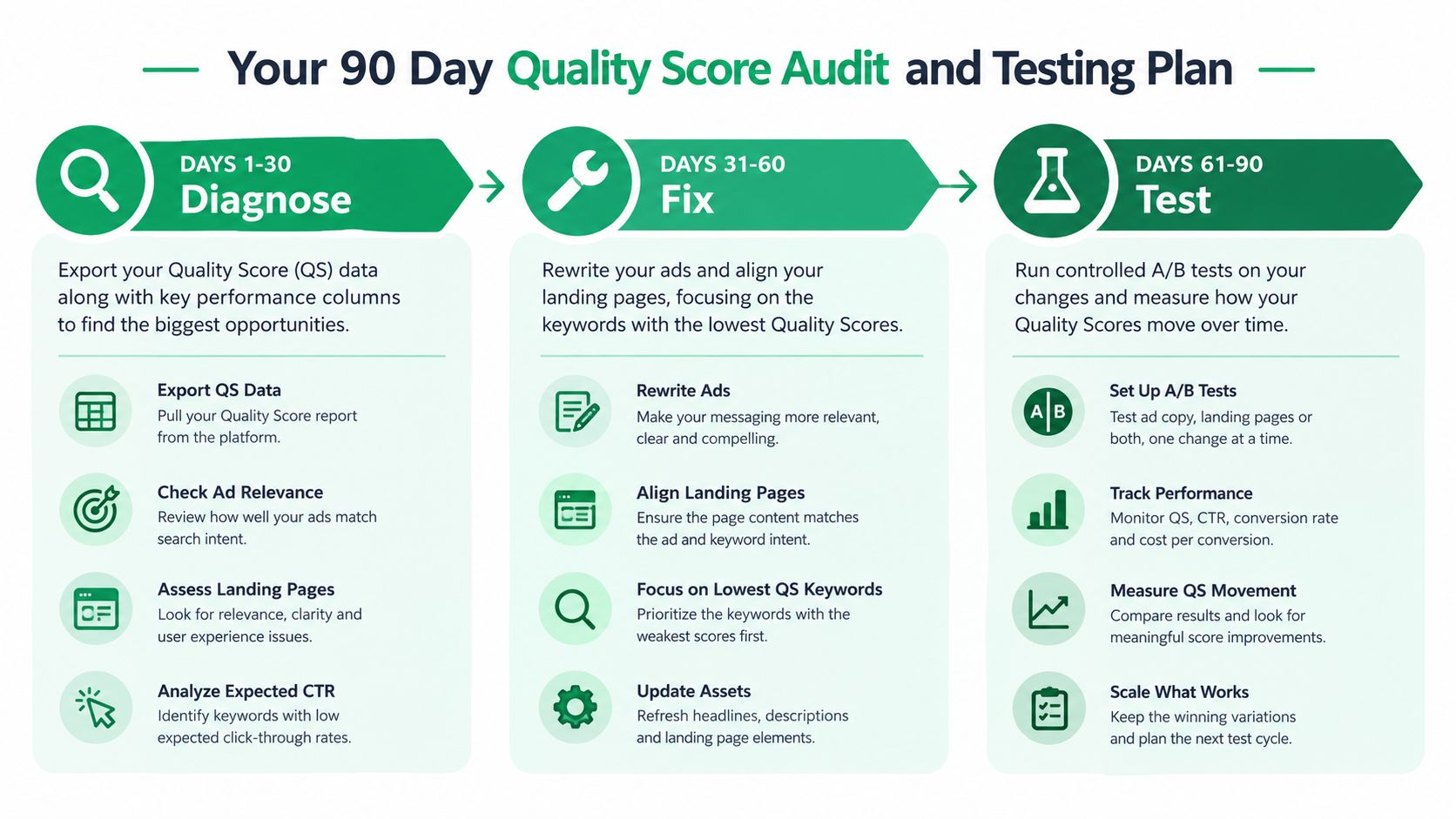
Your 90 Day Quality Score Audit and Testing Plan
A quarterly workflow prevents random optimization. It also keeps Quality Score in its proper role, as a structured source of clues rather than the account's main success metric.
Days 1 to 30 for diagnosis
Export the keyword table with Quality Score, Expected CTR, Ad relevance, and Landing page experience. Sort by impressions and spend, then flag keywords where one component is below average while the other component signals are 7 or higher. That pattern isolates a likely target instead of inviting a full campaign rebuild. Google's historical Quality Score guidance reinforces the need to evaluate trendlines and component-level weaknesses rather than treat the displayed score as a live auction value.
Record:
- Baseline: Quality Score and each component rating.
- Business context: Spend, conversions, conversion rate, and cost per conversion.
- Diagnosis: One primary bottleneck per keyword or ad group.
- Priority: High-spend and high-value terms first.
Days 31 to 60 for ad and CTR fixes
Run controlled responsive search ad and copy tests. Change the ad relevance inputs in one ad group at a time, keeping the keyword theme and landing page stable wherever possible. Test clearer intent language, stronger differentiators, and better calls to action. In parallel, review sitelinks, callouts, structured snippets, image assets, and negative keywords for expected CTR opportunities.
Track component movement, not only the headline score. A stronger ad may first improve relevance or engagement signals before the displayed score changes.
Days 61 to 90 for landing page exposure
Work through the pages connected to the remaining weak keywords. Rewrite one page template at a time, tighten message match, improve mobile usability, and remove distractions from the primary action. Re-measure after the page has enough relevant traffic to provide a useful comparison.
Quality Score is historical, so don't judge a test immediately. Use consistent observation windows and compare the baseline with the later component ratings, CTR, conversion rate, and cost efficiency.
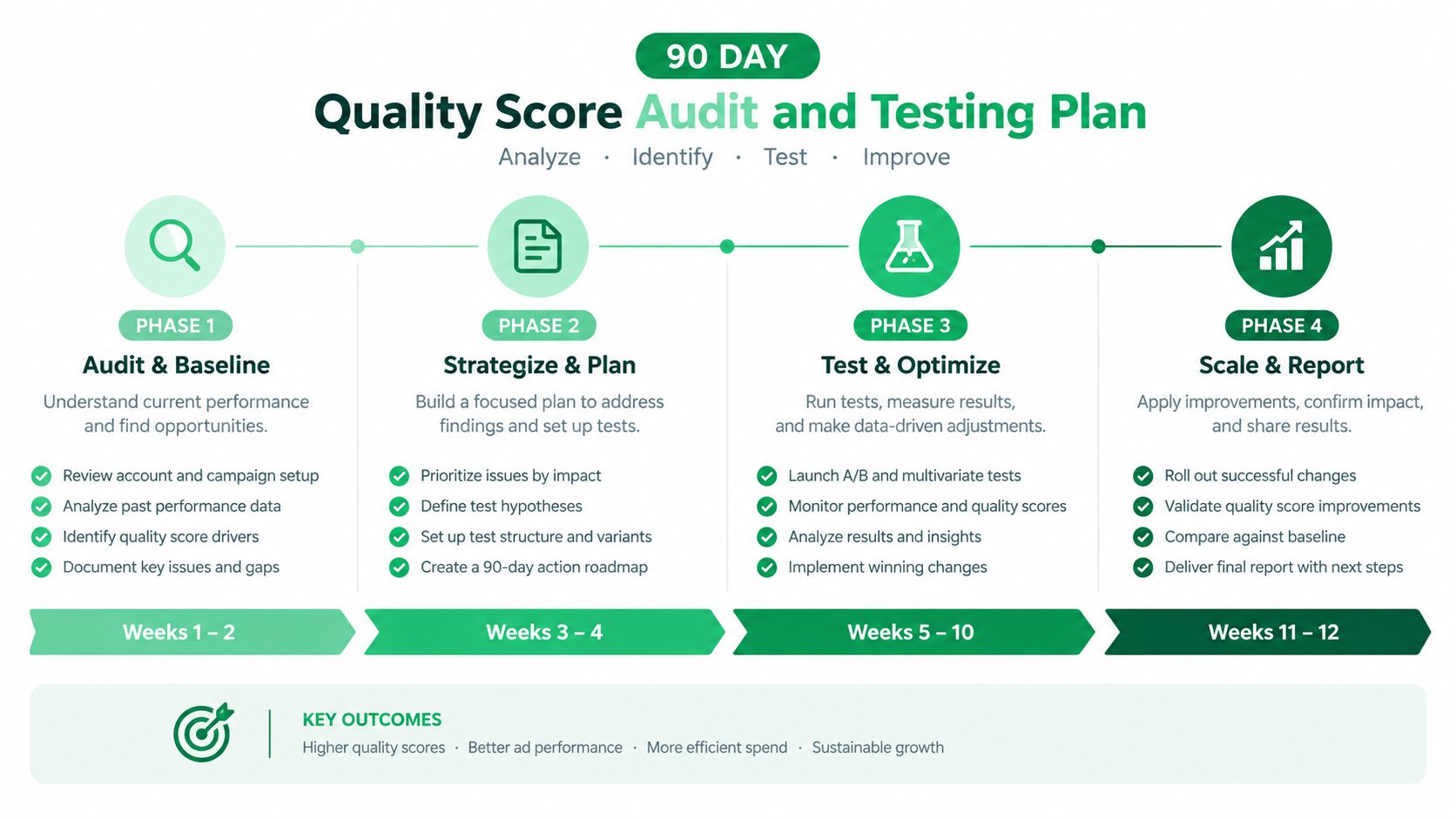
Quarterly checklist
- Audit: Export the four Quality Score columns and prioritize meaningful exposure.
- Structure: Split mixed-intent ad groups when relevance is weak across the group.
- Copy: Align headlines, descriptions, display paths, and assets with the query.
- CTR: Review offer clarity, extensions, devices, time periods, and negative keywords.
- Landing pages: Match the page promise to the ad and confirm a usable mobile path.
- Measurement: Record baseline ratings, component changes, CTR, conversions, and conversion rate.
- Review: Keep profitable keywords in context instead of pausing them solely for a low score.
Mr. Green Marketing, LLC helps businesses audit Google Ads accounts, improve keyword-to-ad alignment, test PPC messaging, and connect landing-page changes to measurable goals. If your Quality Score data is noisy or your account is losing efficiency, visit Mr. Green Marketing, LLC to request a focused audit and performance report.
- Tags:
- ad relevance ,
- Google Ads ,
- landing pages ,
- ppc tips ,
- quality score
Leave a Comment
sing in to post your comment or sign-up if you dont have any account.