
How to Use Amazon Seller Central: The most popular advice about Amazon Seller Central is incomplete: create a listing, turn on ads, and watch sales. That workflow can make a catalog look active while margins deteriorate, inventory becomes stranded, delivery promises slip, and compliance notices go unanswered. Learning how to use Amazon Seller Central profitably means treating the account as an operating system for pricing, listings, fulfillment, finance, advertising, and account health.
Amazon’s third-party marketplace is now too large for casual management. Third-party sellers accounted for 62% of paid units sold on Amazon in Q4 2024, compared with less than one-third a decade earlier, and third-party seller services generated $156.1 billion in 2024, or 24.48% of Amazon’s total revenue, according to Marketplace Pulse’s analysis of Amazon’s third-party seller share. Your Seller Central decisions sit inside that mature, tightly governed ecosystem.
How to Use Amazon Seller Central: Table of Contents
- Why Seller Central Is an Operating System, Not Just a Dashboard
- Account Setup and Verification Without Getting Suspended
- Building Listings That Survive the 2026 Title and Attribute Rules
- Choosing Between FBA and FBM Using Real Operational Benchmarks
- The Fee Structure and the Profit Gap Most Sellers Miss
- Running Daily Operations Across Ads, Orders, and Account Health
- Your First 30 Days in Seller Central, A Sequenced Launch Plan
How to Use Amazon Seller Central: Why Seller Central Is an Operating System, Not Just a Dashboard
Seller Central controls more than product uploads and yesterday’s revenue. It connects the detail page with inventory availability, fulfillment promises, pricing, advertising eligibility, customer experience, fees, and account compliance. A decision in one area creates work elsewhere. Lowering price can bring traffic while shrinking contribution margin, and a stockout can interrupt sales while wasting advertising spend.
The marketplace scale makes loose management expensive. Amazon had 6,090,000 third-party sellers in 2021, including 3,119,000 in North America, or 51% of the total, according to Marketplace Pulse’s seller-count analysis. Broader industry summaries place registered seller accounts at about 9.7 million by 2025. Seller Central is now operating infrastructure for global commerce, not a side utility.
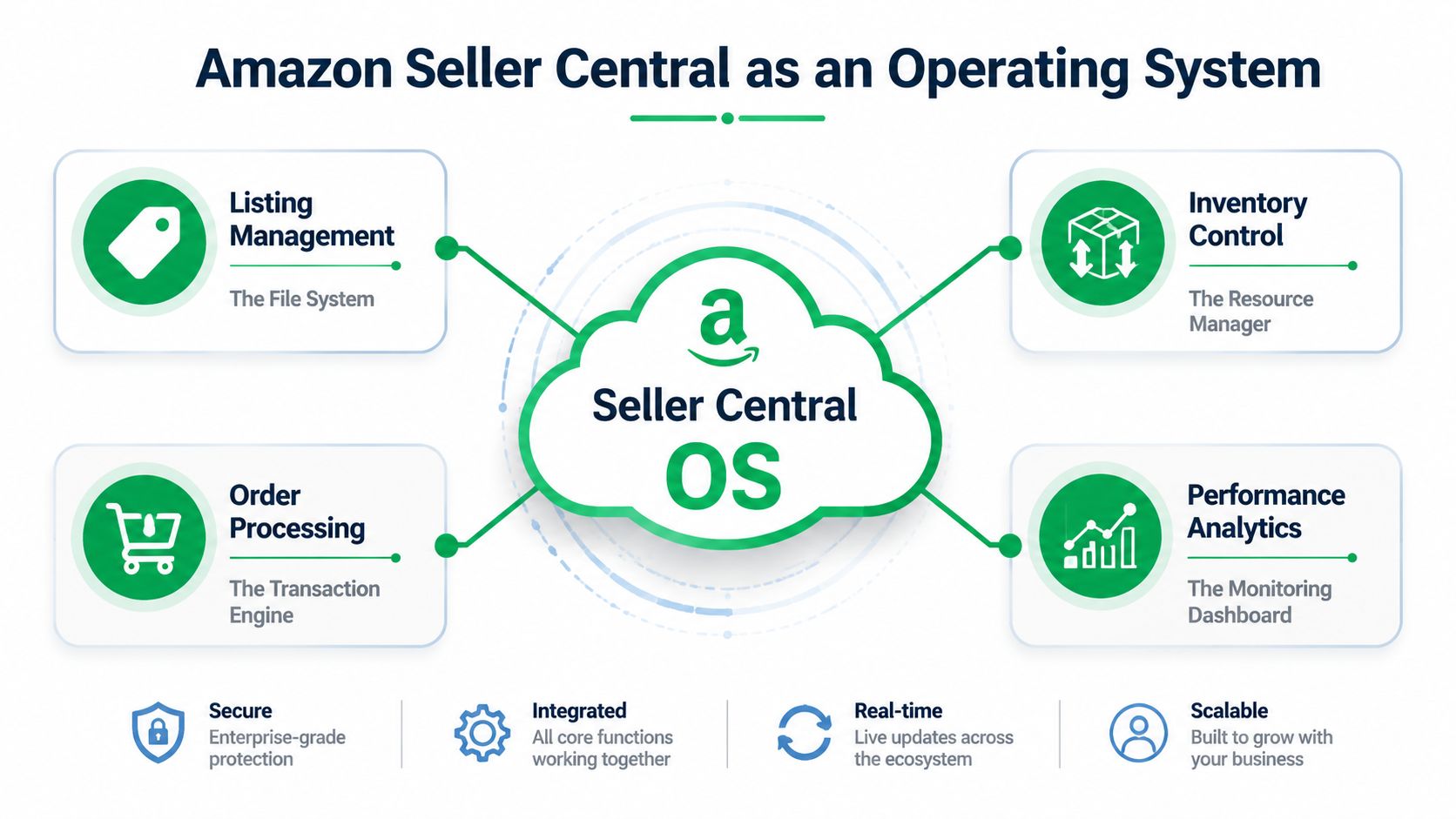
How to Use Amazon Seller Central: The four systems you need to run together
Run these workstreams as one operating loop:
- Listing management: Titles, attributes, images, bullets, descriptions, and brand content determine whether shoppers understand the offer.
- Inventory control: Replenishment, stranded units, aged stock, and sell-through determine whether the offer stays available.
- Order processing: Delivery speed, cancellations, returns, and customer service shape the customer experience.
- Performance analytics: CX Metrics, advertising reports, account health, fees, and transaction data show whether activity is producing a sustainable business.
This structure also supports an omnichannel marketing strategy, with Amazon managed as one channel in a wider commercial system. The common mistake is optimizing a visible dashboard number while the constraint underneath remains unresolved.
CX Metrics gives operators working benchmarks rather than vague service goals. Monitor a 95% Price Competitiveness target, a 30% target for delivery within one day for standard-size items, and a 10% target for oversize items. Amazon also lists a 70% target for delivery within two days for standard-size items, with targets of 45% for oversize and 15% for extra-large items, plus a 70% Inventory Supply target for standard-size inventory, as documented in Seller Central’s CX Metrics guidance.
Use the metrics to find operational gaps, not to decorate a weekly report. Publish or revise the listing, review the relevant measures, then adjust pricing, fulfillment promises, or replenishment cadence. IPI discipline belongs in the same review because stranded and aging inventory can turn apparent sales momentum into tied-up cash. The sellers who chase traffic while delivery and inventory deteriorate are managing activity, not profitability.
Account Setup and Verification Without Getting Suspended
Account setup begins with a cost decision, but verification is the main gate. Amazon’s Professional selling plan costs USD $39.99 per month, while the Individual plan has no subscription fee and charges $0.99 per item sold. Professional sellers don’t pay a per-item fee, so choose the plan by comparing your expected selling pattern with the fee structure documented in Amazon’s selling-plan guidance.
The wrong approach is choosing a plan casually and treating verification as an administrative afterthought. Amazon requires an identity document, business verification documents, and proof of address. Its Seller Identity Verification requirements identify a government-issued photo ID, business information, and, where applicable, a bank-account or credit-card statement and a business license.
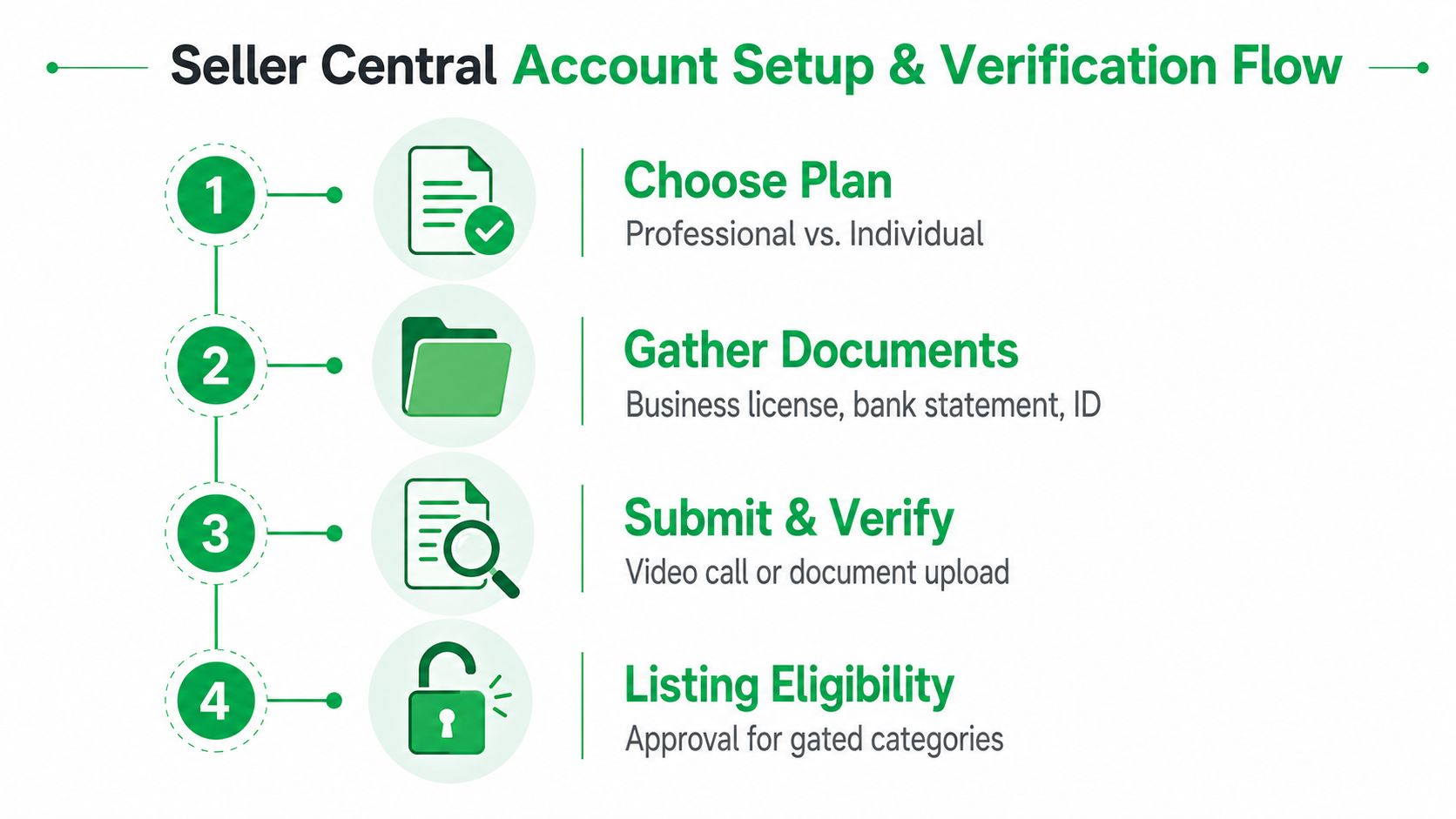
How to Use Amazon Seller Central: Prepare the file before registration
Use a single, consistent identity across the application:
- Select the selling plan: Base the decision on your expected activity, not on a vague desire to “start small.”
- Gather matching documents: Keep the legal business name, address, banking information, and identification details consistent.
- Submit readable files: Blurry scans, cropped statements, or documents with mismatched addresses can create avoidable review loops.
- Monitor Seller Central notifications: Verification requests are operational tasks. Don’t leave them buried in email.
Amazon’s process may involve document upload or another verification step. A useful third-party verification perspective is to treat the submission like a controlled compliance package, with clean records and no unexplained discrepancies.
Treat certification as a recurring obligation
The INFORM Consumers Act adds an ongoing verification requirement. Amazon says seller information must be verified whenever it changes and at least annually. Once you reach the Notice and Certification page, you must complete electronic certification within 10 days or the account may be deactivated, according to Amazon’s INFORM Consumers Act requirements.
Create an internal reminder process for the annual cycle and document every change to legal, banking, or business information. Waiting for a suspension warning is a poor control system. Verification is part of operating Seller Central, alongside inventory and orders.
How to Use Amazon Seller Central: Building Listings That Survive the 2026 Title and Attribute Rules
The old listing habit was to force every possible keyword into a long title. That approach no longer fits Amazon’s 2026 rules. Effective July 27, 2026, Amazon announced that product titles will be reduced from 200 characters to 75 characters, while a new Item highlights attribute will have a 125-character limit, as described in Amazon’s 2026 listing-policy guidance.
The shift changes the writing job. Your title should identify the product, brand, defining variation, and primary use clearly. Item highlights should carry concise differentiators, while bullets, images, and A+ Content answer the objections that prevent conversion.
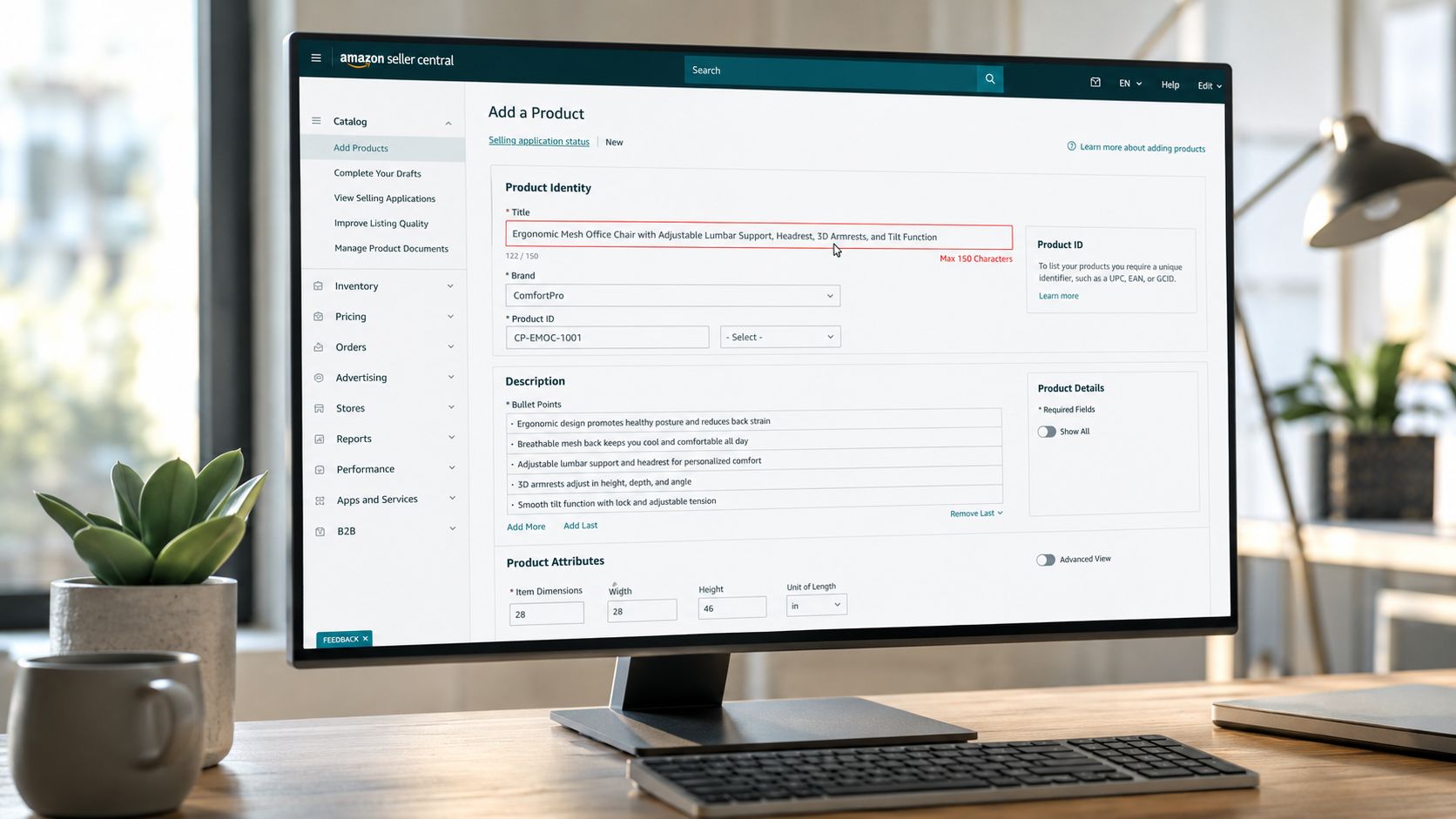
Build the detail page as a coordinated system
Open Catalog, choose Add Products, and determine whether the product already exists in Amazon’s catalog. If it does, add your offer to the correct detail page. If it doesn’t, create a new listing and complete the product identity, variation, compliance, image, and offer fields carefully.
A practical content hierarchy looks like this:
- Title: State what the item is and the most important buying distinction.
- Item highlights: Use the new attribute for compact, persuasive product benefits.
- Bullet points: Explain features, use cases, dimensions, compatibility, care, or included components.
- Backend search terms: Add relevant search language that doesn’t belong in customer-facing copy, without stuffing irrelevant terms.
- A+ Content: Use enhanced modules when brand ownership and available assets justify the additional merchandising work.
For a deeper working method, use this Amazon product listing optimization guide alongside the live fields in Seller Central. The important distinction is that compliance comes first, then clarity, then search coverage. A title that technically contains keywords but makes the product difficult to understand is not optimized.
How to Use Amazon Seller Central: Review generated content like an editor
Amazon’s optional generative AI tools can help draft listing content from product information, images, web pages, or spreadsheets. They can accelerate catalog work, but they don’t remove your responsibility to verify claims, measurements, compatibility, and policy compliance. Review every proposed field before submission, especially when the product has regulated attributes or technical specifications.
The 2026 title cap also makes prioritization unavoidable. Put the strongest identifying information in the title, reserve supporting value for Item highlights and bullets, and use images to show what words can’t communicate efficiently.
How to Use Amazon Seller Central: Choosing Between FBA and FBM Using Real Operational Benchmarks
Fulfillment by Amazon and Fulfillment by Merchant are operating models shaped by delivery speed, inventory availability, margin, and control. Choose the model your team can execute consistently, not the one that appears simpler in the setup screen.
Seller Central’s CX Metrics page provides useful operating benchmarks. For standard-size items, Amazon lists a 30% target for delivery within one day and a 70% target for delivery within two days. For oversize items, the targets are 10% and 45%. Extra-large items have a 15% target for delivery within two days. Amazon also lists a 70% Inventory Supply target for standard-size inventory in its benchmark guidance.
Use those figures as a diagnostic, not as a promise that every SKU must perform identically. Compare your actual delivery results and inventory availability by product size, warehouse, and fulfillment method. A model that looks profitable at the item level can still create account-health problems if it repeatedly misses delivery expectations or runs out of stock.
FBA reduces the work involved in storage, picking, packing, and delivery execution because Amazon handles fulfillment after receiving your inventory. The trade-offs include fulfillment and storage fees, inbound planning, and less control over the physical customer experience. FBM gives you control over packaging, warehouse processes, carrier selection, and handling standards. It also makes you responsible for staffing, shipping accuracy, delivery promises, and returns.
| Criterion | FBA | FBM |
|---|---|---|
| Delivery execution | Amazon manages fulfillment execution after inbound receipt | Seller manages warehouse, carrier, handling, and delivery promise |
| Inventory control | Requires accurate replenishment into Amazon’s network | Requires disciplined warehouse forecasting and allocation |
| Oversize or specialized products | Can be less attractive when handling and storage economics are difficult | May work when your facility and carrier network are efficient |
| Customer-service workload | Amazon handles many fulfillment-related interactions | Seller carries more operational responsibility |
| Margin visibility | Model Amazon fees alongside product and inbound costs | Model labor, packaging, postage, software, and returns |
| Best fit | Sellers prioritizing network reach and operational simplicity | Sellers needing control, customization, or specialized handling |
Keep IPI in the operating review
Amazon’s Inventory Performance Index is not a single stock counter. Its IPI guidance describes inventory health through several signals, including sell-through, excess inventory, stranded units, and stockout risk. Review them together before increasing purchase orders or advertising spend.
Use inventory reports to set reorder points, inspect aged stock, and clear stranded units. FBA, FBM, or a hybrid model can work, but each requires disciplined replenishment. Stockouts interrupt sales and campaigns, while overbuying ties up cash and can create storage constraints.
Fulfillment also affects offer competitiveness. Sellers assessing how to win the Amazon Buy Box should begin with reliable delivery and available inventory, then evaluate price and seller performance.
How to Use Amazon Seller Central: The Fee Structure and the Profit Gap Most Sellers Miss
Seller Central can show money moving through the account without showing the profit you can safely take home. Amazon’s referral fee isn’t a flat marketplace commission. Amazon calculates it using the item price plus delivery and gift-wrap charges, multiplied by the category referral-fee rate, or the applicable minimum referral fee, whichever is greater, with the charge applied when the buyer’s order ships. The formula appears in Amazon’s referral-fee explanation.
That calculation is only one layer. Your real contribution also depends on COGS, inbound shipping, advertising, returns processing, long-term storage, and chargebacks. Independent analysis places the gap between Seller Central-reported profit and actual net profit at an average of 8% to 22% of revenue, as discussed in NovaData’s analysis of Amazon profit tracking.
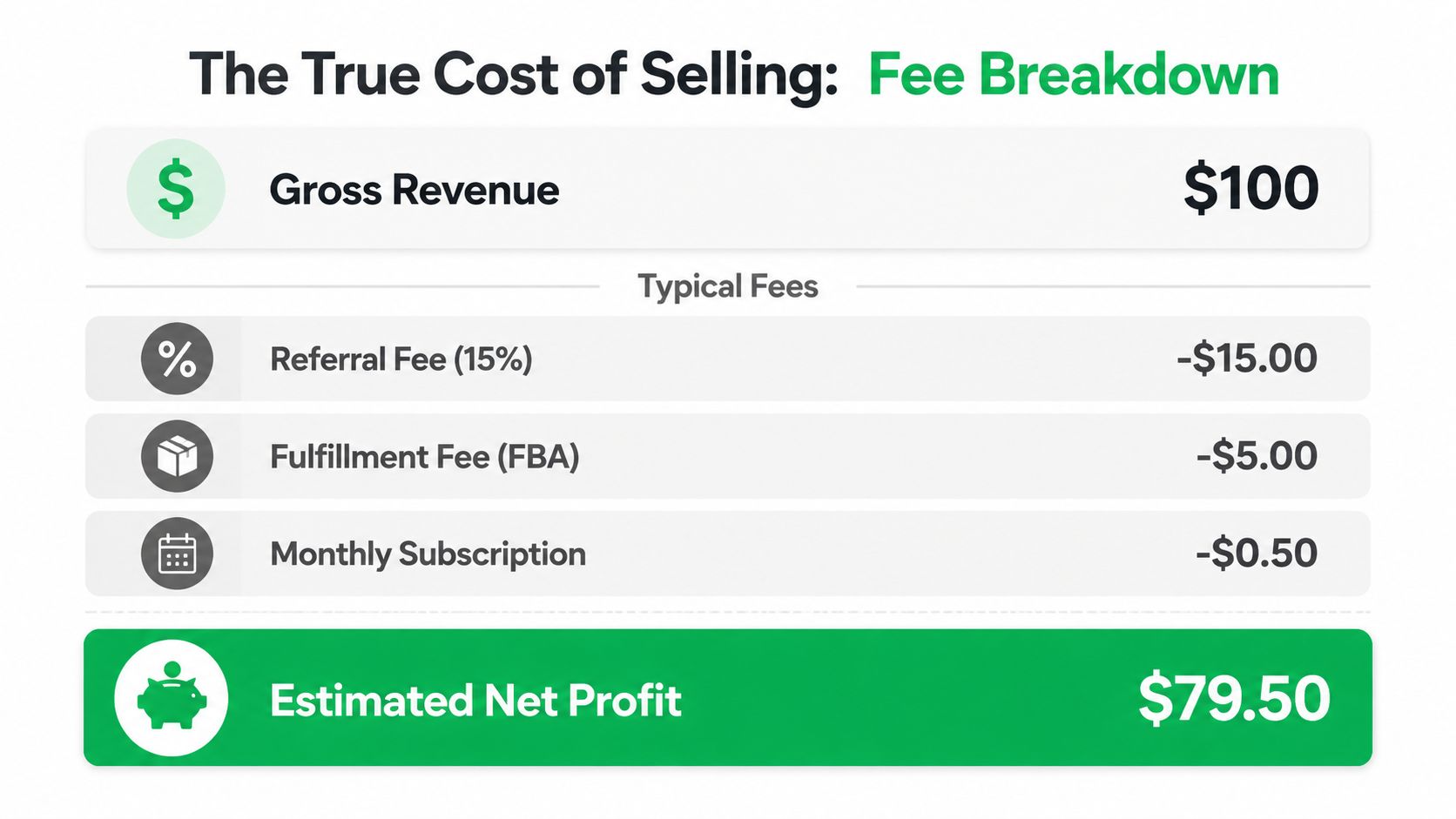
Reconcile transactions instead of trusting a headline
Pull the Date Range Transaction and Summary reports from Seller Central and map each transaction type into your accounting structure. Amazon updated these reports in 2026 to better support accrual-style reconciliation and 1099-K reporting, but the reports still need to be connected to your product-level costs and external records.
Your reconciliation should separate:
- Amazon-collected revenue: Product sales, delivery charges, and other customer-paid amounts.
- Marketplace deductions: Referral fees, fulfillment fees, subscription costs, refunds, and other Amazon charges.
- Commercial costs: COGS, inbound freight, prep, packaging, and warehouse expenses.
- Growth costs: Sponsored ads, creative production, promotions, and agency or software fees.
- Exception costs: Returns processing, chargebacks, damaged units, and storage-related expenses.
A useful operating statement is built around contribution margin by SKU, not just total account revenue. If an ad campaign appears efficient inside an advertising report but the SKU loses money after COGS and returns, increasing spend only scales the loss.
Practical rule: Use Seller Central for transaction evidence, then use an external accounting or profit-tracking system to decide what the business can afford.
How to Use Amazon Seller Central: Running Daily Operations Across Ads, Orders, and Account Health
Treat daily management as one operating loop. Advertising creates demand, inventory fulfills it, orders generate customer-experience signals, and Account Health determines whether the offer can continue selling. Reviewing each area separately hides problems until they affect revenue or eligibility.
Start with Sponsored Products. Check targeting, match types, search-term behavior, bids, placements, and negative keywords. Irrelevant clicks from a broad target usually call for a negative keyword or tighter campaign structure. A converting search term may justify its own target, but review SKU-level contribution margin before increasing spend.
Check the offer before changing bids. Low inventory can turn higher bids into a stockout. Slower delivery requires a review of handling time, carrier performance, warehouse cutoffs, and promise settings before the campaign receives blame. Sellers who outsource campaign execution can review Amazon PPC management services as one option, while retaining control of margin and inventory decisions.
A workable cadence
Each day, review sales and order exceptions, ad spend, stranded-inventory alerts, suppressed listings, customer messages, and urgent Account Health notifications. Prioritize issues that can stop sales or create a compliance problem.
Each week, examine CX Metrics, Inventory Performance Index signals, replenishment requirements, search-term reports, return reasons, and SKU-level contribution margin. Compare the offer’s price position with the 95% Price Competitiveness target documented in the Seller Central guidance, then decide whether pricing, content, fulfillment, or advertising needs adjustment. IPI review should also cover excess, aged, stranded, and at-risk inventory, because storage and availability problems can develop before they appear in sales results.
On the compliance schedule, record certification dates and business-information review dates in a shared operating log, then check Seller Central notifications for changes or new requests. This keeps recurring verification work visible without repeating the broader compliance process here.
The goal is a repeatable control loop: protect availability, inspect customer experience, correct account risks, and scale advertising only when the underlying SKU economics support it.
Your First 30 Days in Seller Central, A Sequenced Launch Plan
A live listing isn’t a finished operation. Use the first month to establish records, product data, fulfillment controls, measurement, and compliance habits in sequence.
Week one, establish the account
Choose the selling plan, prepare identity and business documents, submit verification, and confirm the legal, banking, and address information matches across the application. Open Account Health and Seller Central notifications so verification requests don’t sit unnoticed.
Week two, build the product detail page
Use Catalog, then Add Products, and create or join the correct catalog page. Write the title within the 75-character limit effective July 27, 2026, complete the 125-character Item highlights attribute, and review every bullet, image, variation, and compliance field before submission. Don’t use AI-generated copy without checking the claims yourself.
Week three, make fulfillment measurable
Choose FBA, FBM, or a hybrid model based on size, margin, velocity, handling requirements, and geographic demand. Create the relevant shipping or inbound workflow, set reorder points, and inspect Inventory Performance Index signals, including excess, aged, stranded, and at-risk inventory.
Week four, connect demand to economics
Launch advertising cautiously, review search terms and negative keywords, and compare spend with SKU-level contribution margin. Open CX Metrics, evaluate price competitiveness, delivery speed, and inventory supply, then complete your first transaction-report reconciliation. Also review 2026 fee changes, including the shift of low-inventory fees to the FNSKU level and changes affecting certain aged-inventory and MCF fees, using Amazon’s current policy guidance.
By day 30, you should have more than a published offer. You should have a verified account, compliant product content, a fulfillment plan, inventory controls, advertising rules, CX benchmarks, and a profit view that includes costs Amazon doesn’t present as true net profit.
Mr. Green Marketing, LLC helps sellers improve Amazon product listings, monitor and manage Seller Central PPC activity, and connect marketplace execution with broader SEO and digital marketing strategy. Visit Mr. Green Marketing, LLC to request a free audit and performance report focused on listing, visibility, advertising, and operational gaps.
Leave a Comment
sing in to post your comment or sign-up if you dont have any account.