
Amazon Product Listing Optimization: A lot of sellers are in the same spot right now. The product is solid, pricing is competitive, ads are running, and yet the listing still feels like it leaks money. Impressions come in, clicks come in, but the page doesn’t close the sale.
That usually means the listing isn’t functioning as a system.
Amazon product listing optimization isn’t just title cleanup or a prettier image stack. It’s the work of making every part of the page do two jobs at once. First, help Amazon understand what the product is and when it should surface. Second, help a shopper decide, quickly, that this is the right purchase.
Amazon Product Listing Optimization: Your Listing Is More Than a Page It’s Your Salesperson
A weak Amazon listing creates two problems at the same time. It reduces discoverability, then wastes the traffic it does get. That’s why sellers often misread the issue. They think they need more ads, when the listing itself is what’s underperforming.
And the stakes aren’t small anymore. Amazon’s sales grew 44% between 2020 and 2021, and the company’s net sales recently surpassed $691 billion, according to Amazon Seller Central guidance. In plain terms, more shoppers, more competition, and less room for lazy merchandising.
Your listing is your salesperson. It handles the first impression in search results, the objection handling on the detail page, and the final push to purchase. It does that all day, every day, with no second chance if the page is vague, cluttered, or unconvincing.
A strong listing doesn’t just describe a product. It answers the buyer’s next question before they ask it.
That’s also why listing optimization can’t live in a silo. Ranking, conversion, fulfillment trust, pricing logic, and offer competitiveness all affect one another. If you’re also battling offer-level pressure, this breakdown of Market Edge on winning Amazon Buy Box is worth reading because the listing can be excellent and still lose momentum if the offer stack is weak.
What actually changes results
The best-performing optimization work usually follows a simple principle. Fix relevance first, then clarity, then persuasion.
That means:
- Search alignment: Use the exact terms and attributes shoppers use.
- Conversion structure: Make the title, bullets, and images easy to scan.
- Trust signals: Show the product clearly, answer objections, and remove ambiguity.
- Ad readiness: Give paid traffic a page that can convert instead of bounce.
Most generic guides stop at the checklist. Effective work involves understanding why each element matters and how one weak section drags down the others.
Amazon Product Listing Optimization: The Foundation A Bulletproof Keyword Strategy
Most sellers start writing too early. They open Seller Central, type a title, add a few obvious terms, and call it optimization. That’s backwards.
Keyword strategy comes first because Amazon can only index what exists in the listing. If a term, attribute, use case, or synonym never makes it into your content or backend fields, Amazon has very little reason to connect your ASIN to that search.
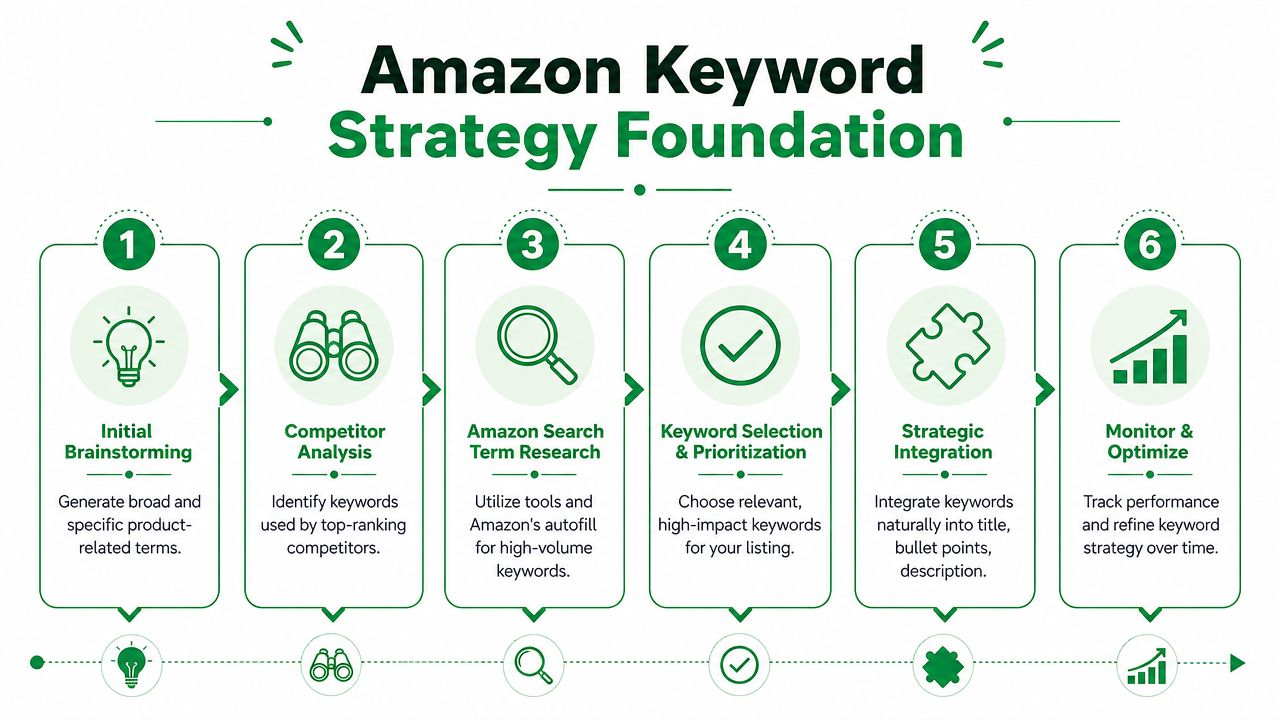
Start with customer language, not tool output
Tools like Helium 10 and Jungle Scout are useful. So is Amazon autofill. But tools only become valuable when you organize the data by buyer intent.
I build keyword sets in four buckets:
- Primary product terms
These are the core phrases that define what the product is. If you sell a French press, this includes the plain-English terms a buyer uses when they already know the product type. - Attribute terms
Material, size, count, compatibility, color, finish, scent, intended use. These often separate broad traffic from qualified traffic. - Problem and outcome language
In this context, reviews matter. Buyers don’t always search by product category alone. They search for a result, a frustration, or a scenario. - Synonyms and long-tail variants
These often belong in bullets, description support copy, or backend terms instead of the title.
Reverse-engineer the page-one listings
Competitor research isn’t about copying. It’s about pattern detection.
Open the strongest listings in your category and compare:
- What terms appear repeatedly in top titles
- Which attributes show up early
- What objections they answer in bullets
- Where they’re leaving gaps
- Whether their copy is readable or stuffed
Here, a structured workflow matters. If you want a clean process for reviewing rival listings, this Amazon competitor research guide is a practical starting point.
Practical rule: If a keyword has traffic but doesn’t describe your product accurately, it’s not an asset. It’s future refund risk.
Amazon Product Listing Optimization: Build a master keyword map
Don’t work from a messy spreadsheet forever. Turn the research into placement decisions.
A simple version looks like this:
| Listing area | Best use |
|---|---|
| Title | Primary keyword, top attributes, core relevance signals |
| Bullets | Benefits, use cases, supporting terms, objections |
| Description or A+ support copy | Detail, context, secondary language |
| Backend fields | Synonyms, alternate phrasing, uncovered long-tail terms |
That mapping step is what keeps a listing from becoming repetitive.
Borrow a good habit from other niches
One reason photographers often write stronger service pages than Amazon sellers write product pages is that they obsess over intent and phrasing, not just volume. Some of the thinking behind these marketing tips for photographers applies here too. The lesson is simple. The best keyword strategy reflects how buyers describe the problem in their own words.
What to avoid
Three mistakes show up constantly:
- Guessing based on internal jargon: Customers rarely use the same language your product team does.
- Chasing only broad terms: Broad traffic can be expensive and low intent.
- Forcing every keyword into visible copy: That hurts readability and conversion.
Good keyword research gives you a controlled vocabulary for the whole listing. Bad keyword research gives you a pile of terms and no idea where they belong.
Amazon Product Listing Optimization: Crafting High-Converting Listing Copy
Once the keyword map is done, the writing gets easier. Not because copywriting is easy, but because you’ve stopped guessing what belongs on the page.
Many Amazon listings fall apart. The seller knows the product well, but the copy reads like internal product notes. Features pile up. Keywords get jammed in. The buyer still doesn’t know why they should care.

According to a Jungle Scout study of over 1,000 sellers, nearly 80% prioritize listing optimization, and current best practices include keeping titles under 200 characters, placing the primary keyword in the first 80 characters, and using PPC for 14 days to collect conversion data that can support organic ranking, as outlined in Jungle Scout’s Amazon listing optimization guide.
Write the title for both ranking and scanning
A title has one job in search results. Help Amazon classify the product and help the shopper identify it fast.
A weak title usually has one of two problems. It’s too vague, or it’s packed with every phrase the seller could think of.
A better approach:
- Lead with the primary keyword
- Add the most important differentiating attributes
- Keep the wording natural
- Put the most useful information early, because mobile cuts off fast
Here’s the difference.
Before
Stainless Steel Coffee Maker Kitchen Brewer Pot Premium Quality Home Durable Coffee Press for Coffee Tea Office Travel Gift
After
French Press Coffee Maker, Stainless Steel, Double-Wall Insulated, 34 oz, for Coffee and Tea
The second version gives Amazon cleaner relevance signals and gives the shopper immediate clarity.
Amazon Product Listing Optimization: Bullets should sell outcomes, not dump specs
Too many bullet sections read like a warehouse intake sheet. Material. Size. Quantity. Done.
That’s not enough. Bullets need to convert uncertainty into confidence.
A good bullet sequence usually covers:
- Primary benefit: What the product helps the buyer do
- Core feature support: What makes that benefit believable
- Use case: Who it’s for or where it fits
- Objection handling: Durability, compatibility, comfort, cleanup, setup
- Practical specifics: Dimensions, materials, included items
Buyers don’t purchase features by themselves. They purchase a clearer outcome, with enough detail to trust it.
Amazon Product Listing Optimization: A simple before-and-after bullet example
Weak bullet
Made from stainless steel and has filter system for coffee.
Stronger bullet
Smooth coffee with less grit: Stainless steel mesh filter helps separate grounds cleanly, so you get a richer cup without the muddy finish common in cheaper presses.
Notice what changed. The stronger bullet starts with the benefit, then supports it with the feature.
Description and supporting copy
If your category still relies on a plain description, use it to expand, not repeat. Keep the writing skimmable. Short paragraphs. Clear phrasing. Real specifics.
If you have Brand Registry and A+ Content, the same principle holds. Don’t waste that space restating your five bullets. Use it to answer the questions the bullets couldn’t fully handle.
A few copy rules I use in nearly every listing audit:
- Cut filler adjectives: “Amazing,” “premium,” and “high quality” mean nothing without proof.
- Replace vague claims with specifics: Dimensions, materials, compatibility, included parts.
- Write for interrupted attention: Most buyers scan. They don’t study.
And yes, fragments can help when used carefully. Especially in bullets. Short. Direct. Easy to process.
Amazon Product Listing Optimization: Winning the Click with Visuals and A+ Content
A lot of sellers still treat images like decoration. They upload a compliant main image, toss in a few extra photos, and move on.
That’s a mistake. Visuals carry a huge amount of the conversion burden on Amazon because shoppers judge product quality before they read thoroughly. If the image stack is weak, the copy has to work too hard.
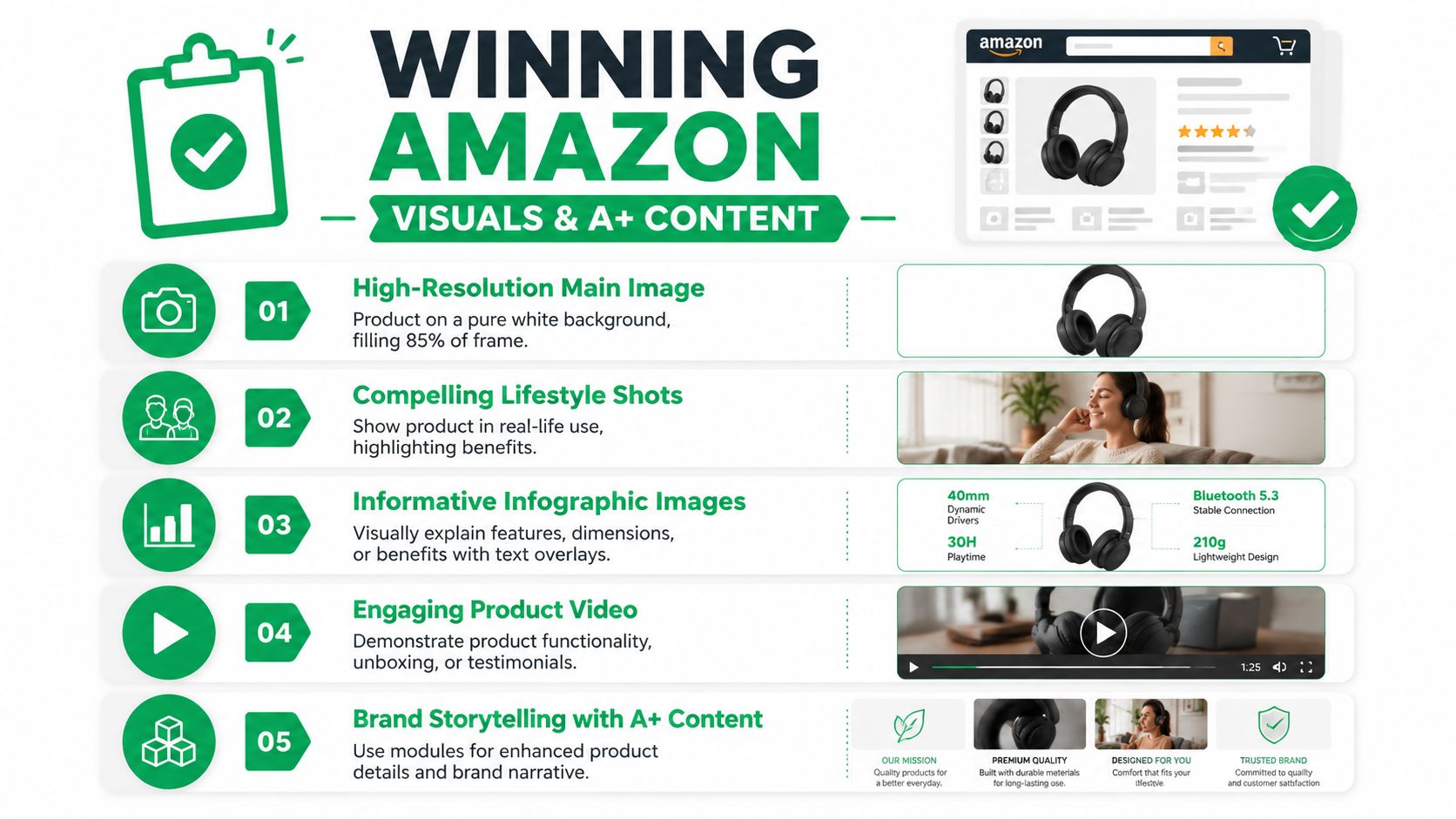
Analysis of Amazon listings shows that customers infer quality from strong imagery, and the recommended operating model is a main image for recognition followed by close-ups, infographics, and use-case shots that surface dimensions, materials, and other buying details, as discussed in this Amazon listing visuals analysis on YouTube.
The main image is a traffic filter
Your main image has to win the click in a crowded grid. It isn’t there to be clever.
The standards matter. Amazon-facing guidance recommends a white background, and one widely used benchmark is that the product should fill about 85%+ of the frame. If the product looks tiny, dark, cropped poorly, or hard to identify, shoppers keep scrolling.
What works:
- Clear product silhouette
- Strong lighting
- Accurate color
- Immediate recognizability
What fails:
- Busy compositions
- Tiny product scale
- Props that confuse the offer
- Low-resolution source files
Amazon Product Listing Optimization: Build an image stack that answers objections
The best secondary image sets do a different job from the main image. They reduce hesitation.
A practical image sequence often looks like this:
| Image type | What it should communicate |
|---|---|
| Main image | What the product is |
| Close-up | Material, finish, construction detail |
| Infographic | Dimensions, included components, feature callouts |
| Lifestyle shot | Use case and context |
| Comparison or explanation graphic | Why this option fits better |
This is also where A+ Content earns its keep. Strong A+ modules can carry product education, brand context, and side-by-side product comparisons far better than the standard listing body. If you’re refining branded detail pages, this guide to Amazon A+ Premium Content lays out the module strategy clearly.
Before the next point, watch how a visual-first listing is typically framed in practice:
Amazon Product Listing Optimization: A+ Content should deepen trust, not repeat the obvious
A+ Content is wasted when it just reformats the bullets with prettier icons.
Use it for things like:
- Comparison logic: Which version suits which buyer
- Product construction: Materials, design choices, compatibility
- Use guidance: How it fits into real life
- Brand reassurance: Why the product exists and what standards shaped it
If your images don’t answer sizing, materials, fit, or usage, shoppers go hunting in reviews. That’s rarely where you want the sale decided.
And one more trade-off. Brands often overdesign A+ modules. They add too much text, too many concepts, too many visual styles. Clean wins. Scannable wins. Objection-handling wins.
Amazon Product Listing Optimization: Mastering the Hidden Levers Backend Fields and Reviews
A finished front-end listing still leaves a lot of performance on the table. Some of the most impactful work happens where shoppers don’t look directly.
Backend fields shape discoverability. Reviews and Q&A shape trust. Together, they influence whether the listing gets surfaced and whether the buyer believes what they see once they land.

A practical workflow for backend optimization is to reserve search terms for synonyms and long-tail variants that don’t already appear in the title or bullets. Amazon allows up to 249 bytes for backend search terms, and stuffing or duplicating keywords wastes limited indexable space, according to Perpetua’s guide to Amazon product listing optimization.
How to use backend fields without wasting space
This part is simple, but sellers still overcomplicate it.
Backend search terms are for:
- Synonyms that didn’t fit naturally on-page
- Alternate phrasing shoppers might use
- Long-tail variants that expand relevance
- Coverage gaps left after title and bullets are finalized
They are not for:
- Repeating indexed terms
- Stuffing every possible phrase
- Writing unreadable strings with no prioritization
A good backend pass usually happens last, not first. Visible copy gets the strongest terms. Backend fields catch what’s left.
Amazon Product Listing Optimization: Reviews aren’t just social proof
They’re also diagnostic data.
When I audit listings, I read three review groups in order:
- Your positive reviews
These show what buyers value most in real language. - Your negative reviews
These reveal where the page may be overpromising, underspecifying, or failing to set expectations. - Competitor negative reviews
Often, copy and image opportunities appear in competitor negative reviews. If buyers keep complaining about fit, fragility, confusing setup, or missing dimensions on competing products, your listing should address those issues directly.
Q&A and review management
Don’t leave the Q&A section to drift. It often contains the exact concerns a hesitant buyer is trying to resolve before purchase.
Keep the process tight:
- Answer clearly: Use plain language, not canned replies.
- Address repeat concerns in the listing: If the same question comes up often, the page is missing something.
- Watch for expectation gaps: If buyers misunderstand what’s included, the listing needs clearer visuals or bullets.
Reviews tell you how customers describe the product after using it. That language is often more persuasive than the copy you started with.
And yes, this work is tedious. But it’s the kind of tedious that compounds. Better indexing, fewer surprises, clearer trust signals.
Amazon Product Listing Optimization: Closing the Loop PPC Analytics and Future-Proofing
You launch a cleaner listing, traffic holds steady, and sales still stall. In practice, that usually means the page and the ad account are sending mixed signals. Amazon rewards listings that attract the right click and convert it. If one side is weak, the other gets more expensive.
That is why listing optimization and PPC have to be managed as one system. Keywords affect indexing and ad relevance. Titles and images affect click-through rate. Bullets, A+ Content, reviews, and offer clarity affect conversion rate. Those conversion signals then shape how efficiently you can bid, scale, and defend rank.
Use PPC to validate listing decisions
A listing can read well and still miss buyer intent. Sponsored Products campaigns expose that quickly because they show how shoppers respond at each step of the funnel.
Use PPC as a testing layer, not just a traffic source.
Watch for patterns like:
- High impressions, low click-through rate: Search result packaging is underperforming. Check the main image, title clarity, review count, star rating, and price positioning against the competing ASINs beside you.
- Healthy click-through rate, weak conversion rate: The product detail page is losing the sale. Review image sequence, bullet specificity, variation setup, and whether the listing answers the objections implied by the search term.
- Strong conversion on a small set of terms: Those terms deserve stronger placement in the title, bullets, or image copy, and often warrant tighter bid control in PPC.
- Spend concentrated on broad traffic with weak order volume: The keyword strategy is too loose, or the listing is too generic to close mixed-intent traffic.
This is the part many sellers miss. PPC does not just help you sell the product. It helps you diagnose why the listing ranks, why it fails to rank, and which message earns the click from the right shopper.
If you also send traffic from email, influencers, or other outside channels, Amazon Attribution tracking for external traffic measurement helps connect those visits to on-Amazon behavior so you can judge traffic quality, not just volume.
What to track without drowning in dashboards
A tighter operating cadence beats a bloated reporting stack. I want a short list of metrics tied to action.
Track these consistently:
- Search term conversion quality: Which terms produce orders, not just clicks
- Placement-level click-through trends: Whether top-of-search, product pages, or rest-of-search traffic is matching the listing
- Session-to-order performance on priority ASINs: Whether conversion changes after copy, image, or offer updates
- Organic rank movement after listing edits: Whether stronger conversion is feeding visibility
- Recurring review and Q&A themes: Whether post-click objections are still unresolved
The point is simple. Every metric should answer a decision. Raise bids, cut waste, rewrite copy, replace an image, split out a keyword, or leave it alone.
Prepare for AI-driven discovery
Amazon search is getting better at interpreting attributes, context, and shopper intent. That changes how strong listings are built. Clean keyword placement still matters, but so does explicit coverage of use case, compatibility, size, material, included components, and differences between variations.
Write so both systems can parse the page. Amazon’s ranking engine needs relevance and conversion signals. Shoppers need fast answers and enough confidence to buy without hunting through reviews for basic facts.
That means the listing should state, clearly and early:
- What the product is
- Who it is for
- What problem it solves
- What is included
- How one option differs from another
- What a buyer should know before purchase
Clear structure tends to hold up better as discovery changes across platforms. Some of that same thinking shows up in AgentPulse marketing resources, where intent-driven discovery also favors specific, structured answers over vague promotional copy.
Done well, the listing stops behaving like a static asset. It becomes a working sales system. Ads send demand into it, conversion data sharpens it, and each update gives Amazon a clearer reason to show it to the next qualified shopper.
Leave a Comment
sing in to post your comment or sign-up if you dont have any account.