
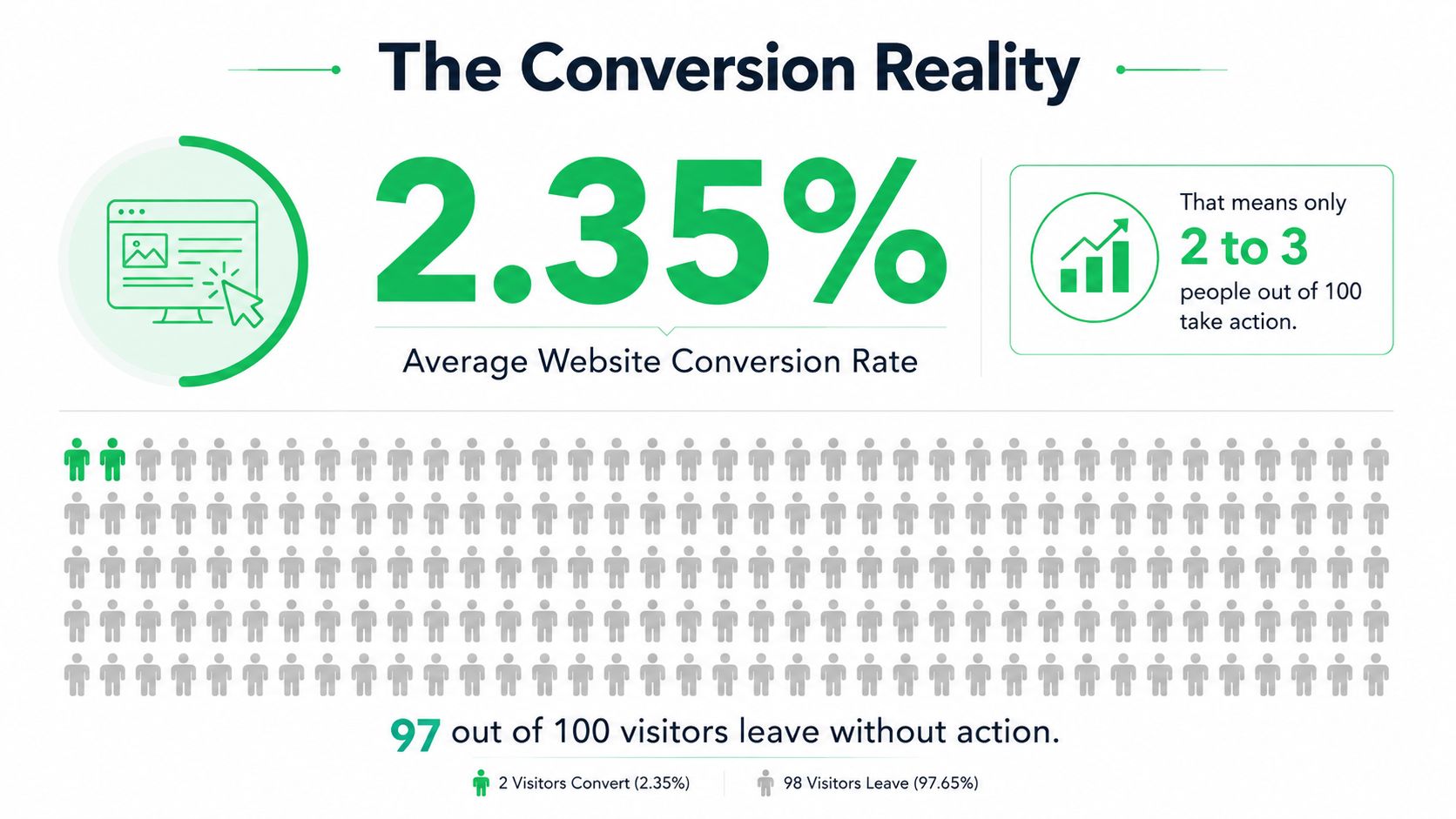
Web Design for Conversion: The average website converts at only 2.35%, so roughly 97.65% of visitors don’t convert. Moving beyond that baseline requires more than attractive visuals. It requires a deliberate system for reducing hesitation, confusion, accessibility barriers, and mobile friction.
That’s the practical meaning of web design for conversion. Every headline, image, menu, form field, and button either helps visitors understand what to do next or makes them work harder to act. A polished interface can still lose qualified buyers if the path to conversion feels uncertain. And a simpler page can outperform it when the simpler page answers the visitor’s question faster.
The strongest conversion improvements usually come from fixing overlooked moments rather than adding more features. Start with the behavior you want, identify where users hesitate, then design the shortest clear path to that action.
Web Design for Conversion: Table of Contents
- Why Most Websites Are Leaving Money on the Table
- Building Layouts That Guide Visitors Toward Action
- Crafting CTAs and Microcopy That Convert
- The Mobile-First Paradox Where Polished Doesn’t Always Convert
- Accessibility as a Conversion Strategy Rather Than Just Compliance
- Testing What Works Through A/B Testing and Analytics
- Your Next Steps Toward Higher Conversions
Web Design for Conversion: Why Most Websites Are Leaving Money on the Table
The 2.35% average website conversion rate is a useful baseline across industries, based on reporting that cites Contentsquare’s analysis of 46 billion sessions (conversion benchmark analysis). Put plainly, roughly 97.65% of visitors don’t convert. That isn’t proof that every site is failing. It is a reminder that the typical starting point leaves substantial room for better clarity, stronger trust, more useful layouts, and less friction.
Many businesses respond to weak results by buying more traffic. That can help only when the landing experience supports the promise made in the campaign. If an advertisement offers a clear solution but the page opens with vague branding, competing calls to action, or an unclear form, additional visitors only create more opportunities for the same leakage.
The benchmark also matters because performance varies widely. Top-performing pages convert far above the average, which points to a design and user experience problem rather than a traffic problem alone. In a competitive local-service, B2B, or ecommerce market, a visitor who can’t quickly understand your offer can move to a competitor without giving you a second chance.
The baseline changes the redesign conversation
A redesign shouldn’t begin with “How can we make this look newer?” It should begin with questions such as:
- What action matters most? A purchase, consultation request, account creation, call, or qualified inquiry needs a defined primary path.
- Where does uncertainty appear? Visitors may not know what happens after clicking, whether an offer applies to them, or whether the business is trustworthy.
- What creates unnecessary work? Dense navigation, repeated information, excessive fields, and weak error messages all consume attention.
- What does the page promise? The headline, visual hierarchy, proof, and CTA should support the same decision.
Practical rule: Treat every conversion as a task. If a visitor has to interpret your page before acting, the design is charging them a cognitive cost.
Reviewing ways to reduce website bounce rate can help uncover early signs of that cost, but bounce rate alone won’t explain every failure. A visitor can stay on a page, read carefully, and still abandon because the next step is vague or difficult. Conversion-focused design connects engagement signals to actual task completion.
Web Design for Conversion: Building Layouts That Guide Visitors Toward Action
A conversion layout gives attention somewhere to go. It establishes a clear order: what the visitor offers, why it matters, why the business deserves trust, and what action comes next. The page shouldn’t force users to assemble that sequence themselves.
Start with the first viewport. A visitor should be able to identify the audience, the value proposition, and the primary action without hunting through decorative elements. That doesn’t mean cramming every detail above the fold. It means making the opening useful enough to earn the next scroll.

Web Design for Conversion: Establish a visual route
Most visitors scan before they read. Desktop pages often support a broad, horizontal scan, while text-heavy pages tend to create an F-shaped reading pattern. The label matters less than the principle: users look for cues that confirm relevance, then decide whether deeper attention is worthwhile.
A practical hierarchy often looks like this:
- Promise: State the outcome or problem you address.
- Evidence: Show relevant work, testimonials, product detail, credentials, or process clarity.
- Explanation: Answer the objections that prevent action.
- Action: Present the next step in language that describes the outcome.
Whitespace supports that hierarchy. It separates decisions, makes headings easier to scan, and gives the primary CTA visual weight. It isn’t empty decoration. Used well, it prevents a page from presenting every element as equally important.
Web Design for Conversion: Remove competing priorities
A homepage can support several journeys, but the opening experience should still have a dominant path. If “Request a Quote,” “Download a Guide,” “Explore Services,” and “Join the Newsletter” all compete visually, visitors must decide which action matters before they understand the business.
For a campaign landing page, the stronger approach is usually narrower. Match the page to the visitor’s intent, keep supporting navigation limited where appropriate, and place proof close to the point of hesitation. A service page might lead with a result, follow with the method, then show what the engagement includes before asking for contact details.
A conversion-focused website design approach should preserve brand personality while giving users a predictable route. The mistake is not having visual character. The mistake is allowing visual character to overpower the decision the page needs to support.
Web Design for Conversion: Crafting CTAs and Microcopy That Convert
A CTA usually loses conversions through ambiguity, not weak styling. “Submit” describes a mechanical event. “Request a project estimate” tells visitors what they are doing and gives the click a clear purpose.
Write button copy to complete the sentence, “I want to…” Visitors comparing options need “View pricing.” Someone seeking expert help gets a clearer promise from “Book a consultation” than “Continue.” For a downloadable asset, “Get the checklist” connects the click with a specific benefit.
Make the next step feel safe
People hesitate when they cannot tell what happens after clicking. Short microcopy can answer that question without turning the form into an explanation-heavy obstacle.
Useful patterns include:
- Set expectations: “We’ll review your request and reply with next steps.”
- Reduce commitment anxiety: “No obligation to proceed.”
- Explain privacy: “Your details are used to respond to this inquiry.”
- Clarify timing without inventing a promise: “A confirmation appears after you submit.”
- Support evaluation: “See what the consultation includes.”
Keep every statement true. False urgency, manufactured scarcity, and a “free” label that conceals an obligation may win an initial click, then weaken trust at the next decision. Conversion copy should reduce uncertainty, not manufacture pressure.
Color and placement still signal priority. Use one consistent primary CTA style, repeat it after meaningful sections, and give secondary actions less visual weight. A button can stand out and still arrive too early. Visitors need enough information to understand the offer before being asked to act.
Web Design for Conversion: Treat forms as part of the sales conversation
Each field requires effort and may ask visitors to disclose personal or business information. Keep fields that the team needs to qualify, fulfill, or answer the request. Collect later details later when the first interaction does not require them.
On mobile, validation should explain both the problem and its fix. “Please correct the highlighted fields” forces a search. “Enter a valid email address, such as name@example.com” gives a direct repair path. Preserve entered information after an error, keep labels visible, and make the active field obvious. These details matter more than a polished form mockup because they determine whether a visitor can recover.
Microcopy should also match the actual commitment. “Request a review” implies a different next step from “Start your application,” so test the language against the workflow the team can support.
Use power words for marketing copy selectively, but let specificity carry the message. “Get a custom accessibility review” is more credible than surrounding a generic “Learn More” button with dramatic adjectives. Clear language supports conversion without making the page sound like a sales script.
Web Design for Conversion: The Mobile-First Paradox Where Polished Doesn’t Always Convert
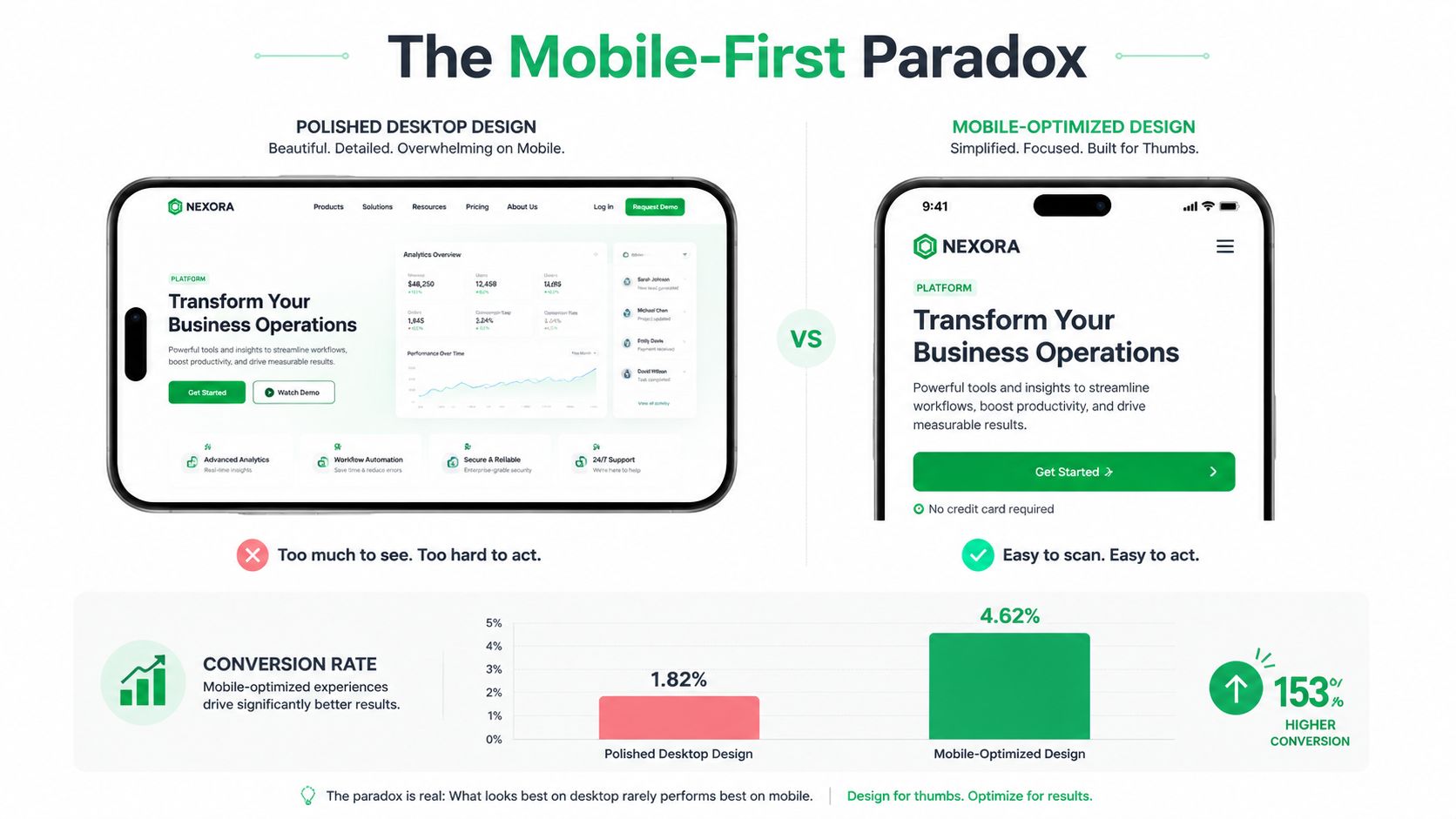
A polished desktop layout can become a frustrating mobile task. Columns collapse, navigation expands, images push the CTA below useful content, and balanced text turns into a long block that visitors must scan with one hand. Visual quality survives only when the page still helps people understand and act quickly.
Mobile conversion often trails desktop conversion, even though mobile accounts for a larger share of web traffic. Treat that gap as a usability warning, not a reason to copy the desktop page into a narrower container. Responsive structure, fast loading, clear navigation, and low-effort input all affect whether visitors reach the action.
Design for the first useful interaction
Mobile visitors often arrive while comparing providers, checking product details, or completing a task between other activities. Make the first interaction useful:
- Lead with the decision: Put the core promise and primary action where visitors can find them quickly.
- Collapse secondary detail: Use accordions only when their labels clearly describe the content inside.
- Keep controls reachable: Position important actions within comfortable thumb reach.
- Protect readability: Avoid tiny type, cramped spacing, and low-contrast text.
- Reduce input effort: Use suitable keyboards, autofill, clear labels, and sensible defaults.
A decorative animation can compete with the CTA. A large hero image can delay comprehension. A menu with too many options can force visitors to make unnecessary choices. Remove an element when it does not improve understanding, confidence, or action.
Web Design for Conversion: Choose simplicity deliberately
Compare two service pages. One opens with full-screen video, layered navigation, rotating testimonials, and animated cards. The other starts with a concise promise, one proof point, a single CTA, and a short process explanation. The second may receive less praise in a design review, yet it gives mobile visitors fewer decisions to make.
Rich photography, demonstrations, and brand details can earn their space when they answer buying questions. The test is functional: does the element reduce uncertainty, or does it decorate the route to action?
Mobile website optimization guidance should include real-device review, not only a responsive browser preview. Check different widths, test keyboard behavior, submit forms on a phone, and inspect sticky elements that cover content or focus states. Review the first useful interaction as carefully as the final screen, because a page that looks refined can still lose visitors before they reach its action.
Web Design for Conversion: Accessibility as a Conversion Strategy Rather Than Just Compliance
Accessibility exposes friction that many teams don’t notice because they use the site with a mouse, a large screen, strong vision, and familiar context. A visitor who uses a keyboard, enlarges text, uses a screen reader, or needs clear error recovery experiences the interface differently. Fixing those barriers often makes the same journey easier for everyone.
The checkout problem is especially serious. Contentsquare’s 2025 ecommerce accessibility reporting says most audited ecommerce sites still have inaccessible checkout flows, while another 2025 study found only 11% of scanned cart and checkout URLs were WCAG-compliant (Contentsquare Foundation accessibility barometer). The same reporting says 94% of Europe’s top ecommerce sites have inaccessible checkout flows. Those findings frame accessibility as a direct conversion gap, not a box to tick after launch.
Build against testable standards
WCAG 2.2, the current W3C accessibility standard for web content, organizes conformance into Level A, Level AA, and Level AAA. Level A is the minimum conformance level, while Level AA requires meeting all Level A and Level AA success criteria (WCAG 2.2 standard).
Readable design has concrete requirements. WCAG 2.2 defines line spacing of at least 1.5 times the font size, paragraph spacing of at least 2 times the font size, and letter spacing of at least 0.12 times the font size. These rules help content-heavy landing pages remain scannable, especially when visitors enlarge text or read under difficult conditions.
WCAG 2.2 also adds nine new success criteria beyond WCAG 2.1. The mechanics matter:
- Target Size Minimum: Interactive targets should be at least 24 by 24 CSS pixels, with adequate spacing as an alternative in applicable cases.
- Focus Appearance: Focus indicators need at least a 3:1 contrast ratio between focused and unfocused states.
- Focus Not Obscured: Sticky headers and overlays shouldn’t hide the element receiving focus.
- Accessible Authentication: Login flows shouldn’t require a cognitive function test, subject to the standard’s exceptions.
These requirements improve keyboard navigation, tap accuracy, form recovery, and account access. They also help users who are temporarily distracted, using a small screen, dealing with glare, or trying to correct an input quickly.
Web Design for Conversion: Fix the moments that stop completion
Start with labels that remain associated with their fields, instructions that appear before errors occur, and messages that identify both the problem and the correction. Keep help in a consistent relative location, and don’t force users to re-enter information they’ve already supplied unless it’s necessary. WCAG 2.2 addresses both Consistent Help and Redundant Entry, which align closely with a smoother funnel (WCAG 2.2 authentication and form requirements).
A website accessibility checklist is a useful starting point, but automated scans can’t judge every interaction. Test the complete journey with a keyboard, zoomed text, mobile touch, and assistive technology where possible. Conversion design works best when every visitor can identify the task, complete it, and recover when something goes wrong.
Testing What Works Through A/B Testing and Analytics
Conversion design becomes dependable when opinions are replaced by observable behavior. A/B testing compares a control page with a deliberate variation. Analytics shows where visitors arrive, hesitate, abandon the process, and complete it. Each answers a different question: analytics locates friction, while testing evaluates a specific remedy.
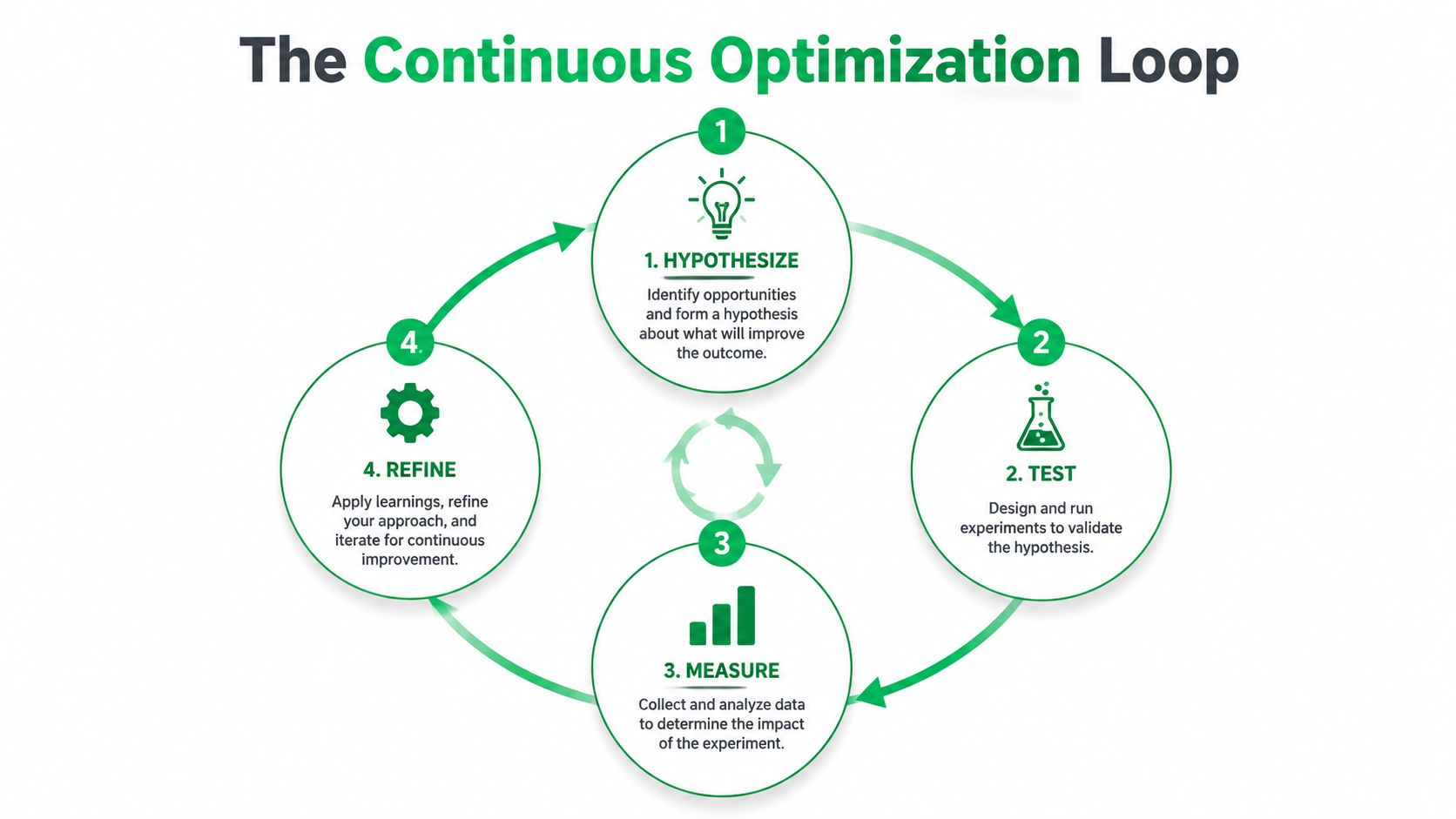
Start with a testable hypothesis: “If we replace the generic CTA with language that names the outcome, more qualified visitors will begin the inquiry flow.” Define the primary success event before launch. Add guardrails for form errors, low-quality submissions, refunds, or support requests. A higher click rate is not a win if it produces worse customers or more service work.
Web Design for Conversion: Choose the right test for the question
Use an A/B test when comparable traffic can reach a controlled variation and the result can be evaluated with reasonable confidence. Lower-traffic sites often learn faster from usability sessions, session recordings, form analytics, customer interviews, and before-and-after measurement. Forcing an A/B test onto a page with few visitors creates noise dressed up as evidence.
Prioritize ideas with a simple matrix:
| Priority | Potential impact | Effort | Suitable first move |
|---|---|---|---|
| High | A major form or checkout obstacle | Moderate | Investigate and test the clearest fix |
| High | Confusing offer or CTA | Low | Rewrite, observe, then run a controlled comparison |
| Medium | Layout refinement | Moderate | Validate with usability feedback |
| Low | Decorative styling | High | Defer until task friction is addressed |
The order depends on the funnel, but the operating principle holds: remove barriers to action before refining elements visitors may never reach.
Measure behavior, not applause
A button click can increase while completed submissions stay flat. Track the full path, including CTA interaction, form start, field error, completion, qualified lead, purchase, or another meaningful outcome. Segment device type and traffic source separately. A change that helps desktop visitors can create a mobile friction point, especially when spacing, loading behavior, or form interaction differs.
Do not stop a test when one variation merely appears ahead. Set the evaluation approach before launch, account for normal fluctuations, and record the change being tested. If the result is unclear, keep the hypothesis, collect stronger behavioral evidence, and test a more precise variation. That discipline turns each experiment into usable knowledge instead of a one-off opinion.
Your Next Steps Toward Higher Conversions
Start with a conversion inventory, not a visual wish list. For every important page, record its primary action, the visitor’s likely intent, the evidence supporting the decision, and the point where the user must invest effort. This often exposes pages that request contact details before establishing trust or offer several competing actions without a clear priority.
Audit the experience in the order users encounter it:
- Message: Can visitors understand the offer immediately?
- Route: Does the layout make the next step obvious?
- Confidence: Are proof, policies, process details, and expectations easy to find?
- Interaction: Can users complete the action on mobile and with a keyboard?
- Recovery: Do errors explain how to continue without deleting entered information?
- Measurement: Are completed outcomes tracked instead of surface engagement?
Do not redesign everything at once. Group fixes by friction type, test the highest-impact change you can explain clearly, and record the result. Keep the hypothesis, audience, device context, and observed outcome together. A clean record prevents teams from repeating failed ideas because the page changed after the last review.
Use focused campaign pages when the visitor arrives with a focused intent. A general homepage may support exploration, but it often forces visitors to choose among unrelated paths. Give each campaign one primary goal, then align its headline, proof, form, and follow-up with that goal. The point is not a prettier page. It is a shorter route from intent to completed action.
Mr. Green Marketing, LLC can serve as one potential partner for website design, conversion optimization, SEO, PPC, accessibility, and performance reporting. Its process begins with listening, identifying existing strengths, and building a plan around measurable goals rather than applying the same redesign package to every business. A free audit and performance report can help identify visibility gaps and prioritize practical improvements.
The gap between an average page and an exceptional one rarely comes from a clever button. It comes from clear messaging, disciplined hierarchy, mobile usability, accessible interaction, credible proof, and testing that connects interface changes to business outcomes. Start with the moment that demands the most effort, fix that friction, and measure what changes.
Mr. Green Marketing, LLC offers conversion-focused website design, SEO, PPC, accessibility improvements, and performance reporting for businesses seeking more qualified action from existing traffic. Visit Mr. Green Marketing, LLC to request a free audit and performance report, then use the findings to prioritize the next practical conversion improvement.
Leave a Comment
sing in to post your comment or sign-up if you dont have any account.