
Conversion Focused Website Design: You launched the redesign. The homepage looks cleaner, the fonts match the brand, and everyone on the team likes it. Then the phone stays quiet, forms still trickle in, and the dashboard looks annoyingly familiar. That’s the frustration with conversion focused website design, it can’t be judged by taste alone, because a site that looks sharper can still leave the same revenue on the table.
The fix starts with a harder question than “Does this look better?” It’s “Can a visitor understand the offer, trust it, and take the next step without friction?” In practice, that means design choices need to be tied to measurement, not mood. A conversion-focused site is a system for reducing abandonment, especially on mobile and landing pages where every second and every extra field can matter, and where a small improvement can outpace a complete visual refresh. For a useful redesign planning companion, keep a website redesign checklist open while you work.
Conversion Focused Website Design: Table of Contents
- Why Most Redesigns Look Better but Convert the Same
- The Seven Principles of Conversion-Centered Design
- The Page Elements That Actually Move Conversion Rates
- Mobile-First Means Designing for the Thumb and the Ticker
- Copy and Microcopy That Earn the Click
- Testing Discipline That Beats Opinion Every Time
- Your 90-Day Conversion Design Roadmap and Checklist
Why Most Redesigns Look Better but Convert the Same
A polished redesign often fails for a simple reason, it optimizes for internal approval instead of visitor action. Marketing likes the new hero image. Sales likes the updated wording. Leadership likes the brand refresh. But if the page still hides the primary action, buries the proof, or makes the form feel like work, the user behaves the same way they always did.
That’s why conversion focused website design has to start with a measurement problem. The page needs one primary conversion goal, one baseline to compare against, and one clear path for the visitor to follow. The visual layer matters, but only after the behavior target is clear. If the team can’t tell you the one action a page exists to drive, the design brief isn’t ready.
Conversion Focused Website Design: What good looks like
The best redesigns are the ones that make the offer obvious sooner and remove confusion faster. They don’t add cleverness where clarity is needed. They reduce the number of decisions a visitor has to make before clicking, calling, booking, or buying.
Practical rule: if a page can’t be explained in one sentence, it usually can’t convert cleanly either.
That’s the shift most SMB sites need. Not a prettier surface. A cleaner decision path.
The Seven Principles of Conversion Focused Website Design
A page that converts is built as a measurement system first and a visual system second. The framework from conversion-centered design matters because it names the parts that influence behavior: create focus, build structure, stay consistent, show benefits, draw attention, design for trust, and reduce friction. Miss one of them, and the page can still look polished while the path to action gets weaker.
Conversion Focused Website Design: Focus and structure first
Create focus means one page, one action, one primary outcome. If the hero asks users to subscribe, book, and download at the same time, the page is working against itself before the visitor has a chance to decide. Build structure means the information hierarchy answers the visitor’s questions in the order they appear, not the order the internal team prefers.
A service page that starts with “About Us” usually underperforms a page that starts with the problem, the offer, the proof, and the next step. A landing page with a single dominant CTA is stronger than one with three competing buttons. On mobile, that hierarchy matters even more because a cluttered top section forces extra scrolling before the visitor can do anything meaningful.
Conversion Focused Website Design: Consistency, benefits, attention, trust, friction
Stay consistent keeps the experience aligned across the ad, the landing page, the form, and the thank-you step. If the promise changes halfway through, people feel the disconnect and hesitate. Show benefits means the copy needs to state the outcome, not just the feature list.
Draw attention means visual hierarchy makes the CTA easy to spot without turning the page into a distraction. Design for trust uses testimonials, client logos, review snippets, and familiar proof near the moment of decision, because proof works best when the visitor is already considering the next step. Reduce friction means trimming the form, clarifying labels, and removing unnecessary steps. A page can have trust and still confuse people if the structure is weak. A page can have strong attention cues and still leak leads if the form feels like work.
That is why the first pass at conversion design should be measured, not argued. Check the event tracking before you debate button colors, because lower-traffic SMB sites usually get more value from fixing mobile friction, field drop-off, and CTA placement than from testing decorative variations. If the page does not already have clean tracking on the primary action, form starts, form submits, and scroll depth, the team is guessing about what changed. For a practical checklist of what to measure before you redesign, use the conversion rate optimization best practices guide.
Conversion Focused Website Design: The Page Elements That Actually Move Conversion Rates
The fastest gains usually come from the most specific edits. In published optimization frameworks, the estimated impact ranges are highest for the value proposition headline, then CTA copy and design, then hero layout, form length, and social proof positioning. The link that matters most is the one between what the visitor wants and how quickly the page reflects it. For examples of how those pieces show up on real landing pages, see high-converting landing page examples.
Prioritize in this order
Start with the headline. If the page doesn’t say what it does, who it’s for, and why it matters, everything else works harder than it should. A vague hero line like “Solutions for Modern Brands” might sound polished, but it doesn’t help the user decide.
Then move to the CTA. “Submit” is weak because it describes the form, not the value. “Get My Quote” or “See Pricing” is better because it tells the visitor what happens next. After that, inspect the hero layout. If the CTA sits too low, the image dominates, or the subhead repeats the headline without adding clarity, the hero is wasting space.
Short version: the page usually doesn’t need more elements, it needs fewer excuses to hesitate.
Conversion Focused Website Design: Page elements ranked by typical conversion impact
| Element | Typical Impact Range | First Test to Run |
|---|---|---|
| Value proposition headline | 40–100% | Rewrite for clarity, specificity, and outcome |
| CTA copy and design | 25–50% | Swap vague labels for action-based language |
| Hero layout | 20–40% | Move the primary action higher and reduce clutter |
| Form length | 15–35% per field removed | Remove one field and compare completion |
| Social proof positioning | 15–25% | Place proof closer to the CTA |
| Navigation simplification | Qualitative | Reduce competing exits and track click behavior |
Once the headline, CTA, and hero are stable, trim the form. Every extra field asks for more effort. Then move the social proof nearer to the ask, and simplify the navigation if the page is meant to convert rather than browse. That sequence keeps the work focused on the highest-impact changes first.
Conversion Focused Website Design: Mobile-First Means Designing for the Thumb and the Ticker
A mobile page is not a shrunken desktop layout. It has a different job. For many SMB and ecommerce audiences, the phone is the first place a decision gets made, which means the page has to work for a thumb, a short attention window, and a small screen. That puts pressure on CTA placement, text size, and forms that can be finished without friction.
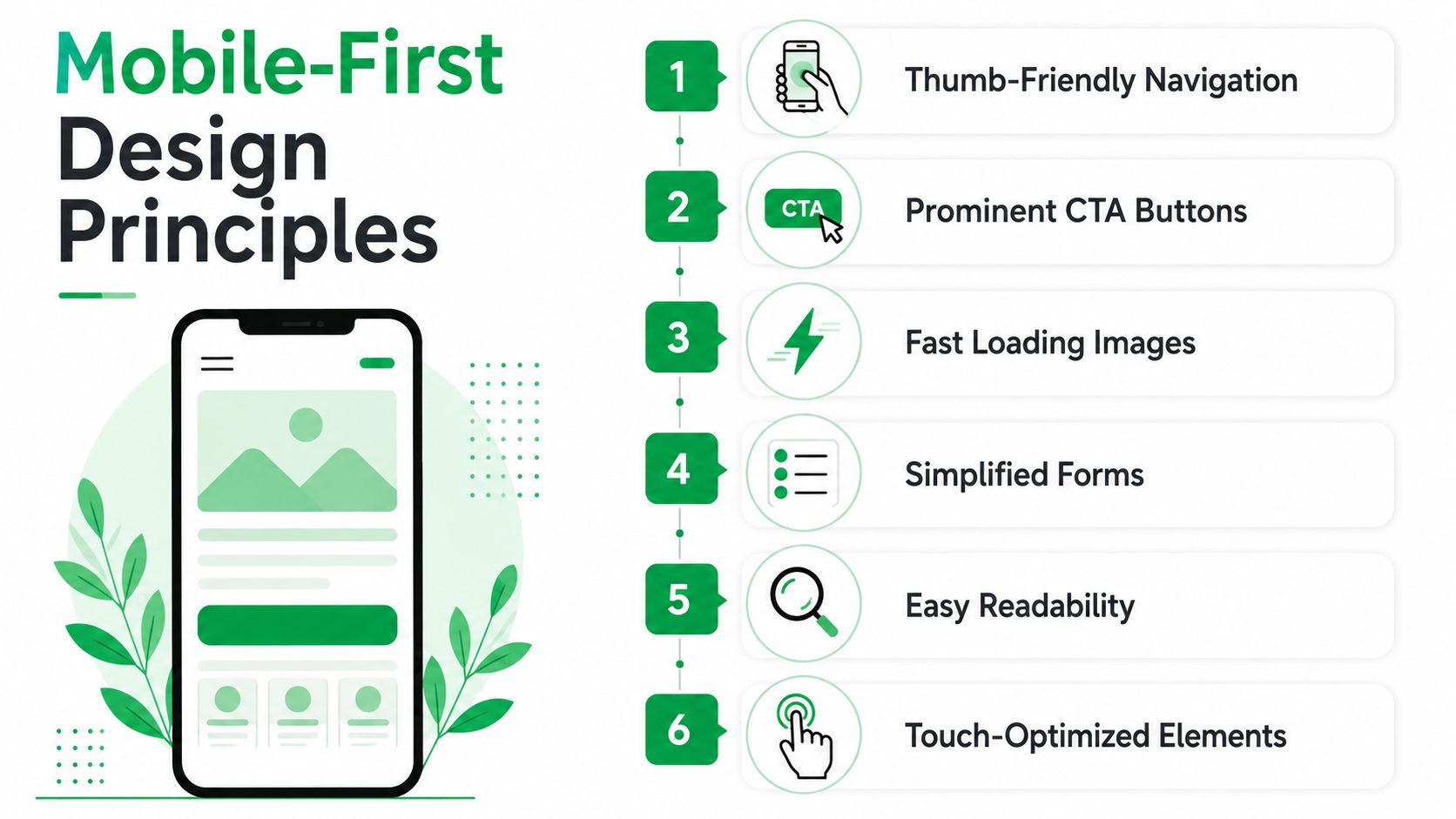
Speed affects that decision window fast. Benchmark research cited in conversion rate statistics on page speed and landing page ROI links a 1-second delay to a 7% drop in conversions, and another benchmark places the conversion cost at about 0.3% for each additional second. Independent web design research also finds that 40% of visitors leave if a page takes more than 3 seconds to load, and a Google-related statistic says 53% of smartphone users leave a site that takes more than 3 seconds on mobile in conversion-focused web design principles. In the same benchmark source, ecommerce conversion rates fall from 3.05% at 1 second to 0.67% by 4 seconds.
What mobile-first changes in practice
The practical response is direct. Put the primary CTA where thumbs can reach it without stretching. Collapse navigation if the page is meant to sell or capture a lead. Cut form fields to the minimum needed to move the visitor forward. For service businesses, add click-to-call and click-to-text where they remove steps instead of adding clutter.
A mobile-first audit should also ask whether the page loads quickly enough to stay in the conversation, whether text can be scanned without zooming, and whether the most important action is visible before the user has to hunt for it. That is the kind of review discussed in how to optimize a mobile website for conversion. If the answer is no, the page is asking too much.
Conversion Focused Website Design: Copy and Microcopy That Earn the Click
Words do more conversion work than most layouts admit. The headline carries the promise, the subhead stabilizes it, the button label triggers the action, and the microcopy removes the last bit of anxiety. If those layers disagree, the page feels slippery even when the design is clean.
A useful starting point is to write from the visitor’s desired outcome, not from the company’s internal vocabulary. Button text like Get My Quote, See Pricing, or Start Free Trial performs better in practice because it mirrors the next step the user expects. Phrases like “Submit,” “Learn more,” and “Click here” are weak because they describe the mechanics, not the payoff. For a broader vocabulary list, the power words reference can help spark more direct labels.
Headline and subhead patterns
The headline should identify the result plainly. The subhead should add one layer of context, usually who it’s for or what problem it solves. That pairing works better than trying to sound clever.
Form labels should also reduce friction. “Work email” is clearer than a generic field title. Error messages should tell the user exactly what to fix without sounding mechanical. Trust signals can appear in short copy near the CTA, especially when the user is one click away from abandoning the page.
Good microcopy doesn’t persuade by being louder. It persuades by removing uncertainty.
One of the fastest copy audits is simple. Replace vague CTA labels with outcome-based ones, tighten the headline, and delete any line that repeats what the visitor already knows from the page above it. If the page still reads naturally after that trim, the copy is probably carrying its weight.
Testing Discipline That Beats Opinion Every Time
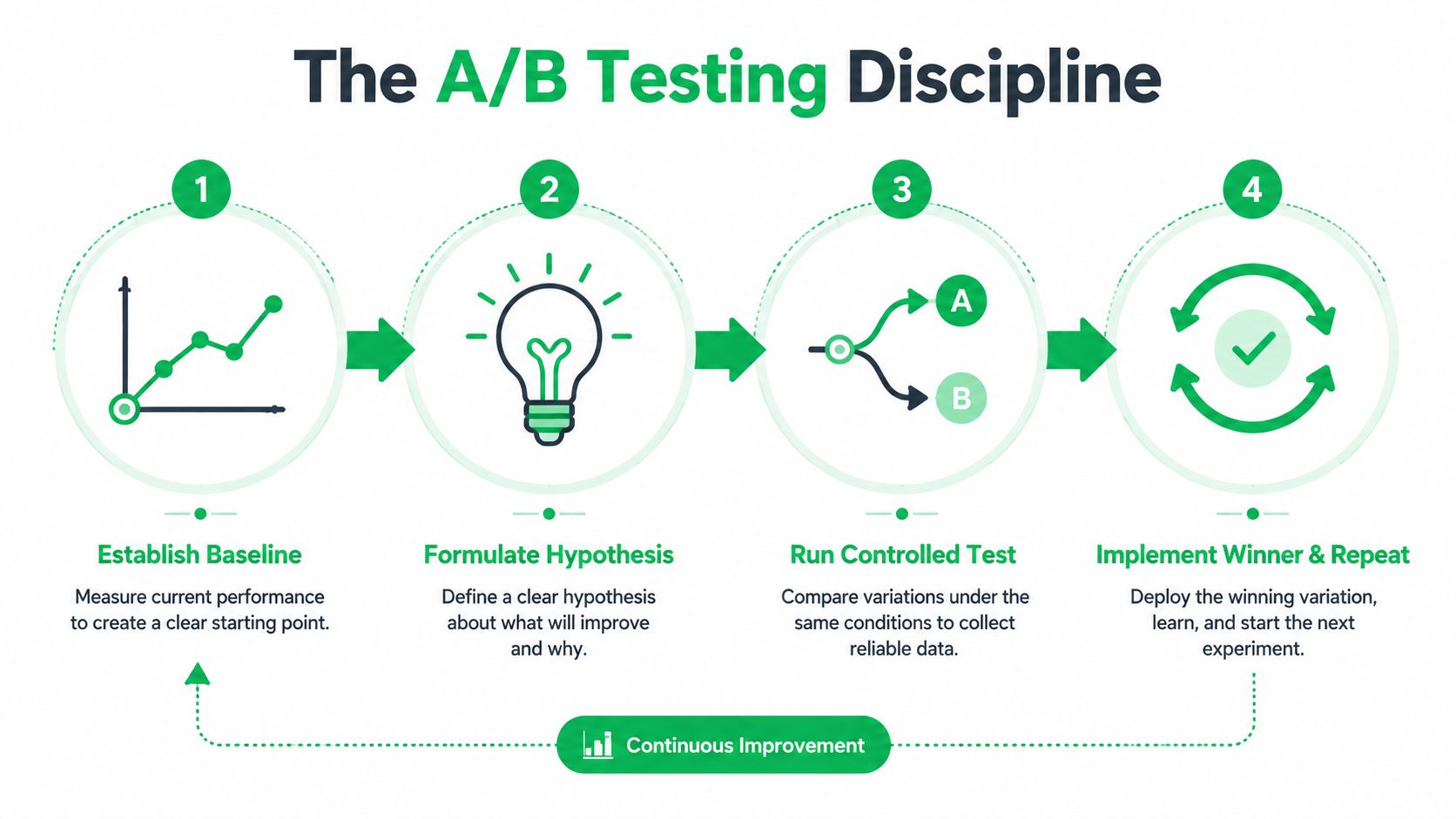
Most redesigns don’t fail because the team lacked taste. They fail because nobody set a baseline, no one isolated the variable being changed, and the test ended before the result was statistically useful. That’s why measurement discipline matters more than a nice dashboard.
A proper CRO loop starts with a benchmark, then a hypothesis drawn from behavior data, then a single-variable test, then a decision. One published framework recommends waiting for statistical significance, with 95% confidence and 100+ conversions per variant, or roughly 4 to 8 weeks on lower-traffic sites, before drawing a conclusion from conversion-focused web design guidance. Another framework recommends tests run for at least two weeks and 1,000+ visitors before making a call in the conversion-focused website design guide.
The mistakes that waste time
The first mistake is changing too many things at once. Headline, CTA, and form length all move together, and then nobody knows what mattered. The second is stopping early because one variant looks ahead on day three. The third is ignoring device or traffic-source segments, which hides the fact that a desktop winner can underperform on mobile.
If a site doesn’t have reliable event tracking, form analytics, and segmentation, the team is basically decorating the interface while the leak stays hidden. That’s especially true for smaller businesses, where traffic is limited and every test needs a cleaner hypothesis. The goal isn’t more testing. It’s better testing.
Your 90-Day Conversion Design Roadmap and Checklist
A conversion redesign works best when the work is sequenced instead of scattered. The first month should establish the measurement layer, the second should clean up the highest-friction page elements, and the third should harden the mobile experience and begin structured testing. That order keeps the team from polishing screenshots before they know what the page is supposed to do.
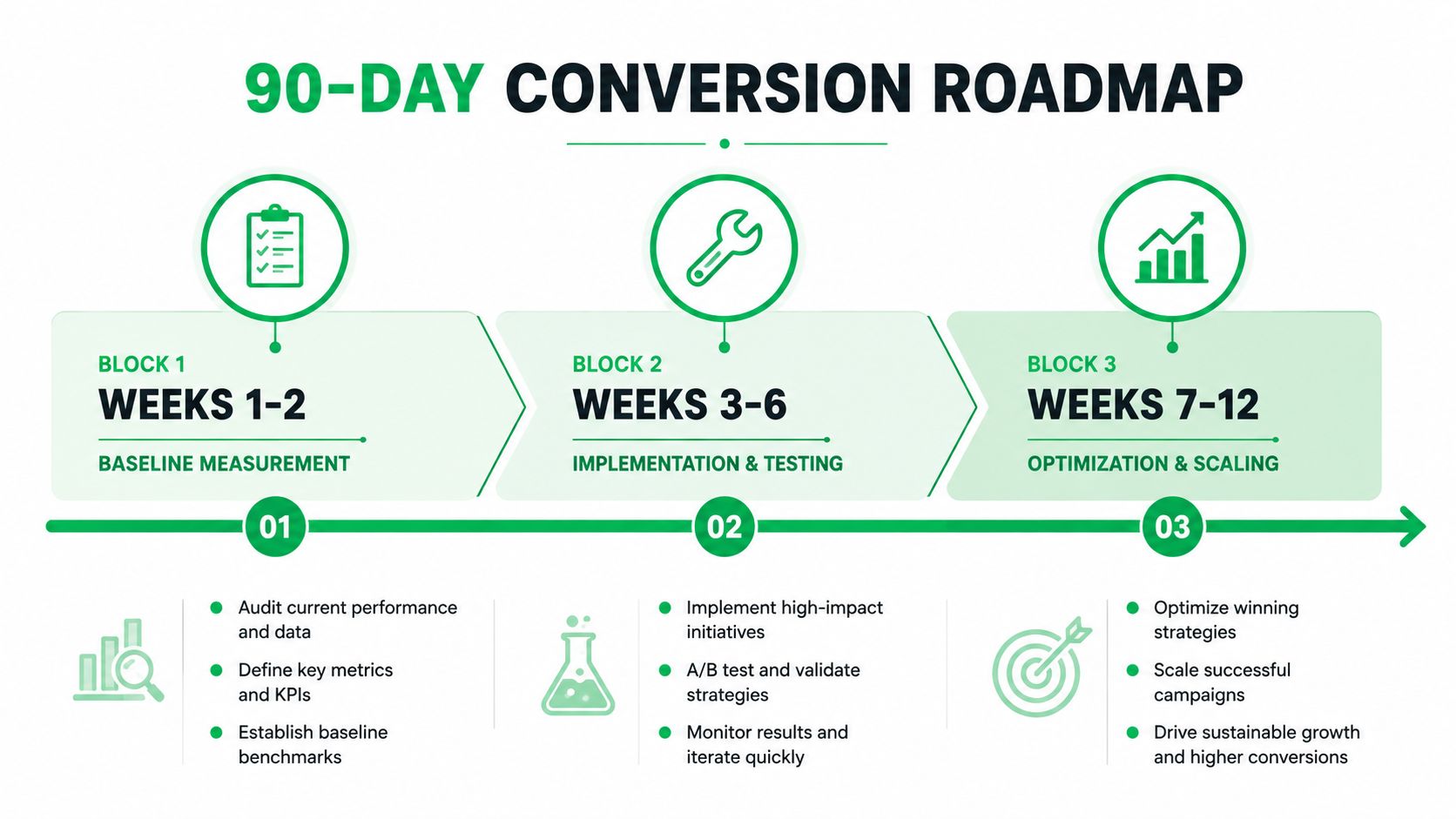
Weeks 1 to 2
Set the primary conversion metric for each page. Fix event tracking, form tracking, and source-level segmentation before changing the layout. Capture a clean baseline, then pull heatmaps and session recordings to find where visitors hesitate.
Weeks 3 to 6
Rewrite the headline if the value proposition is fuzzy. Tighten the CTA copy. Simplify the hero. Remove one form field if the flow supports it, then move trust proof closer to the ask. Keep the page focused on one action.
Weeks 7 to 12
Audit mobile speed, thumb reach, readability, and tap targets. Reduce friction in forms. Add click-to-call where it shortens the path for service leads. Then run one controlled A/B test at a time and document what changed, what moved, and what didn’t.
A practical handoff checklist for a designer or developer looks like this:
- Define the conversion goal: one primary action per page, no mixed objectives.
- Measure before changing: baseline rate, events, and traffic source split.
- Prioritize the first pass: headline, CTA, hero, form, proof, navigation.
- Design for mobile first: thumb reach, short forms, readable type, fast load.
- Test with discipline: one variable, clear hypothesis, statistical significance.
- Keep iterating: ship the winner, then move to the next bottleneck.
Mr. Green Marketing, LLC approaches this kind of work through strategy-led web design, measurement, and conversion audits, which makes the process easier to sequence instead of guessing at fixes. If you want a redesign that’s tied to tracking, speed, and actual lead flow, visit Mr. Green Marketing, LLC and ask for a free audit and performance report.
Leave a Comment
sing in to post your comment or sign-up if you dont have any account.