
Website Design for Local Business: You might be in this spot right now. A customer hears about your business, searches your name, opens your site, and gets a page that feels dated, thin, awkward on mobile, or just unclear. They don’t call. They don’t book. They move on.
That’s the quiet problem with local websites. Most owners know they need one. Fewer realize the site is often doing active sales work, or active damage, every hour it’s live. And for local buyers, trust forms fast. Really fast.
Why Your Local Business Website Is Your Best Salesperson
A local business website has one job before anything else. It needs to make a stranger feel comfortable taking the next step.
That step might be calling your office, requesting a quote, visiting your store, or booking service. But it only happens if the site feels credible, current, and easy to use. According to Network Solutions’ small business website statistics, 94% of potential customers form their initial opinion based solely on the site, and that judgment happens in just 0.05 seconds.
That means your website design for local business isn’t a side asset. It’s your first handshake.
A lot of owners treat the website like a digital brochure. A few pages. Some stock photos. A phone number buried in the footer. Done. That approach usually fails because local buyers don’t browse casually. They scan, compare, and decide.
Website Design for Local Business: What your website is really selling
Your site is selling more than your service list.
It’s selling:
- Legitimacy. Do you look established or improvised?
- Clarity. Can visitors tell what you do in seconds?
- Convenience. Is it obvious how to contact or book you?
- Confidence. Do people feel safe choosing you over the competitor down the street?
And yes, niche matters. A cleaning company, for example, needs a site that handles trust, local intent, and service clarity without fluff. If that’s your category, this guide on how to attract customers with a cleaning site is a useful companion because it shows how service-focused messaging and structure work in practice.
Practical rule: If a customer can’t tell who you help, where you work, and what to do next within a quick scan, the site isn’t selling well.
Good local websites don’t just exist. They answer hesitation before the visitor says it out loud.
Website Design for Local Business: The Foundation Your Website Must Be Built On
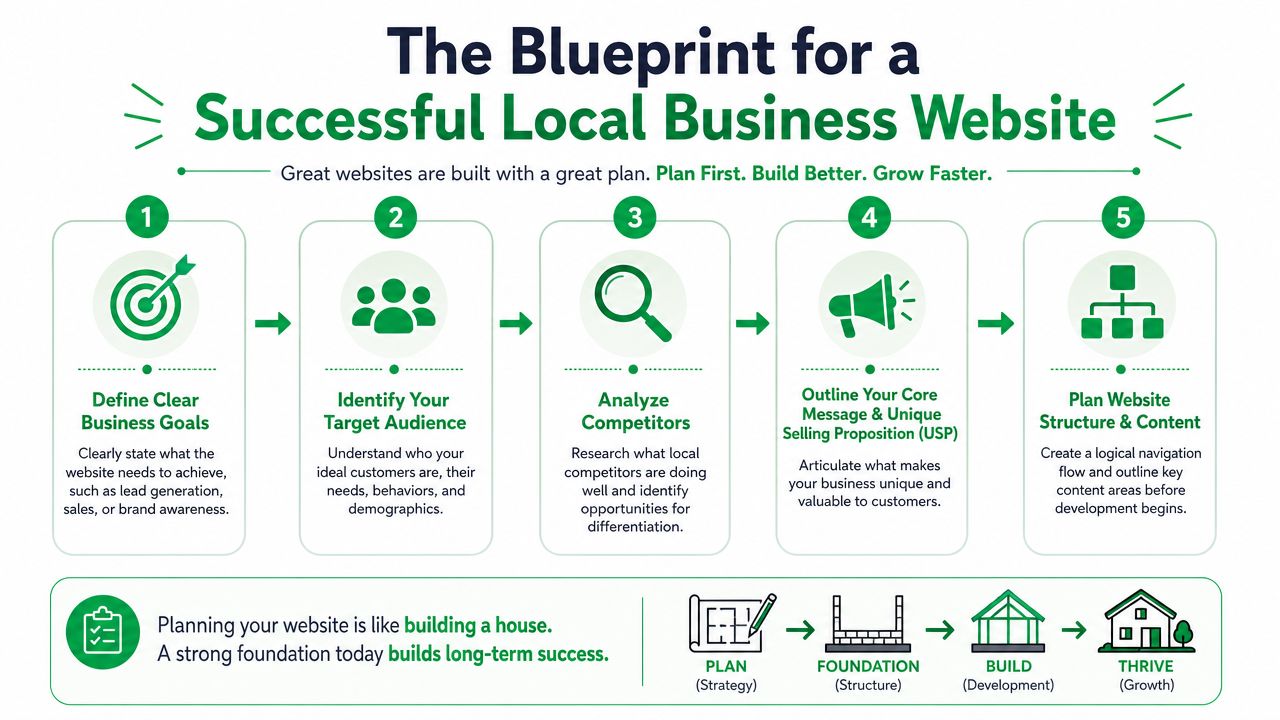
Design starts before fonts, colors, or homepage layouts. We plan the business logic first.
That’s where most weak websites go off track. The owner wants the site to do everything for everyone. The result is clutter. Mixed messages. Too many pages. No clear path.
Website Design for Local Business: Start with one primary goal
Every local business site needs one primary conversion goal.
Not five. One.
For a service business, that’s often a booked call, estimate request, or appointment. For a retailer, it might be store visits or product purchases. You can still support secondary actions, but the site needs a clear center of gravity.
A simple planning model works well:
- Primary goal. The main action that drives revenue.
- Secondary goals. Supporting actions like email signups or direction requests.
- Proof elements. Reviews, credentials, project photos, FAQs, and service details that reduce doubt.
When this hierarchy is clear, content decisions get easier. You stop adding pages just because a competitor has them.
Website Design for Local Business: Know the customer you actually serve
Local businesses often write copy for “everyone in the area.” That usually makes the messaging bland.
A better approach is to identify the small set of customer problems you solve repeatedly. If you’re a roofer, emergency leaks and insurance-related repairs are different conversations. If you’re a med spa, first-time visitors need a different comfort level than returning clients. Small distinctions. Big difference.
We usually map this out in plain language:
| Question | What to define |
|---|---|
| Who is buying? | Homeowner, office manager, parent, shopper, operations lead |
| What triggered the search? | Urgency, comparison shopping, referral follow-up, repeat need |
| What are they worried about? | Cost, reliability, quality, safety, location, professionalism |
| What do they need next? | Call, form fill, directions, quote, availability, proof |
That customer view should shape page order, CTA wording, and even image choice.
Keep the structure flat
A complicated sitemap usually signals unclear strategy. BrightLocal notes that a flat site architecture with no more than three clicks from the homepage to any other page improves usability and crawlability, and when paired with a clear goal hierarchy, it can improve mobile conversion rates by up to 28% in their framework for local business websites at BrightLocal.
That standard is practical, not theoretical.
A strong local structure often looks like this:
- Home
- About
- Services or Products
- Service Area or Locations
- Reviews or Gallery
- Contact
That’s usually enough to start.
If you’re revisiting mobile experience as part of the planning stage, it helps to review examples of how teams optimize mobile website performance around structure, page priorities, and click depth before development starts.
A website with fewer choices often converts better because visitors don’t have to decode your navigation before they trust you.
And one more thing. Competitor review matters, but don’t copy their structure blindly. Use it to spot gaps. Sometimes the best move is the simple one they skipped.
Website Design for Local Business: Crafting Pages That Build Local Trust
Local trust is a balancing act. You need to feel rooted in the community without looking small-time. You need to look polished without sounding generic.
That’s the actual gap in a lot of website design for local business. Owners either overdo “local keywords” until the copy sounds forced, or they build a sleek site that could belong to any company in any city.
The homepage should feel specific, not broad
The strongest homepages don’t try to say everything. They make a fast case for relevance.
A visitor should see, within the first screen, what you do, who you serve, and where you work. If you’re a local HVAC company, “Heating and cooling repair for homeowners in [service area]” is stronger than a vague brand slogan. If you’re a retailer, lead with the product category and the local reason to visit, such as curated inventory, same-day pickup, or in-store guidance.
Then support that headline with proof that feels real. Not polished-for-polished’s-sake. Real.
According to Cube Creative’s home service web design guidance, local service businesses build trust by showing real photos of your uniformed team, clear licensing and certifications, a service-area map, branded vehicles, and a local phone number with area code. Those five elements are described as essential for conversion.
Your about page should answer one quiet question
That question is simple. “Are these people legit?”
The about page isn’t where you dump a company timeline no one will read. It’s where you show how your business became reliable. That can include your founder story, but only if it supports trust.
Use the page to show:
- Who’s behind the work. Real names, real team photos, real roles.
- Why your standards are consistent. Training, process, licensing, experience.
- Why you belong locally. Neighborhood familiarity, service-area experience, recognizable locations.
The “global trust vs. local relevance” issue becomes apparent. The page should make you feel local, but not amateur. Clean layout, professional photos, concise writing.
Website Design for Local Business: Service pages need local proof, not keyword stuffing
A service page should read like it was written by someone who’s delivered the work.
For example, a landscaping company shouldn’t just list “lawn care,” “hardscaping,” and “mulching.” It should explain what the client gets, what kinds of properties it serves, and what the process looks like. If you serve multiple areas, build pages around meaningful local differences instead of swapping city names into the same paragraph.
Show the truck. Show the team. Show the license. Show the map. Those details do more trust work than another paragraph of marketing copy.
A good contact page matters too. Keep it friction-free. Local number. service area. hours. contact form. map. No mystery.
And skip the stock photo of a headset operator unless that person is an employee. People can feel the disconnect.
Website Design for Local Business: Designing for Action Not Just Appearance
A nice-looking site can still fail hard if visitors can’t use it comfortably.
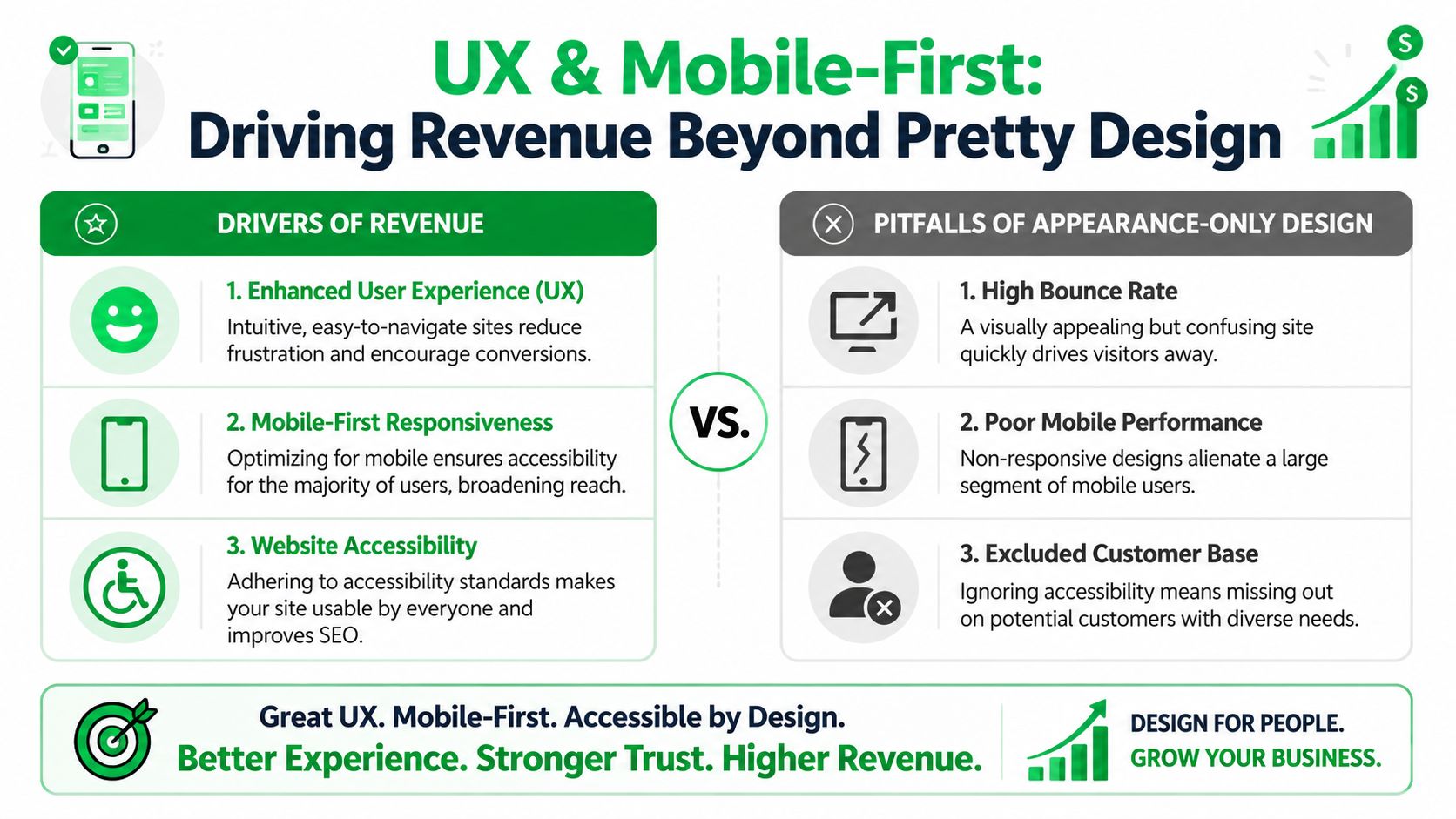
That’s why we treat design as a conversion system, not decoration. Layout, mobile behavior, CTA placement, contrast, button labels, form fields, and page speed all shape whether someone acts or leaves. A visually impressive homepage that hides the phone number and buries the service list isn’t good design. It’s just expensive.
Mobile-first is the default now
Local intent often starts on a phone. Someone needs a repair, directions, availability, or pricing context while they’re already moving. If the mobile experience is clumsy, the sale slips away fast.
Wix reports that users are 67% more likely to make a purchase from a mobile-friendly website, and custom-designed CTAs can boost visitor conversions by 42%, based on their small business website statistics. That’s why button placement, thumb-friendly spacing, short forms, and clean mobile hierarchy matter so much.
A few practical wins:
- Use one primary CTA per screen. “Book Now,” “Request Estimate,” or “Call Today.”
- Keep forms short. Ask only for what your team needs to respond.
- Make tap targets obvious. Tiny links cost leads.
- Prioritize the essentials. Phone, service summary, location, proof.
If you want a broader view of how website choices connect with lead generation and channel performance, this piece on website design and digital marketing gives useful context.
Accessibility affects revenue too
This gets overlooked all the time. Owners hear “accessibility” and think compliance checklist. But accessible design usually creates a smoother experience for everyone.
High-contrast text is easier to scan. Clear link labels help visitors understand where they’re going. Keyboard-friendly forms reduce friction. Descriptive alt text strengthens usability and helps keep image content meaningful.
And for local businesses, accessibility ties directly into trust psychology. If a customer struggles to read your mobile text, use your form, or understand your buttons, they don’t blame their device. They blame your business.
One test worth doing: Open your site on your phone in bright sunlight, with one hand, and try to request service in under a minute. If it feels annoying, customers are feeling it too.
Pretty matters. But easy wins.
Website Design for Local Business: The Local SEO Launch Checklist
A local site can look sharp and still stay invisible if the launch details are sloppy. Often, owners lose momentum. The homepage is approved, photos are uploaded, the site goes live, and basic search signals are still missing.
That’s fixable if you use a checklist.
Check the signals Google and customers both need
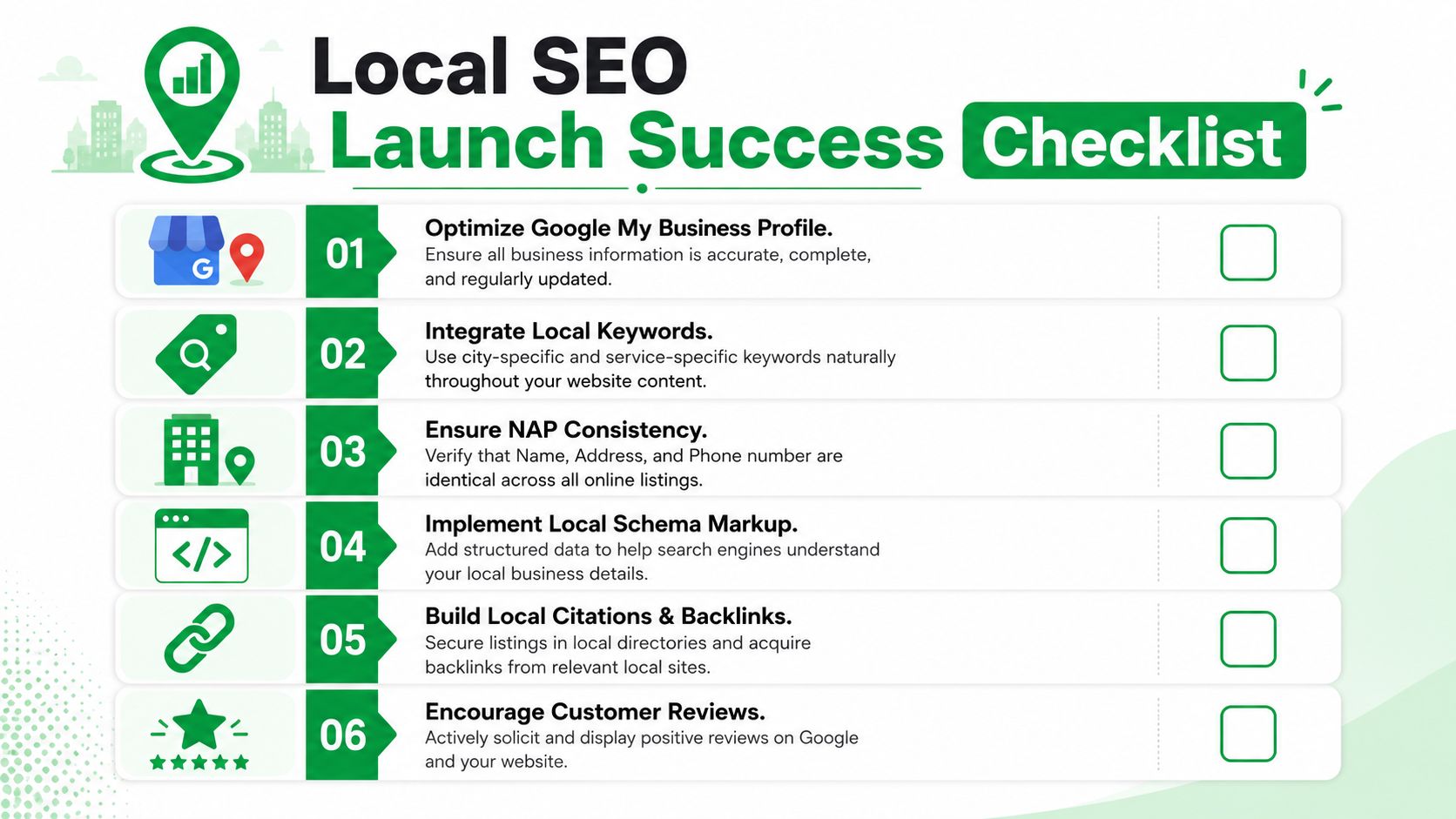
Start with the basics that should match everywhere your business appears online.
- Name, Address, Phone. Keep them consistent across your site, directory listings, and business profiles.
- Google Business Profile. Make sure categories, hours, service areas, and photos are current.
- Location details on-site. Put your contact information where people can find it without hunting.
If your business serves a niche with heavy local competition, the supporting strategy matters too. Restaurants are a good example. This restaurant SEO services guide is useful because it shows how category, local intent, and visibility work together in a crowded market.
Website Design for Local Business: Fix the structural issues before they spread
Navigation and branding problems hurt more than owners expect.
According to New Perspective Studio’s guidance on small business website design, navigation menus with more than six items can increase bounce rates by 35%, and inconsistent branding across pages can reduce trust by 42%. The same source notes these issues can be addressed with a mobile-first approach, image compression, and clear visual hierarchy, boosting conversions by 30%.
That means launch review shouldn’t focus only on spelling errors and broken links. Review the user path.
A fast checklist for that review:
| Area | What to verify |
|---|---|
| Navigation | Keep the top menu concise and predictable |
| Branding | Use the same colors, tone, and logo treatment across pages |
| Images | Compress files and avoid oversized uploads |
| CTAs | Make the next action obvious on every important page |
| Contact path | Test call buttons, forms, map links, and hours |
Here’s a useful walkthrough to pair with your launch checklist:
Add local schema and keep the site technically clean
Schema.org markup helps search engines understand what your business is, where it operates, and what details belong in local search results. For local companies, LocalBusiness schema is worth implementing early because it supports clarity around your business identity.
If you’re working with a developer or agency, ask directly whether they’ve set up local schema, checked crawl paths, and reviewed mobile UX before launch. Teams that handle both web and local visibility, including local SEO lead generation, usually treat those items as part of the same build process because they affect each other.
One missed detail won’t usually sink the site. A pile of small misses will.
Beyond Launch Day Measuring and Growing
Launch day feels like a finish line. It isn’t. It’s the point where you finally get clean feedback from real users.
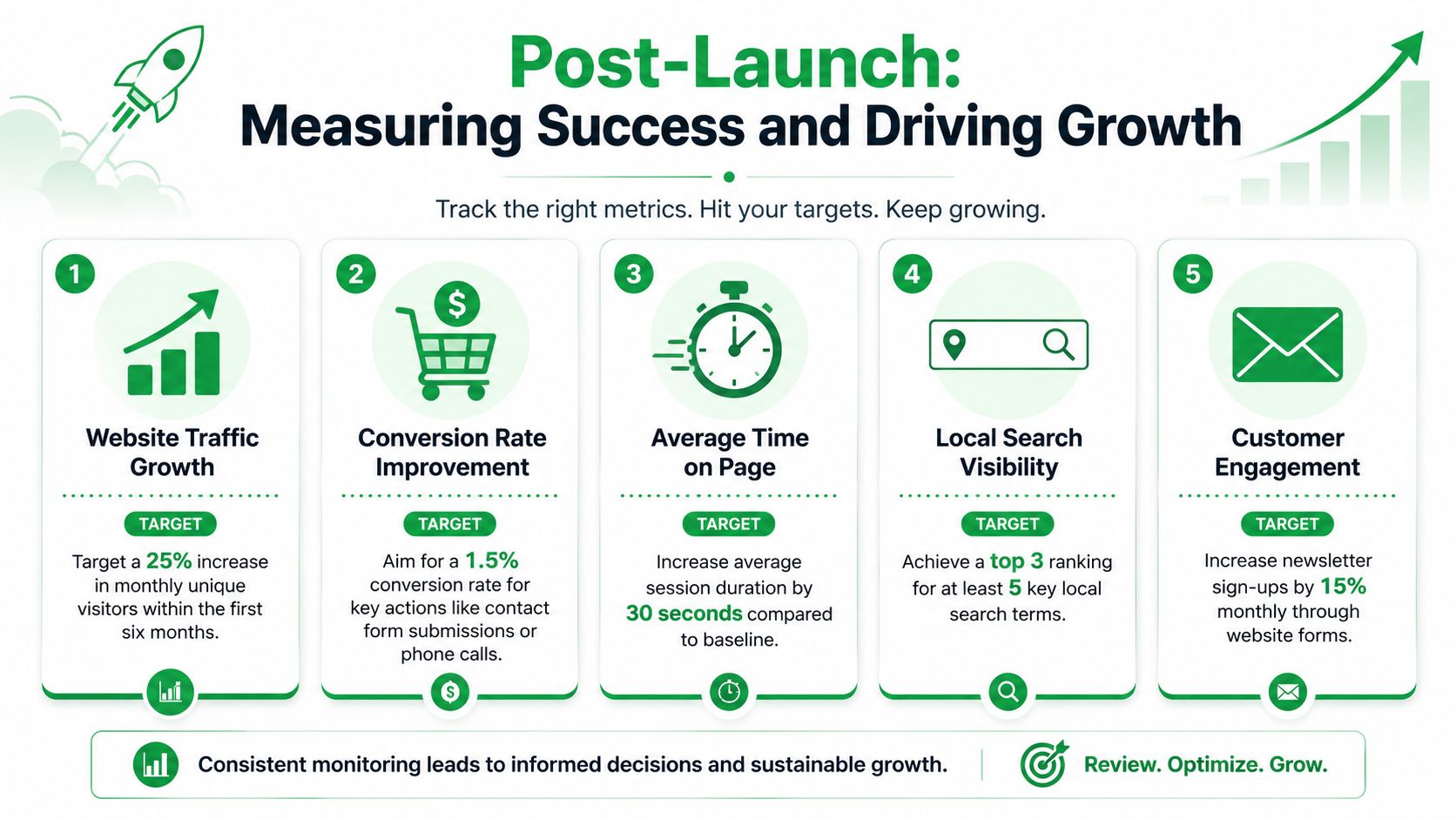
Once the site is live, the job changes from building to learning. Which pages attract local traffic. Which service pages get ignored. Which forms are too long. Which CTA labels pull better responses. Through this ongoing analysis, websites transform into useful business tools instead of static assets.
Track actions, not vanity noise
Most owners open analytics, see a pile of dashboards, and stop looking.
Keep it tighter than that. Watch the actions tied to revenue or lead flow:
- Contact form submissions
- Phone call clicks
- Direction requests
- Booked appointments
- Top landing pages for local traffic
Those metrics tell you whether the site is helping the business, not just collecting visits. If you also run in-store campaigns, location-based promotions, or guest access programs, this article on understanding customer behavior via Wi-Fi adds a helpful layer because it connects digital behavior with real-world traffic patterns.
Build a simple optimization loop
We use a straightforward cycle.
First, look for friction. Maybe people visit a service page but don’t submit the form. Maybe the mobile CTA is too far down. Maybe the contact page gets traffic but weak conversion. Then make one focused change and review what happened.
A few examples:
- Rewrite a homepage button from “Submit” to “Request Estimate”
- Move the phone CTA higher on mobile
- Replace generic hero copy with a local service promise
- Swap stock images for actual project photos
- Shorten a form by removing nonessential fields
Don’t redesign the whole site every time performance dips. Isolate one likely issue, change it, then watch the response.
Refresh content before it goes stale
A local site ages quickly when nothing changes. Team photos get old. Service areas expand. Hours shift. New reviews come in. Old offers expire. Buyers notice.
Content maintenance is part trust management, part SEO hygiene. Fresh photos, accurate business details, and updated service information make the site feel alive. That matters more than flashy redesigns in most cases.
If a page consistently underperforms, don’t assume the answer is more text. Sometimes the issue is weaker proof, a poor CTA, thin local relevance, or confusing page order. Small refinements often do more than large rewrites.
And yes, this is the part many businesses skip. Then they wonder why the site “just stopped working.”
Common Questions About Local Business Websites
How much should a local business website cost
The answer is that price follows complexity.
A simple brochure-style site costs less than a site with booking tools, local landing pages, ecommerce, or custom integrations. DIY builders lower the upfront cost, but they often increase the time you spend wrestling with layout, content, mobile issues, and SEO basics. Freelancers can be a good fit for lean projects. Agencies usually make more sense when you need strategy, copy, design, development, and search visibility working together.
Don’t shop on price alone. Shop on fit, process, and whether the build supports your actual business goal.
Which platform should you choose
Choose the platform based on what the business needs to do.
WordPress fits businesses that want flexibility, custom content structures, and deeper SEO control. Squarespace works for simpler service sites with lighter functionality. Shopify is the cleaner choice when ecommerce is central, not secondary.
The mistake is picking a platform because it’s popular, then forcing your business model into it.
How long does it take to see results
Paid traffic and direct response improvements can show up quickly if the site removes friction and improves conversion paths.
Organic visibility usually takes longer. Search engines need time to crawl, evaluate, and trust the site structure, local signals, and content. That means you should expect progress in phases. First better usability. Then stronger lead flow from existing traffic. Then improved local search performance if the SEO foundation is sound.
Should you write the copy yourself
You can, if you know your customers well and can write clearly.
But most owners are too close to the business. They either leave out key trust details or overload pages with internal language customers don’t use. A good process pulls the expertise from you, then turns it into clear sales-focused copy that sounds human.
What matters most if your budget is tight
Get the essentials right first.
That means clear messaging, mobile usability, contact visibility, trust signals, local relevance, and solid page structure. Fancy motion effects can wait. So can bloated feature lists. A lean site with sharp fundamentals usually beats a prettier site with muddled priorities.
If you want a website that’s built around lead generation, local SEO, and conversion-focused design, Mr. Green Marketing, LLC offers strategy-led web design as part of broader digital marketing support. A practical starting point is a free audit and performance report to identify visibility gaps, mobile friction, and the quickest improvements to make first.
Leave a Comment
sing in to post your comment or sign-up if you dont have any account.