
Graphic and Web Design: Your business probably doesn’t have a design problem. It has a decision problem.
The logo may feel dated. The website may look acceptable on a laptop and awkward on a phone. Your sales deck, packaging, social graphics, and landing pages may all look like they came from different companies. And when you finally decide to fix it, the next question hits fast. Do you need a graphic designer, a web designer, or both?
That’s where many owners stall. Not because design is vague, but because the wrong hire creates expensive rework. A strong brand identity without a usable site won’t convert. A sleek site without a clear visual system won’t build recognition. Graphic and web design work best when they’re treated as connected business functions, not isolated creative tasks.
Graphic and Web Design: Your Guide to Graphic and Web Design
The practical difference matters because the business outcomes are different.
Graphic design shapes how your brand looks and communicates. Think logo systems, typography, color palette, packaging, sales collateral, ad creatives, pitch decks, and social templates. It answers questions like: Do we look credible? Do people recognize us? Does our visual identity match our price point?
Web design shapes how people use your digital presence. It covers layout, navigation, page structure, mobile behavior, calls to action, readability, and the overall path from visit to action. It answers a different set of questions. Can visitors find what they need? Can they trust the site quickly? Can they convert without friction?
The confusion comes from overlap. A homepage hero section needs brand judgment and UX judgment. Product pages need visual polish and structural clarity. And yes, many designers can do some of both. But the core disciplines still differ.
Business reality: If your brand looks polished but your site is hard to use, visitors leave. If your site works but your visuals feel inconsistent, trust drops before the user even reads your offer.
That’s why business owners should evaluate design the way they evaluate sales operations or paid media. Not as decoration. As a system.
For companies reviewing vendors, examples of high-performance web design can be useful because they show how design choices affect speed, conversion flow, and usability, not just visual taste.
A smart investment starts with the right diagnosis. If your identity is fragmented, start with graphic design. If leads are leaking on mobile, start with web design. If both are shaky, treat them as one coordinated project.
Graphic Design vs Web Design The Core Differences
Graphic design and web design share visual principles, but they solve different business problems.
Graphic design has older roots. The term “graphic design” entered professional usage in 1922, when William Addison Dwiggins used it, and the discipline itself is commonly traced back to 15th-century movable-type printing. That history matters because it shows the field’s foundation in static visual communication, which is very different from the interactive nature of websites, as noted in Canva’s history of graphic design.
Web design came later, shaped by screens, interaction, and behavior. One discipline creates the visual language. The other applies that language inside an experience people click, scroll, search, and use.
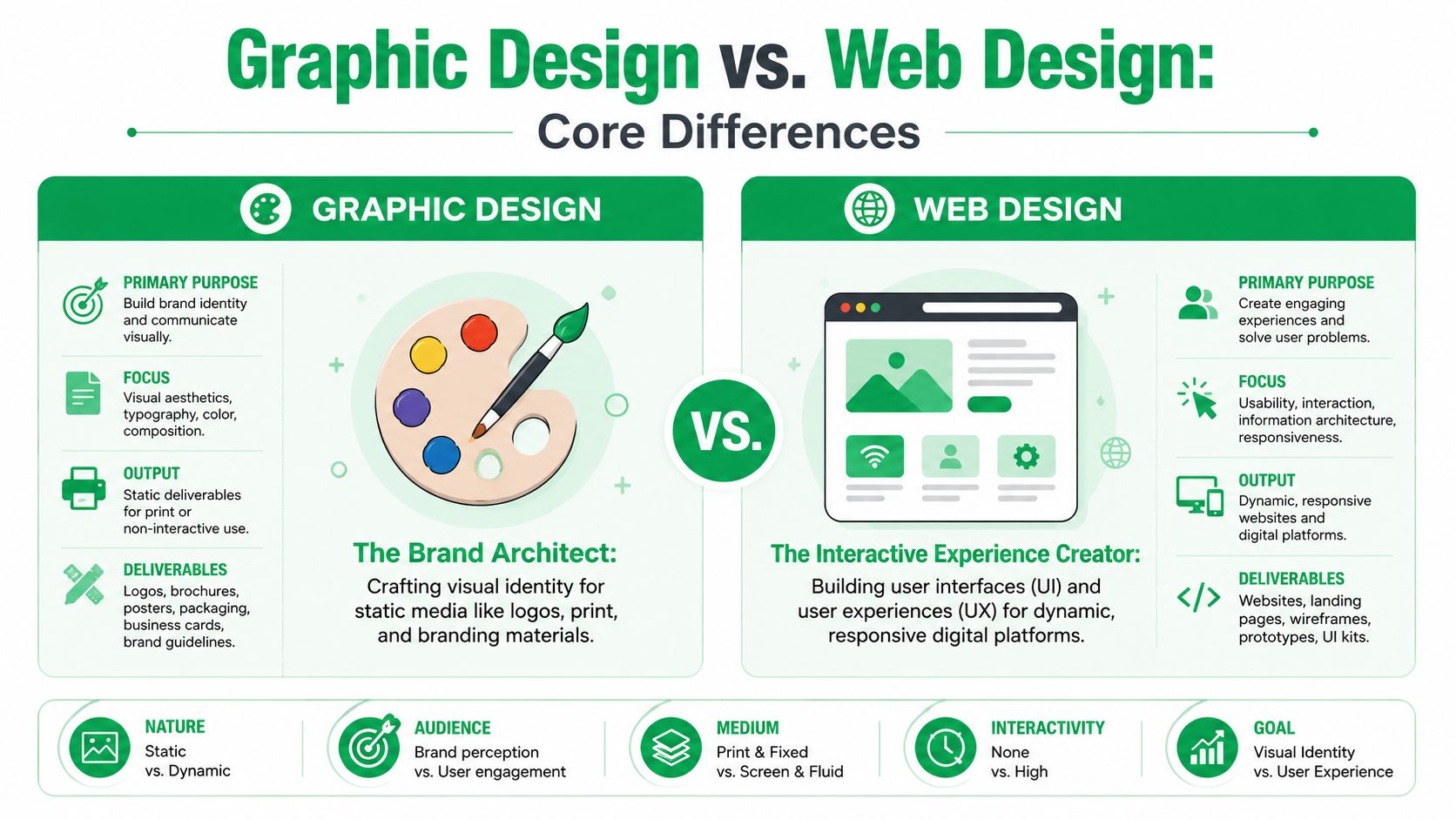
The brand architect and the digital builder
A graphic designer is usually working on identity and communication assets. Their job is to make the brand recognizable and coherent. That might include a logo suite in Adobe Illustrator, a typography system, brand colors, packaging concepts, trade show banners, social templates, or a PDF brochure built in Adobe InDesign.
A web designer takes that brand system and turns it into an interface people can use. That work often happens in Figma and involves navigation patterns, wireframes, mobile layouts, content hierarchy, UI components, and handoff files for development.
And that difference changes what “good” looks like.
A graphic designer can succeed with a static layout that delivers one clear message. A web designer has to think about what happens when a visitor lands halfway down the funnel, taps from a phone, misses the menu, needs reassurance, and wants to contact you in ten seconds.
Graphic Design vs Web Design At a Glance
| Aspect | Graphic Design | Web Design |
|---|---|---|
| Primary focus | Visual identity and communication | Usability, interface, and on-screen interaction |
| Typical outputs | Logos, brand guides, packaging, print assets, ad creatives | Page layouts, navigation systems, responsive interfaces, prototypes |
| Main question | How should the brand look and speak visually? | How should the site work for the user? |
| Common tools | Adobe Illustrator, Photoshop, InDesign | Figma, design systems, prototyping tools |
| Success measure | Memorability, clarity, consistency | Findability, readability, task completion, conversion flow |
| Medium | Often static | Interactive and responsive |
One useful way to judge the gap is to review examples of engaging online experiences in website design and notice how much of the work is structural, not decorative.
The fastest way to waste a budget is to hire for aesthetics when the real problem is flow.
Graphic and Web Design: From Brief to Launch The Design Process and Deliverables
Design projects fall apart when owners expect one process and get another.
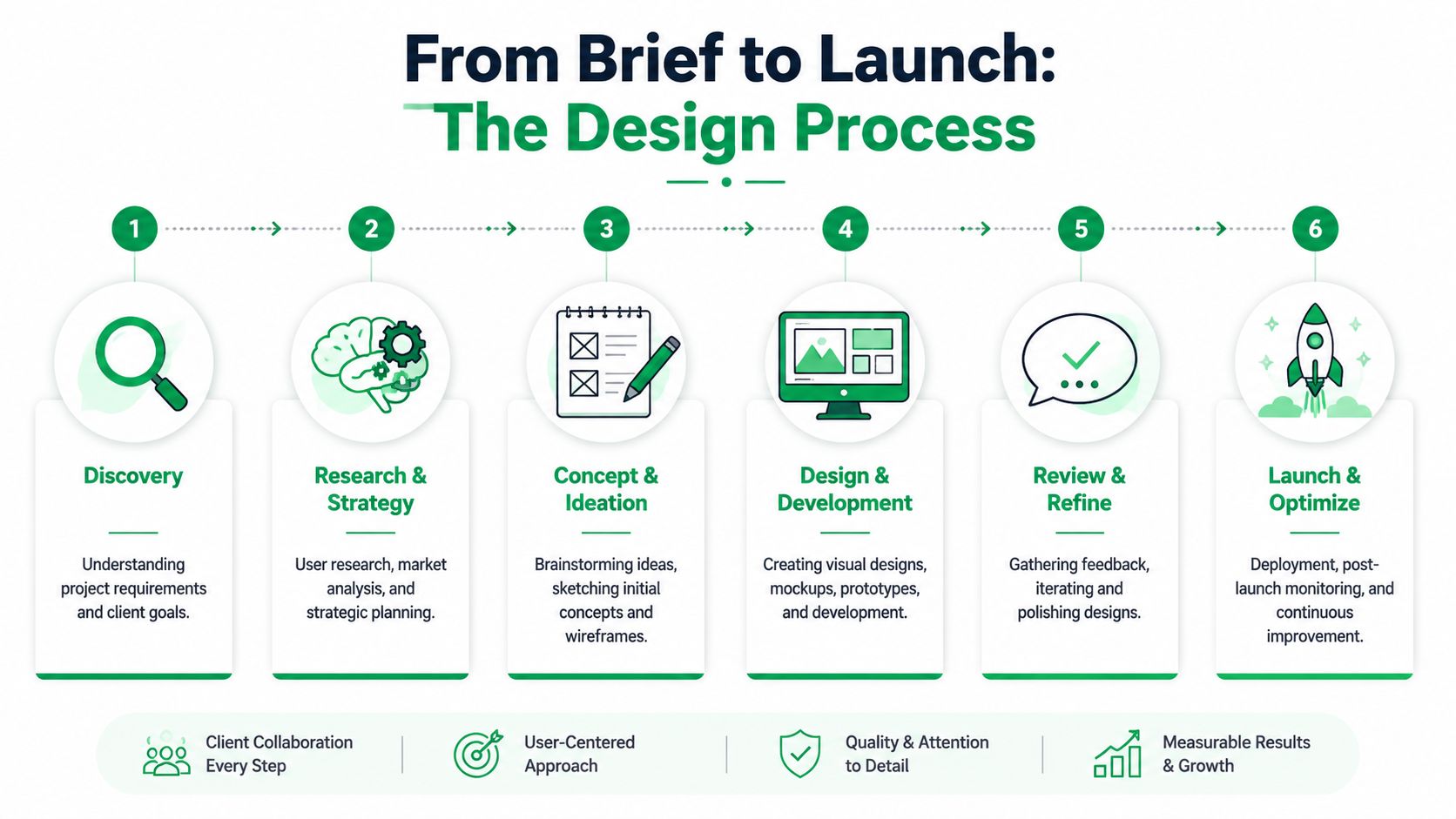
A graphic design project often moves in cleaner, file-based stages. A web design project is more layered because the final deliverable isn’t a PDF or logo package. It’s a functioning experience that has to hold up across devices, browsers, and user intent.
At the end of 2025, there were over 1.38 billion websites, with roughly 252,000 new sites launched every day, according to VisualFizz’s web design industry overview. That scale is one reason process matters. Your site isn’t competing with a handful of local alternatives anymore.
What a graphic design workflow usually looks like
A branding or collateral project tends to move through a sequence like this:
- Creative brief
The client defines goals, audience, constraints, required formats, and references. - Concept development
The designer explores directions. Logo sketches, moodboards, type pairings, color routes. - Refinement
One route gets selected and tightened. Weak briefs typically lead to too many revision rounds in this phase. - Production files
Final deliverables might include SVG, PNG, PDF, print-ready artwork, social templates, or a brand guide.
That process is communication-heavy, but technically contained. Once approved, the asset is done.
Graphic and Web Design: What a web design workflow actually requires
Website work has more dependencies.
- Discovery and strategy come first. Offer clarity, audience intent, sitemap, content needs, conversion goals.
- Wireframes follow. These are not “unfinished designs.” They’re the structural blueprint.
- High-fidelity mockups apply branding to the approved structure.
- Development turns screens into working pages.
- Testing checks responsiveness, forms, navigation, readability, and device behavior.
- Launch and iteration continue after the site goes live.
Practical rule: If a team skips wireframes because they want to “see the real design,” they usually pay for that shortcut during revisions.
The handoff between graphic and web design often happens in the middle. Brand assets and visual rules feed the web layout. Then web constraints push back. Some oversized typography won’t survive mobile. Some decorative textures hurt readability. Some brochure habits don’t belong on a conversion page.
For owners managing this process, a simple reference like these six steps of the design process helps set expectations before the first draft arrives.
The key deliverable difference is simple. Graphic design gives you approved assets. Web design gives you a system people interact with.
Graphic and Web Design: Why Good Design Is Good for Business
Design affects revenue long before anyone mentions aesthetics.
If visitors can’t understand your offer quickly, trust slips. If they can’t scan pricing, compare options, or find the next action, conversion drops. This is why strong graphic and web design should sit close to sales and marketing strategy, not off to the side as a finishing touch.
Design guidance for data-heavy layouts consistently points back to visual hierarchy, contrast, and simplicity because those elements reduce cognitive load and help people interpret information faster, as explained in this visual design guidance for reports and dashboards.
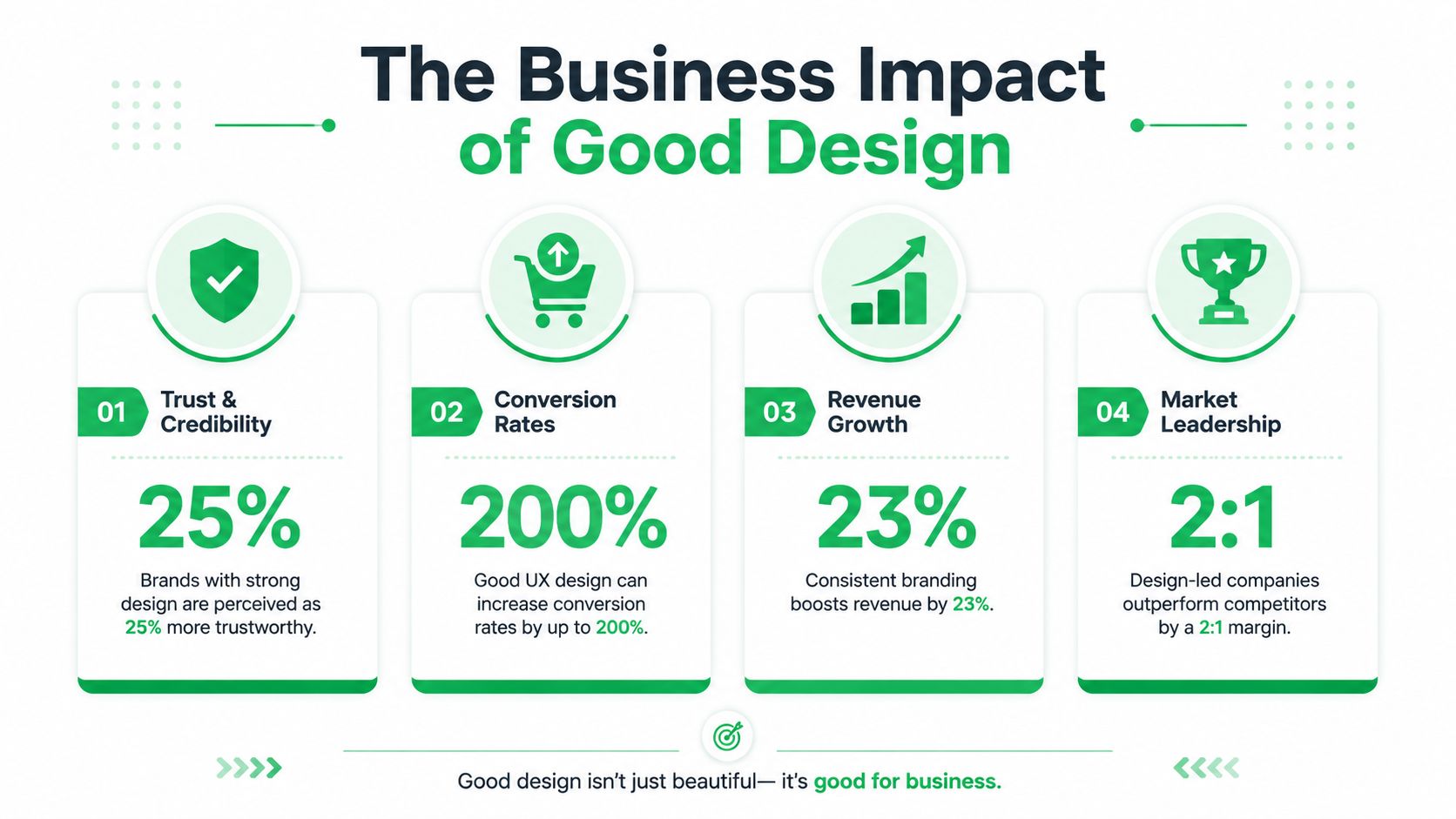
Trust starts before the first sales conversation
People make fast judgments from visual cues. In practice, that means mismatched fonts, inconsistent colors, cramped spacing, and low-quality imagery undermine confidence. A polished visual system signals that the business is organized and established.
Graphic design does most of that heavy lifting. It creates the recognizable shell customers remember.
Usability decides whether attention turns into action
Web design takes over.
A site can have beautiful branding and still underperform if the navigation is bloated, the call to action is buried, or the mobile layout forces users to pinch and zoom. Clean structure matters because visitors don’t study pages. They scan them.
- Hierarchy helps scanning so users notice product benefits, pricing, and trust signals in the right order.
- Simplicity removes friction when the page asks for one clear action instead of six competing ones.
- Consistent patterns build confidence because users don’t have to relearn the interface from page to page.
Graphic and Web Design: SEO benefits from design choices too
Many owners separate SEO from design. On a real website, they’re connected.
Readable layouts improve engagement. Strong heading structure helps page organization. Mobile-friendly interfaces support usability. Faster, lighter pages help performance. And when design teams clutter a page with oversized assets or decorative distractions, rankings and conversions can both suffer.
Good design doesn’t just make pages attractive. It makes the offer easier to understand and easier to act on.
That’s the business case in plain terms. Better design creates less hesitation.
Modern Design Best Practices That Drive Results
A business owner signs off on a polished homepage, then checks analytics a month later and finds the same problem. Traffic arrives, but visitors do not move. The issue is rarely that the site needs more decoration. It usually needs better decisions about priority, clarity, and performance.
Modern design works when it supports the sale. Brand presentation still matters, but every visual choice should help a visitor understand the offer faster, trust the business sooner, and complete the next step with less friction.
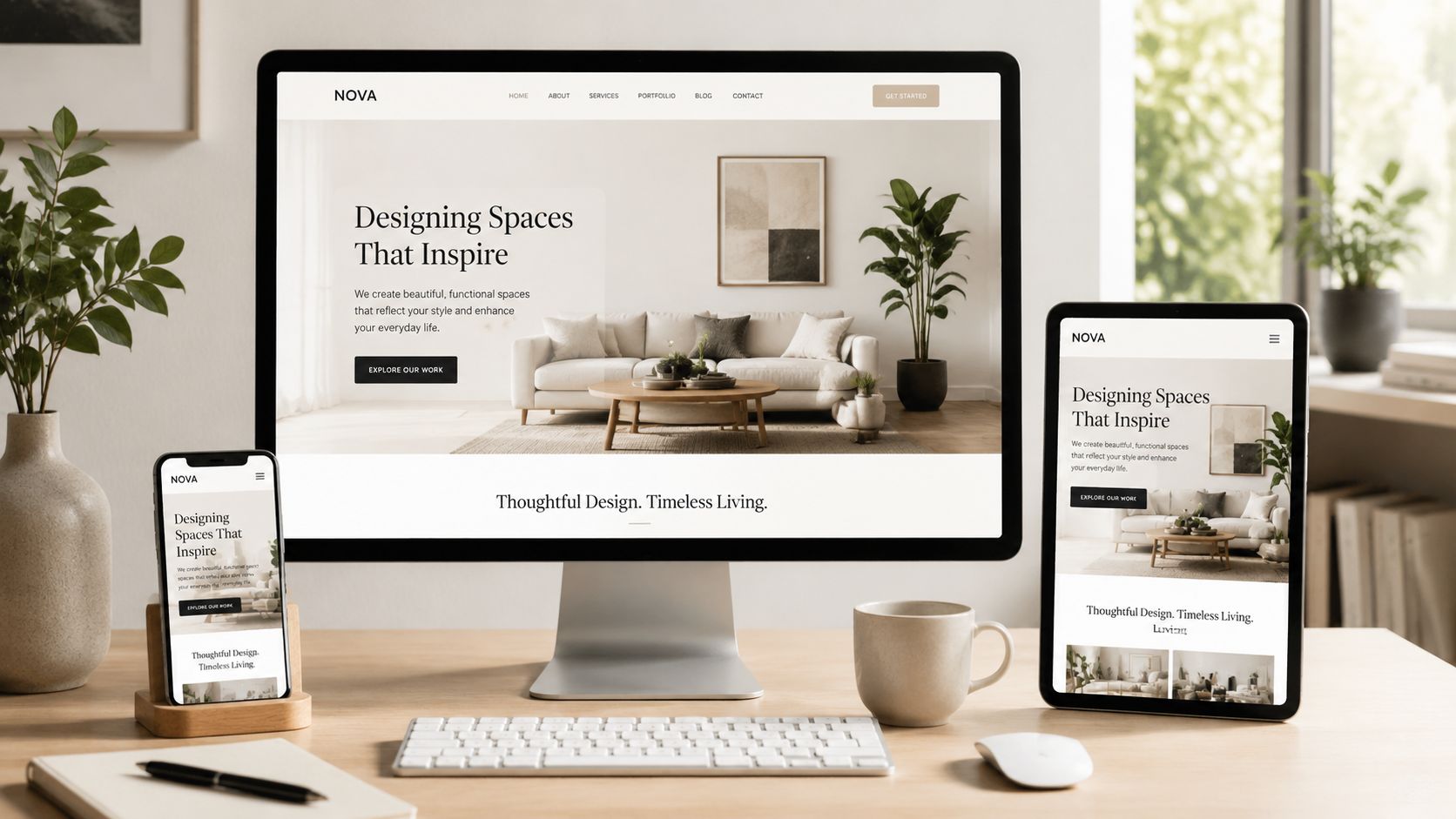
Responsive design should change priorities, not just proportions
Responsive design is not a desktop layout squeezed onto a smaller screen. It is a decision about what matters most when attention is short and space is limited.
On a large screen, users may compare services, read supporting detail, and explore case studies. On mobile, they often want the answer first. What do you do, why should they trust you, and what should they click next? Strong responsive design changes the order of content, shortens weak sections, and brings key actions higher on the page.
I see this mistake often in redesign projects. Teams protect every visual element from the original mockup, then wonder why the mobile version feels crowded and conversion rates stall. Good mobile design requires restraint.
Graphic and Web Design: Accessibility improves conversion quality
Accessibility is often treated like a compliance task after design work is done. In practice, it improves the parts of a site that affect lead quality and completion rates.
The University of Texas at Dallas guidance on digital accessibility for designers points to practical requirements such as at least 4.5:1 text contrast, logical heading order, keyboard operability, and avoiding color-only communication. Those are usability decisions. They help people read faster, recover from confusion, and complete forms without unnecessary effort.
A few details matter more than teams expect:
- Contrast makes pricing, benefits, and buttons easier to read in real conditions, including glare and low-quality mobile screens.
- Heading structure keeps long pages scannable and gives content a clearer hierarchy for users and search engines.
- Touch targets reduce missed taps on phones, especially on booking forms, menus, and checkout steps.
If a visitor has to squint, guess, or retry, the design is already losing money.
Graphic and Web Design: Brand expression has to work within performance limits
Businesses do not need to choose between a strong brand and a fast site. They need a design system disciplined enough to support both.
Use imagery where it clarifies the offer or strengthens trust. Cut decorative sections that add weight without adding understanding. Use motion only when it helps orientation or draws attention to a meaningful action. This is also one area where AI can speed production by helping teams generate variants, draft layouts, or repurpose creative, but only if someone is still making sound editorial calls. For teams reviewing that balance, this guide to generative AI for marketers is a useful reference.
Readable typography deserves the same discipline. Body copy should feel easy to scan on a phone, not styled to look refined in a static mockup. Data displays, feature comparisons, and pricing tables need extra care because they fail quickly when spacing, labels, or contrast are weak.
The best-performing designs usually look controlled on purpose. They are built to support action, not to show how many visual ideas can fit on one page.
Hiring the Right Help How to Brief a Designer or Agency
A common scenario looks like this. The owner hires “a designer” to fix a slow, underperforming site, then learns halfway through the project that the actual gap was not visual polish. It was messaging, page structure, UX, development coordination, and search visibility.
Hiring well starts with the business problem.
A freelance graphic designer can be the right fit for a logo refresh, packaging, sales collateral, or social templates. A web designer may be enough for a homepage update when the brand system, copy direction, and site structure are already settled. Larger projects usually need coordinated skills across brand strategy, UX, content planning, development, SEO, and QA. That is where an agency model often earns its cost because fewer handoffs means fewer mistakes, less rework, and a clearer path from concept to launch. Mr. Green Marketing, LLC, for example, handles web design, branding, and logo creation inside a wider marketing scope, which suits businesses that need connected execution instead of isolated files.
For e-commerce brands, the gap between attractive design and effective design gets expensive fast. Reviewing best-designed ecommerce sites helps clarify what strong execution includes: product clarity, trust signals, mobile usability, and a purchase path that feels straightforward.
What to put in a brief
Weak briefs create expensive revisions. Strong briefs shorten the project and improve the outcome.
Include these items:
- Business objective
State what needs to improve. More qualified leads, stronger average order value, better conversion on key pages, clearer local service positioning. - Target audience
Describe the buyer, their context, and what they need to decide. “Small manufacturers comparing vendors” is useful. “Everyone” is not. - Scope and deliverables
List exactly what you expect to receive. Logo package, brand guide, wireframes, high-fidelity page designs, development-ready files, live site build, or post-launch support. - Content and assets
Clarify what already exists and what still needs to be created. Copy, photography, product data, testimonials, and technical documentation all affect timeline and quality. - Constraints
Note the platform, required integrations, internal approvals, budget range, legal requirements, and launch deadline. - Success criteria
Define how the work will be judged after launch. Better lead quality, lower bounce on service pages, higher add-to-cart rate, easier content management, or stronger organic visibility.
Graphic and Web Design: Questions to ask before signing
Portfolios matter, but process matters more.
- How do you handle discovery before design starts?
If a team skips wireframes because they want to “see the final design,” expect expensive revisions later. - Who is responsible for strategy, and who is responsible for production?
Some providers need tight direction. Others can challenge a weak page plan before it becomes an expensive build. - How do you prepare designs for development?
Ask what the handoff includes. Annotated files, component libraries, responsive states, and QA expectations all affect whether the build matches the design. - How do you account for SEO and content structure during design?
A site can look polished and still bury important service terms, category logic, or internal-link opportunities. - What happens after launch?
Serious partners talk about iteration, measurement, and improvements based on user behavior.
For store owners, this is especially important when evaluating Shopify design and development. The right partner should be able to explain how design choices affect collection pages, product templates, app performance, and conversion flow, not just homepage aesthetics.
A polished portfolio can hide a messy delivery process. Ask how decisions are made, how files are handed off, and how the team handles changes once real constraints show up.
Red flags worth noticing
- They start with visuals before they understand the offer or customer
- They cannot explain why a layout, hierarchy, or CTA choice should improve performance
- They treat revisions as unlimited exploration instead of managed decision-making
- They ignore implementation details such as CMS limits, dev handoff, or page speed
- They talk about style constantly and business outcomes rarely
Good hiring comes down to fit and process. The right partner should help the business make better decisions, not just produce attractive screens.
Graphic and Web Design: Quick Wins for SMBs and E-commerce Sellers
A common small-business scenario looks like this. The ads are driving clicks, the products are solid, but the site feels inconsistent at the exact moment a customer needs reassurance. One page uses one button style, another page uses different colors, product images do not match, and the next step is harder to find on mobile than it should be. Those are design problems, but they are also revenue problems.
If the budget is tight, start where friction is easiest to remove and easiest to measure. Clean up the parts of the experience that affect trust, clarity, and action.
Fix the easy things first
- Create a one-page brand guide
Set the logo versions, colors, type choices, button style, and image treatment. A simple PDF is enough. It keeps social posts, sales materials, product graphics, and site pages from drifting apart. - Improve body copy readability
Use a text size that reads comfortably on a phone and check line spacing while you are there. This change is small, fast, and usually improves product comprehension, form completion, and time on page. - Trim your main navigation
Small business sites often overload the menu with every service, every category, and every idea the company wants to say. Fewer top-level choices usually produce a clearer path to quote requests, calls, or product discovery. - Make the primary call to action obvious on mobile
Put the next step where a visitor can find it immediately. For a local service business, that may be a phone number or quote request. For a store, it may be Add to Cart, Buy Now, or a clear path into key categories.
For e-commerce teams
Start with product and category pages. That is where buying decisions happen, and it is usually where design changes pay back faster than a homepage refresh.
- Standardize product images so shoppers are not switching between different backgrounds, crops, and lighting styles from one listing to the next.
- Make benefit copy easy to scan with short sections, clear subheads, and visible hierarchy.
- Review category and product pages on a phone before redesigning anything larger.
- Check charts, specs, and comparison tables for clarity. If product information is hard to scan, shoppers hesitate. As noted earlier, visual presentation matters most when it helps people compare options faster.
If you are choosing a partner for platform-specific work, this guide to evaluating Shopify design and development is a practical way to pressure-test whether the team understands conversion flow, template constraints, and merchandising logic.
It also helps to study examples of well-designed e-commerce sites with a specific question in mind. What did they remove to make buying easier? Strong stores usually win with clearer hierarchy, tighter navigation, stronger product presentation, and fewer distractions.
Small changes often outperform another decorative redesign. Better typography, clearer calls to action, and consistent product presentation usually have a more direct effect on conversions.
If your brand looks inconsistent, your site feels harder to use than it should, or you are not sure whether you need graphic design, web design, or both, Mr. Green Marketing, LLC is one option to consider for a coordinated review. The agency works across branding, logo creation, web design, SEO, PPC, Amazon marketing, and related digital strategy, which is useful when the problem runs across the full customer journey rather than one page or one asset.
Leave a Comment
sing in to post your comment or sign-up if you dont have any account.