
Conversion Optimization Audit: The global average website conversion rate is about 2.9%, which means most sites only convert roughly 2 to 3 visitors out of every 100. In practice, a conversion optimization audit that lifts performance by even one percentage point can materially change revenue without buying more traffic.
That’s why a real conversion optimization audit isn’t a design critique. It’s a diagnostic. You’re checking whether the site can measure truth, whether the funnel leaks at specific steps, whether mobile friction is hiding in plain sight, and whether your testing plan can detect a real change.
A lot of teams skip straight to button colors and hero copy. I get why. Visual changes feel concrete. They’re easy to present in a meeting. But on live sites, the bigger losses usually come earlier: duplicate conversion fires, blended mobile and desktop reporting, broken attribution, weak funnel segmentation, and tests launched without enough sample size to tell signal from noise. Small things. Expensive things.
Conversion Optimization Audit: Table of Contents
- Why a Modern Conversion Optimization Audit Exists
- Setting Up Proper Measurement Before Any Changes
- Benchmarking Your Site Performance Correctly
- Auditing Mobile Usability and Core Web Vitals
- Deciding Between Final Conversions and Micro-Conversions
- Planning A/B Tests with Real Statistical Inputs
- Building a Prioritized Action Plan from Audit Findings
Why a Modern Conversion Optimization Audit Exists
A modern conversion optimization audit exists because average performance is still low, and guesswork still burns time. With a benchmark around 2.9% globally, and another commonly cited average at 2.35% with top-performing websites reaching 11% or more, there’s a huge spread between ordinary and excellent execution, as noted in these 2026 CRO benchmarks.
That spread is exactly why audits matured into a discipline instead of staying a marketing hunch.
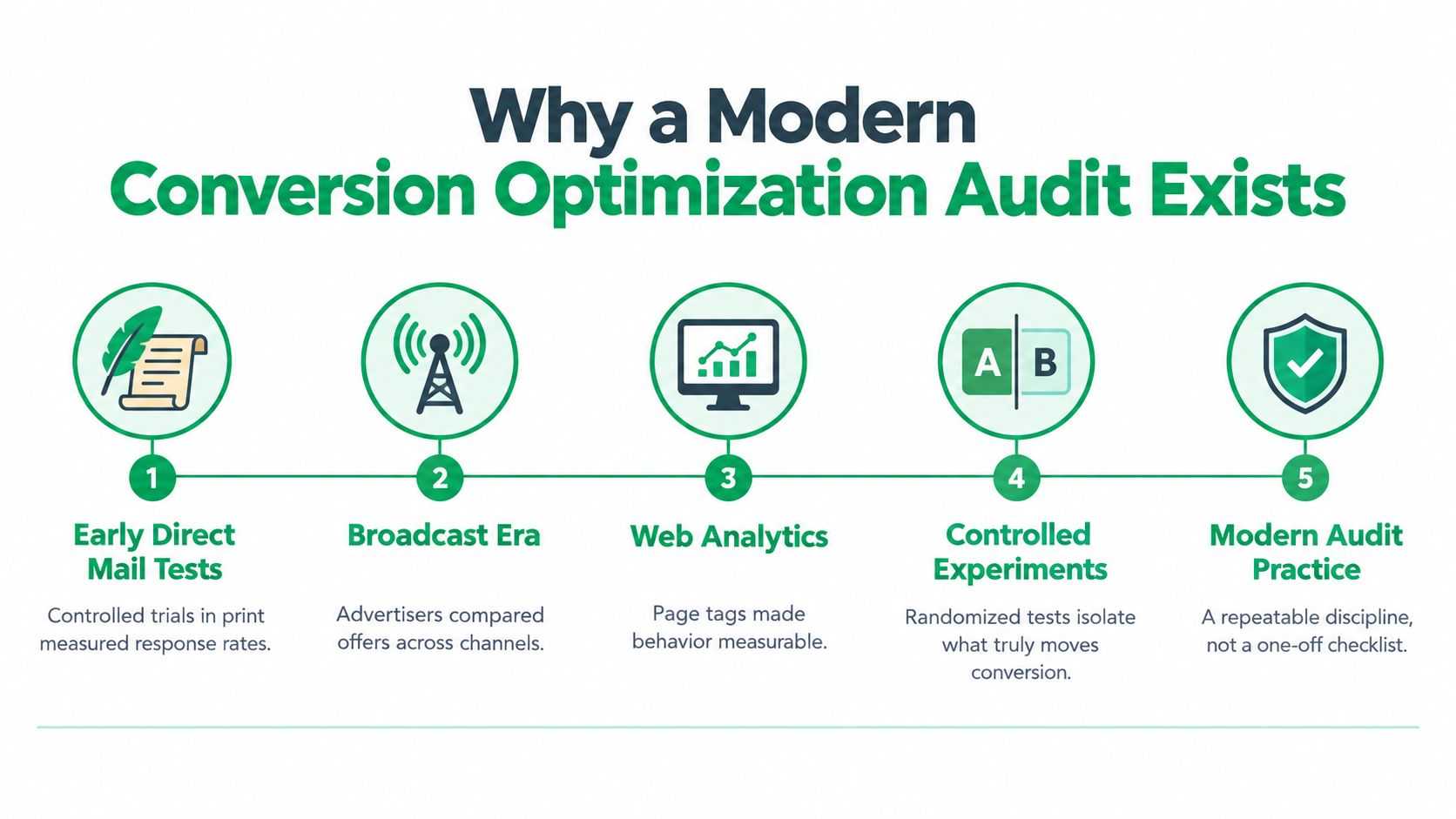
Conversion Optimization Audit: From split testing to audit discipline
Conversion work didn’t start with today’s dashboards. It grew out of controlled testing. Early direct-mail and advertising tests appeared in the early 1990s, Google launched Website Optimizer in 2006, and Microsoft introduced CUPED in 2013 to reduce variance and detect effects faster with smaller samples, according to this history of CRO milestones.
Those dates matter more than they seem to.
They explain why experienced teams don’t treat a conversion optimization audit as a punch list of design tweaks. The audit is the operating system for experimentation. It tells you what to trust, what to fix first, and what deserves a test instead of an opinion.
Practical rule: If your audit starts with visual feedback before it checks analytics integrity, it’s backwards.
What older audit models miss
Plenty of audit templates still act like conversion optimization is mostly about page layout. Headline clarity. CTA color. Form length. Those matter, sure. But they’re downstream issues.
A stronger audit usually starts with questions like these:
- Can the data be trusted: If conversion events fire more than once, every later conclusion is shaky.
- Is the funnel segmented properly: A blended sitewide conversion rate hides where the actual friction lives.
- Can the team validate change: If there’s no testing discipline, the audit becomes opinion dressed up as analysis.
- Is attribution still intact: Privacy changes and tracking loss can make “wins” look bigger or smaller than they are.
If you’re reviewing outside help, compare the audit scope against broader digital marketing audit services and make sure conversion analysis isn’t being reduced to surface-level UX comments.
A useful audit has some historical humility baked into it. It assumes intuition is fallible, measurement can break, and user behavior rarely improves because someone in the room “felt strongly” about a redesign. Good. That skepticism is healthy.
Conversion Optimization Audit: Setting Up Proper Measurement Before Any Changes
Before changing a page, fix the measurement layer. This is not optional. A conversion optimization audit should verify that conversion events are captured once per completion, consent state is recorded, bot and internal traffic are excluded, and analytics conversions reconcile with CRM records within five percent, based on this CRO audit framework.
That last check catches more problems than expected.
What to verify first
I’d audit tracking in this order because it isolates the expensive failures fastest:
- Single conversion firing
Make sure the same conversion isn’t recorded multiple times from page reloads, thank-you page revisits, or duplicate tag logic. - Consent-aware event handling
If consent state isn’t recorded correctly, platform numbers can look clean while the underlying attribution is partial. - Traffic hygiene
Exclude bot traffic and internal activity. Otherwise your “conversion rate” may reflect staff QA sessions, agency reviews, or junk traffic. - CRM reconciliation
Compare analytics conversions with actual recorded leads or orders. If the gap is larger than that accepted five percent threshold from the audit guidance above, stop and diagnose before optimizing pages.
Bad measurement doesn’t just blur results. It changes what your team believes is happening.
Conversion Optimization Audit: Segment before you diagnose
Once the events are trustworthy, split the baseline by device and by funnel stage. The same Axelerant guidance recommends reviewing stages such as page-to-cart, cart-to-order, and step completion rates rather than relying on one blended conversion figure.
That distinction matters because different problems produce very different symptoms:
- Tracking error often shows up as impossible jumps or missing steps
- Mobile UX friction appears when mobile underperforms while desktop stays stable
- Offer mismatch tends to depress early-stage progression
- Checkout friction usually appears late, after intent is already clear
A sitewide conversion rate compresses all of that into one number. Useful for reporting. Weak for diagnosis.
Conversion Optimization Audit: Modern audits need privacy-aware measurement
And older CRO guides fall short. Recent audit guidance increasingly points to server-side tagging, Conversion API setup, and first-party data as essential checks because privacy rules and cookie deprecation weaken traditional tracking, as discussed in this review of the 2026 online marketing audit gap.
If the attribution layer is degraded, AI-driven optimization won’t save you. It will just automate decisions on shaky inputs.
For teams building a recurring process, a tight analytics review should sit next to the broader reporting setup. That’s where a resource like analytics and reporting guidance fits. Not as a vanity dashboard exercise, but as audit infrastructure.
Conversion Optimization Audit: Benchmarking Your Site Performance Correctly
A low conversion rate doesn’t automatically mean your site is broken. Sometimes the baseline is ordinary for the category. Sometimes the site is structurally weak. Sometimes the issue is concentrated in one stage and the homepage gets blamed for no reason.
The job of benchmarking is to separate those cases.
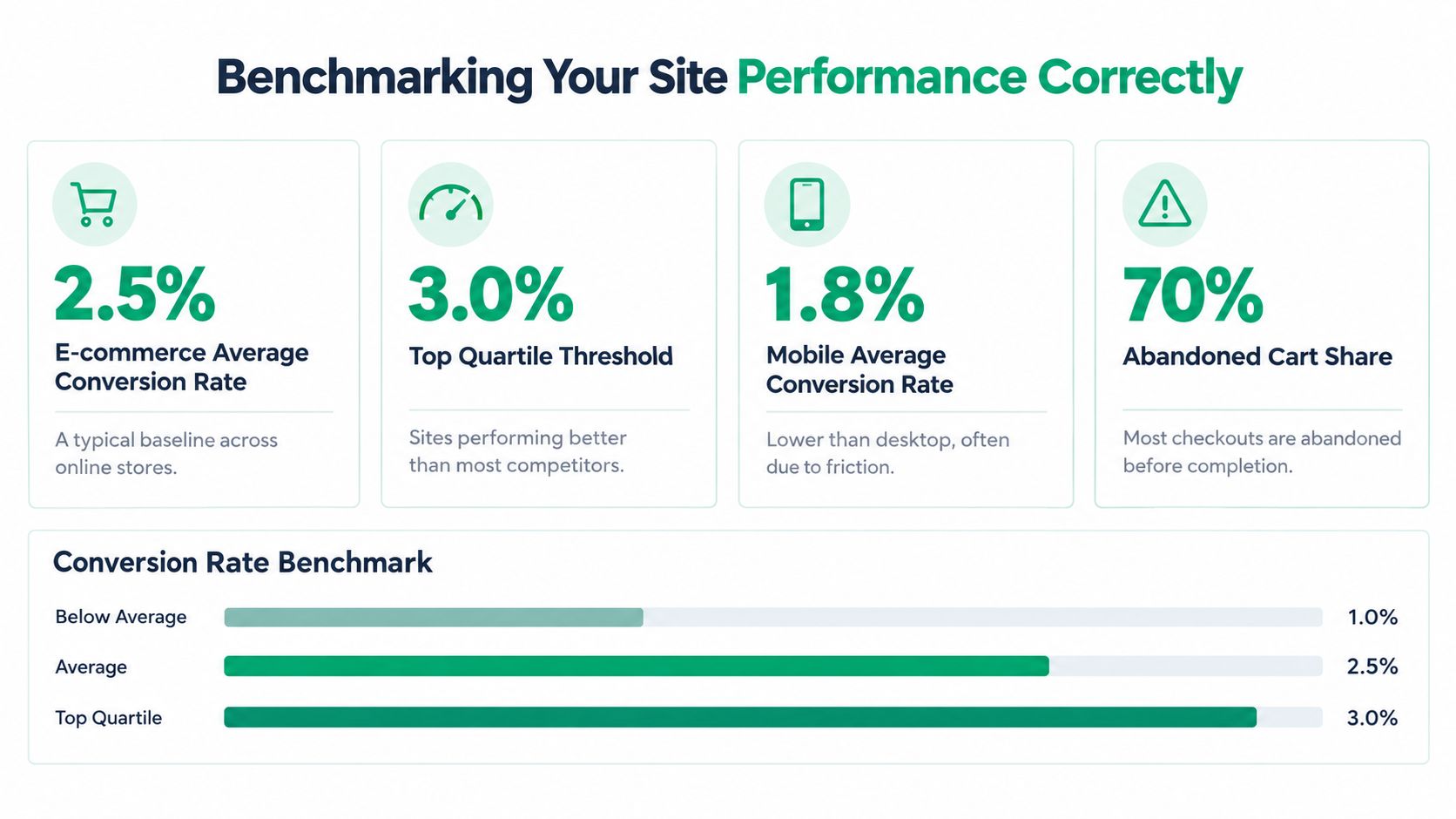
Use benchmarks as context, not a verdict
One audited ecommerce dataset reported a median site-level conversion rate of 3.5% across 168 A/B tests and 23 clients, with a normal range of 1.8% to 5.5%. Another dataset across 1,055 audited A/B tests reported a median control conversion rate of 4.6%, according to these ecommerce conversion rate benchmarks.
That’s enough context to ask a better first question: are you underperforming structurally, or are you already near the range where incremental testing makes more sense?
The same source gives a useful rule of thumb:
- More than 30% below benchmark: prioritize structural audit work
- Within 10% to 15% of benchmark: focus on incremental A/B testing
That’s a pragmatic distinction. If you’re far below the market range, don’t spend the quarter debating microcopy. Fix the bigger leaks first.
Conversion Optimization Audit: What to review before declaring a problem
Benchmarks only help if you compare the right thing. I’d validate performance through a mix of quantitative and behavioral review:
- Check device splits: Mobile and desktop shouldn’t be blended if one experience is clearly weaker.
- Review funnel stages: A healthy landing page can still feed a weak cart or form flow.
- Watch abandoned sessions: The same benchmark source recommends reviewing session recordings over 2 to 4 weeks and looking at 50 to 100 abandoned sessions to find recurring drop-off patterns.
- Remeasure after changes: Don’t call the audit done when fixes ship. Recheck performance after 30 to 60 days.
Benchmarks should narrow your diagnosis, not end it.
What works better than gut feel
The strongest benchmarking conversations are concrete. Not “our conversion rate feels low.” More like, “we’re under the normal audited range and the weakest step is late funnel on mobile.” That’s actionable.
And sometimes the answer is uncomfortable. The site may not need a redesign at all. It may need cleaner acquisition intent, tighter funnel sequencing, or a checkout experience with fewer distractions. Different problem. Different fix.
Conversion Optimization Audit: Auditing Mobile Usability and Core Web Vitals
A lot of conversion audits say they cover mobile when they really mean they resized the browser window. That doesn’t count. Mobile friction has to be checked directly, on the page, with simple mechanics that affect whether people can complete the next action.
Google’s Core Web Vitals guidance treats Largest Contentful Paint under 2.5 seconds as “good,” and practical audit checklists also flag 48×48 pixel tap targets, readable text without zooming, and a primary CTA visible on the first screen, as summarized in this mobile-focused website conversion audit guide.
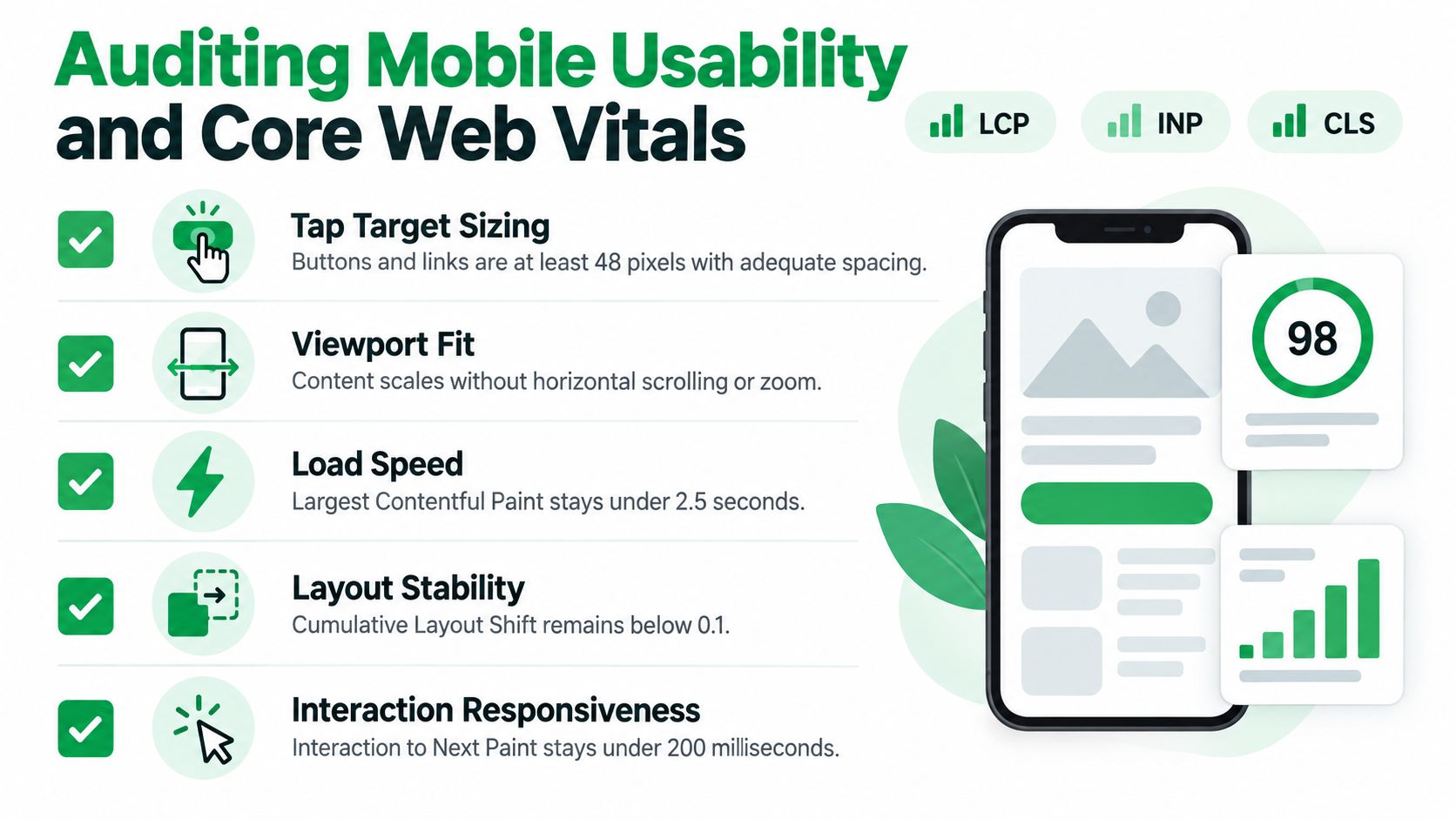
The fast mobile audit I actually trust
When auditing mobile pages, I care less about whether they look modern and more about whether they remove effort.
Here’s the checklist:
- Tap targets: Buttons and links should meet that 48×48 guidance and have enough spacing that users don’t mis-tap.
- Readable text: If body copy or key labels require pinch-zoom, the page is adding strain at the exact moment it should reduce it.
- First-screen CTA visibility: The primary action needs to appear immediately. If users have to hunt for the next step, many won’t.
- LCP review: If the key content arrives too slowly, users start forming a quality judgment before the offer even loads.
- Form behavior on mobile: Input fields should feel native, predictable, and easy to recover from when errors happen.
Small details. Big fallout.
Conversion Optimization Audit: Where teams usually miss the problem
Desktop-first teams often approve layouts that technically “work” on mobile but create hesitation. Common patterns include oversized sticky bars that crowd the viewport, stacked trust badges pushing the CTA down, and form fields that look neat in mocks but become tiring on a phone.
Mobile problems rarely announce themselves as “mobile problems.” They show up as vague underperformance until someone audits the mechanics.
If mobile is a serious acquisition or purchase path for your business, pair this audit with a broader mobile website optimization checklist so your fixes don’t stop at page speed alone.
A good mobile audit is repetitive on purpose. You check the same core mechanics every time because regressions happen constantly. New popups. New scripts. New banner logic. And suddenly the CTA sits just below the fold again.
Conversion Optimization Audit: Deciding Between Final Conversions and Micro-Conversions
A narrow audit watches the final sale or lead submit and calls it a day. A stronger one also looks at the smaller behaviors that lead there. Product views, plan comparisons, account creation starts, onboarding steps, repeat engagement, saved carts, content interactions. The exact events vary by business. The principle doesn’t.
Recent CRO coverage argues that optimization now extends beyond landing pages and checkout into onboarding, retention, and micro-interactions, while many audit templates still focus mainly on purchases and form fills. That shift is discussed in these CRO trends shaping 2025.
Conversion Optimization Audit: Final conversion focus versus full-funnel view
Here’s the trade-off in plain terms.
| Audit style | What it catches | What it misses |
|---|---|---|
| Final-conversion only | Late-stage friction, broken forms, checkout leaks | Early intent loss, onboarding stalls, engagement signals |
| Micro-conversion plus full funnel | Behavioral patterns, step-level hesitation, retention-linked friction | Can create noise if the team tracks too many weak signals |
A final-conversion-only audit is simpler to explain. It also tends to be slower. You wait for enough completed purchases or leads to accumulate, then infer what happened before them.
A micro-conversion audit gives you earlier signals. That can speed up learning, especially on lower-volume sites. But there’s a catch. If every click becomes a KPI, teams start optimizing for activity instead of progress.
What deserves inclusion
Not every micro-conversion matters. Good candidates usually share one trait: they indicate movement toward value.
Examples that often matter:
- High-intent exploration: Pricing page visits, add-to-cart actions, plan comparisons
- Commitment signals: Form starts, account creation starts, checkout starts
- Activation behavior: Completing setup steps, using a key feature, booking the next interaction
- Retention-oriented actions: Reorders, re-engagement steps, saved preferences
What doesn’t work is treating low-friction vanity actions as proof of progress. More clicks on a tab isn’t automatically meaningful. Neither is more time on page if the task is supposed to be simple.
And yes, sometimes the final conversion should still dominate. On short funnels with clear purchase intent, over-expanding the audit just creates reporting clutter. But if the customer journey includes onboarding, delayed decision-making, or repeat use, a conversion optimization audit that ignores micro-conversions is seeing only the end of the story.
Planning A/B Tests with Real Statistical Inputs
Most bad tests fail before launch. Not because the idea was awful, but because nobody defined the inputs clearly enough to know whether the result would be trustworthy.
Standard A/B test planning uses four core inputs: baseline conversion rate, minimum detectable effect, confidence level, and statistical power. Common defaults are 95% confidence and 80% power, and sample size can quickly rise into the thousands or tens of thousands of visitors per variant when the baseline is low or the expected lift is small, as shown in this A/B test sample size calculator explanation.
The four inputs that matter
If any of these are vague, the test plan is weak:
- Baseline conversion rate
Use the current rate for the exact audience and page type being tested. - Minimum detectable effect
Decide the smallest change worth detecting. If you want to catch tiny lifts, expect a longer test or more traffic. - Confidence level
In common CRO practice, 95% is the default threshold teams use before calling a result statistically reliable. - Statistical power
80% is a common default. It protects against underpowered tests that miss real effects.
What significance actually means
In CRO, p < 0.05 is treated as statistically significant at the 95% confidence level, meaning there is less than a 5% chance the observed difference happened randomly if the null hypothesis were true, according to this explanation of A/B testing significance thresholds.
That definition matters because teams often misuse “winning” too casually.
A result can look promising before it’s reliable. That’s not the same thing as a win.
What usually goes wrong in practice
The mechanics are straightforward. The discipline is harder.
Common errors include:
- Using the wrong baseline: Sitewide averages are often useless for a page-specific test.
- Chasing tiny lifts with low traffic: The test won’t reach enough volume to tell you much.
- Switching KPIs midstream: One test needs one primary objective.
- Ending early: A temporary gap is not a stable result.
If you need a broader framework for tying tests back to commercial outcomes, website conversion rate optimization planning is where that work belongs. The audit finds the candidate problems. Statistical planning decides which ones can be tested cleanly.
Building a Prioritized Action Plan from Audit Findings
An audit only becomes useful when the findings are ranked ruthlessly. Not every issue deserves a sprint. Not every suspected improvement deserves a test. Some things are obvious bugs and should be fixed. Some belong in backlog. Some are just notes.
A practical prioritization model scores each issue on revenue exposure, confidence in causality, and implementation effort, then multiplies the scores to rank fixes. In the published framework, scores above 60 are current-quarter work, 30 to 60 belong in backlog, and below 30 are notes, based on this CRO audit prioritization model.
CRO Audit Issue Prioritization Matrix
| Score Range | Priority Tier | Recommended Action |
|---|---|---|
| Above 60 | Current-quarter work | Fix or test soon, assign owner, set validation window |
| 30 to 60 | Backlog | Scope solution, keep documented, revisit during planning |
| Below 30 | Notes | Monitor, archive insight, do not force into active sprint |
How to turn findings into action
A clean prioritization pass usually looks like this:
- Fix measurement issues first: If tracking is wrong, later wins can’t be trusted.
- Separate bugs from hypotheses: A broken CTA or duplicate event doesn’t need an A/B test.
- Rank by commercial consequence: Revenue exposure should beat cosmetic annoyance.
- Be honest about confidence: Strong session evidence and clean funnel data deserve more weight than opinion.
- Limit active work: A stuffed backlog feels productive. It usually isn’t.
One practical option for organizing this process is a formal digital marketing audit template. And if you want outside support without turning the whole audit into a redesign project, Mr. Green Marketing, LLC offers audit and reporting services that align with this kind of structured prioritization.
Validate after shipping
Implementation isn’t the end. Remeasure after changes go live. Compare post-change behavior against the exact metric you used to justify the fix. And keep the window long enough to avoid declaring victory on noise.
That’s the part many teams skip. They love recommendations. They’re less excited about disciplined follow-through. Still, that’s where the value is.
Mr. Green Marketing, LLC helps businesses turn audits into action through strategy-led website reviews, analytics reporting, SEO, PPC, and conversion-focused execution across digital channels. If you want a team that can evaluate measurement, diagnose funnel friction, and prioritize practical next steps, visit Mr. Green Marketing, LLC.
Leave a Comment
sing in to post your comment or sign-up if you dont have any account.