
How to Do an SEO Audit: You’re probably here because SEO feels busy but unclear. Pages are live, content is published, maybe traffic moves a little, maybe it doesn’t, and every tool seems to surface a different problem. That’s normal.
A real SEO audit fixes that confusion. It gives you a grounded view of what your site can rank for, what’s blocking it, and what should be fixed first. And not just for classic Google rankings. Search has shifted, and if your audit ignores AI-generated overviews, it’s already dated.
How to Do an SEO Audit: Your Starting Point – Why an SEO Audit is Your Business Roadmap
A lot of sites don’t have one giant SEO problem. They have a stack of medium-sized ones. A few pages aren’t indexed. Important service pages sit too deep in the navigation. Metadata is duplicated. Blog posts overlap. Nobody has mapped keywords to URLs. The backlink profile has drifted. Taken one by one, each issue looks manageable. Together, they stall growth.
That’s why an audit matters. It turns scattered symptoms into a sequence. Instead of reacting to whatever a crawler flags first, you build a roadmap based on business value and site reality.
And the payoff can be material. Regular SEO audits directly correlate with a 50%+ increase in organic traffic over 12 months, and 77% of successful audits identify at least three high-impact content gaps that lead to new traffic acquisition. Those findings come from the verified data provided for this topic.
What an audit changes in practice
When we audit a site, we’re not looking for a pretty PDF. We’re looking for answers to practical questions:
- What’s invisible: Which important pages search engines can’t crawl, index, or prioritize
- What’s misaligned: Where content targets the wrong intent or competes with another page on the same domain
- What’s underused: Existing pages that already have authority but need structural or on-page work
- What’s missing: Topics, supporting pages, and SERP opportunities competitors picked up before you did
Practical rule: If you finish an audit and still can’t say what to fix this month, the audit wasn’t finished.
A useful audit also changes conversations internally. Developers stop hearing “SEO wants random changes.” Content teams stop publishing without a target page map. Leadership gets a clearer view of which tasks affect leads, sales, and visibility.
Roadmap, not checklist
A checklist has value, but it doesn’t make decisions for you. A roadmap does.
That distinction matters because some fixes are preventive, some are revenue-adjacent, and some can wait. If your sitemap is broken, that’s one kind of problem. If your top service page is ranking but not converting because the content doesn’t match intent, that’s another. If AI systems can’t easily extract and cite your expertise, that’s becoming a third category entirely.
An SEO audit is where those categories get separated. Cleanly. Without guessing.
How to Do an SEO Audit: Gathering Your Tools and Defining Your Mission
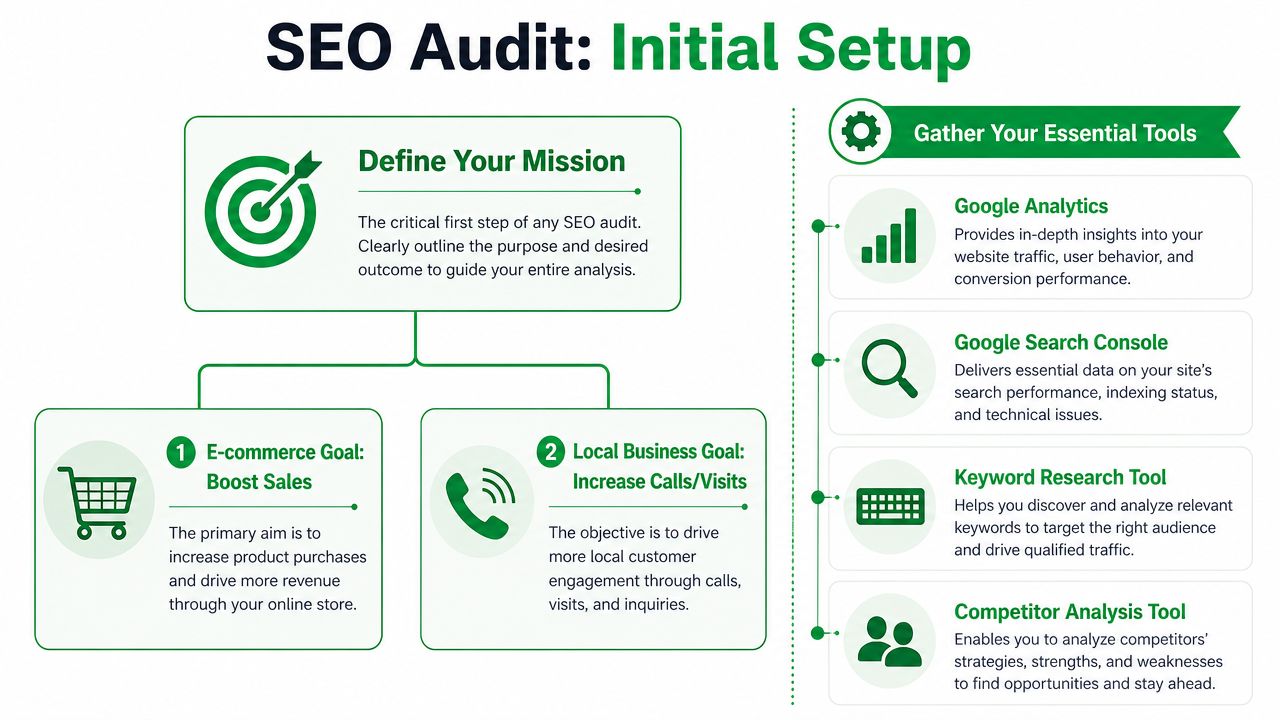
Before you crawl anything, decide what success means. An e-commerce store usually cares about product and category visibility, crawl efficiency, and conversion paths. A local service business often cares more about service pages, location signals, phone call intent, and map-adjacent visibility. Same discipline, different emphasis.
How to Do an SEO Audit: Start with access, not assumptions
A professional audit starts with confirmed access to the systems that show search behavior and site behavior:
- Google Search Console for indexing, queries, impressions, and page-level search diagnostics
- Google Analytics 4 for engagement, conversions, and landing-page behavior
- A crawler such as Screaming Frog, Semrush, or Ahrefs to inspect the site at scale
- A keyword and competitor platform for gap analysis, SERP review, and backlink checks
Without those inputs, people tend to audit what’s easy to see instead of what matters.
A complete audit should cover five core buckets: technical health, search performance, content and keyword gaps, backlinks and authority, and AI visibility. Real data shows that 73% of audit findings are directly tied to technical SEO issues that prevent pages from ranking. That finding comes from the verified data provided for this topic.
The setup decisions that make the audit better
I’d get these questions answered before the first crawl finishes:
- What pages matter most: Revenue pages, lead pages, location pages, product collections, or editorial content
- What changed recently: Redesign, migration, CMS changes, content pruning, tracking issues, or a new development team
- What “winning” looks like: More qualified traffic, more form fills, more calls, better local visibility, stronger non-brand rankings
- What you need to protect: Legacy pages, strong backlinks, top-converting URLs, or pages that sales teams rely on
Those answers shape the audit. They also stop you from wasting time on low-value clean-up while high-impact pages sit neglected.
Tool stack by budget
If budget is tight, use Screaming Frog with Search Console and GA4. You can still run a strong audit. If you need broader competitive and keyword visibility, Semrush or Ahrefs makes the process faster.
If AI visibility is part of the review, add an AI-specific check. A simple way to start is a SearchMention AI catalog check, which helps you review how your brand and content surface in AI-driven discovery. That matters now because a modern audit shouldn’t stop at blue links.
Gather the evidence first. Then form the diagnosis. Teams that reverse that order usually end up defending opinions instead of fixing pages.
How to Do an SEO Audit: Uncovering Technical SEO Issues That Hold You Back
Technical SEO is where many audits either become useful or become noise. If search engines can’t access, understand, and prioritize your pages, content quality won’t save you.
That sounds dramatic, but it’s not. I’ve seen sites with solid content held back by simple technical friction. Bad internal linking. Important pages excluded from the sitemap. Redirect chains left over from an old redesign. Image alt text ignored. Robots directives added too broadly. Small things. Expensive consequences.
Check crawlability first
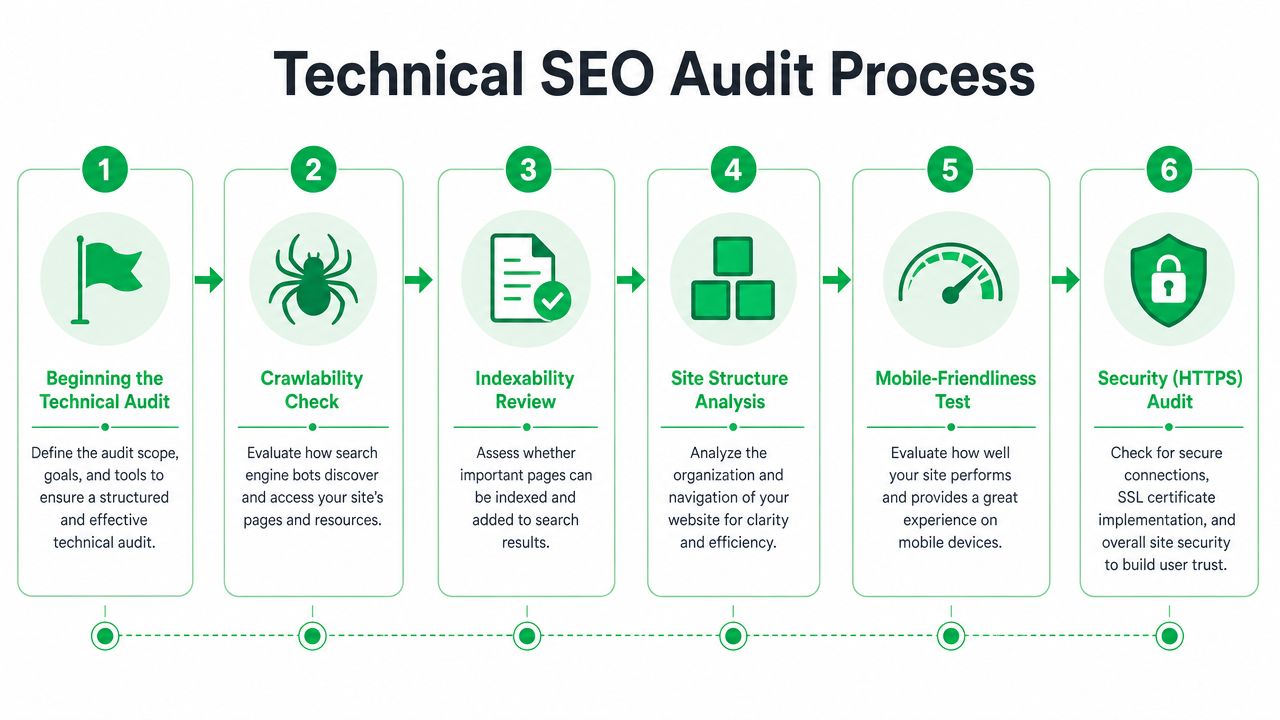
Start with the basics. Can search engines reach the pages you care about?
A rigorous technical audit begins with goals and access to Search Console and analytics, then verifies the XML sitemap, audits image alt text, and checks whether priority content sits within three clicks of the homepage. Pages deeper than four clicks show a 22% lower engagement rate, according to SitePoint’s technical SEO audit guidance.
That’s why the first pass should focus on:
- Robots controls: Look for accidental disallows on directories, templates, or staging leftovers
- XML sitemap quality: Confirm important URLs are included and junk URLs are excluded
- Status codes: Flag 404s, server errors, and redirect chains that waste crawl attention
- Canonical logic: Make sure canonical tags support the page you want indexed
If a key page needs four or more clicks to reach from the homepage, treat that as a structural warning. Semrush’s audit guidance notes that the 4-click threshold is a meaningful way to spot architecture weakness.
How to Do an SEO Audit: Then review indexability
Crawlability asks whether a bot can get to a page. Indexability asks whether that page is allowed and suitable to appear in search.
These are not the same thing.
A page may return a 200 status and still be blocked from search by a noindex tag, canonical conflict, thin duplication, or internal isolation. In these instances, Search Console URL inspection becomes useful. Compare what the crawler found with what Google says it indexed.
Look for patterns, not isolated errors:
- Template-level noindex mistakes
- Parameter pages creating duplicate versions
- Orphaned URLs with no internal links
- Paginated or faceted URLs being treated as primary content
- Important pages present in navigation but absent from the sitemap
A crawler report tells you what exists. Search Console tells you what search engines accepted. The gap between those two is where technical audits earn their keep.
Site structure, speed, and the boring fixes that matter
Priority content should be easy to reach. If users and crawlers have to dig, the site is signaling that those pages aren’t important.
That’s where internal linking and navigation cleanup often outperform fancier tactics. Tighten your hierarchy. Move high-value pages closer to hubs. Use descriptive anchors. Eliminate dead ends. And yes, fix 404s. If you need a plain-English refresher on what those errors mean, this overview of a 404 file not found issue is a useful reference for teams outside SEO.
Core Web Vitals and mobile usability also belong here, but don’t overcomplicate the first pass. You’re looking for responsiveness bottlenecks, unstable layouts, and pages that are visibly frustrating on phones. Not every technical issue deserves equal urgency. A broken indexation path usually matters before a small cosmetic speed win.
How to Do an SEO Audit: Technical audit checks worth logging in your sheet
| Check | What to confirm | Why it matters |
|---|---|---|
| Crawl access | Bots can access key directories and templates | Blocked pages can’t compete |
| Sitemap health | Important URLs are included correctly | Helps search engines discover priorities |
| Internal depth | Key pages are reachable within three clicks | Deep pages lose attention and engagement |
| Error cleanup | 404s, redirects, and server errors are tracked | Broken paths waste authority and hurt UX |
| On-page technicals | Alt text, H1s, meta descriptions are reviewed | Basic signals still affect visibility and click behavior |
This part of the audit can feel mechanical. It is. And that’s fine. Mechanical work often enables strategic wins.
How to Do an SEO Audit: Auditing Your Content and On-Page Performance
Once the technical layer is stable enough to trust, turn to the pages themselves to decide whether your content deserves to rank, whether it matches intent, and whether it gives search engines a clean signal about what each page should own.

A lot of on-page audits fail because they reduce the work to title tags and H1s. Those matter, but they’re the surface. The harder question is whether the page is the right page for the query at all.
Start with keyword mapping
Keyword mapping means assigning relevant keywords to dedicated URLs so pages don’t compete with each other. It’s a simple idea, and teams still skip it all the time.
That process is essential for topical authority and ranking precision, as outlined in Seoprofy’s enterprise SEO audit guidance. If two service pages, three blog posts, and an FAQ all aim at the same core term, you’ve created your own ranking conflict.
A clean content audit should answer:
- Which page is the primary target for each important keyword theme
- Which pages overlap and need consolidation, rewriting, or repositioning
- Which high-intent queries don’t have a strong destination page yet
If your team needs a practical companion resource, this guide on how to add keywords to a website is useful when turning audit findings into page-level updates.
Review intent before metadata
Here’s the trade-off most beginners miss. You can polish metadata on the wrong page forever and still underperform.
Check the current search results for your target term. Are top-ranking pages informational, local, commercial, comparison-driven, or transactional? Then compare that to your page. If the query wants a service explainer and you’ve built a thin sales page, that’s not an optimization problem. It’s a page strategy problem.
Use this quick review framework:
- Intent fit: Does the page match what searchers appear to want?
- Depth: Does it answer the obvious follow-up questions?
- Originality: Is it adding expertise or just paraphrasing standard advice?
- Trust signals: Are authorship, business legitimacy, and supporting proof visible?
- Clarity: Can a user scan it quickly and understand the offer or answer?
Good on-page SEO doesn’t mean squeezing in more keywords. It means removing ambiguity about what the page is for, who it serves, and why it should be trusted.
How to Do an SEO Audit: Look for weak pages in patterns
Don’t judge content one URL at a time only. Group pages by type. Product pages. Service pages. Location pages. Blog posts. Category pages.
That usually exposes the core issue faster. Maybe all location pages use nearly identical copy. Maybe blog content ranks for broad questions but never links users into service pages. Maybe product templates bury the most useful information under generic manufacturer text.
A short training video can help if you’re auditing content with a junior team member:
On-page elements to review without over-fixating
You still need the fundamentals. Just don’t mistake them for the whole audit.
| Element | What to look for | Common issue |
|---|---|---|
| Title tag | Clear target topic and compelling wording | Generic or duplicated titles |
| Meta description | Useful summary aligned to intent | Missing, duplicated, or vague copy |
| H1 and subheads | Clean topical structure | Weak hierarchy or mismatch with query |
| Image alt text | Descriptive and relevant where appropriate | Missing alt text on important pages |
| Internal links | Logical paths to related pages | Isolated pages or repetitive anchors |
And yes, prune or consolidate when needed. Some pages shouldn’t be refreshed. They should be merged into stronger ones.
How to Do an SEO Audit: Reviewing Your Backlink Profile and User Experience
Backlink audits get oversimplified in two directions. One camp treats links as everything. The other acts like links don’t matter anymore. Neither position is useful.
What matters is whether your link profile supports the pages you need to rank, whether the links are relevant and healthy, and whether users who arrive on those pages can complete a useful action. Authority without usability wastes opportunity. Usability without authority often struggles to break through competitive search results.
What to review in the backlink profile
Look for link quality, link concentration, and obvious risk.
That includes the domains linking to you, which pages they support, how anchor text is distributed, and whether competitor sites are earning links from sources you’ve never approached. If your strongest backlinks all point to old blog posts while your key service or category pages have little support, the profile may be healthy in total and still weak where it counts.
For teams working on outreach after the audit, these backlink building techniques are a practical next step.
A useful backlink review usually surfaces three buckets:
- Links to protect: Relevant, editorial, authority-building links already helping
- Links to question: Spammy, manipulative, or context-poor links that deserve scrutiny
- Links to pursue: Domains linking to competitors or mentioning your space without linking to you
User experience belongs in the same conversation
If users bounce because the page is confusing, slow, cluttered, or misaligned with intent, the authority you earned through backlinks won’t produce much business value.
That’s why I review landing-page behavior alongside link signals. Does the page answer the query quickly? Is the offer obvious? Is the layout scannable? Can a user move to the next step without hunting for it? Sometimes the ranking problem is real. Sometimes the page ranks fine and the business problem is that the experience doesn’t convert.
How to Do an SEO Audit: Add the missing layer, AI-readiness
Most audit guides still stop at traditional ranking factors. That’s not enough now.
The verified data for this topic notes that 90% of SEO audit guides focus on traditional factors, while a 2025 BrightEdge study found that sites optimized for AI overviews see 3.2x higher visibility in SGE. The practical implication is straightforward. You need to audit whether your content is ready to be extracted, summarized, and cited by AI systems.
Review pages for:
- Structure: Clear headings, concise answers, and scannable sections
- Entity clarity: Specific people, products, services, locations, and concepts named consistently
- Schema support: Structured data where appropriate to reinforce page meaning
- Answer formatting: Definitions, comparisons, steps, and FAQs presented cleanly
- Citation-worthiness: Original insight, direct expertise, and trustworthy sourcing signals
Your next visitor may not be a person first. It may be an AI system deciding whether your page deserves to inform the answer.
That’s why backlink authority and UX now connect to a broader question. Not just can you rank, but can you be referenced?
Building a Prioritized Action Plan That Drives Results
An audit without prioritization becomes a document people nod at and ignore. The issue isn’t effort. It’s sequencing.
Some fixes are easy and high value. Some are important but resource-heavy. Some are technically valid and still not worth doing this quarter. You need a decision system, not a longer spreadsheet.
Use a 2×2, then defend it
The simplest framework is still the most useful. Plot every finding by implementation effort and business impact.
That approach matters because SEO audit success hinges on a prioritized 2×2 matrix, where Quick Wins account for 40% of initial ROI gains, according to Fourdots’ technical audit guidance. In practice, it keeps teams from burning weeks on low-impact cleanup while higher-value fixes wait in the backlog.
Here’s the matrix I’d use with a client or junior strategist:
| Priority Quadrant | Description | Example Task |
|---|---|---|
| Quick Wins | Low effort, high impact | Fix broken internal links to key service pages |
| Major Projects | High effort, high impact | Rework site architecture and consolidate cannibalized content |
| Fill-ins | Low effort, low impact | Rewrite weak meta descriptions on low-priority pages |
| Reconsider | High effort, low impact | Rebuild sections that don’t support core business goals |
What goes first
Quick wins should create momentum, but don’t confuse momentum with strategy. If a severe indexing issue exists, that may outrank every “easy” task on the list.
I usually sort action plans in this order:
- Access and visibility blockers such as indexing, crawl, sitemap, and broken internal path issues
- High-value page improvements on pages tied to leads, sales, or priority service lines
- Content consolidation and keyword mapping to stop internal competition
- Authority and AI-readiness upgrades once the foundation is stable
A prioritization model also helps with cross-functional work. Developers can see what’s urgent. Content teams know which pages to rewrite first. Leadership gets a clearer reason for why one project moved ahead of another.
What doesn’t work
Huge audit decks with no owner, no due date, and no ordering. Also, “fix everything technical first” as a blanket rule. Some technical issues matter less than a broken money page with weak intent match. Real audits live in trade-offs.
If you’re learning how to do an SEO audit, this is the part to take seriously. Not the crawler export. The judgment.
If you want an outside team to turn audit findings into a practical roadmap, Mr. Green Marketing, LLC provides website SEO audit services as part of its broader strategy-led digital marketing work. That can be useful when you need technical review, content prioritization, and GEO considerations translated into an execution plan your team can implement.
Leave a Comment
sing in to post your comment or sign-up if you dont have any account.