
You've opened your first SEO report. It's a PDF crowded with charts, unfamiliar labels, ranking tables, and recommendations that seem to point in every direction. One graph shows more impressions, another shows fewer clicks, and the final page asks for technical fixes before you've worked out what any of the numbers mean.
The useful question isn't whether the report looks professional. It's whether you can use it to decide what happens next.
Table of Contents
- Opening the Report Without Panic
- The Core Metrics and Why They Behave Differently Than You Expect
- What a Complete Report Actually Covers
- Reading Between the Lines of the Numbers
- What the Report Quietly Hides
- A Real Report Structure You Can Hand to a Client
- Your Reading Checklist Before the Next Report
Opening the Report Without Panic
A small business owner might receive a report after an agency has spent a month improving pages, fixing technical issues, or publishing content. The document may show search queries, landing pages, devices, countries, and changes from an earlier period. None of those sections is valuable on its own. Together, they should explain whether the site is becoming easier to discover, whether searchers choose its results, and whether that attention supports business goals.
So, what is an SEO report? It's a structured measurement document that turns organic-search data into performance signals and prioritized actions. It doesn't list rankings. It connects how often Google shows a page with the clicks that page earns, then helps the team investigate what happens after a visitor arrives.
Google's Search Console Performance report provides the foundation: clicks, impressions, click-through rate, and average position. Its default view covers the previous three months, and you can segment the data by query, page, country, device, and date.
A report might be prepared by an SEO consultant, an in-house marketing team, or an agency such as Mr. Green Marketing's transparent reporting resources. Whoever creates it should make the document readable to someone who doesn't work in SEO every day.
The report's real job
Think of the document as a recurring management tool. First, the team records a baseline. Next, it prioritizes an opportunity, implements a change, and compares the next reporting period with the baseline. That cycle turns isolated charts into a way to learn.
A strong report keeps outcomes separate from recommendations. It may show that a product page earned visibility but attracted few clicks. The recommendation might be to review its title, description, or search intent. The data describes what happened. The recommendation proposes what to do about it.
And a report can still be useful when performance falls. A decline narrowed to one device, page group, or query category gives you a more practical starting point than a broad statement that “SEO is down.”
The Core Metrics and Why They Behave Differently Than You Expect
Start with the four Search Console metrics, but don't treat them as interchangeable.
- Clicks count visits generated from Google Search. For a local plumber, this might be a visit to a service page. For an online shop, it might be a visit to a product category.
- Impressions count how often a site appeared in search results. They measure reported exposure, not visits.
- CTR is clicks divided by impressions. It helps show how often an appearance led to a click.
- Average position represents the average position of the site's highest-positioned result for each impression. It isn't a fixed rank for every URL.
Practical rule: An impression means Google showed the result. A click means someone selected it. They answer different questions.
Consider a page with 10,000 impressions and 500 clicks. Its CTR is 5%, because 500 divided by 10,000 equals 0.05. That figure becomes useful when you compare it with the page's earlier performance, its query mix, or comparable pages. It doesn't prove that the page is successful by itself.
The average-position trap
A site-wide average position can look healthy because a few strong URLs perform well. Meanwhile, an important service page or revenue-driving category may have weak visibility. Google reports the topmost result from the site for an impression, so the aggregate number can conceal page-level weakness.
Filter the report by landing page before making a decision. Then inspect the queries attached to that page. A useful SEO report separates outcomes from recommendations, distinguishes impressions from clicks, and identifies the pages and queries creating measurable search demand instead of presenting one ranking score. That same discipline supports measuring marketing campaign effectiveness, where exposure and action also need separate treatment.
What a Complete Report Actually Covers
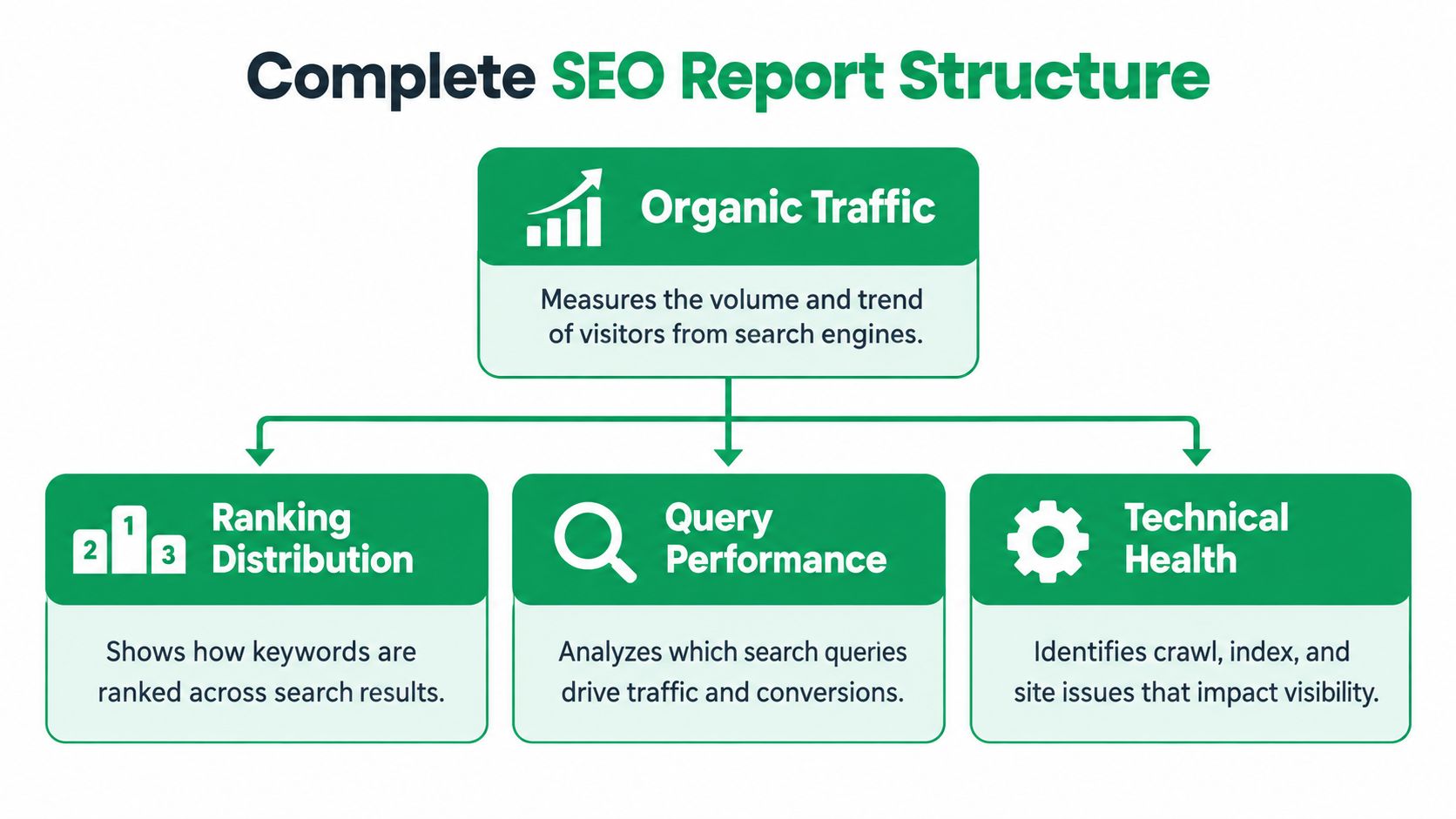
A complete report is easier to read when each section answers a business question. Organic performance asks whether Google Search is sending attention. Ranking distribution asks whether priority query groups are visible. Technical health asks whether users can access and interact with the pages comfortably. Backlink analysis provides context about links pointing to the site, while content and on-page observations explain opportunities in the pages themselves.
A guided tour of the main sections
Organic performance usually brings clicks, impressions, CTR, and average position together with page, query, country, device, and date filters. The decision is whether the site's search visibility is changing in a useful direction, and which segments deserve investigation.
Ranking distribution should focus on priority query groups rather than a giant list of tracked terms. A report might separate branded searches from non-branded searches, commercial categories from informational topics, or local service terms from broader discovery terms. The decision is where content or optimization effort has the greatest relevance.
Technical health should connect issues to affected templates and business importance. Google's Core Web Vitals documentation states that field data evaluates the 75th percentile of page requests over a rolling 28-day period. A URL group's status is determined by its worst-performing metric.
| Metric | Measures | Good threshold |
|---|---|---|
| LCP | Loading performance of the main content | At or below 2.5 seconds |
| INP | Interaction responsiveness | At or below 200 milliseconds |
| CLS | Visual stability | At or below 0.1 |
Lab tests can help diagnose a problem, but field data reflects real users, devices, networks, and locations. A sensible report identifies whether slow server response, heavy JavaScript, image delivery, or unstable dimensions affect important templates. A practical SEO audit can then turn those findings into assigned technical work.
Aggregation changes the story
Search Console can report at the property level or page level. If the same property appears more than once on a results page, property-level counting treats those appearances differently from page-level reporting. A report that compares CTR or position must state which aggregation it uses.
Backlinks belong in the report when they answer a real question, such as whether important pages have supporting authority or whether a link cleanup needs attention. They shouldn't appear as an impressive total without context. The useful output is a decision about outreach, internal linking, content support, or risk review.
Reading Between the Lines of the Numbers
A common reporting mistake is to say, “The page had 10,000 impressions, so it received 10,000 visits.” It didn't. Impressions describe appearances, while clicks describe visits from Google Search. That distinction is the first interpretive move in almost every report.
Suppose the page earned 10,000 impressions and 500 clicks, producing a 5% CTR. The next question isn't whether 5% is universally good. Ask which queries created those impressions, where the page appeared, whether the searches were branded, and whether the rate changed from the comparison period.
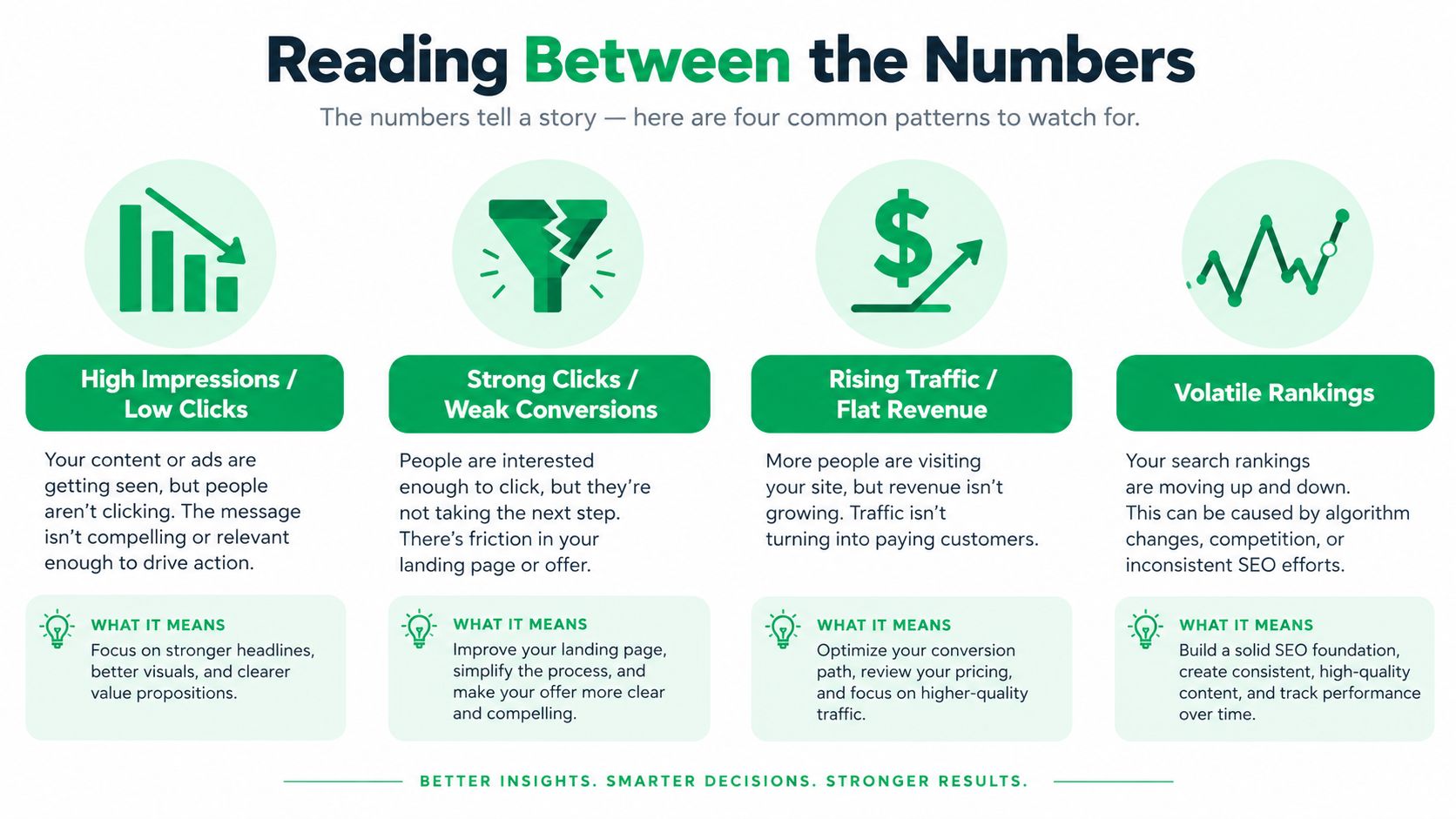
Four patterns worth investigating
- High impressions and low clicks: The page is appearing, but its search-result message may not persuade users. Review the title, description, result features, and alignment with the query's intent.
- Strong clicks and weak conversions: Search visibility is generating visits, but the landing page may have usability, trust, offer, or call-to-action problems. Search Console alone can't diagnose the full post-click experience.
- Rising impressions and flat clicks: Visibility is expanding without proportional engagement. The new impressions may come from less relevant queries, lower positions, or a different device mix.
- Strong average position and weak strategic pages: A few URLs may be lifting the site-wide average while commercially important pages remain hard to find. Filter by page and priority group.
Branded and non-branded queries deserve separate views. Branded visibility can show whether people who already know the business are finding it. Non-branded visibility is often more informative when the question is whether new audiences can discover the company through its services, products, or expertise.
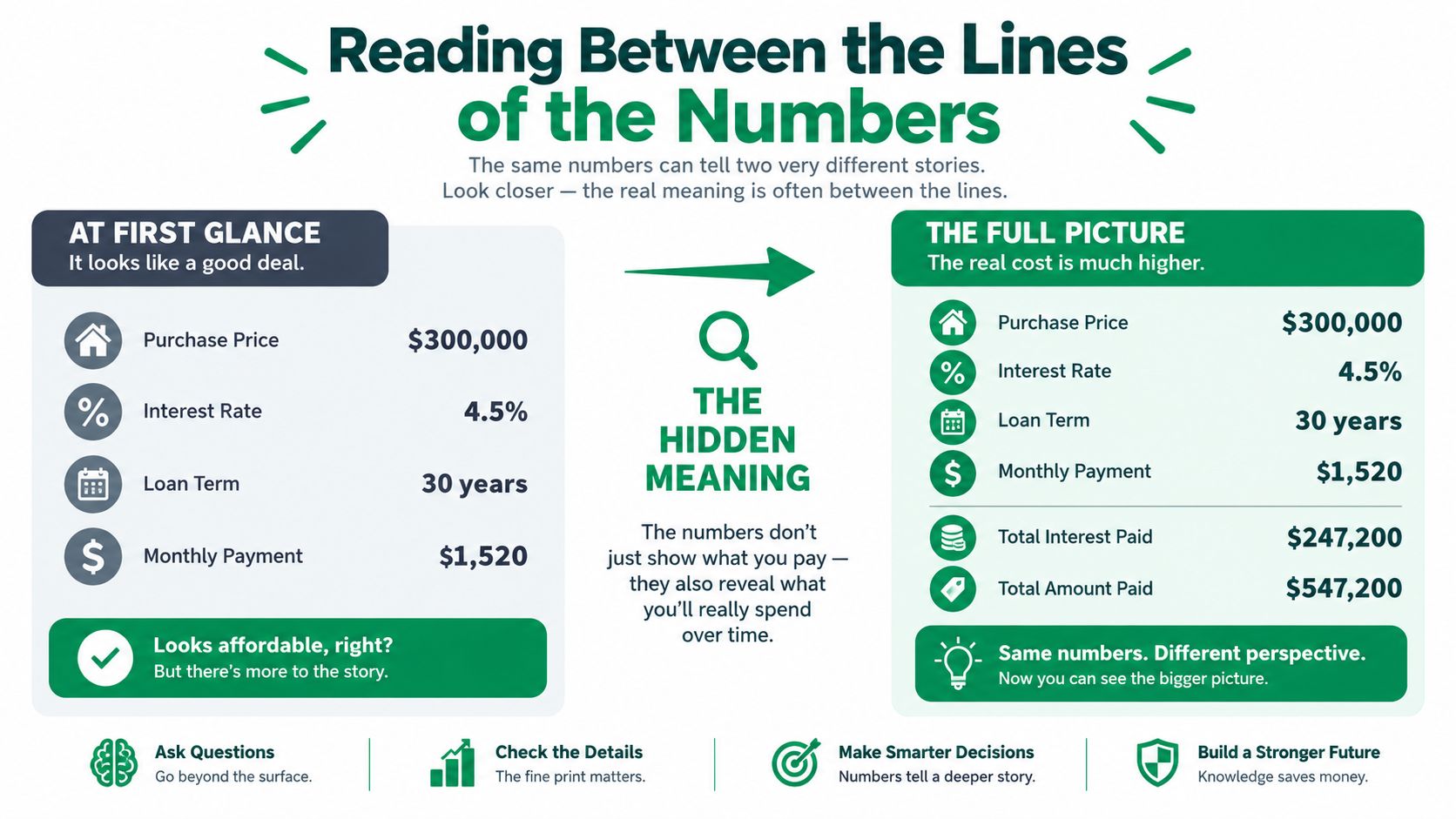
The same critical reading applies beyond search metrics. A report should connect attention with landing-page behavior and business outcomes, while acknowledging that correlation doesn't prove which change caused the result. Teams that maintain an analytics and reporting process can record site releases, content changes, and tracking updates before assigning a cause.
What the Report Quietly Hides
More rows don't automatically create better reporting. Search Console deliberately leaves parts of the dataset out, and those omissions can change how a business interprets a comparison with another platform.
Google excludes some low-volume or sensitive queries for privacy. It stores only top data rows, limits interface exports to 1,000 rows, and processes data differently from analytics tools. Rare searches may therefore be absent even when they contributed to real discovery.

More data does not equal better reporting. Better reporting makes uncertainty visible and still supports a decision.
What a missing row means
If one platform shows fewer queries or lower clicks than another, that difference doesn't automatically indicate lost visibility or faulty SEO work. Search Console and analytics tools measure different stages, apply different processing rules, and may use different scopes, filters, or attribution approaches.
A careful report documents the source, date range, time zone, filters, attribution model, and known omissions. It labels directional trends as directional rather than presenting every total as perfectly complete. It also reconciles Search Console with analytics, CRM records, call tracking, ecommerce data, or marketplace information when the decision depends on leads or revenue.
The AI Overview gap
Traditional SEO reports also struggle to show how a brand appears in AI-generated search experiences. Google has indicated that dedicated AI Overview tracking in Search Console isn't expected in the near future because the data is volatile and could create confusion, leaving AI-citation tracking unmeasured in standard reports, as described in this recap of Google Search Central Live.
That means a conventional report can't reliably tell you how often a brand was cited inside an AI answer. You can use branded-search trends, direct traffic, assisted conversions, lead-source surveys, conversion quality, and periodic manual or third-party observation as proxies. Label those observations as incomplete. No measured citation doesn't prove no AI visibility, and rising traffic doesn't prove AI exposure.
A Real Report Structure You Can Hand to a Client
A client-ready report should feel like a decision document, not a data warehouse. Assemble it in an order that moves from business meaning to evidence, then from evidence to assigned work.
Executive summary: State the major outcomes for the reporting period, the most important change, and the decision requiring attention. Keep recommendations in a separate callout so readers can distinguish observed performance from proposed action.
Organic performance: Show the selected Search Console views by page, query, device, country, and date. Identify the segments behind movement rather than relying on a single total.
Ranking distribution: Group priority queries by intent, brand status, or business category. Explain whether the distribution supports the current content plan.
Technical health: List affected templates, Core Web Vitals status, indexing observations, and implementation owners. A technical finding should lead to a specific investigation or fix, not a vague instruction to “improve the site.”
Backlink overview: Include relevant link context and explain what it means for priority pages. Don't confuse a large inventory with useful authority.
Content and on-page observations: Connect page-level evidence to titles, descriptions, headings, internal links, content depth, and intent alignment. Separate what the page currently earns from what you recommend changing.
Competitive context: Use competitor observations to frame opportunities, not to claim that another site's estimated data is identical to first-party Search Console data.
Prioritized recommendations: Give each action an owner, rationale, expected signal, and review point. The SEO monthly reporting format should make it easy to see what was completed, what remains unresolved, and what comes next.
Search Console makes up to 1,000 top queries available in its interface, while rare queries can be omitted for privacy, according to Google's data storage guidance. That's enough for practical SMB prioritization when the report uses filters and page groups intelligently.
Your Reading Checklist Before the Next Report
The next time a report arrives, don't begin with the biggest chart. Begin with the measurement notes. A small business owner comparing two periods needs to know whether the report uses the same property, filters, date range, time zone, and attribution approach in both views.
Use this checklist before accepting a trend:
- Source: Is each metric labeled as Search Console, analytics, CRM, call tracking, ecommerce, or another system?
- Coverage: Does the property include the pages and subdomains being discussed?
- Period: Are the comparison windows complete and suitable for the question?
- Filters: Were country, device, search type, page group, or query filters changed?
- Counting rules: Are clicks, sessions, leads, and conversions being treated as separate measures?
- Brand split: Are branded and non-branded queries shown separately?
- Page view: Does the site-wide result hide an important landing page?
- Data limits: Does the report disclose privacy filtering, omitted rows, or other known gaps?
- Business outcome: Can the team connect visibility with qualified leads, sales, calls, or another agreed outcome?
- Action: Does every recommendation have an owner and a review point?
Pay particular attention to the difference between visibility, engagement, and value. More impressions may mean broader exposure, but they don't guarantee clicks. More clicks may mean stronger search engagement, but they don't guarantee useful leads or purchases. A report earns trust when it tells you which conclusion the data supports and which conclusion requires another source.
And keep the cycle moving. Establish the baseline, choose a priority, implement the work, and compare the next period using consistent definitions. That habit turns an SEO report from a monthly formality into a practical record of decisions and learning.
Mr. Green Marketing, LLC offers SEO audits and performance reports that identify visibility gaps, organize search and website data, and prioritize practical next steps. If you want a report that connects organic performance with ongoing SEO, PPC, web, and conversion work, visit Mr. Green Marketing, LLC to request an audit and discuss your goals.
Leave a Comment
sing in to post your comment or sign-up if you dont have any account.