
What Is Marketing Automation: You’re probably living some version of this already. A customer fills out a form on your site, a new lead comes in from an ad, an abandoned cart sits there overnight, and someone on your team means to follow up later. Later turns into tomorrow, tomorrow turns into next week, and the opportunity cools.
That’s where marketing automation earns its keep. It’s not just a faster way to send emails, it’s the system that decides who hears what, when, and why based on what people do. For small businesses, that matters because the work never stops, and neither do the expectations from customers who want timely, relevant responses.
What Is Marketing Automation: Table of Contents
- Why Marketing Automation Matters to Small Businesses Right Now
- A Clear Definition That Goes Beyond Email Scheduling
- The Core Components Every Automation Platform Shares
- Real-World Use Cases Across Lead Gen, Retention, and E-commerce
- An Implementation Roadmap for Small and Medium Businesses
- How to Choose the Right Platform for Your Business
- Measuring Success and Avoiding the Common Pitfalls
- Quick Wins and Where to Go From Here
Why Marketing Automation Matters to Small Businesses Right Now
A small e-commerce owner can lose half a day moving between email drafts, ad dashboards, customer questions, and order follow-ups. One message goes out on time, another sits in a draft folder, and a third arrives after the customer has already moved on. That is a workflow problem, not a people problem.
Marketing automation turns that scattered process into an event-driven system that keeps working after the owner closes the laptop. It reacts to a form fill, a cart abandonment, a purchase, or a repeat visit without someone manually pressing send each time. That matters because marketing is no longer just about creating campaigns, it is about deciding who hears what, when, and why, then keeping that sequence moving across channels.
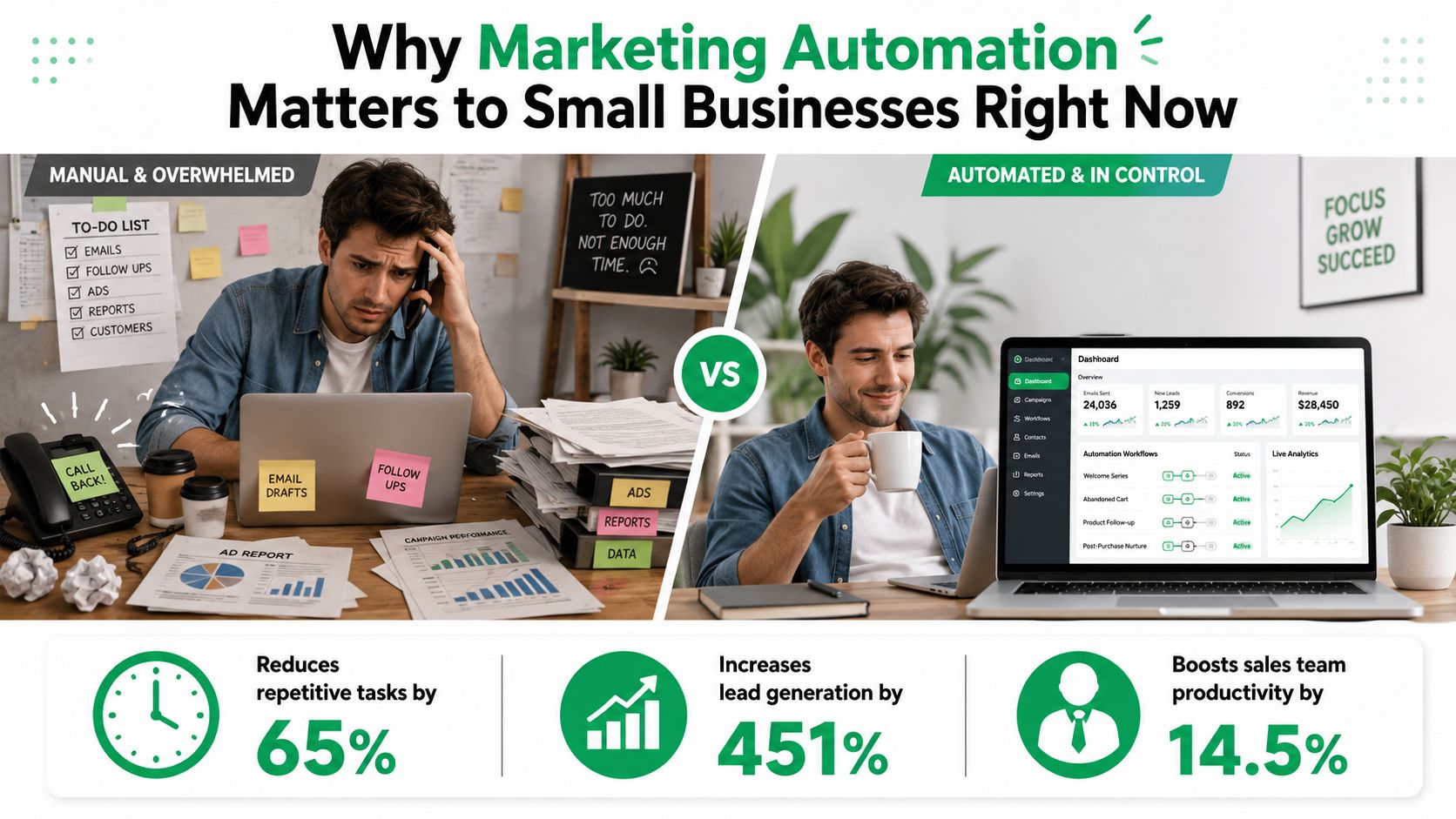
The pressure to automate is visible across the field. The MoEngage marketing automation statistics roundup reports that most marketers have used or plan to use a marketing automation platform, many businesses already rely on automation, and the market continues to expand. Email is still the usual starting point, and many teams connect automation with CRM systems so customer data and workflows stay aligned. If you are still doing all of this by hand, the issue is not just extra effort. Your process is starting to lag behind how customers expect to be contacted.
Practical rule: if a workflow repeats, depends on timing, and uses customer data, it probably belongs in automation before it belongs in someone’s inbox.
For a small business, waiting carries a real opportunity cost. Every manual follow-up is a chance to miss the moment, and every missed moment makes growth more expensive. A useful starting point is to compare your current process with the approach outlined in this practical resource, then mark the places where repetitive work is still absorbing time.
A Clear Definition That Goes Beyond Email Scheduling
The simplest answer to what is marketing automation is software that sends marketing messages automatically. That’s true, but it’s only the surface. If you stop there, you end up thinking about scheduled emails instead of the system underneath them.
From scheduled sends to decision making
Gartner’s framing is more useful because it names the core jobs the software performs, customer segmentation, customer data management, and campaign management, with support for real-time, targeted, data-driven campaigns (Gartner marketing automation glossary). That’s a lot closer to how the system behaves in the wild. It doesn’t just send, it helps determine which audience gets which message and under what conditions.
Imagine a restaurant kitchen, not a single cook at a grill. A customer action comes in as an order, the workflow checks what should happen, the right content gets prepared, and the message gets plated for delivery. The value isn’t the plate itself, it’s the coordination behind it.
What Is Marketing Automation: The four layers behind the scenes
Modern automation is usually described as an event-driven orchestration system with a collection layer, processing and validation layer, storage layer, and activation layer (WJARR technical architecture paper). In plain language, that means:
- Collection layer: captures customer actions from forms, sites, apps, or integrations.
- Processing and validation layer: checks whether the event is usable and routes it correctly.
- Storage layer: keeps the customer record and history in one place.
- Activation layer: triggers the next action, like a message, task, or suppression rule.
That structure matters because it lets teams scale pieces independently as event volume grows. It also explains why a platform can feel powerful and still fail if the workflow logic is weak. A fancy tool without clear rules is just expensive plumbing.
A tool can automate a bad process just as efficiently as a good one.
The broader mental model is this. Email is one channel. Marketing automation is a customer-lifecycle operating system that coordinates the rules, data, and actions behind that channel and several others. This omnichannel strategy resource fits that wider view, because the goal isn’t sending more messages, it’s making the messages fit the journey.
The Core Components Every Automation Platform Shares
Most platforms look different on the sales page but similar under the hood. Once you know the parts, it gets easier to separate genuine capability from shiny packaging. The names vary, the mechanics don’t.
The pieces you’ll keep seeing
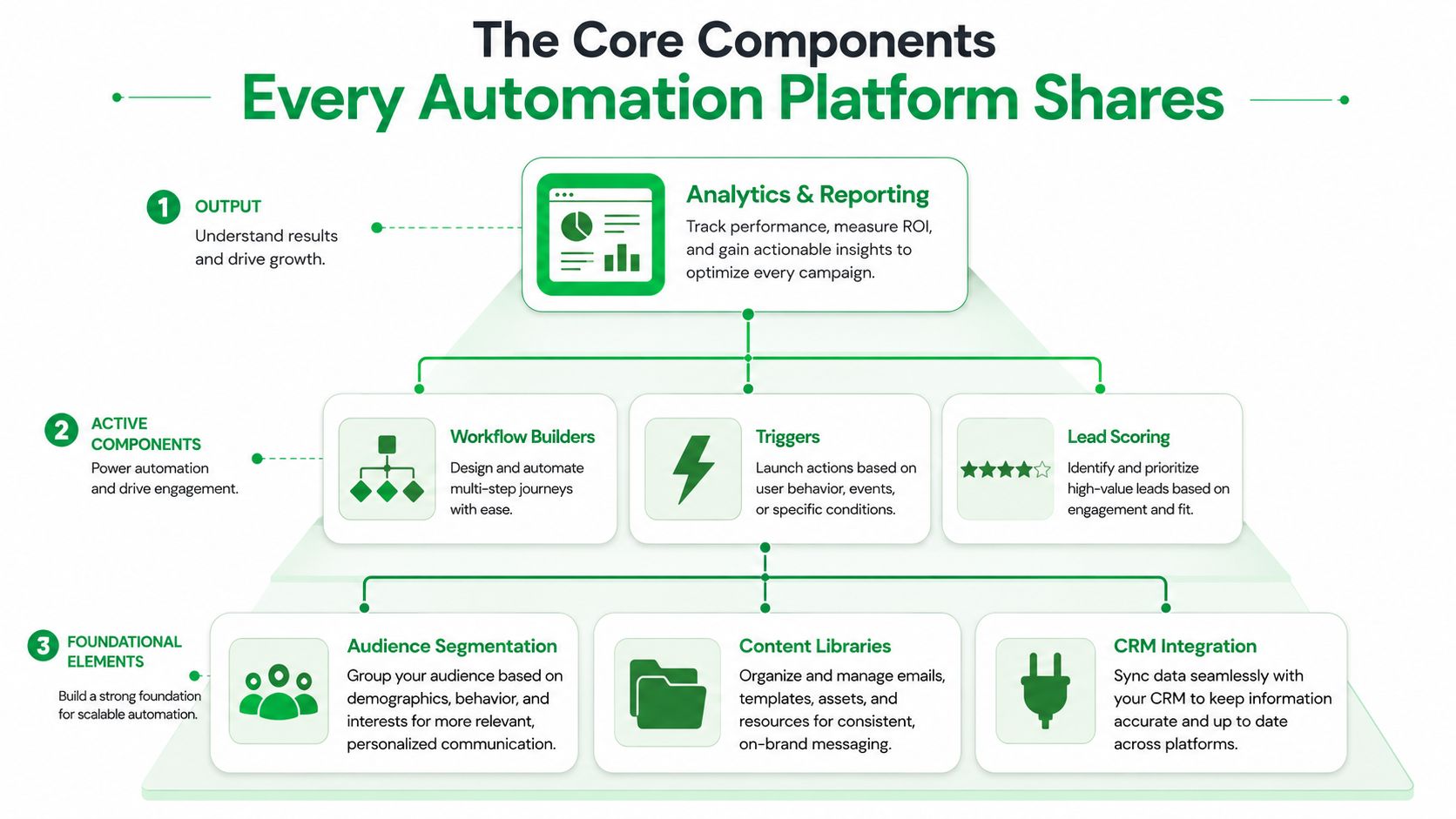
At the foundation, you’ll usually find audience segmentation, content libraries, and CRM integration. Segmentation groups people by behavior or profile. Content libraries hold the emails, texts, or assets you reuse. CRM integration keeps contact records, sales activity, and marketing behavior from living in separate silos.
Above that sit the active components. Workflow builders define the sequence of events. Triggers decide when the workflow starts. Lead scoring helps teams prioritize interest and intent. Analytics sits at the top because it tells you whether the whole thing is working.
What Is Marketing Automation: What each layer actually does
A trigger might be a form submission, a product page visit, or a purchase. The workflow might then send a welcome email, alert sales, or suppress a redundant offer. Analytics then shows whether the path produced a conversion, a reply, or silence.
Here’s the catch. Buying software doesn’t mean you have automation. If your data is messy, your triggers are vague, or your workflow is built around guesswork, the platform just executes confusion faster. That’s why teams should treat the tool as an operating layer, not as the strategy itself.
Strategic note: features are dormant until the workflow design gives them a job.
If you’re already handling customer records in a CRM, a deeper implementation path may look a lot like the one discussed in this CRM implementation guide. The important part is coordination, not count of features.
Real-World Use Cases Across Lead Gen, Retention, and E-commerce
A local service company doesn’t need to automate everything. It needs to automate the parts that repeat and affect timing. The same is true for SaaS, e-commerce, and marketplace sellers, which is why the use case matters more than the buzzword.
What Is Marketing Automation: Four scenarios that make the concept concrete
A lead generation business can send a welcome sequence after someone requests a quote. The first message confirms the request, the second shares proof or FAQs, and the third nudges the person toward a call. That’s simple, but it keeps the lead warm without someone manually chasing every name.
A SaaS company can score prospects based on page visits, trial activity, or content downloads, then route hot leads to sales. IBM’s framing is helpful here because the same automation logic supports both B2B and B2C campaigns across channels, not just one business model (IBM marketing automation overview). The company isn’t just pushing emails, it’s managing routine actions across the journey.
An e-commerce store can recover abandoned carts, send post-purchase follow-ups, and re-engage buyers who haven’t returned in a while. NetSuite describes automation as planning, coordinating, deploying, and measuring campaigns across email, social media, web pages, content downloads, mobile notifications, and text messages, with behavioral data like browsing and purchase history used to trigger communications at the right stage (NetSuite marketing automation article). That’s the practical version of personalization.
An Amazon seller can use the same thinking to coordinate follow-up messaging, review requests, and audience segmentation around purchase behavior. The channel changes, but the logic doesn’t. Someone acts, the system responds, and the next step happens without delay.
Why these examples matter
Each use case shows the same pattern. Data comes in, a rule fires, a message or task goes out, and the result gets measured. That pattern is what makes automation useful across lead generation, retention, and e-commerce.
For a small business trying to generate demand without leaning on cold outreach, this lead generation resource is a useful companion. It sits in the same world as automation, because both depend on better timing and better targeting.
What Is Marketing Automation: An Implementation Roadmap for Small and Medium Businesses
A small business does not need a large marketing operations team to begin. It needs one clear workflow, one place where the data lives, and a rollout plan that matches the team’s capacity. The companies that stall usually try to automate everything before they automate anything that saves time.
A simple four-phase path
Phase 1, audit and identify. Start by listing the repetitive tasks your team handles every week. Then trace where each record comes from, whether that is website forms, CRM entries, the e-commerce platform, the email list, or ad leads. If the same manual handoff keeps showing up, that is the first place to look.
Phase 2, pilot and automate. Choose one workflow with clear value and a simple trigger. A welcome series, lead nurture, or abandoned cart recovery is often easier to prove than a full multi-channel build. Keep the first version focused so the team can see what the system is doing without getting lost in too many branches.
Phase 3, integrate and launch. Build the workflow, test the logic, and confirm that data moves the way you expect. A broken trigger or a bad merge field can hurt the customer experience quickly, especially if the automation sends the wrong message at the wrong time. Many teams also need outside help at this stage, and a free audit from Mr. Green Marketing, LLC can help identify which workflow has the clearest payoff.
Phase 4, measure and expand. Review what happened, compare it with the original goal, and only then add the next workflow. Expansion should follow proof, since each new automation adds another moving part to manage.
The Monday-start version
- Monday: audit repetitive tasks and note where each lead or customer record originates.
- Tuesday: choose one workflow and define the trigger, message, and success metric.
- Wednesday: build the first draft and check the data fields.
- Thursday: test with a small sample and fix the failures.
- Friday: launch, then watch the first results closely.
The first run does not need to look impressive. It needs to work. A simple system that saves time and keeps follow-up consistent is more valuable than a complicated setup that nobody trusts.
How to Choose the Right Platform for Your Business
The wrong platform can make automation feel heavier than the manual process it replaces. So the buying decision should start with your stack, your workflow, and your tolerance for complexity. Not with the prettiest demo.
What to look for first
A solid platform should give you a workflow builder, segmentation, CRM integration, and reporting. If you run an online store, make sure it also connects cleanly to your e-commerce system. If you sell on marketplaces, think about whether the platform can support your sales process without forcing workarounds.
Pricing also matters. Some tools charge by contacts, some by features, and some by usage tiers. Contact-based pricing can get expensive as your list grows, while feature-based pricing can lock key functions behind a higher plan.
Platform archetypes for SMBs
| Platform Type | Best For | Strength | Watch Out For |
|---|---|---|---|
| All-in-one suites | Teams that want email, landing pages, and reporting in one place | Broad feature set and fewer vendors | Can be more tool than you need at first |
| E-commerce specialists | Stores focused on cart recovery, post-purchase flows, and product behavior | Strong commerce workflows | May be weaker for broader lead management |
| CRM-anchored tools | Businesses already living inside a sales CRM | Tight alignment between sales and marketing data | Marketing depth can be limited outside the CRM |
| Amazon-specific solutions | Sellers who need marketplace-focused workflows | Fits seller operations and channel-specific needs | Not ideal if your business needs broader lifecycle marketing |
A practical shortlist filter
Start by asking three questions. Does it fit your current stack? Can your team realistically manage it? Will it still work if you grow into more workflows later?
If a platform checks those boxes, it belongs on the shortlist. If it needs a specialist just to keep it alive, it may be too much for a small team.
What Is Marketing Automation: Measuring Success and Avoiding the Common Pitfalls
A lot of automation pitches lean on the promise of saving time. Sometimes that is true. Sometimes it only moves the work into a different dashboard. The test is simple, does the workflow improve the business, or just create a new place to manage the same mess?
Metrics that actually tell you something
Start with conversion rate per workflow. It shows whether a specific automation path is producing action instead of just activity. If your sales cycle is longer, track lead-to-customer time as well, because faster handoffs often reveal whether routing, follow-up, and lead qualification are doing their job.
Add customer lifetime value, retention rate, and ROAS where they fit your model. Each one answers a different question. Did the workflow improve revenue quality, keep customers around, or make spend more efficient? If you want a fuller framework for tying those numbers back to business outcomes, this guide to measuring marketing campaign effectiveness is a useful companion read.
Common traps to avoid
- Bad data hygiene: duplicate records, stale fields, and missing consent can make even good automation look broken.
- Over-automation: too many messages create noise and train customers to ignore you.
- Tool sprawl: platforms that do not connect add cleanup work instead of reducing it.
- Broken process automation: if the underlying workflow is flawed, automation just repeats the flaw faster.
The other trap is treating the platform itself as the strategy. It is not. Automation amplifies whatever your team has already built, good or bad. That is why the process has to come before the purchase.
Good strategy becomes scalable. Bad strategy becomes scalable noise.
Industry surveys commonly show that marketing teams start by connecting automation to their CRM and email workflows. That pattern makes sense. Those are usually the first places where a team can feel the difference between a system that sends messages and one that decides who hears what, when, and why.
What Is Marketing Automation: Quick Wins and Where to Go From Here
Start with a welcome email series, an abandoned cart flow, a lead scoring rule, a re-engagement campaign, or a post-purchase nurture sequence. Those are the cleanest places to test whether automation helps your business. They also map naturally to email marketing, CRM setup, PPC follow-up, e-commerce, and Amazon services inside Mr. Green Marketing’s broader execution model.
Quick FAQ. What does it cost? It depends on contacts, features, and integrations. How fast is ROI? It varies by workflow and data quality. Isn’t a CRM enough? No, a CRM stores and organizes relationships, while automation triggers actions around them. Is a business too small? If you have repeated leads or repeat customers, probably not.
Mr. Green Marketing, LLC helps businesses turn scattered marketing tasks into working systems across web, SEO, PPC, Amazon, and lifecycle campaigns. If you want a cleaner first workflow, a better stack decision, or a practical audit of what to automate first, visit Mr. Green Marketing, LLC and start with a free performance review.
Leave a Comment
sing in to post your comment or sign-up if you dont have any account.