
SEO for Amazon Sellers: Boost Your Sales in 2026. You’ve probably seen this pattern already. A product goes live, the title is packed with keywords, the bullets mention every feature, the backend fields are full, and nothing really happens. Impressions trickle in. PPC gets expensive fast. Organic rank stalls.
That’s where most Amazon SEO advice falls short. It treats optimization like a one-time checklist. Add keywords. Upload images. Tweak bullets. Done.
Real SEO for Amazon sellers works more like a growth engine. Your listing copy improves relevance. Better relevance gets you more qualified clicks. Better images, pricing, and reviews help those clicks turn into orders. Orders strengthen rank. PPC and external traffic add momentum. Then the whole system starts compounding. And yes, that’s the part most sellers miss.
SEO for Amazon Sellers: Thinking Like Amazon The Real Goal of Seller SEO
Most sellers start with the wrong mental model. They think Amazon SEO works like Google SEO. It doesn’t.
Google helps people find information. Amazon helps people buy products. That difference changes everything. If you want better results, stop treating your listing like a blog page and start treating it like a storefront shelf plus a salesperson.
Ranking follows purchase likelihood
Amazon’s algorithm prioritizes purchase likelihood over simple keyword relevance. That’s why low click-through rates can still lead to strong results if the listing converts. One seller metrics guide notes that typical CTR sits around 0.3–0.5%, while average conversion rates often land at 9–12% and stronger listings can reach 13–15%. The same guide describes a healthy sales-velocity range of 8–12% across most categories, with 13%+ considered excellent, which is why listings that convert and generate transactions tend to rank better than listings that merely contain the right words (Canopy Management’s Amazon metrics guide).
That single idea should rewire how you evaluate everything on the page.
A title isn’t “good” because it includes more terms. It’s good if it attracts the right shopper and sets up the sale. Bullet points aren’t there to prove you know your category. They’re there to reduce hesitation. Images aren’t decorative. They do conversion work.
Practical rule: If a change makes your listing more indexable but less convincing, it’s usually the wrong change.
SEO for Amazon Sellers: Amazon SEO is part of a broader e-commerce system
This is also why sellers get into trouble when they borrow advice from traditional SEO without adapting it. Broader search strategy still matters, especially if you’re building demand off Amazon too. If you need that wider perspective, Keyword Kick’s definitive guide to e-commerce SEO is useful for understanding how marketplace SEO fits alongside site SEO, content, and category visibility.
But on Amazon, relevance alone won’t save a weak offer.
Here’s the practical trade-off:
- Keyword-heavy copy with weak merchandising: You may index, but shoppers won’t buy.
- Beautiful copy with poor keyword coverage: Shoppers who do find you may convert, but not enough people will find you.
- Balanced listing with operational support: That’s where rank holds.
What actually moves rank
Strong Amazon SEO sits at the intersection of four things:
- Relevant keyword coverage: So Amazon knows when to show your ASIN.
- Compelling listing execution: So shoppers click and understand the offer quickly.
- Conversion drivers: Reviews, pricing, imagery, and content quality.
- Sales momentum: Organic, PPC, and external traffic working together.
And yes, that means the actual goal isn’t “rank higher.”
It’s to build a listing that deserves to rank because it keeps closing the sale.
SEO for Amazon Sellers: The Blueprint Building Your Keyword Foundation
Before you touch the title or bullets, build the keyword map. Not a random export from a tool. A map.
Most weak listings don’t fail because the seller had no keywords. They fail because the seller had no prioritization. Everything gets treated like a primary term, and the copy turns into clutter.
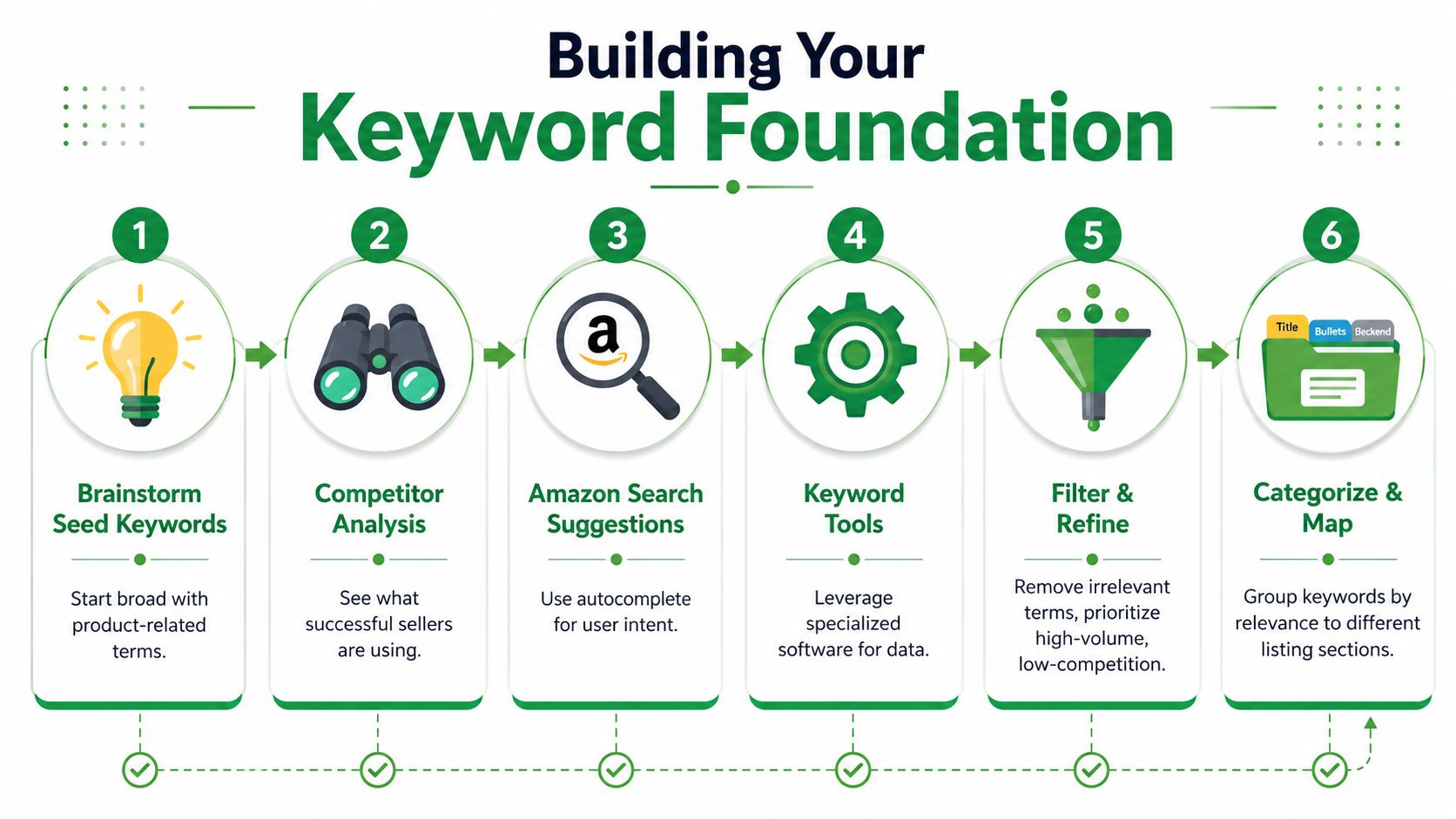
Start with how shoppers actually search
Amazon’s own guidance favors a mix of short-tail and long-tail terms across the title, bullets, and description, with the highest-volume long-tail keyword placed in the title and additional high-volume terms worked into the bullets and description naturally (Amazon’s Amazon SEO guide).
That sounds simple. It isn’t, unless you sort terms by intent.
I split keywords into three buckets:
- High-intent buyer terms
These are the money phrases. Product-specific, close to purchase, usually tied to the exact item someone wants. - Feature and use-case terms
Material, size, audience, compatibility, setting, or problem-solution language. - Discovery terms
Broader phrases that can help you capture adjacent demand, but usually don’t deserve top placement.
A bamboo cutting board listing, for example, shouldn’t give equal weight to “cutting board,” “large bamboo cutting board for kitchen,” and “gift for home chef.” They each do different jobs.
SEO for Amazon Sellers: Build the list from three places
I like a simple workflow because it forces better judgment.
- Competitor listings: Pull titles, bullets, and visible phrase patterns from the best-positioned ASINs in your niche.
- Amazon autocomplete: Type your core term and watch how Amazon completes it. That’s direct insight into search behavior.
- Brand Analytics or search-query data: If you have access, use actual marketplace performance to validate what deserves prime real estate.
Brand Analytics is especially useful because Amazon exposes keyword-level impressions, clicks, carts, and purchases inside Seller Central. That changes keyword research from guesswork into operational SEO.
Sort before you write
New sellers usually rush at this point. Don’t.
Use a worksheet or even a simple spreadsheet and label each term by:
- Intent level
- Product relevance
- Placement priority
- Whether it belongs in visible copy or backend only
Don’t force every relevant phrase into the title. Some terms deserve bullets. Some belong in the backend fields. Some should stay in PPC until they prove they can convert.
SEO for Amazon Sellers: A practical mapping model
A clean keyword foundation usually looks like this:
- Title: One primary long-tail phrase plus critical product identifiers
- Bullets: Supporting high-intent terms, use cases, and objections
- Description or A+ modules: Secondary context and brand story language
- Backend search terms: Coverage gaps, synonyms, and terms that don’t read naturally in visible copy
That structure protects readability. It also keeps the listing useful on mobile, where clutter kills scannability fast.
What doesn’t work
A few things I’d cut immediately if I saw them in an audit:
- Duplicate phrasing everywhere: Repeating the same exact term in title, every bullet, and backend fields wastes space.
- Tool-led keyword dumping: Just because a phrase appears in a report doesn’t mean it belongs on your listing.
- Broad terms without buying intent: These can inflate visibility while dragging down listing quality if they attract poor-fit traffic.
- Writing before clustering: If you start drafting too early, you usually end up rebuilding the whole listing later.
Good keyword research gives you more than ranking targets. It gives you a messaging hierarchy.
And that’s the point. The listing should read like it was built on purpose, because it was.
SEO for Amazon Sellers: Crafting the Perfect Listing Title Bullets and Visuals
Once the keyword map is done, the visible listing has one job. Turn search visibility into action.
A lot of sellers sabotage themselves. They do the hard part of keyword research, then write copy like they’re filling out a catalog form. Flat titles. Generic bullets. Images that show the product but don’t sell the product.
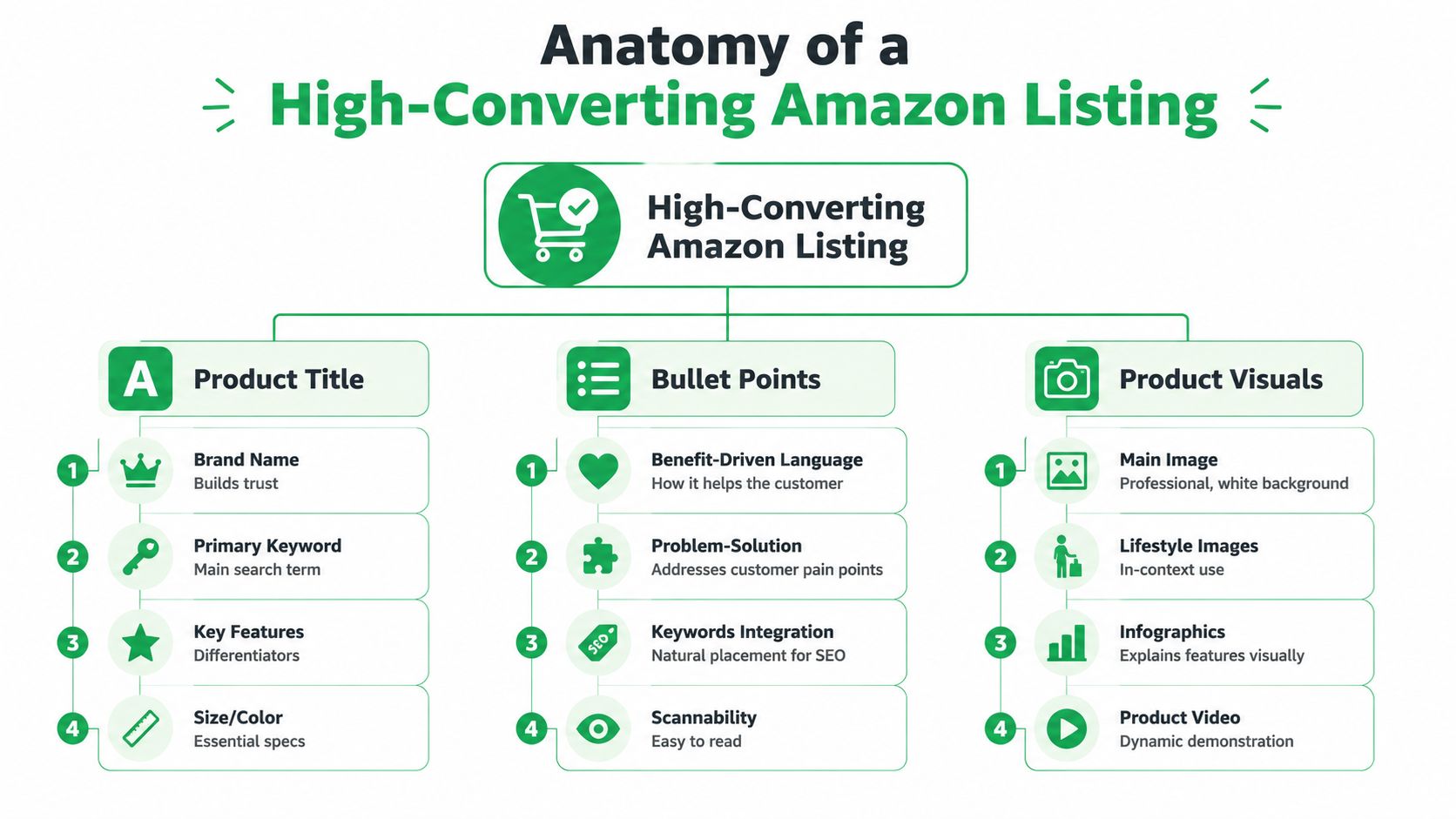
Write titles for both indexing and decision-making
A strong Amazon title does two things at once. It tells the algorithm what the item is, and it tells the shopper why they should care.
That means the title needs your primary keyword, but it also needs order and restraint. Front-load what matters. Keep the product type obvious. Use key differentiators that help a shopper qualify the item quickly.
Bad title logic looks like this: cram every variation near the front because “more keywords = more SEO.”
Better title logic is cleaner:
brand, core product, primary keyword phrase, major differentiator, essential variant details.
On mobile, that discipline matters even more. The first few words do most of the work.
SEO for Amazon Sellers: Turn bullets into sales arguments
Bullet points should never read like copied packaging text.
Each bullet needs a purpose. One can handle the core benefit. One can remove a common objection. One can clarify material or compatibility. One can explain the use case. One can create confidence around quality or convenience.
A good bullet is scannable first, persuasive second, and keyword-aware throughout.
Here’s the pattern I prefer:
- Lead with the customer outcome
- Support it with a concrete product detail
- Include relevant language naturally
- Keep the phrase flow clean enough to skim
Clear copy usually beats dense copy on Amazon, especially when shoppers are scanning fast on mobile.
Use description and A+ Content to finish the sale
You can add depth without making the top of the listing heavy.
Consumer-focused, readable copy outperforms keyword stuffing over time because it supports conversion. Amazon guidance also notes that A+ Content can increase product sales by up to 10%, which is why enhanced content should be treated as part of ranking strategy, not just branding (Amazon Seller Central forum guidance on A+ Content and Amazon SEO).
Use A+ to do the work your title and bullets can’t fully handle:
- Compare versions or sizes
- Explain fit, material, or usage
- Show the product in context
- Reinforce trust with a stronger brand presentation
If you’re reworking a detail page and need a broader checklist for the visible components, this guide on Amazon listing optimization is a useful companion.
SEO for Amazon Sellers: Images are conversion assets, not decoration
Most sellers underinvest here. They upload compliant images, not persuasive ones.
Your main image wins the click with the title. The rest of the stack needs to answer questions before the shopper asks them. Show scale. Show use. Show what’s included. Show the result. If your product solves a problem, visualize the problem and the solution.
For brands experimenting with faster creative production, PhotoMaxi’s guide to AI product images is worth reviewing, especially if you want to create supplementary visual concepts while keeping the merchandising goal in focus.
Keyword Placement Strategy
| Listing Element | Primary Keyword Type | Example |
|---|---|---|
| Title | Highest-priority long-tail keyword | “stainless steel insulated water bottle” |
| Bullet Points | Supporting high-intent and feature terms | “leakproof lid,” “fits cup holder,” “for gym and travel” |
| Description | Secondary context and use-case phrases | “daily commute,” “office hydration,” “weekend hiking” |
| A+ Content | Brand and comparison language | “compare sizes,” “gift-ready packaging,” “premium finish” |
| Image text overlays | Benefit support language | “easy-pour spout,” “double-wall insulation” |
What to cut from the page
I’d remove these fast:
- Keyword piles in titles: They look spammy and reduce click appeal.
- Spec-only bullets: Features matter, but only after the customer understands the benefit.
- Redundant images: Five angles of the same product won’t answer buying questions.
- Generic A+ layouts: If it could fit any product in your catalog, it isn’t doing enough.
Readable pages convert. Scannable pages convert. Listings that answer buying questions before the shopper hesitates tend to hold rank better.
That’s the true test.
SEO for Amazon Sellers: Mastering the Hidden Ranking Factors Backend Search Terms
A seller cleans up the title, rewrites the bullets, swaps in better images, then dumps a giant keyword export into the backend and calls the listing optimized. That last step is where a lot of listings lose discipline.
Backend search terms are not a second title. They are a control panel for relevance. Use them to cover real search gaps that help the listing get discovered without making the customer-facing copy messy.
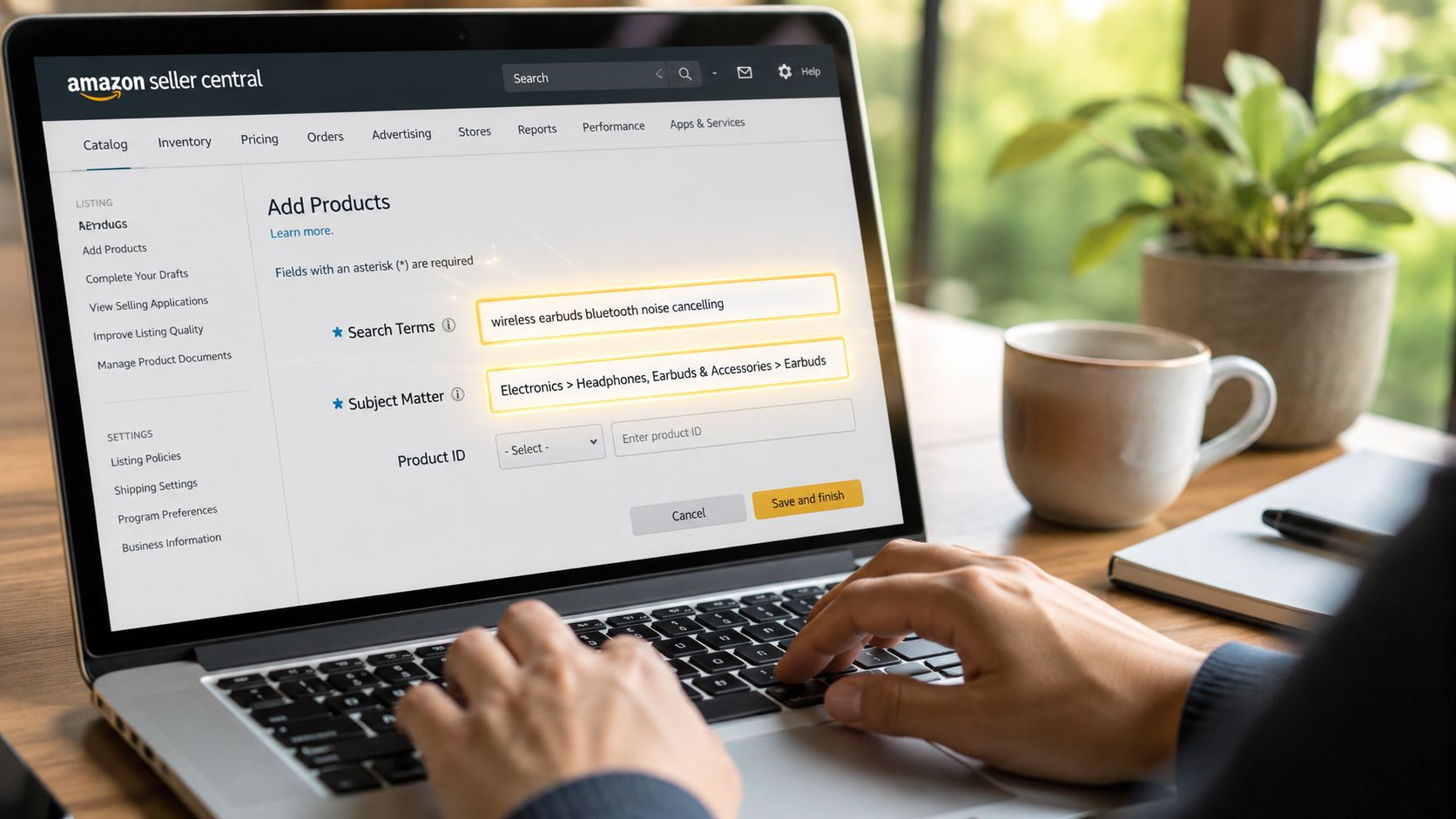
Follow the formatting rules first
The formatting is simple, and breaking it wastes space. Enter backend search terms as lowercase words separated by spaces. Skip punctuation, filler words, and duplicates. If the term is already indexed from the title, bullets, or other visible fields, it usually does not earn another spot here.
That matters because backend terms are part of the same growth engine as the rest of the listing. Extra words do not help if they bring in lower-fit traffic that does not convert. Clean coverage does.
What belongs in backend fields
The best backend terms usually fall into a few practical buckets:
- Synonyms shoppers use: alternate product names and common substitutes
- Abbreviations: especially in categories where shorthand is normal
- Alternate phrasing: reversed word order or common language variants
- Indexable terms you do not want on-page: awkward phrases that hurt readability or click-through
- Secondary descriptors: relevant qualifiers that support discovery but are too minor to feature in the copy
I treat this field like compressed keyword storage. Every word needs a job.
SEO for Amazon Sellers: Think in coverage, not in raw keyword count
The right question is simple. What relevant searches should this ASIN be eligible for that the visible listing does not already cover?
That approach keeps the backend aligned with conversion instead of turning it into a junk drawer.
For example, a listing built around “wireless earbuds for workouts” might use backend space for alternate terms like sports earbuds, gym earbuds, bluetooth earphones, or category shorthand that would clutter the title. It should not repeat every visible keyword, stuff in broad traffic bait like “headphones,” or add unrelated use cases just because a tool surfaced them.
That trade-off matters. Broader indexing can look productive in a report, but weak-fit impressions usually do not help rank for the terms that drive sales. They can also muddy your PPC data, which makes the flywheel harder to tune later.
If you want a clean way to pressure-test relevance, compare backend terms against the language showing up in customer questions, reviews, and your ad search term reports. The overlap is often more useful than another export from a keyword tool. The same review patterns that help with relevance can also guide follow-up improvements, which is why a disciplined Amazon review generation process ends up supporting SEO too.
A quick example
Say the front end already covers “wireless earbuds,” “workout headphones,” “sweat resistant,” and “secure fit.”
Useful backend additions might include alternate shopper language such as “sports earphones,” “running earbuds,” “bluetooth buds,” or a shorthand term common in the category. Poor additions would be color names not tied to the child ASIN, repeated title words, competitor brand names, or giant generic phrases that do not match the product closely.
Small field. High consequence.
A short walkthrough helps if you want to see the mechanics inside Seller Central:
Common backend mistakes
These are the ones I see most often in audits:
- Repeating indexed terms: wasted space with little upside
- Stuffing in broad irrelevant phrases: more impressions, weaker fit
- Using backend fields to compensate for bad front-end copy: fix the listing first
- Updating too many variables at once: harder to tell what changed indexing or sales
- Ignoring catalog structure: backend terms should support the exact parent-child setup and variation logic you are selling through
Handled well, backend search terms strengthen the whole listing. They expand discoverability, keep the front end readable, and feed better traffic into the conversion engine. That is the primary job.
SEO for Amazon Sellers: Fueling the Algorithm With Reviews Pricing and Conversion
Keywords get you considered. Conversion signals decide whether your listing keeps moving up or stalls out.
This is the part many sellers resist because it feels less like SEO. But on Amazon, reviews, pricing, and the total buying experience aren’t side issues. They shape whether the algorithm keeps rewarding your ASIN with visibility.
Reviews change how the listing is perceived
Reviews do two jobs at once. They influence the shopper, and they inform Amazon whether the product consistently satisfies buyers.
That doesn’t mean you should chase them aggressively or step outside policy. It means you need a review acquisition process that is steady, compliant, and tied to real customer experience. Clean packaging, clear instructions, accurate listing claims, and reliable follow-up matter more than clever tricks.
If you need a structured process, this article on how to get more reviews on Amazon outlines practical ways to improve review flow without turning the brand into a spam machine.
Pricing is a ranking lever because it affects conversion
Sellers often separate pricing strategy from SEO. That’s a mistake.
If your price is out of step with the category, shoppers hesitate. If it’s too low, you may win clicks but signal lower perceived quality or burn margin you need for ads and inventory. Good pricing on Amazon is rarely about being the cheapest. It’s about being easy to justify.
Look at the full offer from the shopper’s perspective:
- Is the price believable for the quality level shown?
- Does the image stack support that price point?
- Do reviews reduce the risk enough to make the purchase feel safe?
- Does the listing clearly explain what makes this version worth buying?
That’s conversion work. Which means it’s SEO work too.
SEO for Amazon Sellers: Watch the whole buying experience
Amazon’s ranking system is tied to operational performance alongside keyword match. Third-party guidance consistently emphasizes conversion rate, sales velocity, reviews, and stock availability as core inputs, which means a well-written listing can still underperform if the underlying offer is weak or unstable.
Here’s how I frame it for clients. If the product detail page promises one experience and the order experience delivers another, the listing usually loses momentum over time.
Better SEO won’t fix a weak offer. It will just expose the weakness faster.
The practical order of operations
If a listing is indexed but not gaining traction, I’d usually inspect these in order:
- Offer clarity
Is it obvious what the product is, who it’s for, and why it’s different? - Visual trust
Do the images justify the click and support the price? - Review friction
Are recurring complaints showing up that the listing could preempt or the product team needs to solve? - Price-position fit
Is the offer competitively positioned for the level of proof on the page? - Traffic quality
Are you attracting the right shopper, or just broad traffic with weak intent?
Amazon doesn’t reward effort. Instead, it rewards listings that keep turning visits into orders.
And that’s why mature sellers stop asking only, “How do we rank?” They start asking, “What is blocking the purchase?”
SEO for Amazon Sellers: The Flywheel Effect Using PPC to Amplify Organic Rank
A lot of sellers treat PPC and SEO like separate departments. On Amazon, they’re tied together whether you organize them that way or not.
A sale from Sponsored Products is still a sale. Amazon doesn’t ignore it just because you paid for the click. That matters because paid traffic can help a listing build the momentum it needs to improve organic placement.
PPC is a testing engine first
Before a keyword earns prime space in a title or bullet, I like seeing evidence that it can attract the right shopper.
PPC gives you that testing environment. You can identify search terms that produce quality traffic, then decide whether those terms belong in the listing itself. That’s much safer than rewriting the page around phrases that only looked good in a keyword report.
Amazon SEO guidance has moved toward measurable marketplace signals for exactly this reason. Search performance is no longer just about keyword inclusion. It’s about how those terms behave once real shoppers see the offer.
SEO for Amazon Sellers: The flywheel works when the offer is ready
Here’s the sequence in plain English:
- PPC drives targeted traffic.
- Strong listings convert that traffic into orders.
- Orders support sales velocity.
- Better organic rank brings in more unpaid traffic.
- More organic sales can improve ad efficiency because the listing has more proof and momentum.
That’s the compounding loop. But it only spins if the listing is conversion-ready. If the offer is weak, PPC won’t save it. It will just buy you expensive feedback.
What to pull from ad data
I’m usually looking for three things in search term reports:
- Terms that convert cleanly: These deserve stronger organic placement.
- Terms that get clicks but weak purchase behavior: Keep testing or demote them.
- Terms that reveal intent you didn’t account for: Good source material for bullets, images, and FAQs.
This is also why ongoing coordination matters. The SEO person shouldn’t work in isolation from the PPC person. If your team structure allows it, connect listing updates directly to search-term data and campaign performance. If you use outside support, options like Amazon PPC agency benefits and best practices can help clarify what should be managed in-house versus externally.
External traffic can support the same engine
Neil Patel’s ranking framework emphasizes three broad stages: optimize for the right keywords, maintain strong sales velocity, and keep a healthy account. He also notes that improving click-to-sale conversion and driving external traffic can support organic performance, which is why outside demand generation can complement marketplace SEO when the product page is ready to convert.
That means email, creators, influencer seeding, brand search, and off-Amazon content can all help. Not because external traffic magically “counts more,” but because qualified external traffic can produce more transactions.
What doesn’t work
A few common mistakes:
- Scaling ads before the page converts
- Using PPC only for sales, not insight
- Pushing broad terms too early
- Ignoring search-term data when rewriting listings
Paid and organic aren’t rivals on Amazon. They’re inputs into the same ranking and revenue system.
When they’re aligned, the gains stack.
SEO for Amazon Sellers: The Living Listing How to Audit Monitor and Evolve
A listing can look fine on Monday and lose ground by Friday.
A competitor changes their image stack. Search terms shift with seasonality. Reviews start repeating the same objection. Then a seller panics, rewrites half the page, changes price, swaps images, and wonders why rank gets unstable. I see this a lot. The problem usually is not a lack of effort. It is changing too much at once and losing the ability to tell what actually worked.
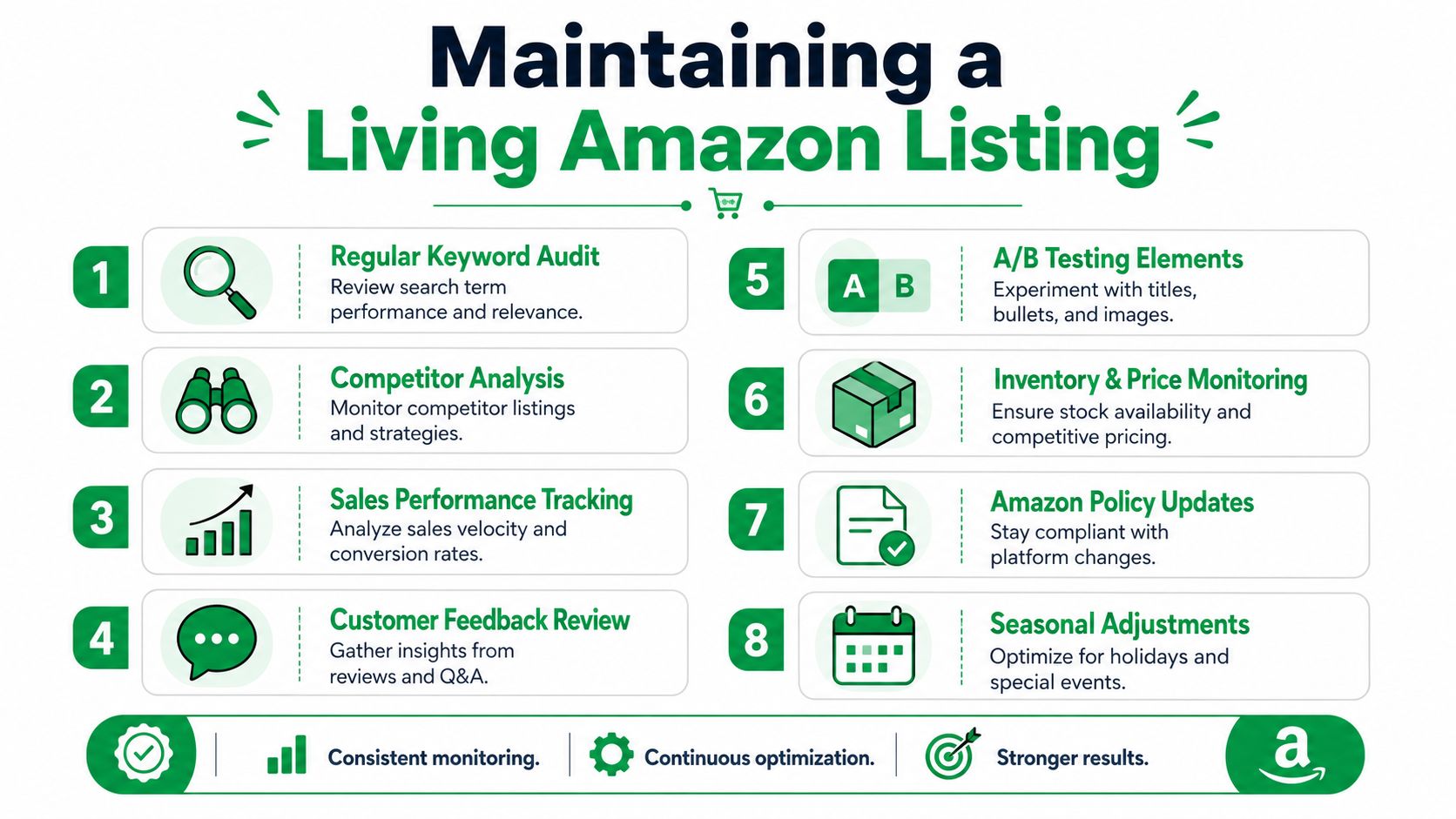
The strongest Amazon listings are managed like active assets, not finished pages. That matters because Amazon SEO is not a static checklist. It is a growth engine. Ranking drives traffic. Traffic exposes conversion problems. Conversion improvements make PPC more efficient. Better PPC data sharpens your keyword targeting. Each part feeds the next.
Make controlled changes
Treat listing updates like tests, not redesigns.
Change one meaningful variable, then watch the result long enough to judge it. If you rewrite the title, replace the main image, add new A+ content, revise backend terms, and adjust price in the same week, you create noise. You might get a lift. You might lose indexation on useful terms. Either way, attribution gets messy.
A cleaner process looks like this:
- update the title for a specific keyword or positioning issue
- monitor click-through rate, conversion rate, and query coverage
- document what changed
- move to the next bottleneck only after the first test has enough data
That discipline protects gains. It also keeps the listing compounding instead of resetting every time performance dips.
Run a real audit, not a surface check
I prefer a recurring audit cadence. Monthly for stable products. Weekly for high-volume SKUs, seasonal items, or listings under active PPC expansion.
Review four areas.
Keyword fit
Check whether shoppers still use the language your listing targets. Pull inputs from Search Query Performance, Brand Analytics, PPC search term reports, customer questions, and review wording. If paid search keeps finding converting phrases that the listing barely mentions, that gap needs attention.
Listing clarity
Open the page on mobile and read it cold. Within a few seconds, can a shopper tell what the product is, who it is for, and why it is different? If not, ranking alone will not solve the problem.
Visual effectiveness
Look at the image stack as a sales sequence. The main image earns the click. Secondary images explain features, use case, scale, and objections. If sessions are healthy but conversion stays soft, images often deserve scrutiny before copy does.
Offer strength
Price, couponing, review quality, inventory stability, and package value all affect search performance indirectly through conversion. Amazon does not separate SEO from merchandising. Neither should you.
SEO for Amazon Sellers: Use Seller Central to find the actual bottleneck
The useful question is not “Did traffic go down?” The useful question is “Where did the page stop doing its job?”
These patterns help isolate the issue:
| Signal | Likely issue |
|---|---|
| Impressions with weak clicks | Title, main image, price perception, or weak query match |
| Clicks with weak purchases | Bullets, secondary images, reviews, offer clarity, or price fit |
| Strong purchases on a narrow set of queries | Positioning is too broad. The listing needs tighter message-to-query alignment |
| Volatility after large edits | Too many fields changed at once |
That diagnosis matters because the first fix should match the failure point. Sellers often rush to add more keywords when the actual issue is click-through rate. Or they blame the title when reviews and price are suppressing conversion.
Start with the highest-friction point
Use the simplest sequence possible.
- Weak clicks: adjust title positioning, main image communication, or price presentation
- Weak conversion after the click: improve bullets, image order, A+ content, and objection handling
- Repeated objections in reviews or Q&A: rewrite copy to address them directly
- Converting PPC terms missing from the listing: work those terms into visible copy with care
- Unstable performance tied to stockouts or offer changes: fix operational issues before rewriting the page again
The flywheel angle holds significant weight. Better copy alone can help. Better copy aligned with proven search terms helps more. Better copy aligned with proven search terms and supported by a stronger offer is where the gains start stacking.
Keep a change log
This sounds simple because it is. It also saves sellers from a lot of bad conclusions.
Track the date, SKU, exact field changed, reason for the change, and what happened next. A spreadsheet is enough. Without a log, teams tend to credit the wrong edit, ignore timing effects, and repeat tests they already ran months ago.
For businesses that want a managed process instead of handling every test internally, Mr. Green Marketing, LLC offers Amazon seller consulting as one option among broader marketplace support services. That is usually most useful when a brand needs consistent testing, reporting, and prioritization rather than occasional listing edits.
A living listing stays competitive because it keeps learning. Audit it. Refine it. Measure the result. Then make the next change with intent.
Leave a Comment
sing in to post your comment or sign-up if you dont have any account.