
How to increase amazon sales – And if you want to actually increase your Amazon sales, you have to start with your product listings. This is the absolute bedrock of your entire strategy.
Forget spending a dollar on ads or chasing down complex growth hacks until your product pages are completely dialed in. A weak listing bleeds conversion, torches your ad spend, and basically tells Amazon’s A9 algorithm your product is irrelevant. A strong one, however? It does the heavy lifting for you, turning casual browsers into buyers.
Mastering Your Foundation: Amazon Product Listings
The competition on Amazon is no joke. The platform commands a staggering 40.9% market share of U.S. e-commerce, and that pie is growing by an average of 9.9% every year. This means nearly half of all online shopping happens right here. Trying to compete in this crowded space with a sloppy listing is like building a skyscraper on sand—it’s just not going to work.
Every single element on your product detail page is a digital salesperson working for you 24/7. Your job? To make sure they’re doing their best work.
How to Increase Amazon Sales – Crafting Titles That Attract and Convert
Let’s be blunt: your product title is the single most important piece of SEO real estate you have. It’s the first thing shoppers see in search results and what the A9 algorithm weighs most heavily when deciding where you rank. Don’t get cute here—get strategic.
A high-performing title follows a simple but powerful formula:
- [Primary Keyword] – Kick it off with the #1 search term your customers are typing in.
- [Brand Name] – Build that crucial brand recognition right away.
- [Key Feature/Benefit] – What’s the main problem it solves? What makes it special?
- [Size/Color/Quantity] – Give shoppers the essential details they need to qualify your product instantly.
For example, “Nice Water Bottle” is a terrible title. But “Insulated Stainless Steel Water Bottle – BrandX – 24oz Leakproof Sports Cap for Gym & Hiking – Black”? Now that’s a keyword-packed sales pitch that does the work for you.
How to Increase Amazon Sales – Writing Bullet Points That Solve Problems
This is where so many sellers completely miss the mark. They use the five bullet points to list dry, boring features. Nobody cares that your garlic press is made from a “high-grade zinc alloy.” What they do care about is that it’s “Effortless to Clean and Dishwasher Safe – Never Struggle with Sticky Garlic Skins Again.”
Stop selling the steak and start selling the sizzle. Frame every feature as a direct benefit to your customer. Connect what your product is with what it does for them. This shift is everything when it comes to writing copy that actually converts.
Think of each bullet as the answer to a question your customer is thinking:
- How does this make my life easier?
- Is it going to last?
- Who is this actually for?
- Why is this one better than the ten others I just saw?
- What all comes in the box?
Answering these questions builds confidence and crushes the hesitation that keeps people from hitting “Add to Cart.” Our comprehensive guide on Amazon listing optimization goes way deeper into these copywriting strategies.
How to Increase Amazon Sales – Using Images and A+ Content to Tell a Story
People are visual. And your images are your best chance to show your product in action and create an emotional connection. You need way more than just a couple of sterile shots on a white background.
Your image stack should be a full-blown visual pitch:
- The Hero Image: A crystal-clear, compliant shot on a pure white background. No exceptions.
- Infographics: Call out key features visually. Show dimensions, materials, or what makes you unique.
- Lifestyle Shots: Show a real person happily using your product. Help shoppers picture it in their own lives.
- Comparison Chart: How do you stack up against the competition? Make it obvious why you’re the better choice.
And for brand-registered sellers, A+ Content is a non-negotiable advantage. It lets you swap out that boring block of text in the description for a rich, visual landing page. Use it to tell your brand story, dive deeper into features, and build a premium feel that justifies your price.
Before you move on, use this quick checklist to see where you stand. These are the foundational elements you absolutely must get right—for both the algorithm and your customers.
How to Increase Amazon Sales – Listing Optimization Quick Wins Checklist
| Element | Optimization Focus | Why It Matters |
|---|---|---|
| Product Title | Include primary keyword, brand, key feature, and specs. | This is your most powerful SEO signal and the first thing shoppers see. |
| Bullet Points | Focus on benefits, not just features. Solve a customer problem in each bullet. | This is where you persuade and overcome objections, directly impacting conversion. |
| Hero Image | Use a high-resolution, professional photo on a pure white background. | This is your first visual impression and a requirement for ranking high in search. |
| Secondary Images | Include lifestyle photos, infographics, and comparison charts. | Visuals sell. Help customers imagine using the product and understand its value. |
| A+ Content | Use high-quality modules to tell your brand story and detail features. | For brand-registered sellers, this dramatically increases trust and conversion rates. |
| Backend Keywords | Maximize the hidden search term fields with relevant, non-repeating keywords. | This is free SEO real estate to help you rank for terms you can’t fit in the main copy. |
Getting these elements right is the first, most critical step. Once this foundation is solid, you’re ready to start driving traffic and scaling your sales.
How to Increase Amazon Sales – Unlocking Visibility With Amazon SEO
This is where we separate the amateurs from the pros.
You can have the most beautiful, perfectly optimized listing in the world, but if nobody ever finds it, does it even exist? This is where Amazon SEO comes in, and it’s a completely different beast than what you might know from Google.
Amazon isn’t a search engine; it’s a buying engine. Its A9 algorithm is relentlessly focused on one thing: predicting which products a shopper is most likely to buy. Your entire SEO strategy has to be built around proving to that algorithm that your product is the answer.
And that all starts with keywords.
The Art and Science of Keyword Research
Forget what you think your customers are searching for. You need to know what they are actually typing into that search bar. This process is part discovery, part data analysis, and it’s the single most important thing you can do to get more organic traffic.
Your goal is to build a master list of keywords that covers three main categories:
- Head Terms: These are the big, broad, high-volume keywords with tons of traffic but just as much competition. Think “yoga mat” or “coffee maker.”
- Body Keywords: More specific two-to-three-word phrases that narrow the focus. For example, “extra thick yoga mat” or “12 cup programmable coffee maker.”
- Long-Tail Keywords: Highly specific, lower-volume phrases that often mean a customer is ready to buy right now. A perfect example is “non slip travel yoga mat for hot yoga.”
Don’t just guess. Use dedicated Amazon keyword research tools to pull real search volume data. Your job is to find that sweet spot between search volume, relevance, and competition.
A classic rookie mistake is only chasing high-volume head terms. The real gold is often in the long-tail keywords. Someone searching for a “waterproof bluetooth speaker for shower” is much further down the buying funnel than someone just searching for “speaker.”
Strategic Keyword Placement for Maximum Impact
Once you have your keyword list, you need to place them where they matter most—without sounding like a malfunctioning robot. The A9 algorithm indexes specific parts of your listing, and you need to feed it the right information in the right places.
Think of it like this—you’re having a conversation with both your customer and the algorithm at the same time. To truly unlock visibility, you have to implement modern SEO on Amazon strategies, especially in today’s AI-driven marketplace. Your copy has to be persuasive for humans while being perfectly structured for bots.
Here’s the hierarchy of where to put your most important keywords:
- Product Title: This is your prime real estate. Your most critical, highest-volume keywords must go here.
- Backend Search Terms: This is a hidden goldmine. You have around 250 bytes (not characters!) to add keywords that you couldn’t fit into your title or bullets. Don’t repeat words, don’t use competitor brand names, and don’t use commas—just a space-separated list of relevant terms.
- Bullet Points: Weave your primary and secondary keywords into your benefit-driven bullets naturally. This is where you connect with the shopper while reinforcing your relevance to the algorithm.
- A+ Content & Description: While these have a lower indexing weight, they still count. They’re a great place to naturally work in long-tail keywords and answer specific customer questions.
Getting this right is a game-changer. It’s how you climb the search rankings, get seen by more shoppers, and ultimately, drive the consistent organic sales that build a sustainable Amazon business.
How to Increase Amazon Sales – Winning the Ad Game With Smart PPC Campaigns
Alright, let’s pour some fuel on the fire. Once your listing is dialed in and converting well, it’s time to talk about Amazon Pay-Per-Click (PPC). This isn’t about setting a budget and crossing your fingers—that’s just a fast way to burn through cash. Smart PPC is all about strategic, data-driven advertising that actually delivers a positive return.
Think of it this way: your optimized listing is a powerful engine, and PPC is the high-octane fuel. You absolutely need both to win the race. It’s how you launch new products, defend your turf from competitors, and ultimately, find more customers to increase your Amazon sales.
Automatic Campaigns: The Keyword Discovery Engine
Starting with PPC can feel totally overwhelming, which is why your first move should almost always be a simple Automatic campaign. This is where you let Amazon do the initial heavy lifting.
You just give Amazon your product and a daily budget, and its algorithm starts showing your ad to shoppers based on what it thinks is relevant. A low-effort way to gather priceless data. The main goal here isn’t immediate profit—it’s keyword and ASIN discovery.
Let it run for a week or two, then dive into the search term report. You’ll find the exact—and often surprising—phrases real customers are using to find and buy your product. These are the golden nuggets you’ll use for the next step.
How to Increase Amazon Sales – Manual Campaigns for Precision and Profitability
Now you take back the controls. Armed with the proven, converting search terms from your Auto campaign, you’ll build Manual campaigns to target them directly. This is how you really start to scale your advertising and drive profitable growth.
Manual campaigns let you set specific bids for individual keywords, giving you granular control over where your ad dollars go. There are three match types you need to know:
- Broad Match: Shows your ad for a wide net of related searches. Decent for research but can attract a lot of irrelevant, money-wasting clicks.
- Phrase Match: Your ad shows up when a shopper searches for your exact keyword phrase in that order, even if they add words before or after. A great middle-ground.
- Exact Match: The most precise. Your ad only appears when someone types in your exact keyword. This is where you’ll typically see the highest conversion rates.
The winning formula is a constant cycle: use Automatic campaigns to discover new, high-converting keywords, then move those winners into Manual campaigns with Phrase and Exact match types to bid more aggressively and maximize your sales.
The Secret Weapon: Negative Keywords
This is the one step that separates the struggling advertisers from the truly profitable ones. Mining your search term report isn’t just about finding what works; it’s about finding what doesn’t work and telling Amazon to stop wasting your money on it.
A negative keyword is a term you specifically block your ads from showing up for.
Let’s say you sell premium “leather dog collars.” Your report might show you’re paying for clicks from people searching for “cheap nylon dog collars.” A completely wasted click. By adding “cheap” and “nylon” as negative keywords, you prevent your ad from showing to that irrelevant audience ever again.
Regularly pruning your campaigns with negative keywords is the single most effective way to lower your Advertising Cost of Sale (ACoS) and make every dollar you spend more efficient. Honestly, the expertise an Amazon PPC agency brings often comes down to their rigorous process for managing these crucial details.
How to Increase Amazon Sales – Choosing the Right Amazon PPC Campaign
Deciding where to put your ad budget really depends on your goal. Are you launching a new product, defending your brand, or trying to steal market share from a competitor? The ad type you choose should match the mission. This table breaks down the main options to help you decide.
| Campaign Type | Best Used For | Key Metric |
|---|---|---|
| Sponsored Products | Driving direct sales on individual product listings. This is the workhorse of Amazon PPC. | ACoS (Advertising Cost of Sale) |
| Sponsored Brands | Increasing brand awareness and driving traffic to your Storefront or a collection of products. | New-to-Brand Customers |
| Sponsored Display | Retargeting shoppers who viewed your product but didn’t buy, or targeting competitor listings. | ROAS (Return on Ad Spend) |
At the end of the day, a smart PPC strategy is a living, breathing part of your business. It requires constant monitoring, testing, and tweaking. But by using this framework of discovery, precision targeting, and waste reduction, you turn advertising from a simple expense into a powerful, sales-generating investment.
Strategic Pricing, Promotions, and Inventory
Getting the click from your ads and SEO efforts is a huge win. But it’s only half the battle. Now you have to close the sale.
And a massive part of that comes down to three things: your price, your promotions, and simply having the product in stock when a customer is ready to buy. This is where your marketing strategy plugs directly into your operational backbone. Without that connection, even the best campaigns fall flat.
Winning the Buy Box With Smart Pricing
Pricing on Amazon is a delicate dance. You have to be competitive enough to win the Buy Box—that coveted spot where over 80% of sales happen—without starting a race to the bottom that torches your profit margins.
Manually checking competitor prices is a recipe for disaster. Slow, inefficient, and you’ll always be a step behind. Instead, smart sellers use automated repricing tools. These tools monitor competitor prices in real-time and adjust yours based on rules you set, keeping you competitive 24/7 without you having to live inside Seller Central.
A solid repricing strategy isn’t about being the cheapest; it’s about being the smartest. A good setup usually involves:
- Setting a rock-solid minimum price to protect your margins.
- Defining a maximum price based on what the market will realistically bear.
- Creating a rule to price just below the current Buy Box winner, but only if they are also FBA.
This simple logic keeps you in the game without giving away your profits.
Creating Urgency With Promotions and Deals
Think of promotions as your secret weapon for creating sales velocity. A sudden spike in sales sends a powerful signal to Amazon’s A10 algorithm that your product is hot, which can directly boost your organic search ranking.
Luckily, Amazon gives you a whole toolkit to make this happen:
- Coupons: That little orange tag is a magnet for eyeballs. It’s a powerful visual cue that stops the scroll. We’ve seen a simple 5% or 10% off coupon dramatically improve click-through and conversion rates.
- Lightning Deals: These are short, time-sensitive promotions featured on Amazon’s highly-trafficked Deals page. Fantastic for moving a lot of inventory quickly, especially for a new product launch or clearing out seasonal stock before it gathers dust.
- Prime Exclusive Discounts: This targets Amazon’s most loyal—and highest converting—customers. Offering a special discount just for Prime members builds trust and drives sales from an audience that is ready to buy.
Promotions are not just about discounting your product. They are a strategic investment in your product’s visibility and sales momentum. Use them surgically to launch products, boost rankings during key seasons, or liquidate slow-moving inventory.
How to Increase Amazon Sales – Mastering Inventory and Fulfillment
This is the unsexy part of the business, but it’s absolutely critical. You can have the perfect price and the most irresistible promotion, but if you run out of stock, everything grinds to a halt. A stockout is poison for your Amazon business.
For most sellers, Fulfillment by Amazon (FBA) is a no-brainer. It makes your products Prime-eligible, which is a massive conversion driver. The catch? Using FBA means you live and die by your Inventory Performance Index (IPI) score.
This score measures how efficiently you’re managing your inventory in Amazon’s warehouses. A low IPI score can lead to strict storage limits and eye-watering long-term storage fees. The goal is to keep just enough stock to meet demand without letting inventory sit for too long. For a deeper dive, you can learn more about effective Amazon inventory management to keep your IPI score healthy and your business running smoothly.
How to Increase Amazon Sales – Building Trust Through Reviews and Reputation
On Amazon, trust is everything. And trust is spelled R-E-V-I-E-W-S.
Social proof is one of the most powerful conversion drivers on the platform, period. Think about your own shopping habits—do you ever buy a product with zero reviews when a nearly identical competitor has hundreds? I didn’t think so.
Your product reviews and seller feedback are your digital handshake. They signal to new customers that you’re a real business with a quality product that people actually like. Building this reputation isn’t a passive “wait and see” game; it’s a core business activity that directly fuels your ability to increase Amazon sales. A listing with a healthy number of positive reviews simply converts better, which in turn tells Amazon’s algorithm to rank you higher.
How to Increase Amazon Sales – Proactively Generating Product Reviews
So, how do you get more reviews without running afoul of Amazon’s notoriously strict policies? Hoping and praying isn’t a strategy. The good news is, Amazon gives you a simple, powerful, and 100% compliant tool to make it happen.
It’s called the “Request a Review” button.
You’ll find this little gem right inside your Seller Central order details. And when you click it, Amazon sends a standardized, pre-approved email asking the customer for both a product review and seller feedback. It’s the safest and most effective way to nudge buyers for that crucial social proof.
You should make this a non-negotiable part of your post-sale process. You can do it manually for each order or, more realistically, use approved third-party software from services like Helium 10 to automate it. The key is relentless consistency. Request a review for every single order, usually somewhere between 5 and 30 days after delivery.
Expert Tip: Whatever you do, don’t get creative with your own follow-up messages. Never use manipulative language (“We’re a small family business, please help us!”) or offer incentives for reviews. That’s a fast track to a suspended account. Just stick to Amazon’s approved system. It works, and more importantly, it keeps your account safe.
Handling Negative Reviews Like a Pro
Negative reviews are going to happen. It’s just a part of doing business on a platform this massive. But how you handle them says everything about your brand to the next potential customer scrolling through your listing.
Freaking out, getting defensive, or just ignoring them? The worst thing you can do.
Your primary goal isn’t always to get the review removed—that’s nearly impossible unless it clearly violates Amazon’s community guidelines (like containing profanity or personal information). Your real goal is to demonstrate exceptional customer service publicly.
Here’s the game plan:
- Respond Publicly and Professionally: Jump in and leave a calm, helpful public comment right on the review. Apologize for their bad experience, offer to make things right, and give them a clear way to contact your support team.
- Take the Conversation Offline: Once you’ve posted your public reply, your mission is to solve the customer’s actual problem behind the scenes. If you can fix their issue with a refund, replacement, or just good advice, they might update or remove the review on their own. But never, ever ask them to.
- Learn from the Feedback: Is there a pattern here? If multiple reviews mention the same broken part or confusing instruction, that’s not a cranky customer—that’s a flashing red light for your business. Use that feedback to actually improve your product or clarify your listing.
A single, thoughtful response to a one-star review can build more trust than a page full of flawless five-star ratings. It shows you stand behind your product and genuinely care about your customers—a powerful signal that might be just what the next person needs to see before hitting that “Add to Cart” button.
Your Go-Forward Plan To Increase Sales
Okay, that was a lot to take in. It’s easy to get overwhelmed and wonder where to even start.
The answer is right here. This is your playbook. We’re going to turn all those strategies into a clear, prioritized plan to methodically grow your sales on Amazon.
Forget trying to do everything at once. We’ll break this down into quick wins you can knock out this week for an immediate impact, and then layer on the longer-term strategies for scaling over the next quarter.
Your First 7 Days: The Quick Wins
Your immediate goal is to fix the fundamentals that directly impact conversions. These are the highest-leverage things you can do right now. Don’t touch your ads, don’t worry about building a social media campaign—just focus on getting your listing right.
- Rewrite Your Title: Is your main keyword right at the front? Does it clearly state the brand, a key benefit, and critical specs? If not, fix it. Non-negotiable.
- Overhaul Your Bullet Points: Reread every single bullet. Are you just listing features, or are you actually solving problems for your customer? Your job is to convert every feature into a clear, compelling benefit.
- Audit Your Main Image: Is it crystal-clear, high-resolution, and on a pure white background? A blurry or unprofessional main image kills your click-through rate before a shopper even sees your price or reads your glowing reviews. Priority #1.
Building trust and momentum is a process of consistent, small actions. You have to request feedback, respond quickly to customers, and build a solid reputation one sale at a time.
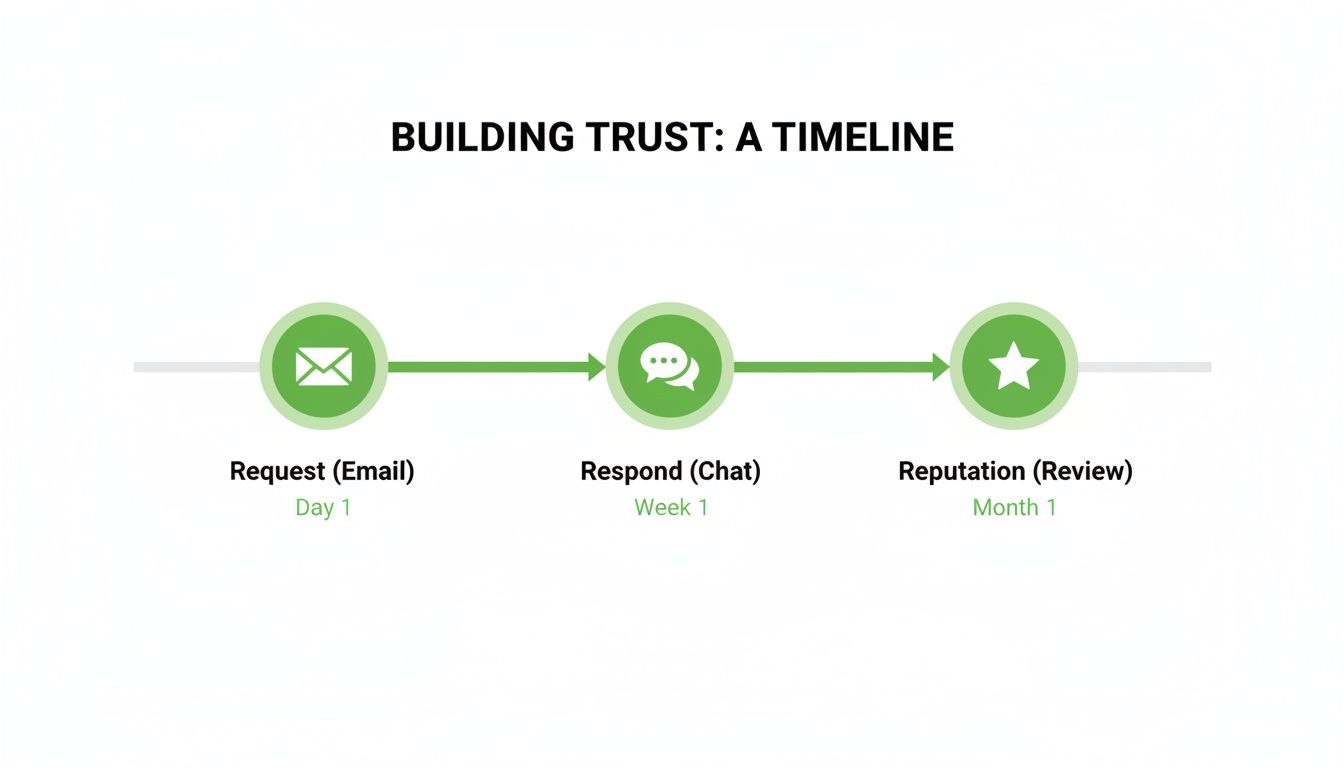
As you can see, these small efforts compound over time, building a strong brand reputation that Amazon’s algorithm loves.
Your 90-Day Scaling Plan
With a solid foundation in place, now you can start driving traffic and scaling your growth. This is where your focus should be for the next three months.
The biggest mistake sellers make is trying to scale a broken listing. You pour money into ads that send shoppers to a page that doesn’t convert, and then you wonder why your ACoS is through the roof. Fix the leaks in the bucket before you turn on the firehose.
Here’s your roadmap for the next quarter:
- Month 1: Launch Initial PPC: Start with a low-budget Automatic campaign. The goal here isn’t profit; it’s data. You are mining for the exact search terms real customers are using to find your product.
- Month 2: Refine and Target: Take the winning keywords from your Auto campaign and move them into a targeted Manual campaign. This is where you start bidding with precision to drive profitable sales and really hone your strategy.
- Month 3: Expand and Optimize: Now you can start experimenting with Sponsored Brands campaigns and begin exploring off-Amazon traffic sources. The goal is to improve ecommerce conversion rates by implementing proven tactics that turn browsers into loyal buyers.
This is a massive opportunity. In a recent quarter, Amazon’s net sales hit $180.169 billion, a staggering 13.4% year-over-year increase. When the platform is growing that fast, sellers with a smart plan can ride that wave to incredible results.
Frequently Asked Questions
We get it—there are a ton of moving parts when you’re trying to figure out how to increase Amazon sales. It can feel like you’re spinning plates. Let’s tackle some of the most common questions that pop up for sellers who are ready to get serious about growth.
How Long Does It Take to See an Increase in Sales?
This is the big one, right? Everyone wants to know when the sales will start rolling in. The honest answer is—it depends entirely on where you’re starting from.
If your listing is a total mess, you could see a jump in your conversion rate within 24-48 hours just by fixing your title, main image, and bullet points. Seriously. Sometimes the simplest changes make the biggest immediate impact.
But for SEO and PPC, you need a bit more patience. It typically takes a solid 2-6 weeks for Amazon’s A9 algorithm to fully re-index your listing for new keywords. It also takes that long for your ad campaigns to gather enough real-world data to become truly effective and profitable.
Should I Lower My Price to Get More Sales?
Sometimes, but you have to be careful. It’s a dangerous game.
A temporary price drop or a well-placed coupon can definitely boost your sales velocity, which is a key signal that helps your organic ranking. But a permanent race to the bottom is not a sustainable strategy. You just end up killing your profit margins and attracting bargain-hunters who will never become loyal customers.
A much better approach is to focus on increasing your product’s perceived value. Use incredible images, benefit-driven copy, and slick A+ Content to justify your price point instead of just slashing it. Make people want to pay more for your product.
My PPC Budget Is Limited by Amazon. What Do I Do?
Incredibly common, especially for newer sellers, so don’t panic. Amazon often puts new ad accounts into a “probation window” to test your reliability. They want to see consistent spending, a clean billing history, and a listing that actually converts before they let you open up the throttle.
You can often speed this process up by:
- Ensuring your payment method never fails. This is the #1 trust signal you can send to Amazon.
- Starting with simple, focused campaigns. Don’t launch a dozen complex campaigns at once. Keep it clean and prove you know what you’re doing.
- Keeping your daily budget consistent. Avoid wild spikes or pausing your campaigns every other day.
Most sellers see their spending limits increase within a few weeks once they prove they are a reliable advertiser. Think of it as a trust-building exercise—and consistency is key.
Ready to stop guessing and start executing a plan that drives real results? Mr. Green Marketing, LLC specializes in building data-driven strategies for Amazon sellers. We’ll help you optimize your listings, scale your PPC, and build a brand that wins.
Request your free performance audit at Mr. Green Marketing LLC today.
Leave a Comment
sing in to post your comment or sign-up if you dont have any account.