
Page Speed Optimization: You’re staring at a Lighthouse score of 63 while paid traffic keeps getting more expensive. Product pages look fine on a laptop, yet mobile visitors hesitate, tap twice, or leave before the offer appears. The usual reaction is to compress another image, install a caching plugin, and hope the score improves.
That approach misses the business question. Page speed optimization should start with real-user outcomes, traffic segments, and conversion-sensitive templates, not a perfect lab score. Core Web Vitals give you the framework, but your priorities should come from how customers experience and use the site.
Page Speed Optimization: Table of Contents
- Why Page Speed Optimization Is a Revenue Problem Now
- How to Audit Page Speed Without Chasing the Wrong Number
- Quick Wins That Still Move the Needle
- Advanced Fixes Where the Real Wins Now Live
- Choosing the Right Testing and Monitoring Tools
- Setting Up Ongoing Speed Monitoring That Actually Holds
Why Page Speed Optimization Is a Revenue Problem Now
Slow pages waste more than attention. They can weaken ad efficiency, interrupt product discovery, increase cart abandonment, and make a strong landing page feel unreliable. Independent conversion research reports that when load time rises from 1 second to 3 seconds, bounce probability increases by 32% (conversion research on page speed and engagement). For an SMB paying for every click, that lost visit still costs money even when it never becomes a session worth remarketing.
A useful way to frame the problem is to connect each Core Web Vital to a customer moment:
- Largest Contentful Paint, or LCP: How quickly does the main product image, headline, or service promise appear? An image-heavy home page can feel empty while the browser downloads an oversized hero asset.
- Interaction to Next Paint, or INP: How quickly does the page respond after a visitor taps a menu, variant selector, add-to-cart button, or booking form? Heavy JavaScript can make a page look loaded while interactions remain frustratingly slow.
- Cumulative Layout Shift, or CLS: Does the page move while someone is reading or trying to click? An ad slot, image, or banner without reserved space can push the purchase button away at the exact moment a buyer reaches it.
Google defines good Core Web Vitals targets as LCP within 2.5 seconds, INP at 200 milliseconds or less, and CLS at 0.1 or less. Google evaluates those measures at the 75th percentile, segmented by mobile and desktop, so consistent performance for most users matters more than an occasional fast load (Google’s PageSpeed Insights documentation).
A one-second delay can have a material commercial effect. One benchmark reports conversion rates of about 3.05% for pages loading in 1 second and about 1.08% for pages loading in 6 seconds, while summaries of the same research report an average conversion-rate reduction of 4.42% for each additional second between 0 and 5 seconds (independent page speed performance research). Treat those figures as directional benchmarks, not a forecast for your store. Your margins, offer, audience, and checkout experience still decide the outcome.
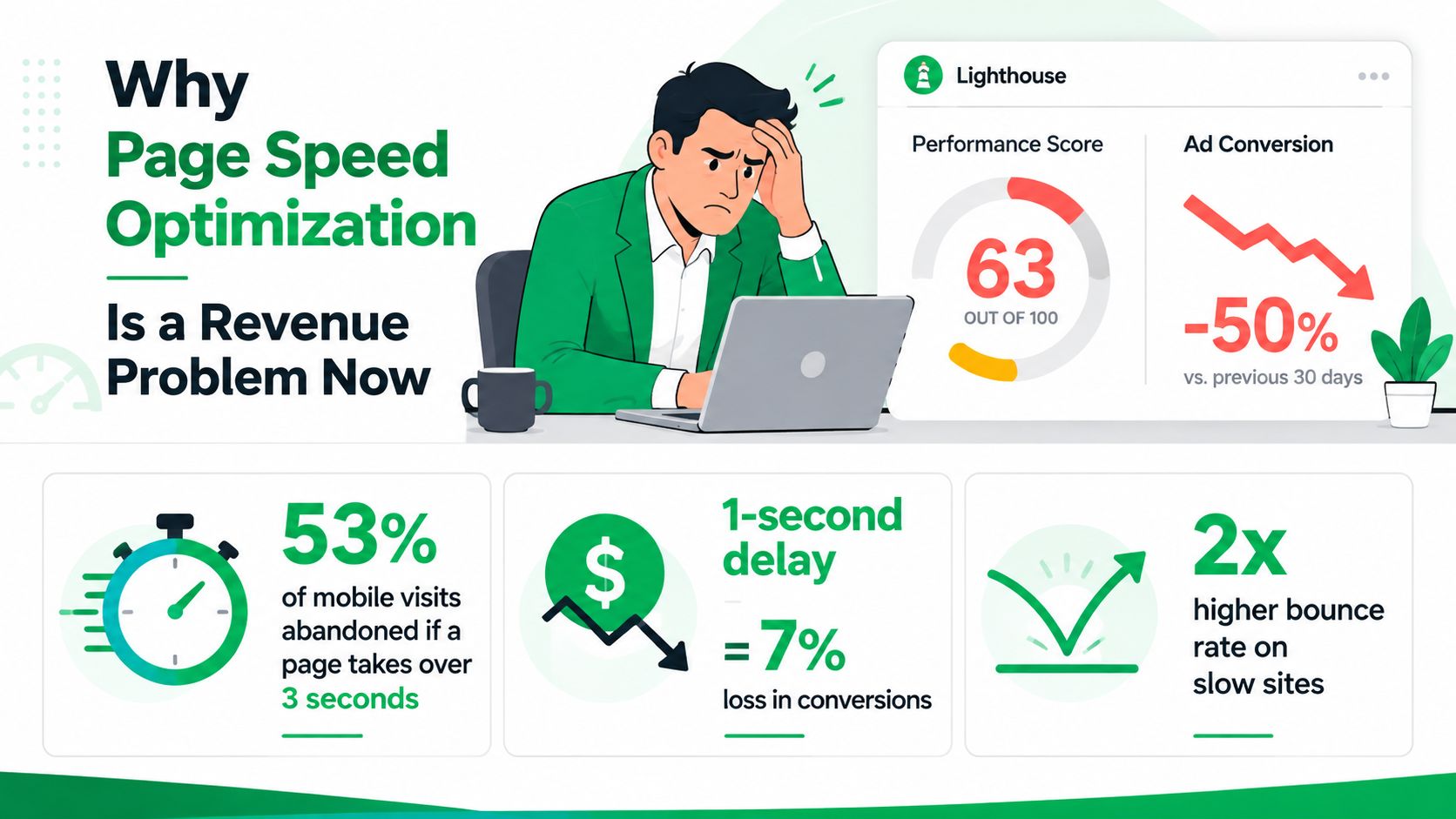
And don’t let the word “speed” reduce the problem to a vanity score. A page can score well in a controlled test and still frustrate shoppers on mobile because its JavaScript blocks interaction or its largest image arrives too late. Use the guidance in this practical guide to reducing website bounce rate to connect performance work with behavior, landing-page relevance, and conversion paths.
Page Speed Optimization: How to Audit Page Speed Without Chasing the Wrong Number
Most audits go wrong before the first fix. Someone runs one test, sees a score, and treats that score as the diagnosis. A reliable audit separates field data, which reflects real visitors, from lab data, which provides a controlled reproduction for debugging.
Start with visitors, then reproduce the problem
Run the workflow in this order:
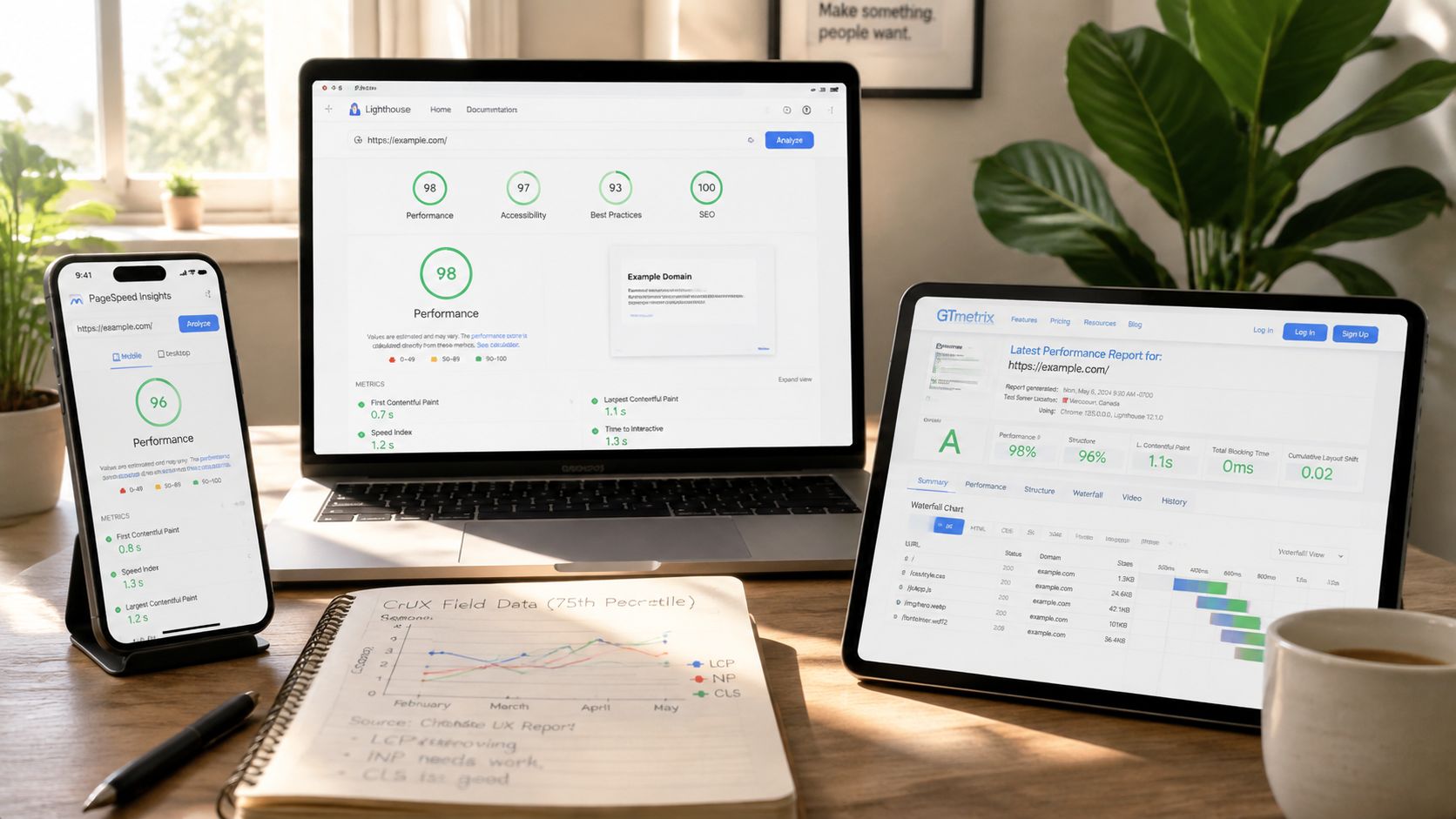
- PageSpeed Insights first: Check whether field data is available, then compare it with the lab assessment. Field data tells you how real Chrome users experience the URL over time. Lab data helps identify likely causes during a controlled run.
- Lighthouse next: Use Lighthouse for repeatable investigations of LCP, INP, CLS, render-blocking resources, unused JavaScript, and accessibility-related implementation issues. Run it against the same template and conditions when comparing changes.
- GTmetrix for the waterfall: Inspect request order, transfer timing, redirects, third-party calls, and the point at which important content becomes visible. The waterfall often exposes a blocking font, tracking request, or oversized image that a summary score hides.
- CrUX for broader patterns: Use the Chrome User Experience Report to examine trends by device and available audience segments. It’s the closest of these tools to a view of actual user experience, although coverage depends on the data available for the site and URL.
Page Speed Optimization: Read the 75th percentile correctly
Google’s Core Web Vitals framework uses the 75th percentile across page loads, with mobile and desktop evaluated separately (Google’s explanation of Core Web Vitals). That means a handful of excellent tests can’t compensate for a large group of visitors receiving a poor experience.
A Lighthouse score of 100 also doesn’t prove that customers are happy. For example, a team could optimize a synthetic run while real-user INP at the 75th percentile remains above 500 milliseconds, a level identified as poor in the referenced performance guidance (Google Search documentation on Core Web Vitals). The score is a clue. It isn’t the outcome.
Practical rule: Use lab tools to explain a problem, but use field data to decide whether the problem matters.
Segment the audit before assigning work. Compare mobile and desktop, guest and logged-in experiences, and product, category, landing, cart, and checkout templates. A local-service site may find its lead form is the priority. An online retailer may discover that product-page LCP is acceptable while variant selection and cart interactions suffer from main-thread JavaScript.
For context, recent independent data reports that only about 48% of mobile origins and 56% of desktop origins pass all three Core Web Vitals, with late-2025 CrUX pass rates of 49.7% on mobile and 57.1% on desktop (HTTP Archive Web Almanac performance data). The practical implication is clear. Don’t optimize every template equally. Find the device and journey where poor experience intersects with commercial value.
A broader SEO audit workflow can help you pair those performance findings with indexability, content, and conversion-path checks.
Page Speed Optimization: Quick Wins That Still Move the Needle
Classic fixes still matter, but they don’t all deserve the same development time. On an image-heavy store, the largest product or hero image often offers a more visible LCP opportunity than another round of code minification. On an interactive storefront, the most valuable work may begin after the page appears, where JavaScript delays response to taps and form input.
Start with the asset that users are waiting for
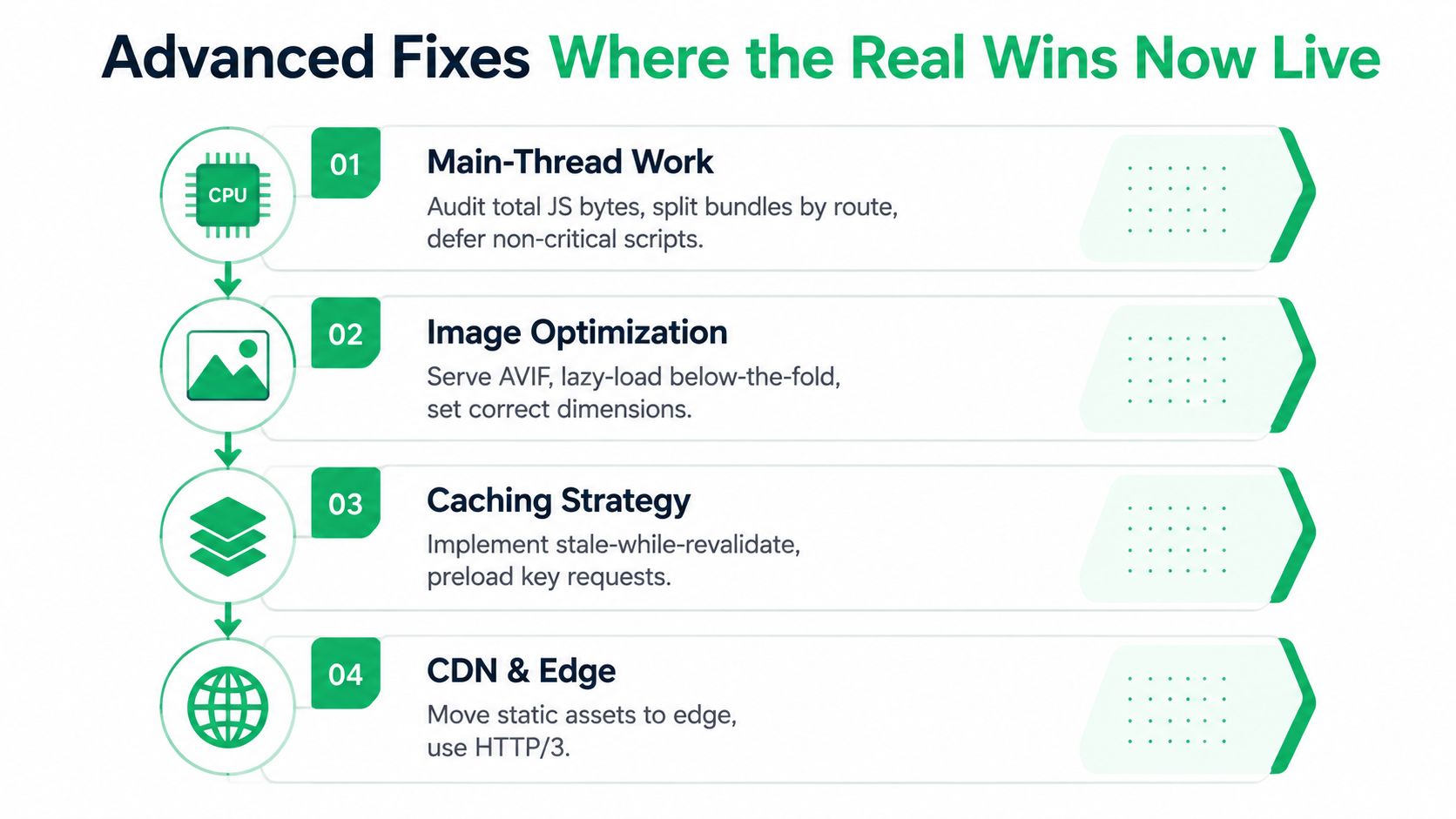
Export images at the dimensions the layout displays. A product image uploaded at a much larger size than its rendered container makes the browser download unnecessary data. Serve AVIF or WebP where the browser and image pipeline support them, provide responsive variants, and lazy-load images below the fold. Keep the primary above-the-fold image discoverable instead of applying lazy loading indiscriminately.
Browser caching should follow. Reusable assets such as stylesheets, scripts, logos, and fonts shouldn’t download from scratch on every return visit. Cache invalidation needs care, though. A long-lived cache paired with stable, versioned filenames can work well. A long-lived cache without versioning can leave visitors using outdated files after a release.
A CDN is valuable when customers are distributed across regions because it can serve cacheable assets closer to them. It won’t repair a slow database query, bloated JavaScript execution, or a poorly prioritized product image. Configure the edge after you understand what can safely be cached.
Treat minification as maintenance
HTML, CSS, and JavaScript minification removes whitespace and comments, but the return is often modest once modern transport and compression are configured. It can still reduce transfer size, yet it rarely deserves priority over removing a redundant widget or splitting a large route bundle.
| Optimization | Typical LCP Impact | Typical INP Impact | Effort | Still Worth It? |
|---|---|---|---|---|
| Responsive image sizing and modern formats | Often high on image-heavy pages | Usually low | Low to medium | Yes, prioritize it |
| Lazy loading below-the-fold media | Often meaningful | Usually low | Low | Yes, when implemented selectively |
| Browser caching | Helpful for repeat visits | Usually low | Low to medium | Yes, baseline work |
| CDN edge delivery | Helpful for distributed audiences | Usually low | Medium | Yes, after cache rules are sound |
| HTML, CSS, and JS minification | Usually small after compression | Usually small | Low to medium | Yes, but don’t lead with it |
The order is deliberate: images first, caching second, CDN configuration third, minification fourth. That sequence keeps effort tied to probable user impact rather than the number of optimization warnings in a report. A focused mobile website optimization process can help teams apply that priority to the device segment where the largest gap appears.
And test each change against field data when possible. A smaller file is an implementation improvement, not proof that customers completed more purchases.
Page Speed Optimization: Advanced Fixes Where the Real Wins Now Live
The most important shift in modern page speed optimization is that the browser’s work matters as much as the network transfer. Recent guidance identifies INP as a major challenge, with roughly 30% of mobile sites scoring poorly because JavaScript blocks interaction (Google Search guidance on Core Web Vitals). That makes the main thread a commercial priority for stores with filters, personalization, reviews, chat, analytics, and dynamic cart behavior.
Reduce main-thread competition
Begin with a JavaScript inventory. Record which bundles load on each route, which scripts execute before interaction, and which widgets are used. Split bundles by route, defer non-critical scripts, remove dead dependencies, and replace heavy widgets with leaner alternatives where the customer experience doesn’t justify the cost.
Third-party code deserves its own review. Tag managers, chat tools, analytics, advertising pixels, review systems, heatmaps, and embedded media can compete with first-party code for parsing and execution time. Delay non-essential tools until the initial experience is usable, but verify that attribution and consent behavior still work correctly. A script that isn’t visible in your source code can still dominate the browser’s work.
Page Speed Optimization: Make rendering intentional
Critical CSS tools such as Critters or Penthouse can help extract rules needed for above-the-fold rendering. Inline only the styles required for the initial view, then load the remainder without blocking that first render. This adds build complexity, so validate responsive states and route-specific components rather than copying a generic recipe into production.
Fonts need the same discipline. Use font-display: swap, preload only important WOFF2 subsets, reduce unnecessary families and weights, and consider variable fonts when they simplify the asset set. Preloading every font is not optimization. It can compete with the content users need first.
Fix the origin when the origin is the bottleneck
Tune time to first byte, enable Brotli where appropriate, use HTTP/2 or HTTP/3, configure edge caching for safe responses, and inspect origin logs. WooCommerce teams should review database queries, plugin behavior, object caching, and uncached requests. Shopify teams have less control over the platform origin, so they should concentrate on theme JavaScript, app scripts, media delivery, and storefront requests.
A fast CDN cannot disguise a slow origin forever. If the server takes too long to produce the document, every downstream optimization starts late.
Use the same business lens throughout. If LCP is poor because the main product image is late, fix discovery and delivery. If INP is poor because a filter click triggers expensive JavaScript, reduce the work performed after the interaction. The metric tells you where to look. The customer journey tells you what to fix first.
Page Speed Optimization: Choosing the Right Testing and Monitoring Tools
One tool can’t answer every performance question. Lighthouse, PageSpeed Insights, GTmetrix, and CrUX overlap, but their useful evidence is different. Treating them as interchangeable is how teams end up polishing a lab score while real customers continue to struggle.
| Tool | Best Question It Answers | Data Type |
|---|---|---|
| Lighthouse | Why is this page slow right now? | Synthetic lab audit |
| PageSpeed Insights | How do lab findings compare with real-user trends? | Lab data plus field data when available |
| GTmetrix | Which request is delaying rendering or loading? | Synthetic timing and waterfall data |
| Chrome User Experience Report | How are real visitors experiencing Core Web Vitals? | Aggregated real-user field data |
| Lighthouse CI | Did the latest deploy regress a defined check? | Automated synthetic data in a deployment workflow |
Match the tool to the decision
Lighthouse is the debugging workbench. Run the same page repeatedly, inspect opportunities, and compare before and after changes under controlled conditions. It’s especially useful when you need to connect an LCP problem to a render-blocking stylesheet or connect INP risk to a long JavaScript task.
PageSpeed Insights is the practical starting point because it presents lab and field views together when field data is available. It helps you avoid treating a single synthetic result as the complete story.
GTmetrix earns its place when the request sequence matters. Its waterfall can reveal a font loaded before the hero image, a redirect that delays the document, or a third-party request that starts earlier than expected. Video capture and regional testing can also make stakeholder discussions more concrete.
CrUX should anchor prioritization. It reflects real-user Core Web Vitals across the audience represented in its dataset, which makes it more useful for deciding whether a problem is widespread or isolated to a test environment.
For reporting, connect the findings to business pages and outcomes rather than sending stakeholders four unrelated scores. A focused analytics and reporting resource can support that broader measurement discipline.
Synthetic scores are proxies. Real-user outcomes decide the priority.
Page Speed Optimization: Setting Up Ongoing Speed Monitoring That Actually Holds
Performance decays through ordinary changes. A theme update introduces extra scripts, a new advertising pixel runs on every page, a plugin adds a widget, or a redesign swaps a correctly sized image for an oversized upload. The fix is not another dashboard. It’s a small operating rhythm with clear ownership.
Build a lightweight cadence
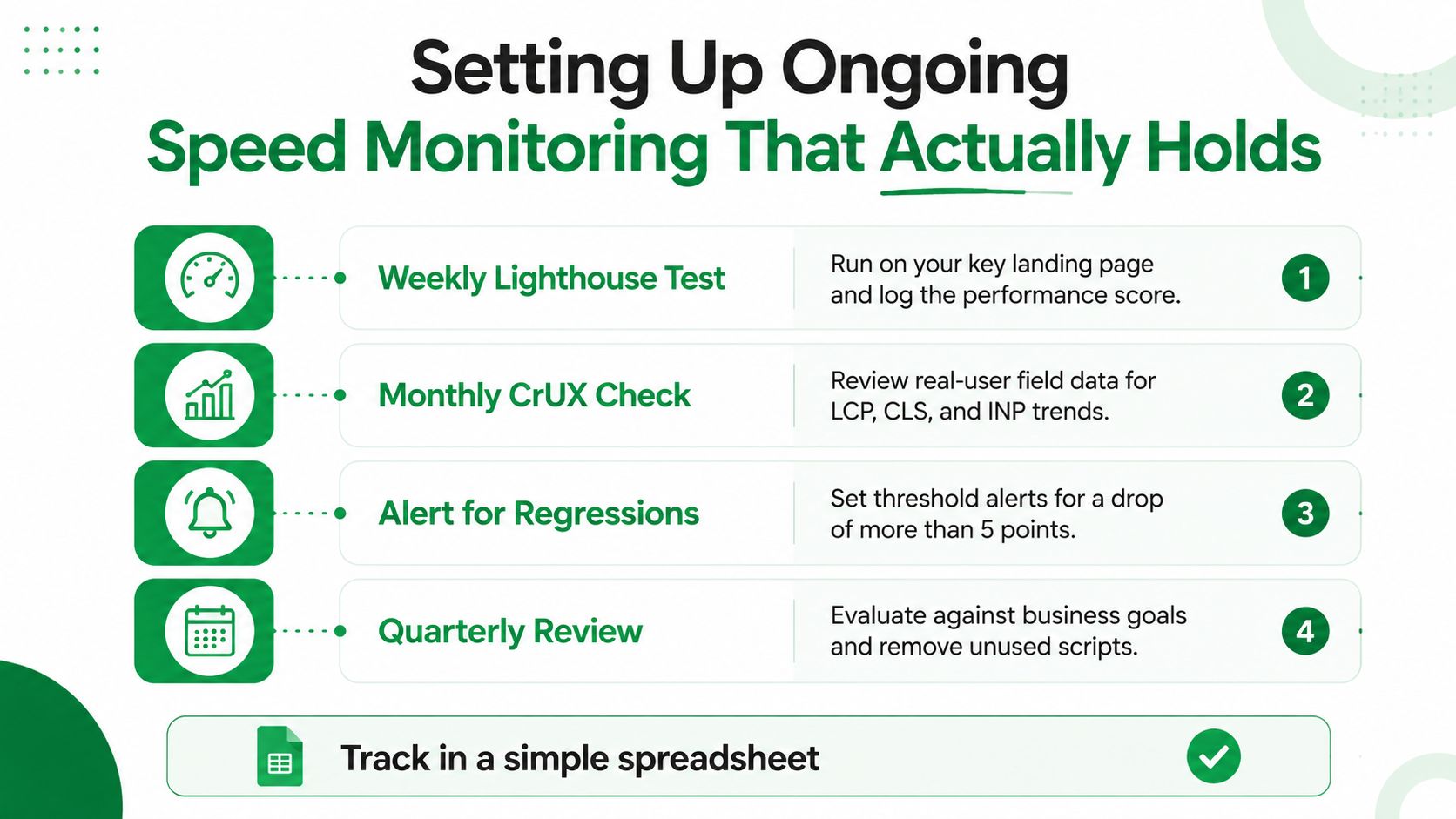
Send a weekly digest from the Search Console Core Web Vitals report so field-data changes reach the team without someone remembering to check manually. Then maintain a CrUX dashboard in Looker Studio or a similar tool, tracking 75th-percentile LCP, INP, and CLS by template type and device segment. Homepages, product pages, and checkout pages fail for different reasons, so one site-wide average can hide the page that matters most.
Run Lighthouse CI on every deployment against the key money pages. Set a regression policy before the first failure arrives. A team might choose a threshold such as a 5-point performance-score drop or a 200-millisecond LCP increase, but the threshold should reflect the site’s normal variance and commercial sensitivity, not an arbitrary target.
Page Speed Optimization: Review the work monthly
Keep the review short and operational:
- Top three regressions: Identify the affected template, device segment, likely cause, and business path.
- Top three wins: Record the change, metric movement, and whether field data confirms it.
- Next sprint: Choose fixes based on user impact and commercial value.
- Owner: Assign one person responsible for testing, release coordination, and verification.
Don’t archive the result in a report nobody opens. Use a simple spreadsheet or shared document with the URL, template, segment, metric, status, owner, and next action. The SEO monthly reporting format can help structure that recurring accountability without turning performance into a separate, disconnected project.
And keep the standard practical. Google’s Core Web Vitals guidance uses LCP at 2.5 seconds or less, INP at 200 milliseconds or less, and CLS at 0.1 or less as good experience targets (Google’s Core Web Vitals documentation). Use those thresholds as guardrails, then prioritize the pages and segments that influence leads, sales, and retention.
Mr. Green Marketing, LLC helps SMBs and e-commerce teams diagnose page speed problems, improve Core Web Vitals, and connect technical fixes with SEO, PPC, and conversion goals. Visit Mr. Green Marketing, LLC to request a performance audit and identify the highest-value fixes for your site.
Leave a Comment
sing in to post your comment or sign-up if you dont have any account.