
PPC management for small business – When you’re running a small business, you need customers—and you probably needed them yesterday. You don’t have the luxury of waiting six months for your website to hopefully, maybe, climb its way up Google’s organic rankings. A tough spot to be in.
And this is exactly where Pay-Per-Click (PPC) advertising flips the script. It’s not just about “buying clicks.” It’s about creating a direct, immediate connection with people actively searching for what you sell, at the very moment they need it. Think of it as opening a storefront on the busiest digital street in the world.
PPC vs. Organic SEO: A Quick Comparison
Before we dive deeper, it helps to see how PPC stacks up against traditional Search Engine Optimization (SEO). While both are critical, they serve very different strategic purposes. SEO is your long-term marathon, building brand authority over time. PPC is the sprint that gets you leads today.
| Factor | PPC (Paid Search) | SEO (Organic Search) |
|---|---|---|
| Speed to Results | Immediate (within hours) | Slow (months to a year) |
| Cost | Direct cost per click | Indirect cost (content, time, agency fees) |
| Position on Page | Top of the page (ad section) | Below the ads (organic results) |
| Typical Use Case | Lead generation, promotions, quick results | Long-term authority, brand building |
Ultimately, the most successful businesses don’t choose one over the other; they use both. But for immediate impact, nothing beats PPC.
PPC Management for Small Business – Why PPC Is a Game-Changer for Small Businesses
1. Get Seen Immediately
The single biggest advantage of PPC is speed. The moment your campaign goes live, you can start appearing at the very top of Google for your most important keywords.
Imagine you’re a local plumber in Phoenix. With a well-structured PPC campaign, your ad can show up the instant someone frantically searches “emergency plumber near me.” That’s an immediate connection with a high-intent customer who has a serious problem to solve. SEO is vital for your long-term digital health, but PPC solves the “right now” problem.
2. Control Every Single Dollar
One of the best parts about PPC is the total budget control it gives you. Worried about a runaway ad budget? You don’t have to be.
- Set Daily Limits: You can tell Google, “Don’t spend more than $20 today,” and it won’t. This prevents any surprises while you’re figuring things out.
- Bid Management: You decide the absolute maximum you’re willing to pay for a single click.
- Pause Anytime: If a campaign isn’t performing or you get swamped with new business, you can pause it with one click. No contracts, no long-term strings attached.
This level of financial control is a massive relief for small business owners who need to make every penny count. The goal is simple: make the cost of that click insignificant compared to the value of the new customer it brings in.
Expert Insight: I always tell new clients to think of their initial PPC budget as an investment in data. In the first month, you’re not just buying clicks—you’re buying priceless information on which keywords, ads, and audiences actually convert into paying customers.
3. Laser-Focused Targeting
PPC platforms offer incredible tools to pinpoint your ideal customer, making sure your ad dollars are spent on the right people. You can target users based on:
- What they search for: Don’t just bid on “shoes.” Target “women’s running shoes size 8” to find a buyer, not a browser.
- Where they are located: Show ads only to people within a 10-mile radius of your local bakery.
- Their demographics: Target homeowners aged 35-55 for a kitchen remodeling service.
- Their past behavior: Remind people who visited your site but didn’t buy to come back and complete their purchase. This is called remarketing, and it’s incredibly powerful.
This is a world away from putting up a billboard and hoping the right people drive by. Proper PPC management for small business is about precision, ensuring your message lands in front of those most likely to become customers. And you’re not just limited to search ads; you can explore a mix of powerful search engine marketing strategies to find what works best for your unique business. This approach turns your advertising from a shot in the dark into a calculated business-driver.
PPC Management for Small Business – Building Your First PPC Campaign From Scratch
Alright, let’s get into the nuts and bolts of building a PPC campaign that actually makes you money. This isn’t about following a generic, step-by-step checklist. We’re going to walk through this the way a seasoned strategist does, focusing on the why behind every decision you make.
Everything—and I mean everything—starts with your business goals. Are you trying to drive immediate online sales? Are you hunting for qualified leads for a service business? Or are you just trying to get your brand name out there? Your answer dictates the entire game plan.
The platform you choose is just as critical. Google Ads is the undisputed king for capturing active search intent. Think of it as putting your business directly in front of someone the moment they raise their hand for help. But don’t overlook Microsoft Ads (which often has cheaper clicks) or social media PPC for building awareness and demand.
Define Your Campaign’s Foundation
Before you spend a single dollar, you need a rock-solid plan. This means nailing down who you’re targeting and exactly what you want them to do. A vague goal like “get more traffic” is a recipe for wasted ad spend.
Let’s use a real-world example: a local yoga studio.
- Goal: Generate 20 new sign-ups for an introductory class package this month.
- Action: A user clicks your ad, is taken to a dedicated landing page for the intro offer, and completes a purchase form.
- Platform: Google Ads is the perfect fit. You want to capture people actively searching for phrases like “yoga classes near me” or “beginner yoga Austin.”
This simple framework forces you to connect ad spend to a measurable outcome. This is the heart of effective PPC management for small business. Without this clarity, you’re just buying clicks, not customers.
The Art and Science of Keyword Research
Keywords are the absolute backbone of any search campaign. They are the bridge connecting a person’s problem to your solution. If you get this part wrong, nothing else you do will matter. You’ll either get zero clicks or, even worse, a flood of expensive, irrelevant ones.
This is where you have to learn to think like your customer. Don’t just bid on a broad term like “yoga.” It’s far too general and incredibly expensive. You need to get specific.
Types of Keywords to Target:
- High-Intent Keywords: These signal someone is ready to buy now. For our studio, this looks like “yoga studio sign up” or “buy yoga class pass.”
- Problem-Aware Keywords: These target people looking for a solution to a problem you solve. Think “stress relief classes” or “how to improve flexibility.”
- Long-Tail Keywords: These are longer, more specific phrases like “vinyasa flow yoga for beginners in south Austin.” They have lower search volume, but they are pure gold because they often convert at a much higher rate.
To set yourself up for success, it’s critical to conduct keyword research and find the exact phrases your ideal customers are typing into Google.
Don’t just rely on keyword planner tools. Use your own brain. Talk to your existing customers. Ask them what words they used when they were looking for a business like yours. You will uncover gems that the tools always miss.
PPC Management for Small Business – Structuring Your Account for Success
This is where most DIY campaigns completely fall apart. A messy account structure is impossible to manage, optimize, or scale effectively. Think of it like organizing a grocery store: you don’t just dump every product into one giant bin. You use aisles (Campaigns) and specific shelves (Ad Groups).
Here’s the simple, powerful structure we use:
- Campaigns: Organize these around a central theme like a service, product line, or location. For our yoga studio, we’d create a “Beginner Classes” campaign and a completely separate “Advanced Workshops” campaign.
- Ad Groups: Inside each campaign, build tightly themed ad groups. Within the “Beginner Classes” campaign, you might have one ad group for “Vinyasa Yoga” and another for “Restorative Yoga.”
- Keywords & Ads: Each ad group should only contain a small, hyper-relevant set of keywords (5-10 is plenty) and 2-3 ads that speak directly to those keywords.
This infographic breaks down how a well-structured PPC campaign turns visibility into tangible results.
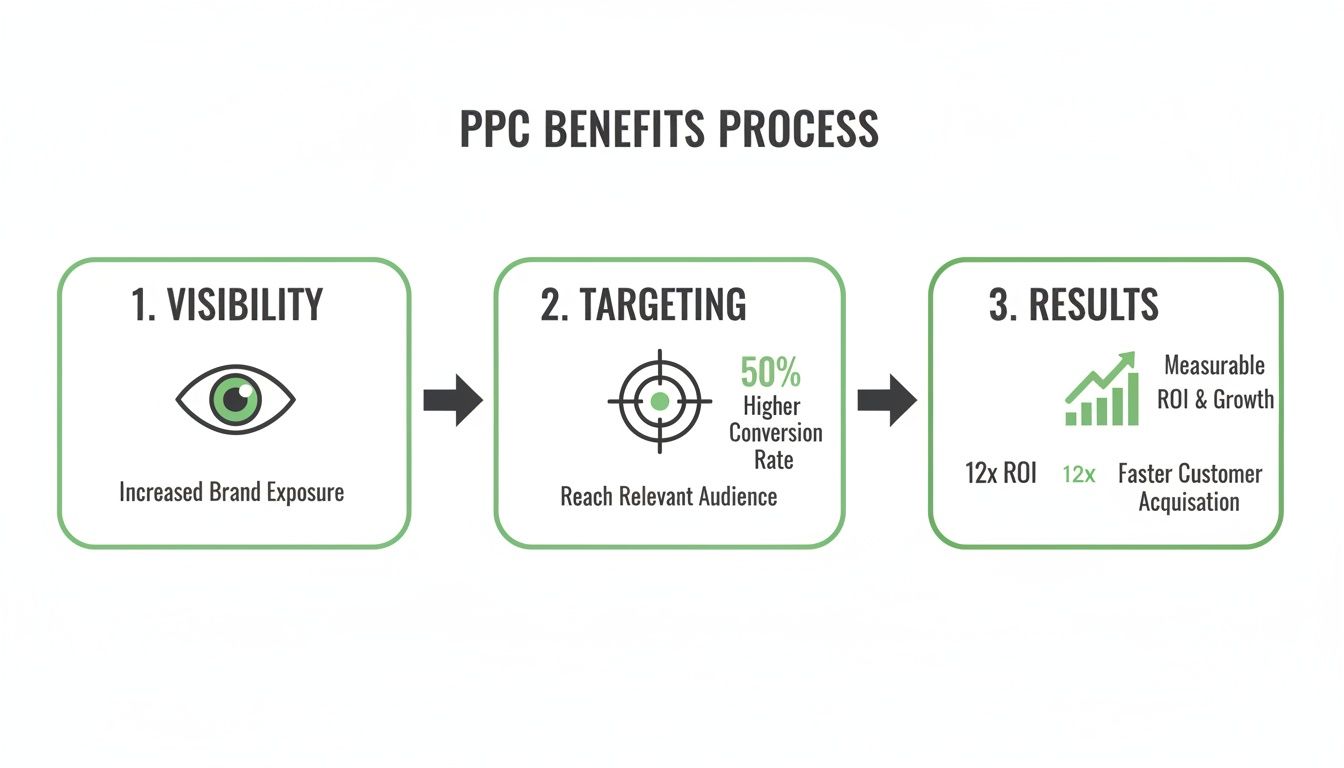
The process starts with broad visibility, narrows down with precise targeting, and ends with measurable business outcomes like leads or sales. Building your campaign with a logical structure is the secret to making this flow work and achieving a high return. For an even deeper look, you can explore our complete beginner’s guide to paid advertising for more foundational tips.
PPC Management for Small Business – Crafting Ad Copy That Actually Converts

Let’s get one thing straight about PPC: picking the right keywords is only half the battle. If your ad copy is boring, generic, or just plain weak, you might as well be lighting your ad budget on fire. I see it all the time—small businesses writing ads that talk about themselves instead of speaking directly to their customers.
Your ad is a tiny digital billboard fighting for a split-second of attention. Its only job is to get a click from a real person who has a real problem. And great ad copy isn’t a sales pitch; it’s a direct promise that you have the exact solution they’re looking for, right now. Effective PPC management for small business depends on mastering this skill. It’s time to get past “Buy Now!” and start writing ads people actually want to click.
PPC Management for Small Business – The Psychology of a Clickable Headline
Your headline is 80% of the work. If it doesn’t immediately resonate with the searcher, the rest of your ad is completely invisible. It has to stop their scroll and instantly connect with what they’re looking for.
A great headline must do one of three things, and do it fast:
- Mirror the Search Query: If someone searches for “emergency roof repair dallas,” a headline like “Emergency Roof Repair in Dallas” is perfect. It screams, “Yes, you found it.”
- Promise a Specific Outcome: Don’t just say “Best Financial Advisor.” Try “Plan Your Retirement with Confidence.” You’re selling the result, not just the service.
- Ask a Question: A headline like “Tired of Overpaying for Insurance?” works wonders. It taps into their internal monologue and gets them nodding along.
Forget being clever. Be clear. In search ads, clarity always wins.
My Two-Second Test: Read your headline out loud. Does it make perfect sense in under two seconds? If not, rewrite it. A confused user never clicks—they just keep scrolling.
PPC Management for Small Business – Writing Descriptions That Solve Problems
If the headline earned you a look, the description is where you seal the deal. This is your chance to expand on your promise and show how you solve the user’s problem. Stop listing features and start highlighting the benefits.
For example, a boutique hotel shouldn’t just say, “We have free Wi-Fi.” Instead, frame it as a benefit: “Stay Connected with Free High-Speed Wi-Fi.” One is a feature; the other solves a customer’s need.
A Simple Formula for Great Descriptions:
- Acknowledge the Pain Point: Show you get it. (“Leaky faucet keeping you up at night?”)
- Present Your Solution: State how you fix it. (“Our 24/7 Plumbers Fix It Fast.”)
- Include a Differentiator: Why you? (“Trusted for 20+ Years. 5-Star Rated.”)
- End with a Call to Action: Tell them what to do. (“Get a Free Quote Now.”)
This structure walks the user from problem to solution in about 90 characters.
Creating Irresistible Visuals for Display and Social
When you step outside of search ads into display or social media, your visuals do most of the heavy lifting. Your image or video has to be strong enough to stop someone from mindlessly scrolling through their feed.
You don’t need a Hollywood-sized budget. Here’s what works:
- Use Real People: Photos of your actual team or happy customers will almost always outperform generic stock photos. Authenticity is what builds trust.
- Show, Don’t Just Tell: If you sell a product, show it in action. If you’re a service provider, show the positive end result. A landscaper should feature a beautiful, finished yard, not just a picture of a lawnmower.
- Keep it Simple: Your visual needs a single, clear focal point. Cluttered or busy images get ignored.
- Add Text Overlays: A short, punchy headline on your image or video gives crucial context and can be the very thing that stops the scroll.
Remember, the visual’s job is to grab attention. The ad copy’s job is to drive the click. They have to work together perfectly.
PPC Management for Small Business – Managing Your Budget and Bids Without Going Broke
Let’s talk about the number one fear every small business owner has with PPC: burning through cash with nothing to show for it. It’s a valid concern. So this section is your financial survival guide, designed to put you firmly in control of your ad spend.
First things first, you need a realistic budget. And this isn’t a number you just pull out of thin air. It’s a calculated decision based on what a new customer is actually worth to your business. If a new client brings in $1,000 in profit, you can obviously afford to spend more to get them than if they only bring in $50.
The key when you’re starting out is to think small. Most small businesses we work with begin with a monthly budget somewhere between $500 and $2,500. The goal here isn’t to get the most clicks possible; it’s to buy the most valuable data. You’re investing in learning what works.
Setting and Pacing Your Daily Budget
Once you land on a monthly number, you’ll set a daily budget in your ad platform. A $1,500 monthly budget, for instance, works out to about $50 per day. A classic rookie mistake is letting Google spend that entire $50 by 10 AM, which means your ads are offline for the rest of the day when your best customers might be searching. A huge waste.
To stop that from happening, you need to use ad scheduling.
- Dig into your data: Look at your reports to see which days and hours generate the most valuable leads or sales.
- Focus your spend where it counts: If you run a roofing business and get most of your calls between 8 AM and 6 PM on weekdays, schedule your ads to run then. Don’t waste your budget showing ads at 2 AM on a Sunday.
- Use “Standard” delivery: Inside Google Ads, always choose the “Standard” delivery option instead of “Accelerated.” This tells Google to pace your budget throughout the day, not blow it all as fast as possible.
These small adjustments give you back control and make sure your ads are live when it matters most. It’s a core principle of smart PPC management for small business.
Demystifying Bidding Strategies
Bidding can feel overwhelming. Manual CPC, Target CPA, Maximize Conversions… what does it all mean? It’s really just about telling the ad platform what you care about most. Are you after raw website traffic, qualified leads, or just getting your name out there?
Your choice of bidding strategy has to align with your campaign’s main goal. Let’s break down the most common options in plain English.
Expert Insight: When you’re just starting out, Manual CPC is your best friend. It gives you maximum control and forces you to learn the ropes without accidentally overspending. Once your campaign is generating at least 15-20 conversions per month, you’ll have enough data to confidently start testing automated strategies like Target CPA or Maximize Conversions.
Here’s a quick guide to help you pick the right bidding strategy for your business.
Common Google Ads Bidding Strategies Explained
This table breaks down the most popular bidding strategies, what they do, and when they make the most sense for a small business to use them.
| Bidding Strategy | Primary Goal | Best For Small Businesses When… |
|---|---|---|
| Manual CPC | Controlling cost per click | You’re new to PPC, have a tight budget, and want to learn the platform without the risk of overspending. |
| Maximize Clicks | Driving website traffic | Your main objective is getting as many visitors as possible for a set budget, typically for brand awareness campaigns. |
| Maximize Conversions | Getting the most leads or sales | You have solid conversion tracking in place and want Google’s AI to find users most likely to convert within your daily budget. |
| Target CPA (Cost Per Acquisition) | Acquiring leads at a specific cost | You know exactly what you’re willing to pay for a lead (e.g., “$50 per form fill”) and have enough historical data to guide the AI. |
Think of it this way: if you’re launching a brand new campaign for your local bakery, you’d start with Manual CPC to get a feel for costs while you gather some data. Once you’re consistently getting online orders and you know each order is worth about $10 in profit, you can switch to Target CPA and tell Google, “Don’t spend more than $4 to get me an order.”
This effectively puts your budget on a smart autopilot, guided by your real-world business numbers.
PPC Management for Small Business – Tracking Performance and Knowing What Works
Launching your campaign is just the starting gun. The real work in PPC management for small business—the part that actually makes you money—happens next. If you’re not tracking performance, you’re not advertising; you’re just guessing with your credit card.
Let’s get one thing straight: you have to know which clicks are turning into actual customers. This isn’t optional. It’s the only way to prove your ad spend is delivering a positive return and not just vanishing into thin air.
Setting Up Your Measurement Foundation
Before you spend another dollar, you must install the tracking pixels from your ad platforms—like the Google Ads tag or the Meta Pixel—on your website. This little snippet of code is the brain of your entire operation.
This pixel is what lets you measure valuable actions on your site. Things like:
- A completed purchase on an ecommerce store.
- Someone filling out your “Request a Quote” form.
- A click on your business phone number from a mobile device.
- A download of your free guide or checklist.
Each of these is a conversion—a specific, valuable action you want a user to take. Without tracking them, you’re flying blind, and that’s the fastest way I’ve seen businesses burn through their budget with nothing to show for it.
A classic mistake I see is the “set it and forget it” campaign. A business owner turns on their ads, doesn’t check in for a week, and then panics when their budget is gone with zero leads. Actively managing your ads—even for just 15 minutes a day—is how you find success and avoid this costly trap.
The KPIs I Obsess Over
Once tracking is live, data will start pouring in. But a dashboard full of numbers is useless unless you know what to look for. Forget the vanity metrics. For a small business, only a handful of Key Performance Indicators (KPIs) truly matter.
Here’s my shortlist of metrics to check every single day.
- Click-Through Rate (CTR): This is the percentage of people who saw your ad and bothered to click it. A low CTR (under 1-2% on search) is a huge red flag. It’s a clear signal your ad copy isn’t connecting with your target keywords. The fix? Go back and rewrite your ads to be more relevant and compelling.
- Conversion Rate: This is the golden metric. The percentage of clickers who actually completed your goal (like making a purchase). A strong conversion rate means your ad and landing page are working together perfectly.
- Cost Per Acquisition (CPA): This is your bottom line—how much you’re paying for each new customer or lead. If your CPA is $50 and each new customer brings in $500 of profit, you’re printing money. But if your CPA is $60 and your profit is $50, you’re losing money on every single sale and need to make changes, fast.
- Quality Score (Google Ads): This is Google’s 1-to-10 rating of your keyword and ad relevance. A higher Quality Score (7 or above) gets you lower costs per click and better ad positions. Think of it as Google rewarding you for creating a good user experience.
PPC Management for Small Business – Turning Data Into Actionable Decisions
Looking at data is one thing; knowing what to do with it is everything. Good PPC management is a constant loop of analyzing, hypothesizing, and testing.
Here are a few real-world scenarios and the exact actions you should take.
Scenario 1: High CTR, Low Conversion Rate
- What it means: Your ad is great! People are clicking. But your landing page is dropping the ball and turning them away after they arrive.
- Action: Audit your landing page. Does the message match the ad’s promise? Is it easy to navigate? Is your contact form too long? Start testing changes to your headline, call-to-action button, or page layout.
Scenario 2: Low CTR, High Conversion Rate
- What it means: Your landing page is clearly effective for the few people who make it there. The problem is your ad isn’t compelling enough to earn the click in the first place.
- Action: You’ve got the right audience, but the wrong message. It’s time to rewrite your ad headlines and descriptions. A/B test different offers or emotional hooks to see what finally gets people to click.
Scenario 3: High Impressions, Very Low CTR
- What it means: Your ad is being shown all over the place, but practically nobody is clicking. This almost always points to a relevance problem—you’re likely bidding on keywords that are far too broad.
- Action: Dive into your search terms report. Are you showing up for irrelevant searches? Add them as negative keywords to stop wasting money. Refine your ad groups to be more tightly themed around a smaller set of hyper-specific keywords.
When to Hire a PPC Agency or Freelancer
If you’re managing your own ads, you eventually hit a wall. It’s the point where you start asking yourself, “Should I still be doing this myself?” It’s a valid question, and the answer isn’t always a simple yes or no.
Let’s be real—running effective PPC campaigns takes a ton of time and deep expertise. Those are two things most small business owners are always running out of. It’s not about just launching a campaign. It’s the constant monitoring, the data-diving, and keeping up with every little platform update. While nearly half of all small business owners handle their own marketing, that doesn’t mean it’s the best use of their time.
The Tell-Tale Signs You’ve Outgrown DIY
Recognizing you need a hand is the first step. If you find yourself nodding along to any of these scenarios, it’s probably time to think about bringing in a pro.
- You’re Spending More Time Learning Than Doing: Are you burning hours on YouTube tutorials just to figure out a new bidding strategy? A professional already has that knowledge, which frees you up to actually run your business.
- Your Results Have Stalled: Maybe what worked six months ago just isn’t cutting it anymore. If your leads have flatlined or your cost per acquisition is slowly ticking up, an expert can usually spot the opportunities you’re missing.
- You’re Drowning in Data: You have all the reports and dashboards, but what do they actually mean for your bottom line? A pro is trained to translate those numbers into a clear, actionable game plan.
- Your Ad Spend Is Growing: Managing a $500/month budget is one thing. When that climbs to $5,000/month or more, it’s a completely different ballgame with much higher stakes and less room for error.
It all comes down to this: If you’re spending 10 hours a week on PPC just to save on a management fee, but that time could be used to generate more revenue in your core business, you’re not actually saving money. You’re losing it.
Freelancer vs. Agency: Which Is Right for You?
Once you decide to get help, you’re looking at two main options: hiring a PPC freelancer or partnering with an agency. Neither is universally “better,” but one is almost certainly a better fit for your business right now.
- PPC Freelancer: This is often a one-person show. A great freelancer can be incredibly skilled and provide very personal, hands-on service. This is a fantastic choice if you have a smaller budget, a straightforward account, and value having a single point of contact. The main trade-off is they might have limited availability or a narrower skill set compared to a full team.
- PPC Agency: An agency brings a whole team to the table—strategists, copywriters, data analysts, and more, all under one roof. They are built for more complex campaigns, larger budgets, or businesses that also need support in other areas like SEO or web design.
Choosing between the two is a major decision. To help you navigate it, we put together a guide on how to choose a digital marketing agency that walks you through the critical questions you should ask before signing any contract.
Your PPC Questions, Answered
Let’s be honest. PPC can feel like a labyrinth of acronyms and confusing metrics. If you’re a small business owner, you don’t have time for jargon—you just need to know what works. So, we’re cutting through the noise to answer the questions we hear from clients every single day.
How Much Should a Small Business Spend on PPC?
This is the big one. While there’s no universal magic number, a realistic starting point for most small businesses is between $500 and $2,500 per month.
But the dollar amount isn’t the most important part. Think of your first few months of ad spend as an investment in data. The goal is to learn what converts, not to hit a home run on day one. Start with a budget you’re comfortable testing with, find what works, and only then should you scale up your investment.
How Long Does It Take for PPC to Work?
The good news? You can start seeing clicks, traffic, and impressions almost immediately—often within hours of launching a campaign. It’s one of the fastest ways to get your brand in front of customers.
But—and this is a crucial distinction—seeing profitable and stable results takes a bit more patience.
You should plan for at least 2-3 months of running your ads to gather enough performance data. This is the time you need to test, optimize, and make smart decisions based on numbers, not gut feelings.
PPC is never a “set it and forget it” strategy. The difference between an account that makes money and one that burns it is consistent, active management.
Can I Do PPC By Myself?
Absolutely. Many business owners start out by managing their own accounts, and platforms like Google Ads have become much more accessible over the years. It’s entirely possible to get a basic campaign up and running yourself.
The real question is, at what point does DIY management start costing you more in lost opportunity than you save on fees? As your campaigns become more complex or your budget grows, a single mistake can waste hundreds or thousands of dollars. Hiring an expert not only prevents costly errors but frees up your most valuable asset: your time.
Ready to stop guessing and start building a PPC strategy that drives real growth? The team at Mr. Green Marketing, LLC specializes in performance-focused PPC management that delivers measurable results. Let us show you what’s possible with a free audit and performance report.
Leave a Comment
sing in to post your comment or sign-up if you dont have any account.