
Website design for startups – For a startup, a website isn’t just another box to check on a chaotic to-do list. It’s your 24/7 sales engine and digital handshake, the strategic asset that starts building credibility and winning customers from day one.
And this isn’t about chasing trends; it’s about building a scalable system for growth.
Website Design for Startups: Your Website Is Your Hardest-Working Employee

Let’s be honest—launching a startup is a grind. Your website can’t afford to be a passive digital brochure. It has to be your first impression for investors, your main pitch to early adopters, and the absolute foundation of your marketing.
Think about it: you get a ridiculously short window to make an impact. Studies show it takes just 0.05 seconds for a visitor to form an opinion about your site. That’s all the time you have to prove you’re credible and worth their attention. A blink.
The mindset needs to shift from, ‘I need a website,’ to ‘I need a scalable system for acquiring customers and building credibility.’
This guide is designed to cut through the noise. A strategic approach to website design isn’t a luxury for a startup; it’s a core requirement for survival. It’s what separates a static online business card from a powerful growth machine.
Website Design for Startups – Why Strategic Design Matters More Than Ever
In the early days, every dollar and every minute is precious. A well-planned website isn’t a cost center—it’s an investment that directly fuels your most critical business goals.
Here’s what a strategic approach actually delivers:
- A Crystal-Clear Value Prop. It has to instantly answer a visitor’s first question: “What’s in it for me?” No jargon, no fluff.
- Investor Confidence. A polished, professional site sends a powerful signal. It shows you’re serious, you have a clear vision, and you’re ready for funding.
- A True Lead Generation Engine. Your site must do more than just exist; it needs to actively convert visitors into leads and customers. If you’re looking for practical ways to make this happen, our guide on how website design can fuel lead generation is a great place to start.
- A Foundation That Scales. It’s built on a framework that can actually grow with your company, saving you from expensive and time-sucking redesigns down the road.
This isn’t just theory. This is a playbook for building an online presence that delivers real, measurable results from the get-go.
Website Design for Startups – Nail Your Strategy Before Touching Any Design Tools
So many founders jump straight into picking colors and fonts. And that’s a huge mistake—a costly one. Before you even think about mockups, you need a rock-solid strategy. This is the ‘why’ behind your website’s ‘what,’ the foundation that saves you from expensive redesigns down the road.
This isn’t just about making things look pretty; it’s a measurable driver of business success. Think about it: 94% of first impressions are design-driven, and users form an opinion in a blistering 0.05 seconds. That’s the tiny window you have to establish credibility. Getting it wrong can mean losing up to 35% of potential revenue just from a poor user experience.
Website Design for Startups – Who Are You Actually Building This For?
First things first, get painfully specific about your ideal customer. I don’t mean vague demographics like “millennial tech workers.” I mean digging deep into their real-world problems, their frustrations, and what they’re desperately trying to achieve when they land on your site.
Create detailed user personas—not as a box-checking exercise, but as a genuine guide for every single decision you make.
- Pains and Frustrations. What keeps them up at night? What are the annoying, inefficient workarounds they’re currently using to solve their problem?
- Goals and Motivations. What does success look like for them? What are they really trying to accomplish by seeking out a solution like yours?
- Watering Holes. Where do they hang out online? What blogs do they read, which communities are they a part of, and who do they follow on LinkedIn? This informs both your messaging and your marketing later on.
Getting this right means every element of your website will speak directly to the person you want to attract.
A website built for everyone is a website that truly connects with no one. Your goal is to make your ideal customer feel like you built it just for them.
Website Design for Startups – Defining Your Brand Beyond the Logo
Your brand is so much more than a cool logo and a slick color palette. It’s the entire feeling someone gets when they interact with your company. It’s your personality, your promise, and the reason people should choose you over anyone else.
Before diving into design, you need to lock down your core message, voice, and Unique Value Proposition (UVP). The UVP is non-negotiable—it’s a crystal-clear statement that spells out the benefit you offer, how you solve your customer’s need, and what makes you different from the competition.
Website Design for Startups – Mapping the Journey and Defining Success
Now, let’s map it out. What specific path do you want a visitor to take from the moment they land on your site? This is the user journey, and it should be completely intentional. Do you want them to book a demo, sign up for a newsletter, or start a free trial? Each of those paths requires a different design and messaging strategy.
You also need to define what success actually looks like with clear Key Performance Indicators (KPIs).
- Primary Goal. What is the single most important action you want a user to take? This could be “Request a Demo” or “Start Free Trial.”
- Secondary Goals. What are other valuable actions they might take? Think “Download a Whitepaper” or “Join the Waitlist.”
Before you get lost in design software, you have to get the user experience and website structure right. This is where tools like wireframing tools become invaluable. Nailing this strategic framework first makes every subsequent design choice easier—and far more effective.
Website Design for Startups – Building an MVP Website That Actually Works
Your first website doesn’t need every bell and whistle. For a startup founder, it absolutely shouldn’t. The mission is to launch a Minimum Viable Product (MVP) website—a lean, focused tool that solves one core problem for your ideal customer and lets you start learning from real users, fast.
This isn’t about building less; it’s about building smarter. It means ruthlessly prioritizing the ‘must-haves’ over the distracting ‘nice-to-haves.’ Forget that complex feature you saw on a competitor’s site. Focus only on what delivers immediate value to your first visitors.
The entire process boils down to connecting three simple—but powerful—dots.
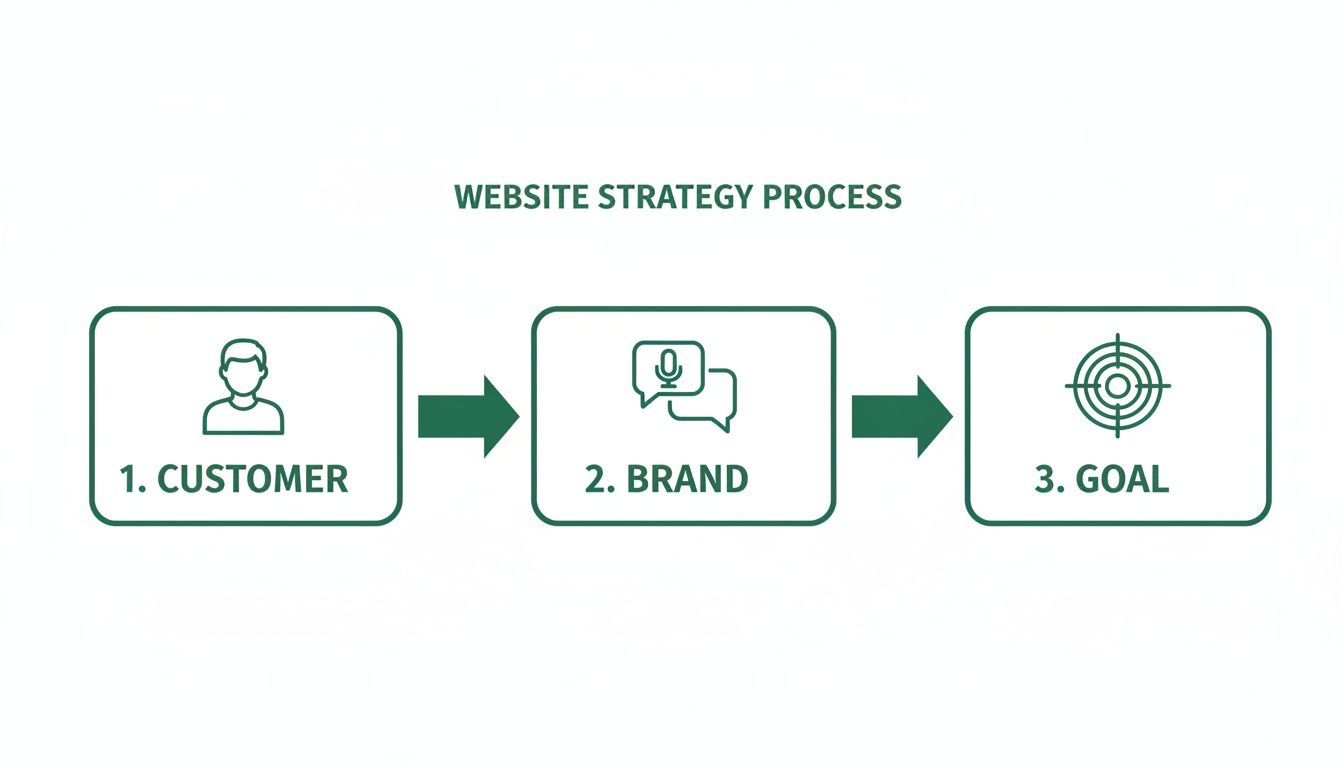
It’s a crucial reminder that a great website isn’t just a collection of pages. It’s a strategic asset built to guide a specific person toward a specific action.
Website Design for Startups – The Art of Ruthless Feature Prioritization
So, how do you decide what makes the cut? I’ve seen too many founders get bogged down trying to build their “forever” website on day one, burning through cash and momentum. Don’t fall into that trap.
Instead, every potential feature needs to be categorized. You have to be honest with yourself—and be brutal.
To make this dead simple, I use a framework that buckets every idea into one of four categories. It forces clarity and keeps the project from spiraling out of control.
Website Design for Startups – MVP Feature Prioritization Framework
| Priority Level | Description | Example Features |
|---|---|---|
| Must-Have | Non-negotiable features. Without these, the website cannot fulfill its primary business goal. | A clear value proposition, a primary call-to-action (CTA) button, a functioning contact/demo form. |
| Should-Have | Important, but not critical for launch. These add significant value and credibility but can be added in the next sprint. | A basic “About Us” page, a few customer testimonials, a simple case study section. |
| Could-Have | The “shiny objects.” These are great ideas for later but add complexity and cost to the initial launch. | An interactive pricing calculator, a resource-heavy blog, complex animations, third-party integrations. |
| Won’t-Have | Explicitly out of scope for now. Deferring these keeps the team focused and the timeline tight. | A customer login portal, full e-commerce functionality, multi-language support. |
This isn’t just about saving money; it’s about speed to market. The faster you get a working site in front of real people, the faster you get real feedback. That data is far more valuable than your internal assumptions.
Website Design Core UX and UI Principles for Startups
With your MVP feature list locked in, it’s time to think about the user experience (UX) and user interface (UI). For a startup, this isn’t abstract design theory—it’s about driving conversions, period. The goal is to make the user’s journey completely frictionless.
An intuitive user experience is good for business. It helps you better meet your audience’s needs, gaining their trust and leading to better conversion rates and increased revenue.
Think of your design as a silent guide. Every element, from a button’s color to a headline’s font size, must work together to steer the user toward your primary goal.
Website Design for Startups – Designing for Trust and Clarity
A clean, professional design is the bedrock of trust. Visitors make snap judgments in milliseconds. A cluttered or confusing layout screams amateur, instantly eroding credibility.
Here are a few practical design principles to get right from the start:
- Visual Hierarchy. The most important information should be the most visually prominent. Use size, color, and placement to draw the eye directly to your value proposition and your main call-to-action (CTA).
- Intuitive Navigation. Your main navigation should be simple and predictable. A user should never have to hunt for your pricing or contact info. Stick to clear, universal labels like “Product,” “Pricing,” and “Contact.”
- Compelling CTAs. Your call-to-action buttons need to stand out. Use a contrasting color that pops off the page and action-oriented text like “Get a Free Demo” instead of a passive “Submit.”
- Whitespace is Your Friend. Don’t cram every inch of the screen with content. Whitespace—the empty area around elements—improves readability, reduces cognitive load, and makes your entire site feel more polished and professional. It lets your key messages breathe.
This MVP approach isn’t about cutting corners. It’s about being strategic, launching with purpose, and building a solid foundation you can grow as your business takes off.
Website Design for Startups – Choosing Your Tech Stack Without the Headache
Let’s be honest, the tech behind your website can feel completely overwhelming. WordPress, Webflow, headless CMS, custom code—the jargon alone is enough to make your head spin.
Making the wrong call here can create massive growing pains down the road. I’ve seen too many startups get locked into a clunky, expensive platform that’s impossible to scale, forcing a costly and painful rebuild right when they should be hitting their stride.
This is your no-nonsense guide to making the right decision. We’ll skip the fluff and focus on what actually matters for a startup: scalability, ease of use for your team, SEO-friendliness, and total cost.
Website Design for Startups, No-Code and Low-Code: The Startup Sweet Spot
For the vast majority of startups, a no-code or low-code platform is the smartest move you can make. These tools hit the perfect balance of speed, flexibility, and cost, letting you launch a professional, high-performing site without a dedicated dev team.
We’re talking about platforms like Webflow, Framer, or even Shopify for e-commerce. They give you total visual control over the design while handling all the complicated backend stuff for you. This means your marketing team can actually launch a new landing page without filing a support ticket and waiting a week.
Choosing a platform your team can actually use is more important than choosing the one with the most features. A simple tool that gets used is infinitely better than a complex one that gathers digital dust.
Website Design for Startups – When to Choose Which Platform: A Practical Breakdown
The “best” platform doesn’t exist. There’s only the best platform for your specific needs right now. For example, a simple Shopify site is a no-brainer for a direct-to-consumer brand, but it would be a terrible fit for a SaaS company trying to build out a complex resource center.
Let’s break it down by common startup scenarios:
- You’re a SaaS or Tech Startup. Your top priorities are flexibility, seamless integrations, and killer SEO performance. Webflow is almost always the winner here. It gives you pixel-perfect design control, a powerful CMS for your blog and help docs, and it spits out clean code that search engines love.
- You’re an E-commerce Brand. If you’re selling physical products, don’t overthink this. Shopify is the king of e-commerce for a reason. Its entire ecosystem—from apps and payment processing to inventory management—is built for one purpose: helping you sell online.
- You Need a Simple Content Site or Blog. If your main goal is publishing content and building an audience, WordPress is still a reliable workhorse. It powers a mind-boggling portion of the internet (over 43%, in fact) and has a plugin for literally everything. Just be ready to handle more of the maintenance and security yourself. You can see a deeper comparison in our guide on the top website building platforms.
What About Headless CMS or Custom Code?
So, what about the really advanced stuff, like a headless CMS or a fully custom-coded website? Honestly—and I say this as someone who builds complex websites for a living—most startups should steer clear of these options at the beginning.
A headless CMS (like Contentful or Sanity) separates your content from your front-end design. It’s incredibly powerful for pushing content to multiple places at once, like a website, a mobile app, and an in-store kiosk. But it requires serious development resources to set up and maintain.
A fully custom build gives you ultimate control, but it also comes with the highest price tag and longest timeline.
My advice? Unless you have a very specific, complex technical requirement that off-the-shelf tools just can’t handle, stick with a modern, scalable solution like Webflow. It gives you all the power you need today and a rock-solid foundation to grow on, ensuring your tech stack is helping you move forward, not holding you back.
Launching and Setting Up for Long-Term Growth
A website launch isn’t the finish line—it’s the starting gun. Hitting ‘publish’ is just one tiny step in a much bigger process. A successful launch demands a plan that goes way beyond just flipping the switch and making the site live.
This is your pre-flight and post-launch checklist for turning your new website into a genuine growth engine.
So many startups trip at this final hurdle. They focus so much on the design and build that they forget about the essential technical setup needed to actually measure performance and attract visitors from day one. Let’s make sure that’s not you.
Your Pre-Launch Technical Checklist
Before your website sees the light of day, it’s mission-critical to run through an ultimate website launch checklist to ensure every detail is nailed down. There are a handful of non-negotiable technical tasks that absolutely must be handled before you announce your site to the world.
These aren’t glamorous, but they are the foundation for everything that comes next.
- Install Google Analytics 4 (GA4). You can’t improve what you don’t measure. Setting up GA4 from the very beginning is critical for understanding visitor behavior—where they come from, what pages they view, and where they drop off.
- Set Up Google Search Console. This is your direct line of communication with Google. It helps you monitor your site’s health, submit your sitemap for faster indexing, and see which search queries are bringing people to your site.
- Check Mobile Performance and Speed. More than 50% of all web traffic comes from mobile devices. Your site must not only look good on a small screen, but it has to load lightning-fast. Use Google’s PageSpeed Insights tool to test and optimize.
- Implement On-Page SEO Basics. This is the low-hanging fruit of search engine optimization. Make sure every single page has a unique, descriptive title tag and a compelling meta description. Ensure your content is structured with proper headers (H1, H2, H3).
This initial setup provides the raw data you’ll need to make smart, informed decisions about your marketing and future site improvements.
A website without analytics is like flying a plane without instruments. You’re moving, but you have no idea where you’re going or if you’re about to crash.
From Launch Day to Growth Engine
Okay, your site is live. The technical boxes are checked. Now what? You can’t just sit back and wait for the traffic to roll in. The real work of turning that beautiful website into a customer acquisition machine starts now.
This is where you need a plan for day one and beyond. It doesn’t have to be complicated—in fact, for a startup, simple and consistent is always better. How will you attract your first 100 visitors? Your first 1,000?
This phase is about creating pathways for people to find you and giving them a reason to stick around. It’s about building a system, not just a site.
Content and Conversion Foundations
Your website needs fuel, and that fuel is content. A static website is a dead website. You need to create assets that attract your target audience and integrate tools that capture their interest.
1. Create Foundational Blog Content
Don’t just start a blog—start a blog that answers your customers’ most pressing questions. Your first 5-10 posts should be cornerstone pieces that address the core problems your product solves. Think “How to…” guides, “The Ultimate Guide to…” articles, and posts that explain key industry concepts.
2. Build High-Intent Landing Pages
Your blog attracts visitors, but dedicated landing pages drive conversions. Create specific pages for your marketing campaigns—like a Google Ads campaign or a webinar promotion—with a single, clear call-to-action. These pages should be ruthlessly focused on getting a visitor to take one specific action.
3. Integrate Your Email Marketing Tools
Every startup needs to be building an email list from day one. Integrate your chosen email marketing platform (like Mailchimp or ConvertKit) with your website. Add signup forms to your blog posts, footer, and create a compelling lead magnet—like a free checklist or ebook—to encourage signups.
This three-part strategy—attract with blog content, convert with landing pages, and nurture with email—is a simple but powerful framework for long-term growth. It ensures your shiny new website is actively working to build your audience and pipeline from the moment it goes live.
Frequently Asked Questions About Startup Web Design
Alright, let’s get into the lightning round. I get asked about the nuts and bolts of startup website design all the time, so I’ve pulled together the most common questions from founders right here. No fluff—just straight, actionable advice.
How Much Should a Startup Budget for a Website?
This is the big one, isn’t it? The only honest answer is: it depends. But that’s not helpful, so let’s break it down into real numbers.
The cost of a startup website can swing wildly based on your approach. You could get a basic templated site off the ground for a few thousand dollars, or you could invest tens of thousands in a completely custom build with a top-tier agency. Neither is inherently right or wrong—it’s all about your stage, your goals, and your resources.
Industry benchmarks show a basic website design typically costs between $6,500 and $15,000, but that really just covers the initial build. For startups planning a redesign or needing more complex features—like e-commerce or custom integrations—costs can range anywhere from $3,000 to $75,000.
When it’s done right, the investment pays off. Research shows that websites focused on user experience can achieve a 400% higher visit-to-lead conversion rate. You can dig deeper into website design statistics to see how those costs break down.
To give you a clearer picture, here’s a look at the common investment options you’ll face.
Startup Website Investment Options
Every founder has to weigh cost against quality and control. This table should help you figure out where you land on that spectrum.
| Approach | Typical Cost Range | Pros | Cons |
|---|---|---|---|
| DIY Website Builder | $300 – $1,000 / year | Extremely low cost, fast to launch, no coding needed. | Limited customization, can look generic, may hit scalability walls quickly. |
| Freelancer | $3,000 – $10,000+ | More affordable than an agency, direct communication, good for specific tasks. | Quality can be inconsistent, may lack strategic depth, availability can be an issue. |
| Boutique Agency | $10,000 – $50,000+ | Strategic partnership, expert team, high-quality custom design, scalable results. | Higher upfront investment, longer timeline than a DIY approach. |
| In-House Team | Varies (Salaries) | Total control over the process, deep product knowledge. | Very expensive, difficult to recruit top talent, slower to get started. |
My advice for most funded startups? A boutique agency or a heavily-vetted freelancer often hits that sweet spot between quality, speed, and genuine strategic value.
How Can I Make My Startup Website Stand Out?
In a sea of look-alike SaaS websites, standing out is a real challenge. It’s not about crazy animations or chasing fleeting design trends—it’s about clarity, authenticity, and a relentless focus on your user.
First, nail your messaging. Your Unique Value Proposition (UVP) must be impossible to ignore. It should be the first thing a visitor reads and immediately answer, “What’s in it for me?”
Then, double down on these key areas:
- Professional Design & High-Quality Visuals. Invest in custom photography or illustrations instead of generic stock photos. A polished, cohesive look builds instant credibility.
- Compelling Copywriting. Your words matter just as much as your design. Use a voice that reflects your brand—be it witty, authoritative, or empathetic. Tell a story.
- A Clear Path to Action. Don’t make users think. Guide them with intuitive navigation and obvious calls-to-action. Every single page should have a purpose.
- Social Proof. Nothing builds trust faster than seeing that other people—real people—are already getting value from your product. Feature testimonials, case studies, and logos of happy customers everywhere you can.
It’s really about being memorable for the right reasons. Clarity over cleverness, always.
Do I Really Need a Blog for My Startup Website?
Yes. I’m not even going to hedge on this one. Yes, you need a blog.
It might feel like a “nice-to-have” when you’re juggling a million other priorities, but it’s one of the most powerful, long-term assets you can build for your business.
A blog isn’t just a place to post company updates. It’s a strategic tool for:
- SEO and Organic Traffic. Each blog post is a new opportunity to rank on Google for keywords your ideal customers are searching for. This is how you attract people who have a problem your startup can solve.
- Establishing Authority. By consistently publishing valuable, insightful content, you position your brand as an expert in your niche. This builds trust long before a visitor is ready to buy.
- Lead Generation. A high-performing blog post can become a 24/7 lead generation machine. By adding a relevant call-to-action—like downloading a free guide or signing up for a webinar—you can turn readers into qualified leads.
- Supporting Your Marketing Funnel. Content can be created to address every stage of the customer journey, from awareness (“What is X?”) to consideration (“Best tools for Y”) to decision (“Product A vs. Product B”).
Don’t think of it as “blogging.” Think of it as building a library of resources that will attract and convert customers for years to come.
How Often Should I Update My Startup Website?
Your website is a living, breathing part of your business—it’s not a static document you create once and then forget about. The right update schedule really depends on which part of the site you’re talking about.
Here’s a practical cadence to follow:
- Blog & Content. You should be publishing new content at least weekly or bi-weekly to build momentum with SEO and keep your audience engaged.
- Product/Service Pages. Update these as soon as changes occur. New features, pricing adjustments, or messaging tweaks should be reflected on the site immediately.
- Homepage & Core Messaging. Revisit your core messaging and homepage design every 6-12 months. Your business evolves, and your website needs to evolve with it.
- Technical & Security. Security patches and software updates should be applied immediately when they become available. This is non-negotiable for protecting your site and your users.
A great website is never truly “done.” It’s a continuous loop of building, measuring, learning, and iterating.
The most important thing is to be constantly testing and learning from your analytics. The data will tell you what’s working and what’s not, guiding your updates and ensuring your website remains your hardest-working employee.
Ready to build a startup website that doesn’t just look good, but drives real growth? The team at Mr. Green Marketing, LLC specializes in crafting conversion-focused websites that deliver measurable results. Let’s build your growth engine together. Request your free audit and performance report.
Leave a Comment
sing in to post your comment or sign-up if you dont have any account.